
1. შესავალი
This manual provides comprehensive instructions for the safe and efficient use of your Logisys PS480D 480W ATX Power Supply. Please read this manual thoroughly before installation and operation to ensure proper functionality and to prevent damage to the unit or other components.

Figure 1: Logisys PS480D 480W ATX Power Supply, front view with cables bundled.
2. უსაფრთხოების ინფორმაცია
გაფრთხილება: კვების წყაროები შეიცავს მაღალი ძაბვისtage კომპონენტები. არ გახსნათ კვების წყარო casinზ. შიგნით მომხმარებლის მიერ შეკეთებადი ნაწილები არ არის.
- ინსტალაციამდე ან მოვლა-პატრონობამდე დარწმუნდით, რომ დენის წყარო გათიშულია ცვლადი დენის წყაროდან.
- Always ground yourself to prevent electrostatic discharge (ESD) when handling internal computer components.
- არ ჩართოთ კვების წყარო სველ ან მშრალ ადგილას.amp პირობები.
- უზრუნველყოს სათანადო ვენტილაცია ელექტრომომარაგების ირგვლივ გადახურების თავიდან ასაცილებლად.
- Use only the provided power cables and connectors.
3. პროდუქტის მახასიათებლები
The Logisys PS480D is a 480W ATX power supply designed for personal computers. Key features include:
- მაღალი ეფექტურობა
- Low Noise & Ripple
- მეტი ტომიtage დაცვა
- მოკლე ჩართვის დაცვა
- Built-in EMI Filter
- Insulation Resistance 100MΩ min.
- Complies with FCC part 15J class B 115VAC operation and CISPR 22 230 VAC operation.
- Meets UL 1950, CSA 22.2 LEVEL 3 Requirement.
- 100% Burn-in test / Vibration test / Hi-pot test / Leakage current test.
- MTBF above 100,000 hours at 25 °C.

Figure 2: Rear panel of the power supply with fan, AC inlet, and power switch.
4. დაყენება და ინსტალაცია
Follow these steps to install the Logisys PS480D power supply into your computer system.
- მომზადება: Ensure your computer is completely powered off and unplugged from the wall outlet. Open your computer case according to its manufacturer's instructions.
- ძველი კვების წყაროს ამოღება (ასეთის არსებობის შემთხვევაში): Disconnect all cables from the old power supply to the motherboard, drives, and other components. Unscrew and remove the old power supply from the case.
- ახალი კვების წყაროს დაყენება: Carefully place the Logisys PS480D into the power supply bay of your computer case. Secure it with screws.
- მთავარ კვების წყაროსთან დაკავშირება: Connect the 20+4 pin ATX mainboard connector to your motherboard. If your motherboard uses a 20-pin connector, detach the 4-pin section. If it uses a 24-pin connector, connect both sections.
- პროცესორის კვების წყაროს შეერთება: Connect the 4-pin +12V power connector to the corresponding port on your motherboard.
- Connect Peripheral Power:
- Use the 4-pin standard drive connectors for HDDs and CD/DVD-ROM drives.
- Use the 4-pin 3.5" FDD or ZIP connectors for floppy disk drives or similar devices.
- Use the Serial ATA (SATA) connectors for SATA hard drives and SSDs.
- საკაბელო მენეჯმენტი: კაბელები აკურატულად გაატარეთ კორპუსში ჰაერის სათანადო მიმოქცევის უზრუნველსაყოფად.
- საქმის დახურვა: Once all connections are secure, close your computer case.
- AC დენის დაკავშირება: Plug the AC power cord into the power supply's AC inlet and then into a wall outlet.
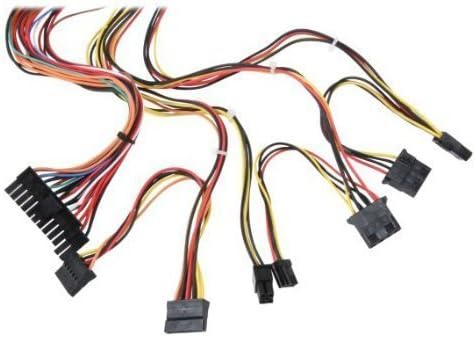
სურათი 3: დასრულდაview of power supply connectors.

Figure 4: Power supply dimensions and included AC power cord.
5. საოპერაციო ინსტრუქციები
After successful installation, you can power on your computer.
- Ensure the power switch on the rear of the power supply (Figure 2) is in the "ON" (I) position.
- დააჭირეთ კომპიუტერის კორპუსზე არსებულ ჩართვის ღილაკს.
- The power supply will provide stable power to your system components.
- To power off, shut down your operating system normally. For complete power disconnection, switch the power supply to the "OFF" (O) position and unplug the AC cord.
6. მოვლა
რეგულარული მოვლა უზრუნველყოფს თქვენი კვების წყაროს ხანგრძლივ მუშაობას და ოპტიმალურ მუშაობას.
- დასუფთავება: Periodically clean dust from the power supply's fan and vents using compressed air. Ensure the power supply is unplugged before cleaning.
- ჰაერის ნაკადი: Ensure that the computer case has adequate airflow and that the power supply's fan is not obstructed.
- კაბელის მთლიანობა: Periodically check all power cables for secure connections and signs of wear or damage.
7. Დიაგნოსტიკა
თუ თქვენს კვების წყაროსთან დაკავშირებით პრობლემები შეგექმნათ, იხილეთ შემდეგი გავრცელებული პრობლემების მოგვარების ნაბიჯები:
- ძალა არ არის:
- შეამოწმეთ, ცვლადი დენის კაბელი საიმედოდ არის შეერთებული როგორც დენის წყაროში, ასევე კედლის სოკეტში.
- Ensure the power switch on the rear of the power supply is in the "ON" (I) position.
- კედლის სოკეტის ფუნქციონალურობის შესამოწმებლად, სხვა მოწყობილობის შეერთებით შეამოწმეთ.
- Check all internal power connections (20/24-pin ATX, 4-pin +12V, peripheral connectors) are firmly seated.
- სისტემის არასტაბილურობა/შემთხვევითი გამორთვა:
- This could indicate an overloaded or failing power supply. Ensure your system's power requirements do not exceed the PS480D's 480W capacity.
- Check for proper ventilation and ensure the power supply fan is spinning. Overheating can cause instability.
- არაჩვეულებრივი ხმაური:
- A loud fan noise might indicate dust buildup or a failing fan bearing. Clean the fan as described in the Maintenance section.
If problems persist after attempting these steps, contact Logisys customer support or a qualified technician.
8. სპეციფიკაციები
| ფუნქცია | სპეციფიკაცია |
|---|---|
| ბრენდი | ლოგისის |
| მოდელის ნომერი | PS480D |
| გამომავალი ვატიtage | 480 ვატი |
| ფორმის ფაქტორი | ATX |
| ზომები (LxWxH) | ზომები: სიგრძე 6" x სიგანე 5.5" x სიმაღლე 3.25" (15.24 x 13.97 x 8.25 სმ) |
| ნივთის წონა | 2.06 ფუნტი (0.93 კგ) |
| მთავარი დაფის კონექტორი | 1x 20+4 Pin ATX |
| CPU დენის კონექტორი | 1x 4 Pin +12V |
| Standard Drive Connectors | 4x 4 Pin (Molex) |
| FDD/ZIP Connectors | 1x 4 Pin 3.5" |
| სერიული ATA კონექტორები | 1x SATA |
| გაგრილების მეთოდი | ჰაერი |
| დაცვები | მეტი ტომიtage დაცვა, მოკლე ჩართვის დაცვა |
| სერთიფიკატები | FCC part 15J class B, CISPR 22, UL 1950, CSA 22.2 LEVEL 3 |
9. გარანტია და მხარდაჭერა
For warranty information, technical support, or service inquiries, please refer to the official Logisys webსაიტზე ან დაუკავშირდით მათ მომხმარებელთა მომსახურების განყოფილებას. შეინახეთ თქვენი შესყიდვის ქვითარი შეძენის დასადასტურებლად.