
1. შესავალი
This instruction manual provides essential information for the safe and efficient use of your THOMSON CE-26 Cassette/SD/USB Audio System. Please read this manual thoroughly before operating the device and retain it for future reference. The CE-26 allows you to play audio from cassettes, USB drives, and SD/MMC cards, as well as record audio directly from cassettes or external sources to MP3 format on USB or SD/MMC media.
2. პროდუქტი დასრულდაview
Familiarize yourself with the components and controls of your CE-26 audio system.

სურათი 2.1: წინა პანელი View. This image displays the front of the THOMSON CE-26 unit, showing the cassette deck, control buttons, display screen, USB port, SD/MMC card slot, and volume knob.
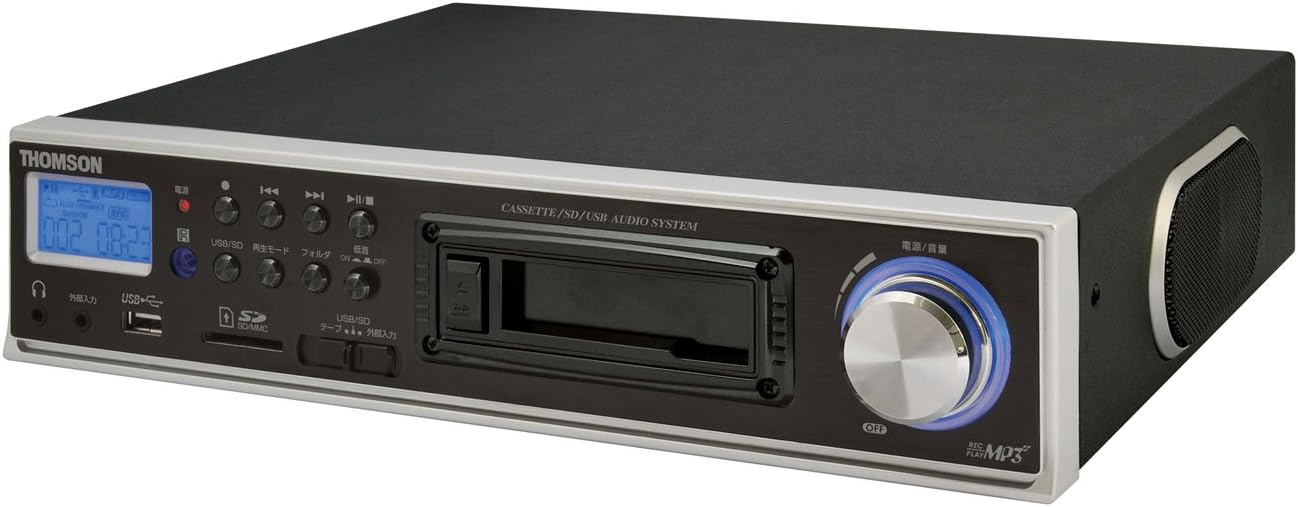
სურათი 2.2: დახრილი View. This image shows the THOMSON CE-26 from an angled perspective, highlighting the integrated side speaker and the overall compact design.

Figure 2.3: Remote Control Unit. This image displays the included remote control for the THOMSON CE-26, featuring buttons for search, display, record, playback mode, program, folder navigation, and USB/SD selection.

სურათი 2.4: ფუნქციების დამატებაview დიაგრამა. This diagram illustrates the key functionalities of the THOMSON CE-26, including direct recording from cassette to USB/SD, MP3/WMA playback, USB/SD memory copying, AUX input, built-in speaker, and remote control.
წინა პანელის კონტროლი:
- დენის ღილაკი: რთავს ან გამორთავს მოწყობილობას.
- ეკრანის ჩვენება: Shows track information, mode, and time.
- კასეტა: For inserting and playing audio cassettes.
- USB პორტი: Connect USB flash drives for playback or recording.
- SD/MMC ბარათის სლოტი: Insert SD or MMC cards for playback or recording.
- დაკვრის კონტროლი: Play, Pause, Stop, Fast Forward, Rewind, Skip Track.
- ჩაწერის ღილაკი: იწყებს ჩაწერას.
- რეჟიმის ღილაკი: Switches between Cassette, USB, SD, and AUX input modes.
- ხმის ღილაკი: არეგულირებს აუდიო გამომავალი დონეს.
- ყურსასმენი ჯეკი: პირადი მოსმენისთვის.
- AUX შეყვანა: შეაერთეთ გარე აუდიო მოწყობილობები.
3. დაყენება
- დენის კავშირი: შეაერთეთ ცვლადი დენის კაბელი მოწყობილობის დენის შესასვლელთან, შემდეგ კი სტანდარტულ კედლის სოკეტთან.
- საწყისი ჩართვა: მოწყობილობის ჩასართავად დააჭირეთ ჩართვის ღილაკს. ეკრანი განათდება.
- მედიის ჩასმა:
- კასეტა: Open the cassette door and insert an audio cassette with the open edge facing upwards. Close the door securely.
- USB დისკი: Insert a USB flash drive into the USB port. Ensure it is formatted to FAT32.
- SD/MMC ბარათი: Insert an SD or MMC card into the card slot until it clicks into place. Ensure it is formatted to FAT32.
- External Audio Device (Optional): To use the AUX input, connect an external audio source (e.g., smartphone, CD player) to the AUX IN jack using a 3.5mm audio cable.
4. საოპერაციო ინსტრუქციები
4.1. Cassette Playback
- ჩადეთ კასეტა ლენტი.
- Press the "Mode" button until "Cassette" mode is selected (or the cassette deck automatically starts playing).
- დააჭირეთ Play ღილაკს (►) მოწყობილობაზე ან დისტანციურ პულტზე.
- დაარეგულირეთ ხმა ხმის ღილაკის გამოყენებით.
- Use Fast Forward (►►) or Rewind (◄◄) ღილაკები ფირზე ნავიგაციისთვის.
- Press Stop (■) to end playback.
4.2. USB/SD დაკვრა
- Insert a USB drive or SD/MMC card containing MP3 or WMA audio files.
- Press the "Mode" button to select "USB" or "SD" mode. The unit will automatically scan and begin playing the first track.
- გამოიყენეთ თამაში/პაუზა (►/∥), გაჩერდი (■), Next Track (►►|), and Previous Track (|◄◄) buttons to control playback.
- The "Folder" buttons on the remote can be used to navigate between folders on the USB/SD media.
4.3. Recording Audio to MP3 (Cassette to USB/SD)
This feature allows you to convert your cassette tapes into digital MP3 files.
- Insert a blank or desired USB drive/SD card into the respective slot.
- Insert the cassette tape you wish to record.
- Press the "Mode" button to select "Cassette" mode.
- Start playing the cassette tape.
- Press the "Record" button on the unit or remote. The recording indicator will light up, and the unit will begin converting the cassette audio to MP3 format on the selected USB/SD media.
- To stop recording, press the "Stop" button. The recorded MP3 file will be saved on your USB drive or SD card.
- შენიშვნა: There might be a slight delay between pressing record and the actual start of recording. It is recommended to start recording slightly before the desired audio begins to avoid cutting off the start of a track.
4.4. Recording Audio to MP3 (AUX Input to USB/SD)
Record audio from an external device connected via the AUX input.
- შეაერთეთ თქვენი გარე აუდიო მოწყობილობა AUX IN ბუდესთან.
- Insert a blank or desired USB drive/SD card.
- Press the "Mode" button to select "AUX" mode.
- დაიწყეთ დაკვრა თქვენს გარე აუდიო მოწყობილობაზე.
- Press the "Record" button on the unit or remote. The recording indicator will light up, and the unit will begin converting the AUX audio to MP3 format on the selected USB/SD media.
- To stop recording, press the "Stop" button.
4.5. გადაწერა Files Between USB and SD/MMC
The CE-26 allows direct copying of MP3/WMA files between a USB drive and an SD/MMC card.
- Ensure both a USB drive and an SD/MMC card are inserted into their respective slots.
- Select either "USB" or "SD" mode using the "Mode" button, depending on which source you want to copy საწყისი.
- ნავიგაცია file or folder you wish to copy.
- Press and hold the "Copy" button (often labeled "USB/SD Copy" or similar) on the unit or remote. Follow any on-screen prompts to confirm the copy operation.
- The display will indicate when the copying process is complete.
5. მოვლა
- დასუფთავება: მოწყობილობის გარე ზედაპირის გასაწმენდად გამოიყენეთ რბილი, მშრალი ქსოვილი. არ გამოიყენოთ თხევადი საწმენდი საშუალებები ან აბრაზიული მასალები.
- კასეტური დეკის მოვლა: Periodically clean the cassette head and pinch rollers with a specialized cassette head cleaner to ensure optimal audio quality and prevent tape damage.
- შენახვა: When not in use for extended periods, disconnect the power cord and store the unit in a cool, dry place away from direct sunlight and extreme temperatures.
6. Დიაგნოსტიკა
| პრობლემა | შესაძლო მიზეზი | გამოსავალი |
|---|---|---|
| არავითარი ძალა | დენის კაბელი არ არის შეერთებული; დენის წყარო არ არის აქტიური. | Ensure power cord is securely connected. Check if the power outlet is working. |
| დაკვრის დროს ხმა არ არის | ხმა ძალიან დაბალია; არჩეულია არასწორი რეჟიმი; ყურსასმენები დაკავშირებულია. | Increase volume. Select the correct input mode (Cassette, USB, SD, AUX). Disconnect headphones if using speakers. |
| Cassette tape not playing or recording correctly | Tape tangled or damaged; Cassette heads dirty; Incorrect tape direction. | Check tape condition. Clean cassette heads and pinch rollers. Ensure tape is inserted correctly. |
| Recording stops prematurely or has gaps | USB drive/SD card full; Media format issue; Intermittent power. | Ensure sufficient storage space. Use FAT32 formatted media. Check power connection stability. |
| Poor audio quality from USB/SD | კორუმპირებული files; Low bitrate MP3/WMA files. | Try different audio fileს. უზრუნველყოს fileარ არის კორუმპირებული. |
| დისტანციური მართვა არ მუშაობს | Batteries depleted; Obstruction between remote and unit; Incorrect angle. | Replace remote control batteries. Ensure clear line of sight to the unit's IR receiver. |
7. სპეციფიკაციები
| ფუნქცია | დეტალი |
|---|---|
| ბრენდი | ტომსონი |
| მოდელის ნომერი | CE-26 |
| მხარდაჭერილი მედია | Cassette Tape, USB Memory, SD/MMC Card |
| მხარდაჭერილი აუდიო ფორმატები | MP3, WMA (playback); MP3 (recording) |
| ჩაწერის ფუნქცია | Direct digital recording from Cassette to MP3, AUX to MP3 |
| დაკავშირება | USB Port, SD/MMC Card Slot, AUX Input (3.5mm), Headphone Output (3.5mm) |
| ჩაშენებული დინამიკი | დიახ |
| დისტანციური მართვა | შედის |
| ზომები (დაახლოებით) | 35.4 x 33.2 x 12 სმ |
| წონა (დაახლოებით) | 3.02 კგ |
8. გარანტია და მხარდაჭერა
For warranty information and technical support, please refer to the warranty card included with your product or contact THOMSON customer service directly. Keep your purchase receipt as proof of purchase.
For further assistance, please visit the official THOMSON webადგილზე ან დაუკავშირდით მათ ავტორიზებულ სერვის ცენტრებს.