
1. შესავალი
The Mount-It! MI-65156 Quad Monitor Desk Mount is designed to optimize your workspace by securely holding up to four monitors. This full-motion mount features height-adjustable arms, VESA compatibility, and integrated cable management, providing an ergonomic and organized setup. This manual provides detailed instructions for assembly, operation, and maintenance to ensure safe and efficient use of your monitor mount.
2. უსაფრთხოების ინფორმაცია
- Read all instructions carefully before assembly and installation.
- Ensure your desk surface can support the combined weight of the mount and all monitors.
- არ გადააჭარბოთ მონიტორზე დასაშვებ მაქსიმალურ დასაშვებ წონას - 9 კგ-ს (19.8 ფუნტს).
- Use only the hardware provided. If any parts are missing or damaged, contact Mount-It! customer service.
- მოარიდეთ ბავშვებს და შინაურ ცხოველებს შეკრების დროს.
- ყველა ხრახნი მჭიდროდ მოუჭირეთ, მაგრამ ზედმეტად არ მოუჭიროთ.
3. პაკეტის შიგთავსი
Verify that all components are present and undamaged before proceeding with assembly. The package includes the main pole, clamp base, L-plate, grommet plate, arm segments, VESA heads, and various screws and tools for installation.
4. დაყენება და შეკრება
Follow these steps to assemble your Mount-It! MI-65156 Quad Monitor Desk Mount.
4.1. Base Installation (Clamp ან Grommet)
The mount offers both C-clamp and grommet mounting options to suit various desk types. The C-clamp supports desk thicknesses from 0.79 to 2.36 inches.

სურათი 1: Clamp and Grommet Mounting Options
For a visual guide on converting between clamp and grommet mounting, refer to the 'Convert Clamp to Grommet' section in the troubleshooting video below.
Video 1: Full Motion Quad Monitor Desk Mount Assembly (MI-65156)
4.2. Attaching Arm Segments
Once the pole is securely mounted, attach the arm segments. The modular design allows for flexible arrangement. Ensure each arm segment clicks firmly into place.

Figure 2: MI-65156 Assembly Diagram
4.3. Attaching Monitors to VESA Heads
The mount supports VESA patterns of 75x75mm and 100x100mm. Attach the VESA plate to the back of your monitor using the provided screws. Then, slide the monitor with the attached VESA plate onto the end of the arm until it clicks into place. The quick-release mechanism allows for easy attachment and removal.

Figure 3: Quick-Release and Cable Management Features

Figure 4: Screen Size and VESA Compatibility
5. ოპერაციული ინსტრუქციები და რეგულირება
The MI-65156 mount offers extensive adjustability for optimal viewკომფორტი
5.1. Gas Spring Arm Tension Adjustment
Adjust the gas spring tension to ensure your monitors stay in the desired position. If a monitor drops, increase tension by turning the adjustment screw counter-clockwise. If it rises, decrease tension by turning it clockwise. Use the provided Allen wrench.

Figure 5: Gas Spring Tension Adjustment
For a detailed video guide on gas spring arm tension adjustment, refer to the 'Gas Spring Arm Tension Adjustment' section in the troubleshooting video below.
5.2. Tilt, Swivel, Rotation, and Height Adjustment
The arms provide 105 degrees of tilt, 360 degrees of rotation (for portrait or landscape orientation), and 360 degrees of swivel. The height is adjustable by 15.75 inches along the pole.
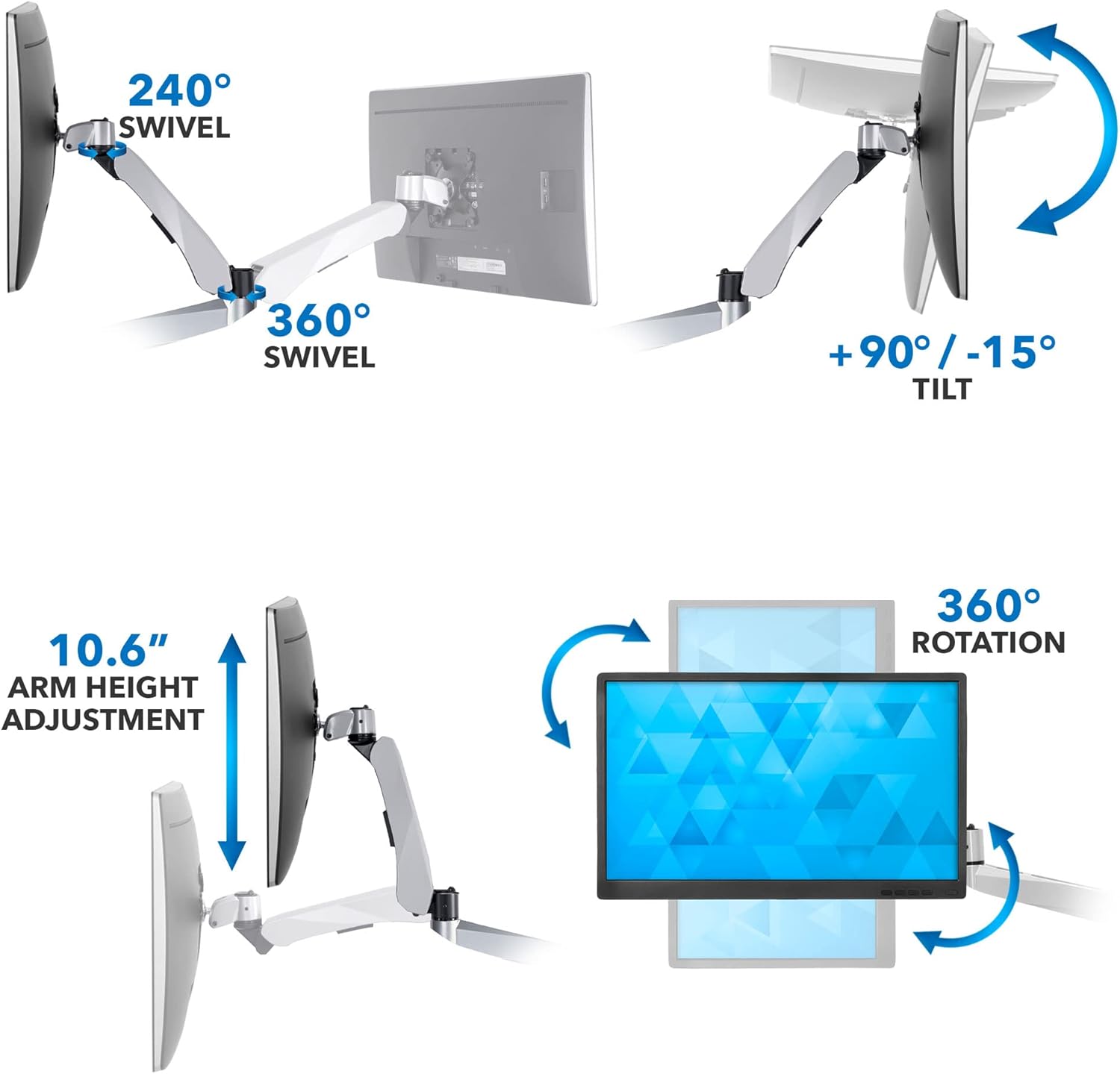
Figure 6: Articulation Features
5.3. კაბელის მენეჯმენტი
Route your cables through the integrated cable management channels in the arms and use the pole clips to maintain a neat and organized workspace.
6. მოვლა
Regularly check all screws and connections to ensure they remain tight. Clean the mount with a soft, damp ქსოვილი. მოერიდეთ აბრაზიული საწმენდი საშუალებების ან გამხსნელების გამოყენებას, რომლებმაც შეიძლება დააზიანოს საფარი.
7. Დიაგნოსტიკა
If you encounter any issues with your monitor mount, refer to the following video for common troubleshooting steps.
Video 2: Modular Monitor Mount Troubleshooting Video!
- Vesa Plate Rotation: If the VESA plate is difficult to rotate upon assembly, loosen the screw on the VESA plate using the provided Allen key. Place the VESA plate flat on a table, attach the arm, and firmly hold the VESA plate while pulling back on the arm to rotate.
- Clamp to Grommet Conversion: The video demonstrates how to convert the clamp base to a grommet mount by disassembling the clamp and reassembling with the grommet plate and bolt.
- Gas Spring Arm Tension: If your monitor is not holding its position, adjust the gas spring tension as described in Section 5.1.
- Quick Release Issues: Ensure the quick-release mechanism clicks into place during assembly. To remove a component, pull back on the clip and slide the component off.
8. სპეციფიკაციები
| ფუნქცია | სპეციფიკაცია |
|---|---|
| მოდელის ნომერი | MI-65156 |
| სამონტაჟო ტიპი | Tabletop Mount (Clamp ან Grommet) |
| მონიტორის მხარდაჭერა | ოთხი მონიტორი |
| ეკრანის მაქსიმალური ზომა | 27 ინჩი |
| დატვირთვის მოცულობა | 19.8 lbs (9 kg) per monitor |
| VESA თავსებადობა | 75x75 მმ, 100x100 მმ |
| C-Clamp Table Thickness | 0.79-დან 2.36 ინჩამდე |
| მოძრაობის ტიპი | არტიკულაცია, როტაცია, მობრუნება, დახრა |
| დახრის დიაპაზონი | 105 degrees (+90°/-15°) |
| როტაცია | 360 degrees (portrait or landscape) |
| მბრუნავი | მაქსიმუმ 360 გრადუსი |
| სიმაღლის რეგულირება | 15.75 ინჩი |
| მასალა | ალუმინის |

სურათი 7: პროდუქტის ზომები და ტევადობა
9. გარანტია და მხარდაჭერა
Mount-It! products are designed for durability and performance. For warranty information or technical support, please contact Mount-It! customer service. Keep your purchase receipt for warranty claims.