
Edifier R1600TIII
Edifier R1600TIII Active Bookshelf Speakers User Manual
Model: R1600TIII
შესავალი
მადლობა შენაძენისთვისasing the Edifier R1600TIII Active Bookshelf Speakers. This manual provides detailed instructions for setting up, operating, and maintaining your speakers to ensure optimal performance and longevity. Please read this manual thoroughly before use and retain it for future reference.
უსაფრთხოების მნიშვნელოვანი ინსტრუქციები
- ყურადღებით წაიკითხეთ ეს ინსტრუქციები.
- შეინახეთ ეს ინსტრუქციები მომავალი მითითებისთვის.
- გაითვალისწინეთ ყველა გაფრთხილება.
- მიჰყევით ყველა ინსტრუქციას.
- არ გამოიყენოთ ეს მოწყობილობა წყალთან ახლოს.
- გაწმინდეთ მხოლოდ მშრალი ქსოვილით.
- არ დაბლოკოთ ვენტილაციის ღიობები. დაამონტაჟეთ მწარმოებლის ინსტრუქციის შესაბამისად.
- არ დააინსტალიროთ სითბოს წყაროსთან ახლოს, როგორიცაა რადიატორები, სითბოს რეგისტრები, ღუმელები ან სხვა მოწყობილობა (მათ შორის ampგამხსნელები), რომლებიც წარმოქმნიან სითბოს.
- დაიცავით დენის კაბელი სიარულისგან ან დაჭიმვისგან, განსაკუთრებით შტეფსელებთან, მოსახერხებელ კონტეინერებთან და იმ ადგილას, სადაც ისინი გამოდიან აპარატიდან.
- გამოიყენეთ მხოლოდ მწარმოებლის მიერ მითითებული დანართები/აქსესუარები.
- გამორთეთ ეს მოწყობილობა ელვისებური ქარიშხლის დროს ან დიდი ხნის განმავლობაში გამოუყენებლობისას.
- მიმართეთ ყველა მომსახურება კვალიფიციურ მომსახურე პერსონალს. სერვისი საჭიროა, როდესაც აპარატი რაიმე ფორმით დაზიანებულია, მაგალითად, დაზიანებულია კვების კაბელი ან შტეფსელი, დაიღვარა სითხე ან ჩავარდა მოწყობილობაში საგნები, აპარატი წვიმს ან ტენიანობას ექვემდებარება, ნორმალურად არ მუშაობს. , ან ჩამოაგდეს.
პაკეტის შიგთავსი
გთხოვთ, შეამოწმოთ თქვენი შეფუთვის შიგთავსი. თუ რომელიმე ნივთი აკლია ან დაზიანებულია, დაუკავშირდით თქვენს გამყიდველს.
- Edifier R1600TIII Active Bookshelf Speakers (1 pair)
- უსადენო დისტანციური მართვა
- დინამიკის დამაკავშირებელი კაბელი
- RCA to RCA Audio Cable
- დენის კაბელი
- მომხმარებლის სახელმძღვანელო (ეს დოკუმენტი)
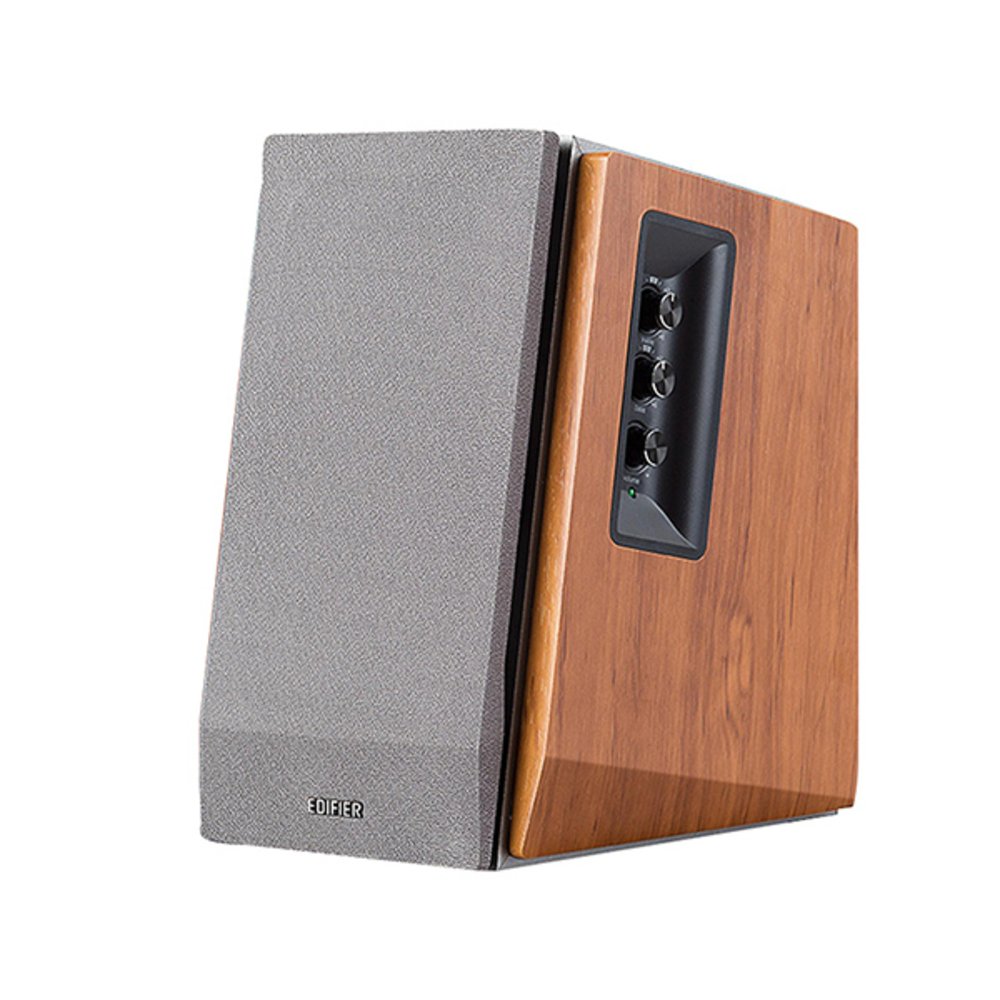
Image: Edifier R1600TIII Active Bookshelf Speakers. This image shows the two speakers, typically one active (with controls) and one passive, connected by a cable. The speakers feature a classic wooden finish and front-facing drivers.
პროდუქტი დასრულდაview
The Edifier R1600TIII is a 2.0 active bookshelf speaker system designed to deliver high-quality audio. It features a total output of 60 Watts and offers versatile connectivity options including RCA and Bluetooth.
კონტროლი და კავშირები
- გვერდითი პანელის მართვა: The active speaker features rotary controls for Volume, Bass, and Treble adjustments.
- უსადენო დისტანციური მართვა: Adjust volume and mute functions conveniently from a distance.
- RCA შეყვანები: Two sets of RCA inputs for connecting to various audio sources like PCs, TVs, or MP3 players.
- Bluetooth დაკავშირება: Seamlessly connect your Bluetooth-enabled devices for wireless audio streaming.
დაყენება
1. სპიკერის განთავსება
Place the speakers on a stable, flat surface such as a bookshelf or desk. For optimal stereo imaging, position the speakers equidistant from your listening position and angle them slightly inwards towards you.
2. დინამიკების დაკავშირება
- Identify the active speaker (with controls and power input) and the passive speaker.
- Connect the speaker connection cable from the active speaker's output to the passive speaker's input. Ensure a secure connection.
3. აუდიო წყაროების დაკავშირება
You can connect audio sources via RCA cables or Bluetooth.
RCA კავშირი:
- Using the provided RCA to RCA cable, connect one end to the RCA input ports on the active speaker (Input 1 or Input 2).
- Connect the other end of the cable to the audio output ports of your source device (e.g., PC, TV, MP3 player).
Bluetooth კავშირი:
- დარწმუნდით, რომ დინამიკები ჩართულია.
- Select the Bluetooth input mode on the speakers (usually by pressing the volume knob or a dedicated input button until the indicator light shows blue).
- On your Bluetooth-enabled device, search for "Edifier R1600TIII" in the Bluetooth settings.
- Select the speaker to pair. Once paired, the indicator light will remain solid blue.
4. დენის კავშირი
- Connect the power cable to the active speaker's power input.
- შეაერთეთ დენის კაბელი კედლის განყოფილებაში.
- Turn on the power switch, usually located on the rear panel of the active speaker.
ოპერაციული ინსტრუქციები
ძირითადი კონტროლი
- ხმის კონტროლი: Rotate the master volume knob on the side panel or use the volume buttons on the remote control to adjust the overall sound level.
- ბასის კონტროლი: Rotate the bass knob on the side panel to increase or decrease the low-frequency output.
- სამების კონტროლი: Rotate the treble knob on the side panel to increase or decrease the high-frequency output.
- შეყვანის შერჩევა: Press the master volume knob on the side panel or the input button on the remote to cycle through available inputs (RCA 1, RCA 2, or Bluetooth).
- დადუმება: Press the mute button on the remote control to silence the audio. Press again to unmute.
უსადენო დისტანციური მართვის გამოყენებით
The wireless remote control allows convenient adjustment of volume and mute functions. Ensure the remote has working batteries and is pointed towards the active speaker for best performance.
მოვლა
- დასუფთავება: Wipe the speaker cabinets with a soft, dry cloth. Do not use liquid cleaners or abrasive chemicals.
- მტვერი: Regularly dust the speaker grilles and surfaces to prevent accumulation.
- გარემო: Avoid exposing the speakers to extreme temperatures, humidity, or direct sunlight.
- შენახვა: თუ დინამიკებს დიდი ხნის განმავლობაში ინახავთ, გამორთეთ ისინი დენის წყაროდან და შეინახეთ გრილ, მშრალ ადგილას.
პრობლემების მოგვარება
| პრობლემა | შესაძლო მიზეზი | გამოსავალი |
|---|---|---|
| ხმა არ არის |
|
|
| ცუდი ხმის ხარისხი / დამახინჯება |
|
|
| Bluetooth კავშირის პრობლემები |
|
|
სპეციფიკაციები
- მოდელი: R1600TIII
- ჯამური სიმძლავრე: 60 ვატი (RMS)
- სპიკერის ტიპი: Active Bookshelf
- სპიკერის ზომა: 4 ინჩი (ვუფერი)
- აუდიო გამომავალი რეჟიმი: სტერეო
- კავშირის ტექნოლოგია: RCA, Bluetooth
- უსადენო კომუნიკაციის ტექნოლოგია: Bluetooth
- კონტროლის მეთოდი: Remote Control, Side Panel Knobs
- თავსებადი მოწყობილობები: Karaoke device, Home cinema, Game console, MP3 player, Desktop computer, Projector, Television
- მასალა: ხის
- ფერი: თეთრი
- პროდუქტის ზომები (L x W x H): 290 x 39.3 x 30.8 სმ (11.4 x 15.5 x 12.1 ინჩი)
- პროდუქტის წონა: 7.38 კგ (16.27 ფუნტი)
- დენის წყარო: კაბელიანი ელექტრო
- განსაკუთრებული მახასიათებლები: Bluetooth დაკავშირება
- წყალგაუმტარი: დიახ (Note: While listed as waterproof, it is generally recommended to protect electronic devices from water exposure.)
გარანტია და მხარდაჭერა
The Edifier R1600TIII speakers come with a შეზღუდული გარანტია. Please refer to the warranty card included in your package or visit the official Edifier webსაიტი დეტალური პირობებისთვის.
For technical support, service, or further inquiries, please contact Edifier customer service through their official webსაიტი ან თქვენი პროდუქტის დოკუმენტაციაში მოცემული საკონტაქტო ინფორმაცია.
Ask a question about this manual
Ask about setup, troubleshooting, compatibility, parts, safety, or missing instructions. Manuals+ will review the question and use this page’s manual context to help answer it.