
1. შესავალი
The Edifier P180 is a stereo earbud headset designed for clear audio and convenient communication. Featuring an inline microphone and control, it offers a comfortable listening experience for various devices.

Figure 1: Edifier P180 Wired Earbud Headset
2. რა არის ყუთში
- Edifier P180 Earbud Headset
- კაბელი
3. ძირითადი მახასიათებლები
- Classic Comfort: Ergonomic design for comfortable wear without irritating the ear canal.
- ხმის შესანიშნავი ხარისხი: Equipped with 16mm neodymium magnetic monomers for high-fidelity audio playback.
- Integrated Microphone and Control: 3.5mm stereo earphones with a built-in microphone and remote button for mobile phone communication.
- ფუნქციონალობა: Single button control for picking up/hanging up calls and skipping songs (device dependent for iOS/Android).
- გამძლე დიზაინი: Constructed with quality materials for longevity.

სურათი 2: ერგონომიული დიზაინი კომფორტული მორგებისთვის.
4. დაყენება
- შეფუთვა: Carefully remove the Edifier P180 headset from its packaging.
- შეამოწმეთ: Check the earbuds and cable for any visible damage.
- დაკავშირება: Insert the 3.5mm audio jack into the headphone port of your compatible device (smartphone, tablet, computer, etc.). Ensure the jack is fully inserted for proper audio and microphone function.
- პოზიცია: Place the earbuds comfortably in your ears. The ergonomic design is intended to rest well without causing irritation.
5. საოპერაციო ინსტრუქციები
The Edifier P180 features an inline control button for easy management of calls and music playback.
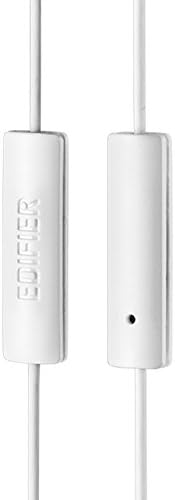
Figure 3: Inline microphone and control button.
- ზარის პასუხი / დასრულება: Press the control button once to answer an incoming call. Press it again to end an active call.
- მუსიკის დაკვრა/პაუზა: Press the control button once to play or pause audio playback.
- ტრეკების გამოტოვება: Double-press the control button to skip to the next track. Triple-press to go to the previous track (functionality may vary by device and operating system).
- ხმის ასისტენტი: Long-press the control button to activate your device's voice assistant (e.g., Siri, Google Assistant).
ვიდეო 1: ოფიციალური პროდუქტი დასრულდაview of the Edifier P180 Classic Earbud Headsets, demonstrating features and usage.
6. მოვლა
- დასუფთავება: Gently wipe the earbuds and cable with a soft, dry cloth. Avoid using harsh chemicals or abrasive materials.
- შენახვა: When not in use, store the headset in a clean, dry place, away from extreme temperatures and direct sunlight. Avoid tangling the cable.
- მოერიდეთ ტენიანობას: Do not expose the headset to water or excessive moisture, as this can damage the internal components.
7. Დიაგნოსტიკა
- ხმა არ არის:
- დარწმუნდით, რომ 3.5 მმ-იანი ჯეკი სრულად არის ჩასმული თქვენი მოწყობილობის აუდიო პორტში.
- შეამოწმეთ თქვენი მოწყობილობის ხმის პარამეტრები.
- მოწყობილობასთან დაკავშირებული პრობლემის გამოსარიცხად, შეამოწმეთ ყურსასმენები სხვა მოწყობილობასთან.
- მიკროფონი არ მუშაობს:
- დარწმუნდით, რომ 3.5 მმ-იანი ჯეკი სრულად არის ჩასმული.
- შეამოწმეთ თქვენი მოწყობილობის მიკროფონის შეყვანის პარამეტრები.
- მიკროფონის შემოწმება სხვა მოწყობილობით ან აპლიკაციით შეგიძლიათ.
- წყვეტილი აუდიო:
- Check the cable for any kinks or damage.
- დარწმუნდით, რომ აუდიო ჯეკი სუფთაა და ნარჩენებისგან თავისუფალი.
8. სპეციფიკაციები
| ფუნქცია | სპეციფიკაცია |
|---|---|
| მოდელის ნომერი | P180 |
| სიხშირის პასუხი | 20 ჰც - 20,000 ჰც |
| ყურსასმენები ჯეკ | 3.5 მმ ჯეკი |
| დაკავშირების ტექნოლოგია | სადენიანი |
| ნივთის წონა | 1.76 უნცია (50 გრამი) |
| პროდუქტის ზომები | 2.01 x 5.59 x 0.91 ინჩი |
| მასალა | ნეოდიმი |
| კონტროლის ტიპი | Inline Control Button |
| წინაღობა | 32 Ohms |
| ხმაურის კონტროლი | ხმის იზოლაცია |
9. გარანტია და დახმარება
The Edifier P180 headset is backed by a 1 წლიანი გარანტია. For any support inquiries or warranty claims, please refer to the contact information provided with your purchase or visit the official Edifier webსაიტი.