
1. შესავალი
This manual provides essential instructions for the safe and efficient installation, operation, and maintenance of your COTEK SP-3000-148 High Frequency Pure Sine Wave Inverter. Please read this manual thoroughly before attempting any installation or operation to ensure proper use and to prevent potential hazards. Keep this manual for future reference.
2. უსაფრთხოების ინსტრუქციები
ელექტროშოკის, ხანძრის ან დაზიანების რისკის შესამცირებლად ყოველთვის დაიცავით შემდეგი უსაფრთხოების ზომები:
- წაიკითხეთ ყველა ინსტრუქცია: Before operating the inverter, read all instructions and cautionary markings on the inverter, the batteries, and all appropriate sections of this manual.
- კვალიფიციური პერსონალი: All electrical work should be performed by qualified personnel familiar with battery and inverter systems and their installation.
- ვენტილაცია: Ensure adequate ventilation around the inverter. Do not install in a zero-clearance compartment.
- მოერიდეთ ტენიანობას: Do not expose the inverter to rain, snow, spray, or bilge water.
- Proper grounding: ინვერტორი სათანადოდ უნდა იყოს დამიწებული.
- ბატარეის უსაფრთხოება: Work in a well-ventilated area when working with batteries. Wear eye protection and protective clothing. Avoid touching eyes while working near batteries.
- დენის გათიშვა: Before performing any maintenance or cleaning, disconnect all power to the inverter.

Image: Always use appropriate safety equipment when working with electrical systems.
3. პროდუქტის მახასიათებლები
The COTEK SP-3000-148 inverter offers the following key features:
- მგრძნობიარე ელექტრონიკისთვის სუფთა სინუსოიდული ტალღის გამომავალი სიგნალი.
- Power ON / OFF remote control capability via green terminal.
- Input & output fully isolation for enhanced safety.
- Temperature & load controlled cooling fan for optimal performance and longevity.
- User-friendly interface for ease of operation.
- Type 1 Indoor Aluminum Enclosure for durability and protection.
4. პროდუქტი დასრულდაview
The COTEK SP-3000-148 is a high-frequency pure sine wave inverter designed to convert 48VDC battery power into stable 120VAC electricity, suitable for a wide range of applications.

სურათი: საერთო view of the COTEK SP-3000-148 Pure Sine Wave Inverter.
4.1 უკანა პანელი
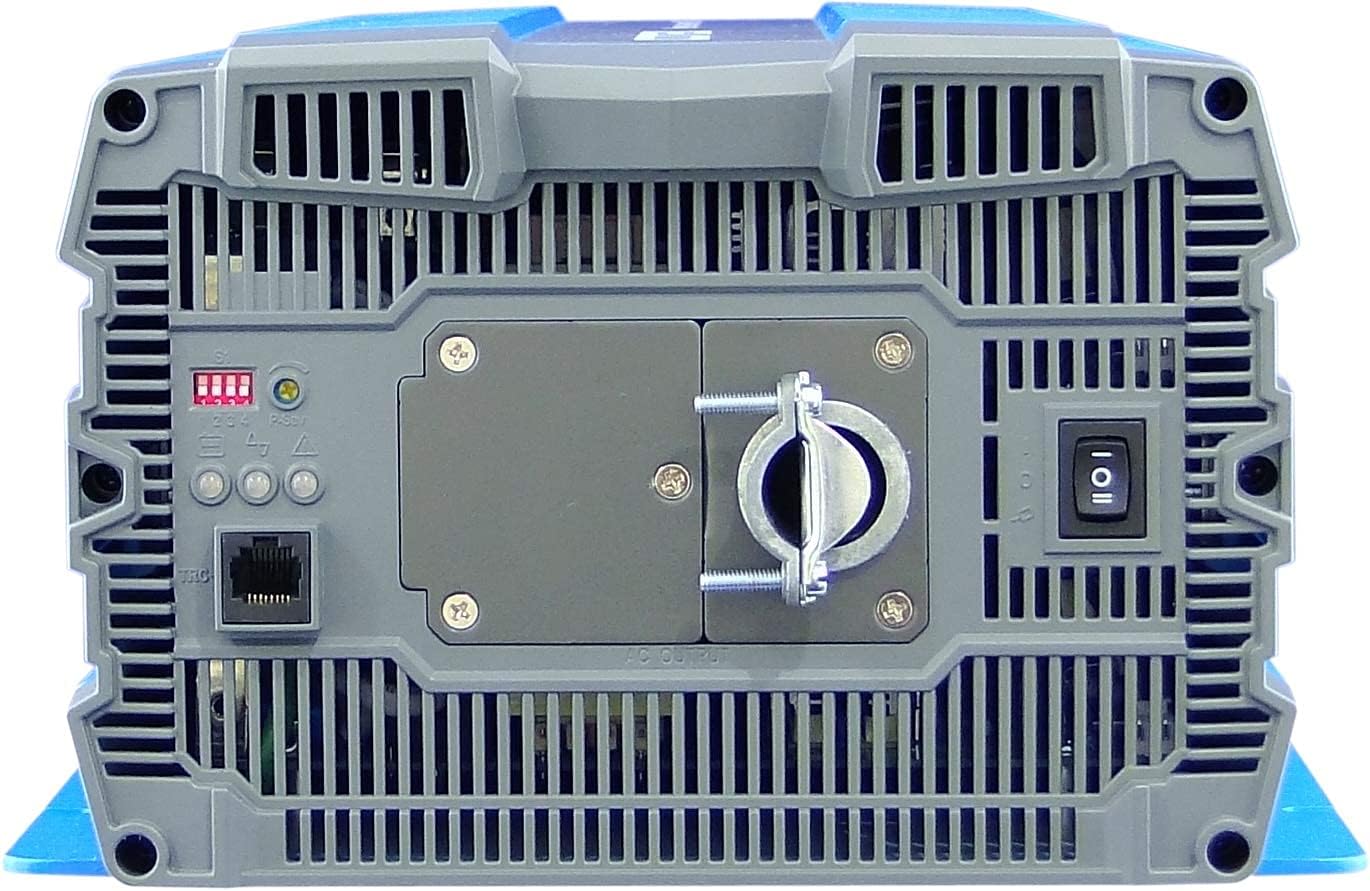
Image: Rear panel of the COTEK SP-3000-148 inverter.
- AC გამომავალი ტერმინალი: Hardwire connection for 120VAC output.
- DIP გადამრთველები: Used for configuring output voltage და სიხშირე.
- Remote Control Port (Green Terminal): For connecting an optional remote ON/OFF switch.
- დენის შეცვლა: Main ON/OFF switch for the inverter.
- LED ინდიკატორები: Display operational status and fault conditions.
4.2 წინა პანელი
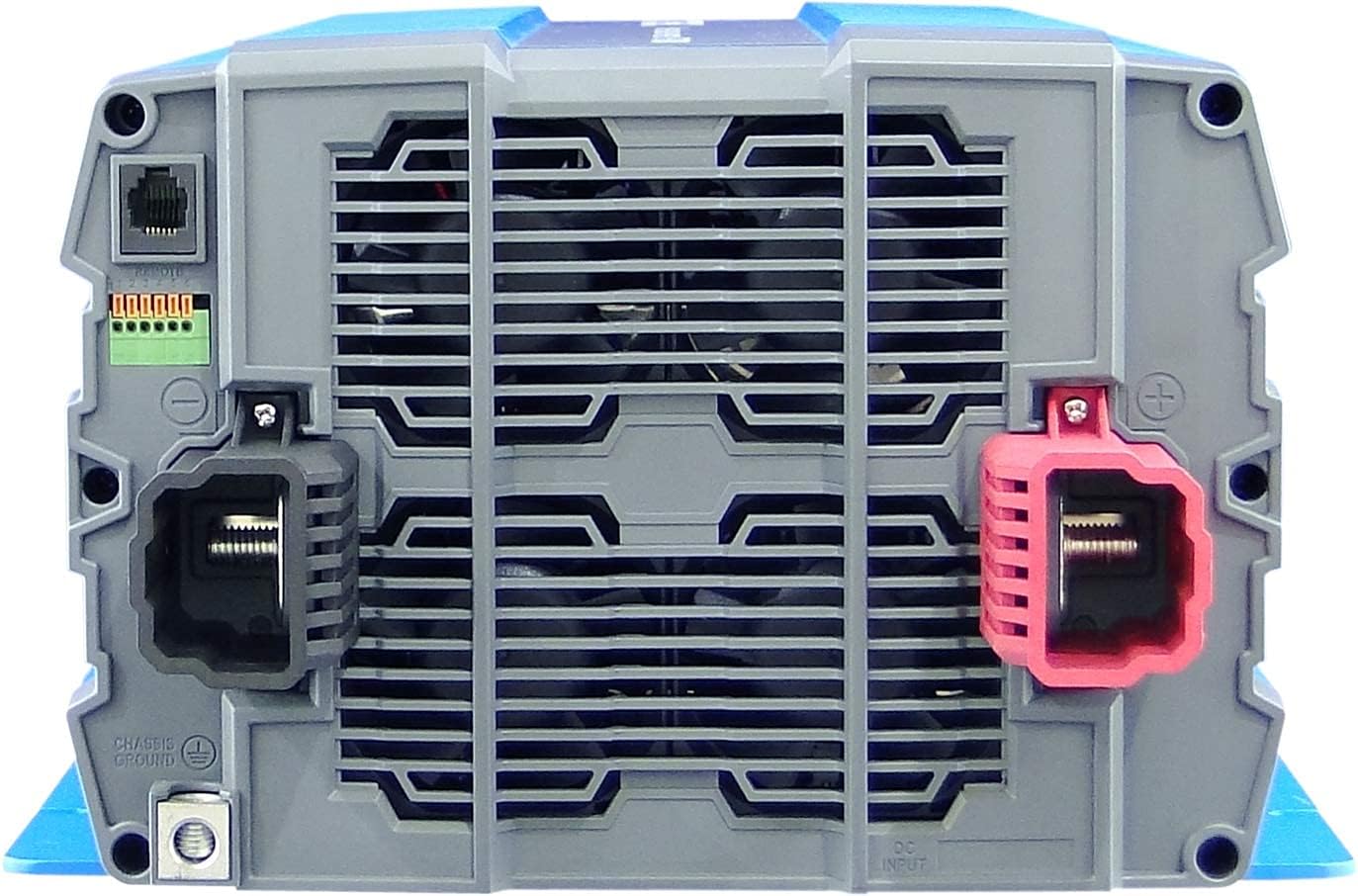
Image: Front panel of the COTEK SP-3000-148 inverter.
- DC შეყვანის ტერმინალები: Positive (+) and Negative (-) terminals for 48VDC battery connection.
- Chassis Ground Terminal: For connecting the inverter to earth ground.
5. მონტაჟი
Proper installation is crucial for the safe and efficient operation of your inverter.
5.1 მონტაჟი
- მდებარეობა: აირჩიეთ მშრალი, კარგად ვენტილირებადი ადგილი, მოარიდეთ მზის პირდაპირ სხივებს, სითბოს წყაროებს და აალებადი მასალებისგან.
- ორიენტაცია: Mount the inverter horizontally on a flat, stable surface. Ensure adequate clearance around the unit for proper airflow.
- უსაფრთხო მონტაჟი: Use appropriate fasteners to securely mount the inverter to prevent movement or vibration.

Image: Mechanical drawings with dimensions for mounting the SP-3000 series inverter.
5.2 გაყვანილობა
ყველა გაყვანილობა უნდა შეესაბამებოდეს ადგილობრივ და ეროვნულ ელექტრო კოდებს.
5.2.1 DC Input Connection (48VDC)
- Connect the positive (+) terminal of the inverter to the positive terminal of your 48VDC battery bank.
- Connect the negative (-) terminal of the inverter to the negative terminal of your 48VDC battery bank.
- Use appropriately sized cables and fuses/breakers for the DC input circuit to prevent overcurrent.
5.2.2 AC Output Connection (120VAC Hardwire)
- Connect your AC loads to the hardwire AC output terminal block on the rear panel.
- Ensure proper polarity (Line, Neutral, Ground) for all AC connections.
- Consult a qualified electrician for hardwiring AC circuits.
5.2.3 დამიწება
- Connect the chassis ground terminal on the inverter's front panel to a reliable earth ground.
- This connection is essential for safety and to minimize electrical noise.
5.2.4 დისტანციური მართვის კავშირი
- Connect an optional remote ON/OFF switch to the green terminal block on the rear panel.
- Refer to the remote control's specific instructions for wiring details.
6. ოპერაცია
6.1 ჩართვა/გამორთვა
- ჩართვა: Ensure all connections are secure. Flip the main power switch on the rear panel to the 'ON' position. The LED indicators will illuminate to show operational status.
- გამორთვა: Flip the main power switch to the 'OFF' position. If using a remote switch, ensure it is also in the 'OFF' position.
6.2 DIP გადამრთველის პარამეტრები
The DIP switches on the rear panel allow configuration of the inverter's output voltage and frequency. Refer to the diagram below for specific settings. Always power off the inverter before changing DIP switch settings.

Image: COTEK SP-3000 series specifications and DIP switch settings.
6.2.1 გამომავალი ტომიtage შერჩევა
The inverter supports various output voltages (100V, 110V, 115V, 120V AC). Adjust DIP switches according to the desired output voltage as indicated in the specifications diagram.
6.2.2 Output Frequency Selection
The inverter can operate at 50Hz or 60Hz. Set the DIP switches to match the required frequency for your region or application.
6.2.3 ენერგიის დაზოგვის რეჟიმი
The inverter features a power saving mode (High Efficiency). Refer to the diagram for enabling or disabling this feature via DIP switches.
6.3 LED ინდიკატორები
The inverter is equipped with LED indicators to display its operational status and alert you to potential issues. Consult the specifications diagram for a detailed explanation of each LED's meaning.
7. მოვლა
რეგულარული მოვლა უზრუნველყოფს თქვენი ინვერტორის ხანგრძლივ მუშაობას და საიმედოობას.
- დასუფთავება: Periodically clean the exterior of the inverter with a dry cloth. Ensure ventilation openings are free from dust and debris. Do not use liquid cleaners.
- კავშირები: Regularly check all DC and AC connections for tightness. Loose connections can cause overheating and poor performance.
- ბატარეის შემოწმება: Inspect your battery bank regularly for corrosion, damage, or signs of leakage.
8. Დიაგნოსტიკა
The SP-3000-148 inverter includes several protection features. If the inverter stops operating or indicates a fault, refer to the table below for common issues and solutions.
| პრობლემა | შესაძლო მიზეზი | გამოსავალი |
|---|---|---|
| No AC Output / Inverter Off | Main switch off, low battery voltage, overload, internal fuse. | Check power switch, charge batteries, reduce load, check DC input fuse. |
| შეყვანა Under-Voltage სიგნალიზაცია | ბატარეის მოცულობაtagძალიან დაბალია. | დატენეთ ან შეცვალეთ ბატარეები. |
| შეყვანის მოცულობაtage სიგნალიზაცია | ბატარეის მოცულობაtagძალიან მაღალია. | Check charging system, ensure correct battery voltage. |
| გამომავალი გადატვირთვა | დაკავშირებული დატვირთვა აღემატება ინვერტორის სიმძლავრეს. | შეამცირეთ ინვერტორთან დაკავშირებული მთლიანი დატვირთვა. |
| ტემპერატურაზე მეტი | ინვერტორის გადახურება ცუდი ვენტილაციის ან ზედმეტი დატვირთვის გამო. | Ensure adequate ventilation, reduce load, allow inverter to cool. |
| მოკლე ჩართვა | Short circuit detected on AC output. | Identify and clear the short circuit on the AC output wiring or load. |
9. სპეციფიკაციები
The following table details the technical specifications for the COTEK SP-3000-148 Pure Sine Wave Inverter:
| ფუნქცია | სპეციფიკაცია |
|---|---|
| მოდელი | SP-3000-148 |
| AC ტომიtage | 120VAC (Selectable via DIP switch) |
| AC რეგულაცია | ±5% |
| რეიტინგული სიმძლავრე | 3000 W |
| Surge Power (1 Sec) | 6000 W |
| მაქსიმალური გამომავალი სიმძლავრე (1 წთ) | 3450 W |
| გამომავალი ტალღის ფორმა | Pure Sine Wave (THD<3% at nominal load) |
| სიხშირე | 60Hz (Selectable via DIP switch) |
| DC ტომიtage | 48VDC |
| ტtage დიაპაზონი | 42.0 ~ 66.0 VDC |
| დატვირთვის დენი | <1.0A @48VDC |
| ენერგიის დაზოგვის რეჟიმი | <0.4A @48VDC |
| ეფექტურობა (მაქს.) | 92% |
| შეყვანა Under-Voltage დაცვა | 42.0 ± 0.5 VDC |
| შეყვანა Under-Voltage სიგნალიზაცია | 44.0 ± 0.5 VDC |
| შეყვანა Under-Voltage აღდგენა | 50.0 ± 0.5 VDC |
| შეყვანის მოცულობაtage დაცვა | 66.0 ± 1.0 VDC |
| შეყვანის მოცულობაtage აღდგენა | 64.0 ± 1.0 VDC |
| გამომავალი გადატვირთვა | Shutdown output, restart to recover. |
| გამომავალი მოკლე | Shutdown output, restart to recover. |
| ტემპერატურაზე მეტი | Shutdown output, auto-recovery after cooling. |
| DC შეყვანის საპირისპირო პოლარობა | დაუკრავენ |
| ოპერაციული ტემპერატურა. | -20°C ~ +40°C |
| შენახვის ტემპერატურა. & ტენიანობა | -30°C ~ +70°C, 10 ~ 95% RH |
| ზომები (W x H x D) | 442 x 239 x 102.5 მმ (17.4 x 9.4 x 4.0 ინჩი) |
| წონა | 8.2 კგ (18.08 ფუნტი) |
| გარანტია | 2 წლიანი მწარმოებელი |
10. ინფორმაცია გარანტიის შესახებ
The COTEK SP-3000-148 Pure Sine Wave Inverter comes with a 2 წლიანი მწარმოებლის გარანტია. This warranty covers defects in materials and workmanship under normal use. Please retain your proof of purchase for warranty claims. For detailed warranty terms and conditions, refer to the official COTEK warranty statement or contact customer support.
11. მომხმარებელთა მხარდაჭერა
If you encounter any issues not covered in this manual or require technical assistance, please contact COTEK customer support. Have your product model number (SP-3000-148) and purchase information ready when contacting support.