
პროდუქტი დასრულდაview
The AAXA Technologies M6 is a Full HD Micro LED Projector designed for both business and home theater use. It features native 1920x1080p resolution, 1200 LED lumens of brightness, and a long-lasting 30,000-hour LED light source. The M6 includes an onboard media player and operates on both AC power and its built-in rechargeable battery, offering portability and versatility.

Figure 1: The AAXA M6 Full HD Micro LED Projector, showcasinგ მისი კომპაქტური დიზაინი.
დაყენება
1. ყუთის გახსნა და შეფუთვის შიგთავსი
ფრთხილად გახსენით ყველა კომპონენტი და დარწმუნდით, რომ შემდეგი ნივთები ხელთ არის:
- AAXA M6 Projector
- დისტანციური მართვა
- Composite AV Cable
- დენის ადაპტერი
- მომხმარებლის სახელმძღვანელო (ეს დოკუმენტი)
2. ფიზიკური განთავსება
Position the projector on a stable, flat surface. Ensure adequate ventilation around the unit. The M6 can project an image size of up to 200 inches diagonally, depending on the distance from the projection surface. For optimal image quality, project onto a flat, light-colored wall or a dedicated projector screen.
3. დენის კავშირი
Connect the provided power adapter to the projector's DC input port and then to a standard electrical outlet. The projector can also operate on its internal battery for up to 90 minutes.
4. პირველადი ჩართვა
Press the power button on the projector or the remote control to turn on the device. The power indicator light will illuminate.
5. ფოკუსის რეგულირება
Rotate the focus wheel located on the side of the projector until the projected image appears sharp and clear. This adjustment is crucial for image clarity at varying projection distances.
6. Keystone რეგულირება
The M6 projector supports vertical and horizontal keystone correction to adjust the image shape if the projector is not perfectly perpendicular to the screen. Use the remote control or on-screen menu to access and adjust keystone settings. This feature helps correct trapezoidal distortion.

Figure 2: Keystone adjustment allows for correcting image distortion when the projector is not perfectly aligned with the screen.
ოპერაციული ინსტრუქციები
1. მოწყობილობების დამაკავშირებელი
The M6 projector offers multiple input options for connecting various devices:
- HDMI: Connect laptops, gaming consoles (Xbox, PS4), smartphones (with adapter), Amazon Fire TV, or other HDMI-compatible devices.
- USB: For direct media playback from USB flash drives.
- მიკრო SD: For direct media playback from microSD cards.
- AV (კომპოზიტური): Connect older devices using the included Composite AV Cable.
- VGA: Connect computers or other devices with a VGA output.

Figure 3: The AAXA M6 features various input ports for broad device compatibility.
2. მედიის დაკვრა
The M6 has an onboard media player. Insert a USB drive or microSD card containing compatible video, audio, or image files into the respective port. Use the remote control to navigate the on-screen menu and select your desired media for playback.
3. დისტანციური მართვის გამოყენება
The included remote control provides full functionality for navigating menus, adjusting settings, and controlling media playback. Ensure the remote has working batteries and is pointed towards the projector's IR receiver.
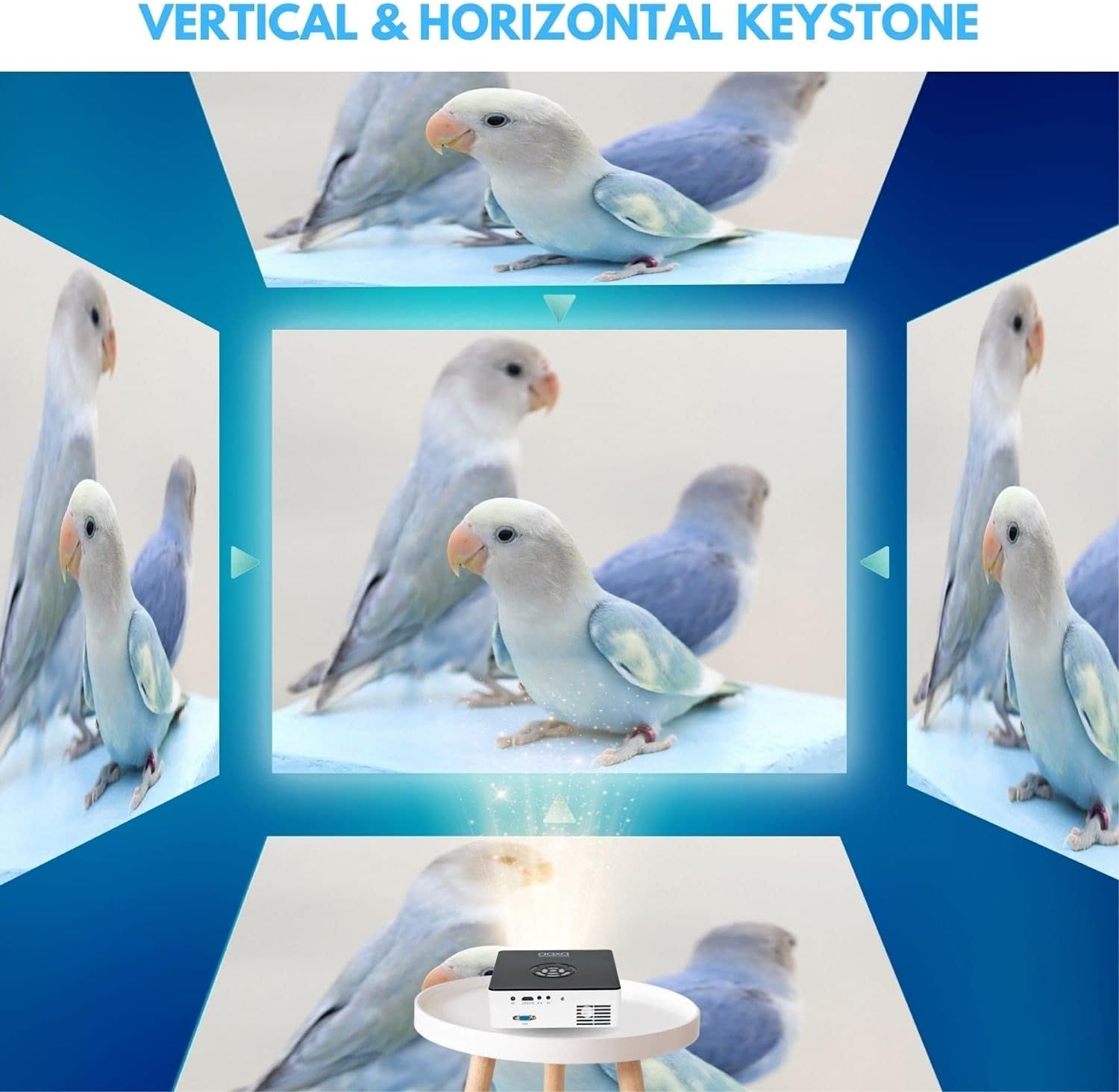
Figure 4: The remote control for the AAXA M6 projector, used for navigation and settings.
4. ბატარეის მუშაობა
The M6 features a built-in rechargeable Lithium-Ion battery, providing up to 90 minutes of operation on a full charge. To charge the battery, connect the power adapter. The battery indicator will show charging status.
5. ეკო რეჟიმი
For extended battery life and reduced fan noise, activate Eco Mode through the projector's settings menu. This mode slightly reduces brightness but can be sufficient in darker environments.
Video 1: Demonstration of the M6 projector's performance in a lower light environment, showcasing its 1080p Full HD native resolution.
მოვლა
1. ლინზის გაწმენდა
Use a soft, lint-free cloth specifically designed for optical lenses to gently wipe the projector lens. Avoid using abrasive materials or harsh chemicals, which can damage the lens coating.
2. Cleaning Vents
Periodically inspect and clean the projector's ventilation openings to prevent dust buildup. Use a soft brush or compressed air to remove any obstructions, ensuring proper airflow and preventing overheating.
3. შენახვა
When not in use, store the projector in a cool, dry place, away from direct sunlight and extreme temperatures. If storing for an extended period, ensure the battery is partially charged (around 50%) to maintain battery health.
4. LED სინათლის წყარო
The M6 projector utilizes a durable LED light source with an estimated lifespan of 30,000 hours, eliminating the need for lamp replacement under normal usage conditions.
პრობლემების მოგვარება
- სურათის გარეშე: Ensure the projector is powered on, the input source is correctly selected, and the connected device is outputting a signal. Check all cable connections.
- ბუნდოვანი სურათი: Adjust the focus wheel until the image is sharp. Ensure the projection surface is flat and the projector is within the optimal throw distance.
- ხმა არ არის: Verify that the volume on both the projector and the connected device is turned up and not muted. Check audio cable connections if using external speakers.
- გულშემატკივართა ხმაური: Some fan noise is normal during operation, especially in brighter modes. Activating Eco Mode can reduce fan speed and noise. Ensure vents are clear of obstructions.
- გამოსახულების დამახინჯება (ტრაპეციის ფორმა): Use the keystone adjustment feature to correct the image shape.
If you encounter issues not listed here or require further assistance, please refer to the Support section.
სპეციფიკაციები
| ფუნქცია | დეტალი |
|---|---|
| მოდელის სახელი | M6 |
| ჩვენების გარჩევადობა | ნატიური 1920 x 1080 (Full HD) |
| სიკაშკაშე | 1200 LED ლუმენი |
| კონტრასტის თანაფარდობა | 2000:1 |
| სინათლის წყარო სიცოცხლე | 30,000 Hours (LED) |
| ჩვენების ტიპი | DLP |
| დაკავშირების ტექნოლოგია | HDMI, USB, microSD, AV, VGA |
| სურათის მაქსიმალური ზომა | 200 ინჩი |
| სროლის მინიმალური მანძილი | 11.5 ინჩი |
| ელემენტის ზომები (L x W x H) | 7" x 7" x 2.1" |
| ნივთის წონა | 2.5 ფუნტი |
| ბატარეის ხანგრძლივობა | 90 წუთამდე |
| კონტროლერის ტიპი | დისტანციური მართვა |
საგარანტიო ინფორმაცია
The AAXA Technologies M6 Projector is covered by a 1 წლიანი შეზღუდული მწარმოებლის გარანტია from the date of purchase. This warranty covers defects in materials and workmanship under normal use. It does not cover damage caused by misuse, accidents, unauthorized modifications, or external causes.
გთხოვთ, შეინახოთ თქვენი შეძენის მტკიცებულება გარანტიის პრეტენზიებისთვის.
მხარდაჭერა
For technical support, service, or additional information regarding your AAXA Technologies M6 Projector, please visit the official AAXA Technologies webსაიტი ან დაუკავშირდით მათ მომხმარებელთა მომსახურების განყოფილებას.
- Webსაიტი: www.aaxatech.com (მაგample, please refer to actual product documentation for correct URL)
- ელფოსტა: support@aaxatech.com (Example, please refer to actual product documentation for correct email)
- ტელეფონი: 1-800-XXX-XXXX (მაგ.ample, please refer to actual product documentation for correct phone number)
When contacting support, please have your product model (M6) and proof of purchase readily available.