
1. შესავალი
This manual provides comprehensive instructions for the installation, operation, and maintenance of your FIBARO FGT-001 Z-Wave Plus Smart Heating Radiator Thermostat. The FIBARO Heat Controller is designed to provide precise temperature management for your home, integrating seamlessly with Z-Wave smart home systems. Please read this manual thoroughly before using the device to ensure proper functionality and safety.

Image 1.1: The FIBARO FGT-001 Z-Wave Plus Smart Heating Radiator Thermostat and its retail packaging.
2. უსაფრთხოების ინფორმაცია
- გამოყენებამდე ყურადღებით წაიკითხეთ ყველა ინსტრუქცია.
- არ სცადოთ მოწყობილობის დამოუკიდებლად შეკეთება ან მოდიფიცირება. ყველა სახის მომსახურება მიმართეთ კვალიფიციურ პერსონალს.
- შეინახეთ მოწყობილობა წყლისგან და მაღალი ტენიანობისგან.
- არ დაუშვათ მოწყობილობა ექსტრემალურ ტემპერატურაზე ან მზის პირდაპირ სხივებზე.
- Ensure the device is securely installed on the radiator valve.
- გადაყარეთ ბატარეები ადგილობრივი წესების შესაბამისად.
3. პაკეტის შიგთავსი
The FIBARO FGT-001 package typically includes:
- FIBARO Heat Controller Head (FGT-001)
- მომხმარებლის სახელმძღვანელო (ეს დოკუმენტი)
- Adapters for various radiator valves (M30 x 1.5, Danfoss RTD-N, Danfoss RA-N) - Note: Specific adapters may vary by region or package.
4. პროდუქტი დასრულდაview
The FIBARO Heat Controller is a smart radiator thermostat designed to regulate the temperature in rooms by controlling the flow of hot water through the radiator. It features Z-Wave Plus connectivity for integration into smart home systems, allowing for remote control and automation. The device is powered by a built-in rechargeable battery.
ძირითადი მახასიათებლები:
- Z-Wave Plus Compatibility: Works with any Z-Wave or Z-Wave+ Controller.
- უსაფრთხოების რეჟიმები: Supports S0 with AES-128 encryption and S2 with PRNG-based encryption.
- დატენვის ბატარეა: Built-in battery recharged via a standard micro-USB port.
- სარქვლის თავსებადობა: Designed for M30 x 1.5, Danfoss RTD-N, and Danfoss RA-N valves.
- LED ინდიკატორი: Features an LED ring that changes color to indicate temperature settings.

Image 4.1: A hand manually adjusting the FIBARO Heat Controller on a radiator valve.

Image 4.2: The FIBARO Heat Controller displaying a target temperature of 18°C.
5. დაყენება და ინსტალაცია
5.1. მოწყობილობის დატენვა
Before installation, ensure the device's built-in battery is fully charged. Connect a standard micro-USB cable to the charging port on the device. The LED indicator will show charging status.
5.2. რადიატორის სარქველზე დამონტაჟება
The FIBARO Heat Controller is designed for easy, tool-free installation.
- Identify Valve Type: Determine if your radiator valve is M30 x 1.5, Danfoss RTD-N, or Danfoss RA-N. Select the appropriate adapter if necessary.
- Remove Existing Thermostat: Unscrew and remove any existing thermostat head from your radiator valve.
- ადაპტერის შეერთება (საჭიროების შემთხვევაში): If your valve is not M30 x 1.5, attach the correct adapter to the valve.
- Mount Heat Controller: Screw the FIBARO Heat Controller onto the radiator valve or adapter. Ensure it is hand-tightened securely.
- კალიბრაცია: The device will automatically begin a calibration process after installation. This may involve the valve opening and closing to learn its range.

Image 5.1: The FIBARO Heat Controller installed on a radiator in a residential setting.
5.3. Z-Wave Network Inclusion
To integrate the Heat Controller into your Z-Wave network:
- Place the Heat Controller within direct range of your Z-Wave controller.
- Set your Z-Wave controller into inclusion (add) mode. Refer to your Z-Wave controller's manual for specific instructions.
- Press the button on the Heat Controller three times quickly.
- The device will be detected and added to your Z-Wave network. The LED ring may indicate successful inclusion.
6. საოპერაციო ინსტრუქციები
6.1. ტემპერატურის ხელით რეგულირება
You can manually adjust the desired temperature by rotating the outer ring of the Heat Controller. The LED ring will change color to indicate the set temperature:
- ლურჯი: Lower temperatures
- მწვანე: ზომიერი ტემპერატურა
- წითელი: Higher temperatures
- მეწამული: Boost/Maximum heating
6.2. Z-Wave Control and Automation
Once included in your Z-Wave network, the FIBARO Heat Controller can be controlled remotely via your Z-Wave gateway's interface or mobile application. This allows for:
- Setting precise temperature schedules.
- Creating scenes and automations (e.g., turn off heating when a window is open).
- Monitoring current room temperature (if an external sensor is paired).
- Voice control integration with compatible smart assistants (e.g., Google Assistant).

Image 6.1: Remote control of the heating system via a smartphone application.
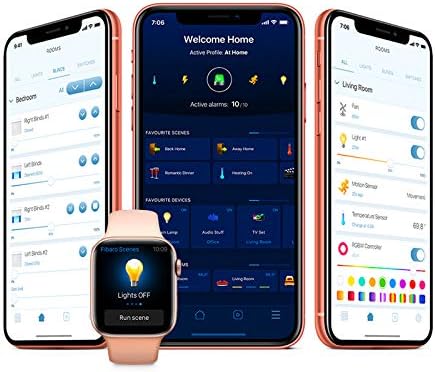
სურათი 6.2: ყოფილიample of the FIBARO smart home application interface for managing devices and settings.
7. მოვლა
7.1. აკუმულატორის დატენვა
The built-in battery should be recharged when the low battery indicator appears (usually a flashing LED). Connect the device to a micro-USB power source. A full charge typically takes several hours.
7.2. დასუფთავება
Clean the device with a soft, dry cloth. Do not use abrasive cleaners or solvents, as these can damage the surface.
8. Დიაგნოსტიკა
8.1. მოწყობილობა არ რეაგირებს
- შეამოწმეთ ბატარეა: Ensure the battery is charged. Connect to a micro-USB charger.
- Z-Wave Network: Verify the device is properly included in your Z-Wave network and within range of the controller.
- ხელახალი კალიბრაცია: If the valve movement seems incorrect, try re-calibrating the device by detaching and reattaching it, or through your Z-Wave controller's interface if supported.
8.2. ტემპერატურის არასწორი მაჩვენებლები
- The Heat Controller measures temperature near the radiator, which can be warmer than the room's ambient temperature. Consider pairing with an external FIBARO temperature sensor for more accurate room temperature readings.
- Ensure the device is not obstructed or exposed to direct heat sources (e.g., direct sunlight, other appliances).
8.3. Difficulty with Z-Wave Inclusion/Exclusion
- Ensure the device is close to the Z-Wave controller during the inclusion/exclusion process.
- Perform a factory reset on the Heat Controller if it fails to include or exclude. Refer to the FIBARO support webსაიტი კონკრეტული გადატვირთვის პროცედურებისთვის.
9. სპეციფიკაციები
| ფუნქცია | დეტალი |
|---|---|
| ბრენდი | ფიბარო |
| მოდელის სახელი | Head (FGT-001) |
| დაკავშირების ტექნოლოგია | Z Wave Plus |
| დენის წყარო | Built-in rechargeable Lithium Polymer battery (charged via Micro-USB) |
| კონტროლერის ტიპი | Z-Wave Gateway, Google Assistant (via compatible gateway) |
| სპეციალური ფუნქცია | ინტეგრაცია ჭკვიანი სახლის სისტემებთან |
| ფერი | თეთრი |
| მასალა | პლასტიკური |
| ნივთის წონა | 3.53 უნცია (100 გრამი) |
| პროდუქტის ზომები | 2.28 x 3.43 x 2.56 ინჩი |
| ჩვენების ტიპი | Digital (LED ring) |
| კონტროლის მეთოდი | App, Voice, Manual Rotation |
| სამონტაჟო ტიპი | Radiator Valve Mount |
| სარქვლის თავსებადობა | M30 x 1.5, Danfoss RTD-N, Danfoss RA-N |
10. გარანტია და მხარდაჭერა
FIBARO products are covered by a manufacturer's warranty. For detailed warranty terms and conditions, please refer to the warranty card included with your product or visit the official FIBARO webსაიტი.
For technical support, troubleshooting assistance, or further information, please visit the FIBARO support portal or contact their customer service.
- ფიბარო Webსაიტი: www.fibaro.com
- მხარდაჭერა: იხილეთ მხარდაჭერის განყოფილება ოფიციალურ ვებსაიტზე webსაიტი ხშირად დასმული კითხვებისთვის, სახელმძღვანელოებისთვის და საკონტაქტო ინფორმაციისთვის.