
1. შესავალი
This manual provides detailed instructions for the installation, operation, and maintenance of your Thomson SB260IBT 2.1 Channel Soundbar. Please read this manual thoroughly before using the product and retain it for future reference.
1.1 უსაფრთხოების ინფორმაცია
- დარწმუნდით, რომ კვების ბლოკიtage შეესაბამება პროდუქტის ეტიკეტზე მითითებულ მოთხოვნებს.
- Do not expose the soundbar or subwoofer to rain, moisture, or extreme temperatures.
- მოერიდეთ მოწყობილობის განთავსებას სითბოს წყაროებთან ახლოს ან მზის პირდაპირ სხივებში.
- უზრუნველყოს სათანადო ვენტილაცია მოწყობილობის გარშემო გადახურების თავიდან ასაცილებლად.
- არ გახსნათ casinგ; ყველა სერვისი კვალიფიციურ პერსონალს მიანდეთ.
- გაწმინდეთ მოწყობილობა მხოლოდ რბილი, მშრალი ქსოვილით.
2. პაკეტის შიგთავსი
დარწმუნდით, რომ შეფუთვაში ყველა ნივთია:
- Thomson SB260IBT Soundbar
- საბვუფერი
- დისტანციური მართვა
- დენის კაბელი
- Audio Cables (e.g., Optical, AUX - may vary by region)
- მომხმარებლის სახელმძღვანელო
3. პროდუქტი დასრულდაview
3.1 ხმის ზოლი და საბვუფერი

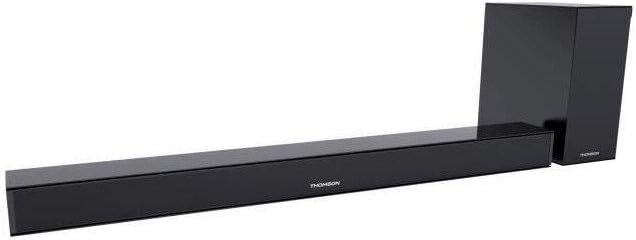
This image displays the Thomson SB260IBT soundbar unit alongside its accompanying subwoofer. The soundbar is a long, slender black unit, and the subwoofer is a compact black cube, both designed to complement modern home entertainment systems.
3.2 მართვის პანელი და პორტები
This image shows a close-up of the soundbar's side panel, revealing various control buttons and input/output ports. These include buttons for power, mode selection, volume control, and ports such as USB, SD card slot, and auxiliary input.
3.2.1 წინა პანელი
- LED ინდიკატორი: აჩვენებს მიმდინარე რეჟიმს ან სტატუსს.
- IR მიმღები: დისტანციური მართვის სიგნალებისთვის.
3.2.2 უკანა პანელი
- დენის შეყვანა: AC დენის კაბელთან უერთდება.
- ოპტიკური შეყვანა: For digital audio connection from a TV or other device.
- AUX შეყვანა: For analog audio connection using a 3.5mm cable.
3.2.3 გვერდითი პანელი
- USB პორტი: აუდიოს დასაკრავად files USB დისკიდან.
- SD ბარათის სლოტი: აუდიოს დასაკრავად files SD ბარათიდან.
- საკონტროლო ღილაკები: Power, Mode, Volume Up/Down.
3.2.4 დისტანციური მართვა
The remote control provides full functionality for power, input selection, volume adjustment, and playback controls.
4. დაყენება
4.1 განთავსება
Place the soundbar on a stable, flat surface directly in front of your television. Position the subwoofer on the floor near the soundbar for optimal bass response. Ensure adequate ventilation around both units.
4.2 დენთან დაკავშირება
- შეაერთეთ კვების კაბელი საუნდბარის კვების წყაროსთან.
- დენის კაბელის მეორე ბოლო შეაერთეთ კედლის სოკეტში.
- Connect the subwoofer to its power source (if separate).
4.3 აუდიო კავშირი
4.3.1 ოპტიკური კავშირი
For high-quality digital audio, connect an optical cable from your TV's optical output to the soundbar's OPTICAL input. Select 'Optical' mode on the soundbar.
4.3.2 AUX კავშირი
Use a 3.5mm audio cable to connect your device's audio output (e.g., smartphone, MP3 player) to the soundbar's AUX input. Select 'AUX' mode on the soundbar.
4.3.3 Bluetooth კავშირი
For wireless audio, select 'Bluetooth' mode on the soundbar. Refer to section 5.4 for detailed pairing instructions.
5. საოპერაციო ინსტრუქციები
5.1 ჩართვა/გამორთვა
დააჭირეთ ძალაუფლება ღილაკი საუნდბარზე ან დისტანციურ მართვაზე მოწყობილობის ჩასართავად ან გამოსართავად.
5.2 შეყვანის შერჩევა
დააჭირეთ რეჟიმი button on the soundbar or remote control to cycle through available input sources: Bluetooth, Optical, AUX, USB, SD Card. The LED indicator will show the selected mode.
5.3 ხმის კონტროლი
გამოიყენეთ ტომი + და მოცულობა - buttons on the soundbar or remote control to adjust the master volume level.
5.4 Bluetooth დაწყვილება
- ჩართეთ ხმის პანელი და დააჭირეთ რეჟიმი button to select Bluetooth mode. The LED indicator will flash, indicating it is in pairing mode.
- თქვენს Bluetooth-თან დაკავშირებულ მოწყობილობაზე (მაგ., სმარტფონზე, პლანშეტზე) ჩართეთ Bluetooth და მოძებნეთ ხელმისაწვდომი მოწყობილობები.
- Select "SB260IBT" from the list of found devices to pair.
- Once successfully paired, the soundbar's LED indicator will stop flashing and remain solid. You can now play audio from your device through the soundbar.
5.5 USB/SD ბარათიდან დაკვრა
Insert a USB drive or SD card (containing compatible audio files) into the corresponding port on the soundbar's side panel. The soundbar will automatically switch to USB/SD mode and begin playback. Use the remote control for playback functions such as Play/Pause, Next Track, and Previous Track.
6. მოვლა
6.1 დასუფთავება
Disconnect the soundbar from the power supply before cleaning. Use a soft, dry cloth to gently wipe the surfaces. Do not use liquid cleaners, abrasive materials, or chemical solvents, as these may damage the finish.
6.2 შენახვა
If storing the unit for an extended period, disconnect it from power and store it in a cool, dry place, away from direct sunlight and extreme temperatures. It is recommended to keep the original packaging for storage.
7. Დიაგნოსტიკა
| პრობლემა | გამოსავალი |
|---|---|
| არ არის ძალა | Check if the power cable is securely connected to the soundbar and the wall outlet. Ensure the wall outlet is functional. |
| ხმა არ არის | Ensure the correct input source (e.g., Optical, AUX, Bluetooth) is selected. Check all audio cable connections. Increase the volume on both the soundbar and the connected device. |
| Bluetooth Disconnection or Failure to Pair | Ensure the device is within the Bluetooth operating range (approximately 10 meters). Turn off and on Bluetooth on your device, then try re-pairing. Ensure no other devices are actively connected to the soundbar. |
| დისტანციური მართვა არ მუშაობს | Check the battery in the remote control and replace if necessary. Ensure there are no obstacles between the remote control and the soundbar's IR receiver. |
8. სპეციფიკაციები
- მოდელის სახელი: SB260IBT
- ბრენდი: ტომსონი
- არხის კონფიგურაცია: 2.1 არხი
- მაქსიმალური გამომავალი სიმძლავრე: 200 ვატი
- კავშირის ტექნოლოგია: Bluetooth, სადენიანი/უკაბელო
- შეყვანის ტიპი: Multiple (Optical, AUX, USB, SD Card)
- დენის წყარო: კაბელიანი ელექტრო
- კონტროლის მეთოდი: Via App, Remote Control, On-unit Buttons
- განსაკუთრებული მახასიათებლები: Bluetooth
- რეკომენდებული გამოყენება: For Computers, Gaming Consoles, Music Players, Smartphones or Tablets, Televisions
- პროდუქტის ზომები: 100 x 15 x 7 სმ (ხმის ზოლი)
- პროდუქტის წონა: Approximately 3 kg (Soundbar and Subwoofer combined)
- ერთეულების რაოდენობა: 2 (Soundbar and Subwoofer)
- წყალგამძლე: არა
- სამონტაჟო ტიპი: მაგიდის
9. გარანტია და მხარდაჭერა
9.1 ინფორმაცია გარანტიის შესახებ
This product comes with a limited warranty. Please refer to the warranty card included in your package for specific terms and conditions, including the warranty period and coverage details. Retain your proof of purchase for warranty claims.
9.2 მომხმარებელთა მხარდაჭერა
For technical assistance, troubleshooting, or service inquiries, please contact Thomson customer support. Contact details can typically be found on the manufacturer's official website or in your product documentation. Please have your model number (SB260IBT) and purchase information ready when contacting support.