
1. შესავალი
This manual provides detailed instructions for the proper use and maintenance of your Edifier W820BT Bluetooth Headphones. Please read this manual thoroughly before using the product to ensure optimal performance and longevity.
2. პაკეტის შიგთავსი
Verify that all items listed below are included in your package. If any items are missing or damaged, please contact Edifier customer support.
- Edifier W820BT Bluetooth Headphones
- დამტენი კაბელი (USB)
- აუდიო კაბელი (3.5 მმ)
- მომხმარებლის სახელმძღვანელო (ეს დოკუმენტი)
3. პროდუქტი დასრულდაview
The Edifier W820BT headphones are designed for comfort and extended listening, featuring Bluetooth v4.1 connectivity and a long-lasting battery.
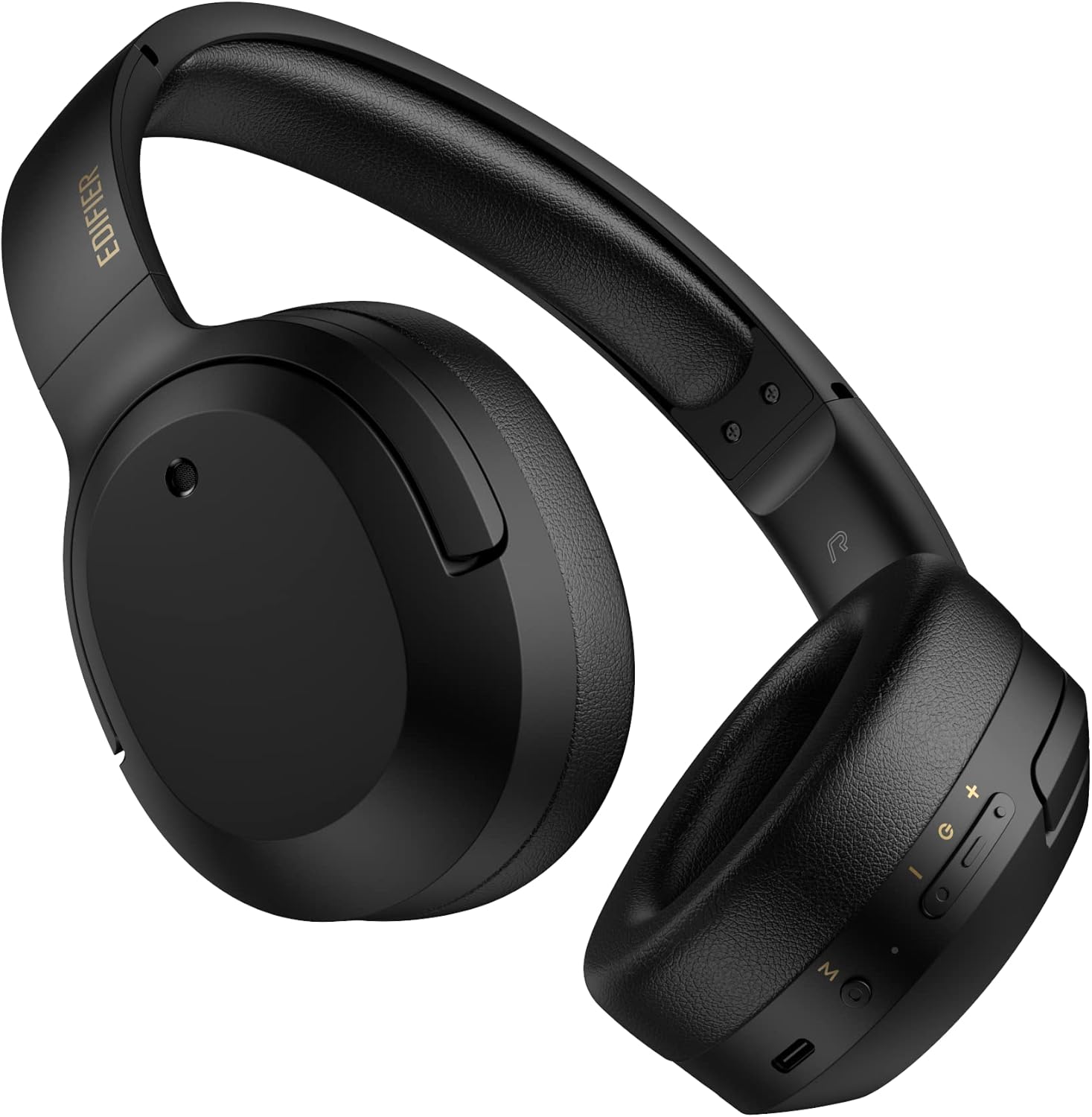
სურათი 3.1: წინა view of the Edifier W820BT Bluetooth Headphones.

სურათი 3.2: მხარე view of the Edifier W820BT Bluetooth Headphones, highlighting the control buttons.
ძირითადი მახასიათებლები:
- Bluetooth V4.1 with CSR Technology for stable wireless connection.
- ბატარეის ხანგრძლივობა 80 საათამდე.
- დასაკეცი დიზაინი პორტაბელურობისთვის.
- Soft leather ear pads for comfort.
- Durable and flexible steel headband.
- On-ear controls for media playback and calls.
4. დაყენება
4.1 ყურსასმენების დატენვა
პირველი გამოყენების წინ, ყურსასმენები სრულად დატენეთ.
- Connect the micro-USB end of the charging cable to the charging port on the headphone (located on the right earcup).
- დამტენი კაბელის USB-A ბოლო შეაერთეთ USB კვების ადაპტერთან (არ მოყვება) ან კომპიუტერის USB პორტთან.
- The LED indicator will illuminate during charging and turn off once fully charged.
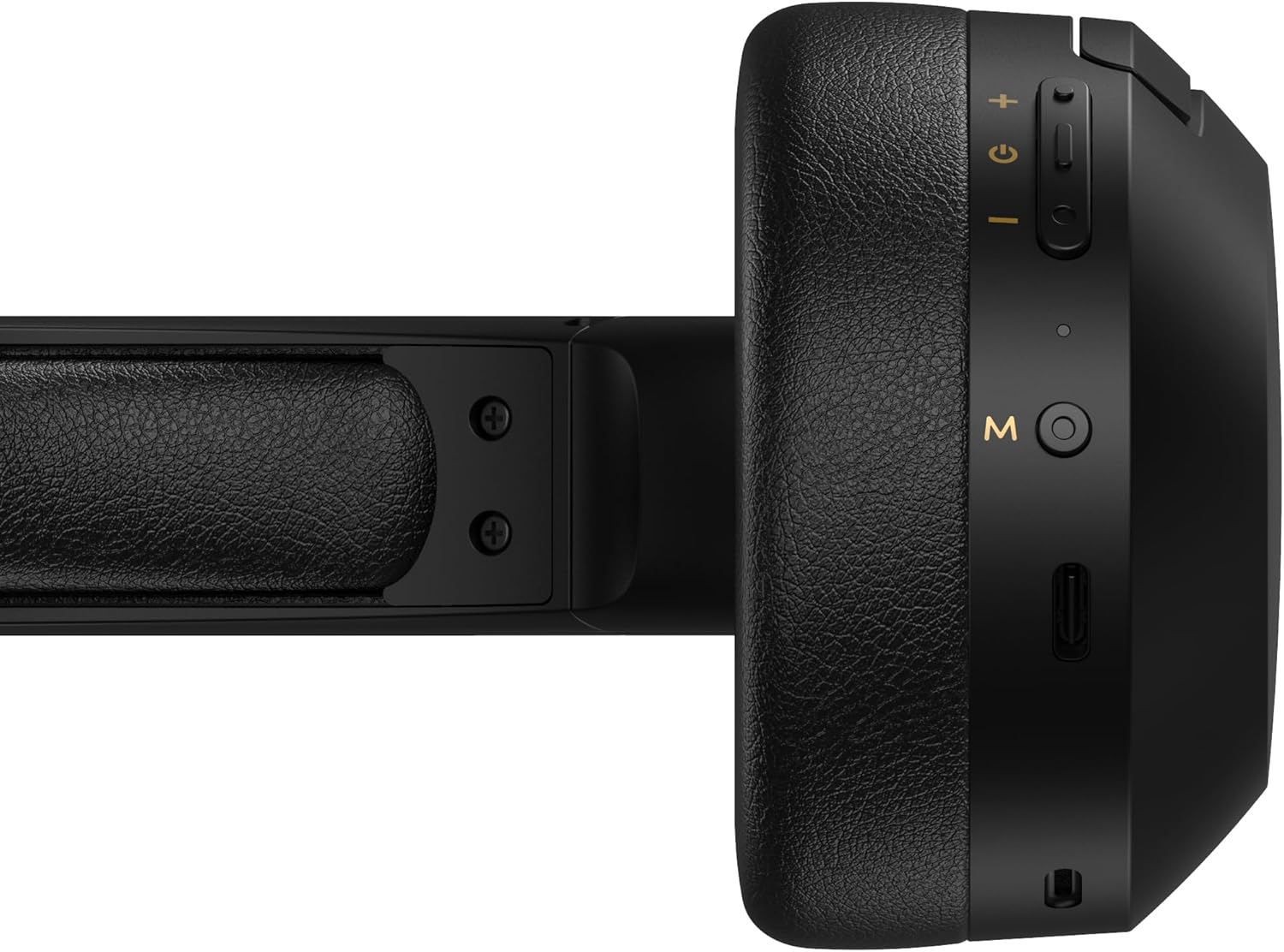
Figure 4.1: Close-up of the charging port and control buttons on the right earcup.
4.2 ჩართვა/გამორთვა
- ჩართვა: Press and hold the multi-function button (usually marked with a power icon or 'M') for approximately 3 seconds until the LED indicator flashes blue.
- გამორთვა: Press and hold the multi-function button for approximately 5 seconds until the LED indicator flashes red and then turns off.
4.3 Bluetooth დაწყვილება
ყურსასმენების Bluetooth-თან თავსებად მოწყობილობასთან დასაკავშირებლად:
- დარწმუნდით, რომ ყურსასმენები გამორთულია.
- დააჭირეთ და გააჩერეთ მრავალფუნქციური ღილაკი დაახლოებით 5-7 წამის განმავლობაში, სანამ LED ინდიკატორი მონაცვლეობით წითლად და ლურჯად არ აციმციმდება. ეს მიუთითებს დაწყვილების რეჟიმზე.
- თქვენს მოწყობილობაზე (სმარტფონი, პლანშეტი, კომპიუტერი) ჩართეთ Bluetooth და მოძებნეთ ხელმისაწვდომი მოწყობილობები.
- Select "EDIFIER W820BT" from the list of found devices.
- დაწყვილების შემდეგ, LED ინდიკატორი ნელა ციმციმებს ლურჯად.
შენიშვნა: ყურსასმენები ჩართვისას ავტომატურად შეეცდებიან ბოლოს დაწყვილებულ მოწყობილობასთან ხელახლა დაკავშირებას.
5. საოპერაციო ინსტრუქციები
5.1 ყურზე დამონტაჟებული მართვის საშუალებები
The control buttons are located on the right earcup.
| ღილაკი/მოქმედება | ფუნქცია |
|---|---|
| Multi-function Button (M) |
|
| ხმის გაზრდა (+) |
|
| Ხმის დაწევა (-) |
|
5.2 სადენიანი კავშირი
The W820BT headphones can also be used with a wired connection.
- Connect one end of the 3.5mm audio cable to the audio input jack on the left earcup of the headphones.
- 3.5 მმ-იანი აუდიო კაბელის მეორე ბოლო შეაერთეთ თქვენი მოწყობილობის აუდიო გამომავალ ბუდესთან.
- ყურსასმენები ავტომატურად გადავა სადენიან რეჟიმში. Bluetooth ფუნქცია გამორთული იქნება.

Figure 5.1: Connecting the 3.5mm audio cable for wired listening.
6. მოვლა
- ყურსასმენები რბილი, მშრალი ქსოვილით გაწმინდეთ. არ გამოიყენოთ აბრაზიული საწმენდები ან გამხსნელები.
- მოერიდეთ ყურსასმენების ექსტრემალურ ტემპერატურაზე, ტენიანობაზე ან მზის პირდაპირ სხივებზე ზემოქმედებას.
- ყურსასმენები შეინახეთ გრილ, მშრალ ადგილას, როდესაც არ იყენებთ. დასაკეცი დიზაინი კომპაქტურ შენახვას უზრუნველყოფს.
- Do not disassemble the headphones. This will void the warranty.
7. Დიაგნოსტიკა
If you encounter issues with your Edifier W820BT headphones, refer to the following common problems and solutions:
| პრობლემა | გამოსავალი |
|---|---|
| ჩართვა შეუძლებელია | დარწმუნდით, რომ ყურსასმენები დატენილია. დამტენი კაბელის გამოყენებით შეაერთეთ კვების წყაროსთან. |
| Bluetooth-ის საშუალებით დაწყვილება შეუძლებელია |
|
| ხმა არ არის |
|
| ხმის ცუდი ხარისხი |
|
8. სპეციფიკაციები
| ფუნქცია | დეტალი |
|---|---|
| მოდელის სახელი | W820BT |
| დაკავშირების ტექნოლოგია | უსადენო (Bluetooth), სადენიანი (3.5 მმ ჯეკი) |
| Bluetooth ვერსია | 4.1 |
| ბატარეის ხანგრძლივობა | 80 საათამდე |
| ყურსასმენის ფორმა | ყურზე |
| მასალა | ფოლადი (თავსაბურავი) |
| ნივთის წონა | 1.14 ფუნტი (დაახლოებით 517 გ) |
| პროდუქტის ზომები | 9.25 x 7.64 x 3.41 ინჩი |
| მწარმოებელი | რედაქტორი |
9. გარანტია და მხარდაჭერა
Edifier provides a ერთწლიანი გარანტია in the USA and Canada for the W820BT headphones. For warranty claims or technical support, please contact Edifier customer service.
For more information, visit the official Edifier webსაიტზე ან იხილეთ თქვენი შეძენის დოკუმენტაცია.
10. ვიდეო დემონსტრაცია
Watch the official product video for a visual guide on the Edifier W820BT Bluetooth Headphones' features and usage.
ვიდეო 10.1: ოფიციალური პროდუქტი დასრულდაview of the Edifier W820BT Bluetooth Headphones, demonstrating features like battery life, comfort, foldable design, and on-ear controls.