
1. შესავალი და მეტიview
The Xiaomi Mi Air Purifier 2S AC-M4-AA is designed to improve indoor air quality by efficiently filtering out pollutants. This intelligent air purifier is suitable for rooms up to 37m² and features a Clean Air Delivery Rate (CADR) of 310m³ per hour. It offers smart connectivity for app control and integrates with voice assistants for convenient operation, providing real-time air quality monitoring via its OLED display.
2. პროდუქტის მახასიათებლები
- European Version for compliance with regional standards.
- Smart air purifier with Wi-Fi connectivity and mobile app control (Mi Home app).
- Effective for rooms up to 37m² (approximately 398 sq ft).
- High air purification capacity of 310m³/h CADR.
- Integrated OLED display for real-time air quality (PM2.5), temperature, humidity, and filter status.
- Equipped with a high-efficiency HEPA filter for comprehensive air purification.
- Low noise operation, especially in Night Mode (as low as 32 dB).
- Voice control compatibility with supported smart home platforms.
3. პაკეტის შიგთავსი
დარწმუნდით, რომ შეფუთვაში ყველა ნივთია:
- Xiaomi Mi Air Purifier 2S (AC-M4-AA)
- დენის კაბელი
- მომხმარებლის სახელმძღვანელო
- HEPA Filter (pre-installed or separately packaged)
4. უსაფრთხოების ინსტრუქციები
To ensure safe operation and prevent damage, please read and follow these safety guidelines:
- Always unplug the air purifier before cleaning, maintenance, or moving it.
- Do not block the air inlet or outlet vents. Maintain at least 20 cm (8 inches) clearance from walls and other objects.
- Use only the power adapter provided with the device. Ensure the voltagე შეესაბამება თქვენს ადგილობრივ ელექტრომომარაგებას.
- Do not operate the air purifier in wet or humid environments, such as bathrooms. Keep it away from water and other liquids.
- ეს მოწყობილობა არ არის განკუთვნილი შემცირებული ფიზიკური, სენსორული ან გონებრივი შესაძლებლობების ან გამოცდილების და ცოდნის ნაკლებობის მქონე პირების (მათ შორის ბავშვების) გამოსაყენებლად, გარდა იმ შემთხვევისა, როდესაც მათ არ მიეცათ ზედამხედველობა ან ინსტრუქცია მოწყობილობის გამოყენების შესახებ მათ უსაფრთხოებაზე პასუხისმგებელი პირის მიერ.
- არ ჩადოთ თითები ან უცხო საგნები ჰაერის შესასვლელში ან გამოსავალში.
- Do not use the air purifier near heat sources, flammable gases, or volatile substances.
- თუ დენის კაბელი დაზიანებულია, ის უნდა შეიცვალოს მწარმოებლის, მისი სერვისის აგენტის ან მსგავსი კვალიფიკაციის მქონე პირების მიერ, რათა თავიდან აიცილოთ საფრთხე.
5. დაყენება
Follow these steps to set up your Xiaomi Mi Air Purifier 2S:
- გახსენით მოწყობილობა: Carefully remove the air purifier from its packaging. Remove any protective films or tapes.
- Install/Check Filter: Open the filter compartment cover, usually located at the back or bottom of the unit. Ensure the HEPA filter is correctly seated and any plastic packaging around the filter is removed. Close the cover securely.
- გამწმენდის განთავსება: Place the air purifier on a flat, stable surface. Ensure there is at least 20 cm (8 inches) of clear space around all sides and above the unit for optimal air circulation.
- დაკავშირება ძალა: Plug the power cable into the power port on the back of the purifier, then plug the other end into a suitable electrical outlet.
- ჩამოტვირთეთ Mi Home აპლიკაცია: Scan the QR code in the manual or search for "Mi Home" in your smartphone's app store (Google Play Store or Apple App Store). Download and install the app.
- აპთან დაკავშირება: Open the Mi Home app, create an account or log in. Follow the in-app instructions to add your Xiaomi Mi Air Purifier 2S. This typically involves selecting the device, connecting to its temporary Wi-Fi hotspot, and then connecting it to your home Wi-Fi network (2.4GHz only).

სურათი: წინა მხარე view of the Xiaomi Mi Air Purifier 2S, showing the main body and the circular OLED display.

სურათი: ზემოდან ქვემოთ view of the Xiaomi Mi Air Purifier 2S, highlighting the fan grille and control buttons on the top surface.
6. საოპერაციო ინსტრუქციები
Your air purifier can be operated via the physical buttons on the unit or through the Mi Home app.
6.1. Using Physical Buttons
- დენის ღილაკი: Press the power button on the top of the unit to turn the air purifier on or off.
- რეჟიმის ღილაკი: Press the mode button (often integrated with the power button or a separate button) to cycle through operating modes: Automatic, Night, and Manual.
6.2. Using the Mi Home App
The Mi Home app provides comprehensive control and monitoring features:
- დისტანციური მართვა: Turn the purifier on/off, change modes, and adjust fan speed from anywhere.
- რეალურ დროში მონიტორინგი: View current PM2.5 levels, temperature, and humidity in your room.
- განრიგი: Set schedules for the purifier to turn on/off or change modes automatically.
- ფილტრის სტატუსი: Monitor the remaining lifespan of your filter and receive notifications when it's time for replacement.
- პარამეტრები: Adjust display brightness, enable/disable sounds, and other device-specific settings.
6.3. ოპერაციული რეჟიმები
- ავტომატური რეჟიმი: The purifier intelligently adjusts its fan speed based on the real-time air quality detected by its sensors.
- ღამის რეჟიმი: Operates at the lowest fan speed with minimal noise and a dimmed OLED display to ensure undisturbed sleep.
- მექანიკური რეჟიმი: Allows you to manually select a desired fan speed or purification intensity.
6.4. OLED Display Information
The circular OLED display provides key information at a glance:
- PM2.5 კონცენტრაცია: Shows the current particulate matter level in µg/m³.
- ტემპერატურა: Displays the ambient room temperature.
- ტენიანობა: Shows the relative humidity level.
- Wi-Fi სტატუსი: Indicates connection status to your home network.
- ოპერაციული რეჟიმი: Shows the currently active purification mode.
- ფილტრის სიცოცხლის ხანგრძლივობა: Displays the remaining percentage of the filter's life.

Image: The Xiaomi Mi Air Purifier 2S positioned in a modern living room, demonstrating its compact design and how it blends with home decor.
7. მოვლა
რეგულარული მოვლა უზრუნველყოფს ოპტიმალურ მუშაობას და ახანგრძლივებს თქვენი ჰაერის გამწმენდის სიცოცხლის ხანგრძლივობას.
7.1. ფილტრის გამოცვლა
The HEPA filter has a limited lifespan, typically 6-12 months, depending on usage and air quality. The Mi Home app and the OLED display will indicate when the filter needs replacement.
- Unplug the Purifier: Always disconnect the power before replacing the filter.
- გახსენით ფილტრის განყოფილება: Locate and open the filter compartment cover (usually at the back or bottom).
- ძველი ფილტრის წაშლა: ფრთხილად ამოიღეთ გამოყენებული ფილტრი. გადააგდეთ ადგილობრივი რეგულაციების შესაბამისად.
- ახალი ფილტრის ჩასმა: Place a new, genuine Xiaomi HEPA filter into the compartment, ensuring it is correctly oriented and seated.
- დახურეთ ყდა: საიმედოდ დახურეთ ფილტრის განყოფილების სახურავი.
- Reset Filter Lifespan: After replacement, open the Mi Home app and follow the prompts to reset the filter lifespan counter. This ensures accurate tracking of the new filter's usage.

სურათი: უკანა view of the Xiaomi Mi Air Purifier 2S, illustrating the location of the filter compartment cover for maintenance.
7.2. Cleaning the Purifier
- გარე გაწმენდა: Wipe the exterior surfaces of the air purifier with a soft, dry cloth. Do not use abrasive cleaners, solvents, or harsh chemicals, as these can damage the finish.
- ჰაერის შესასვლელი/გამოსასვლელი გისოსები: Use a soft brush or a vacuum cleaner with a brush attachment to gently clean dust and debris from the air inlet and outlet grilles.
- Laser Particle Sensor: Periodically clean the laser particle sensor, usually located on the back of the unit. Refer to the detailed manual or Mi Home app for specific instructions on how to access and clean this sensor, as it is crucial for accurate air quality readings.
8. Დიაგნოსტიკა
თუ თქვენს ჰაერის გამწმენდთან დაკავშირებით პრობლემები შეგექმნათ, იხილეთ შემდეგი გავრცელებული პრობლემები და მათი გადაჭრის გზები:
| პრობლემა | შესაძლო მიზეზი | გამოსავალი |
|---|---|---|
| მოწყობილობა არ ჩაირთვება | Power cable not connected; Filter compartment not closed properly; Power outlet issue. | Ensure power cable is securely plugged in. Close the filter compartment cover completely. Test the power outlet with another device. |
| No Wi-Fi connection / App control not working | Incorrect Wi-Fi password; Router too far; 5GHz Wi-Fi network; App pairing issue. | Ensure your Wi-Fi network is 2.4GHz. Move the purifier closer to the router. Restart the purifier and your router. Follow the Mi Home app's re-pairing instructions. |
| გაწმენდის ცუდი შესრულება | Filter lifespan expired; Air inlets/outlets blocked; Dirty laser particle sensor. | Check filter lifespan in the app and replace if necessary. Ensure no obstructions around the air inlets/outlets. Clean the laser particle sensor as per maintenance instructions. |
| არაჩვეულებრივი ხმაური მუშაობის დროს | Foreign object inside; Filter not seated correctly. | Unplug the device and check for any foreign objects. Ensure the filter is properly installed and secured. |
| OLED display not working or showing incorrect information | Temporary glitch; Sensor malfunction. | Try restarting the device by unplugging and plugging it back in. If the issue persists, contact customer support. |
9. სპეციფიკაციები
Detailed technical specifications for the Xiaomi Mi Air Purifier 2S AC-M4-AA:
| სპეციფიკაცია | ღირებულება |
|---|---|
| მოდელის ნომერი | AC-M4-AA |
| ზომები (L x W x H) | 24 x 24 x 52 სმ (9.4 x 9.4 x 20.5 ინჩი) |
| წონა | 4.5 კგ (9.9 ფუნტი) |
| დენის წყარო | ელექტრო კაბელი |
| რეიტინგული სიმძლავრე | 29 ვატი |
| ფილტრის ტიპი | HEPA |
| გამოსაყენებელი ზონა | 37 მ²-მდე (398 კვ. ფუტი) |
| ხმაურის დონე | 32 Decibels (in Night Mode) |
| კონტროლის ტიპი | Application and Physical Buttons |
| განსაკუთრებული თვისებები | Wi-Fi Connectivity, OLED Display |
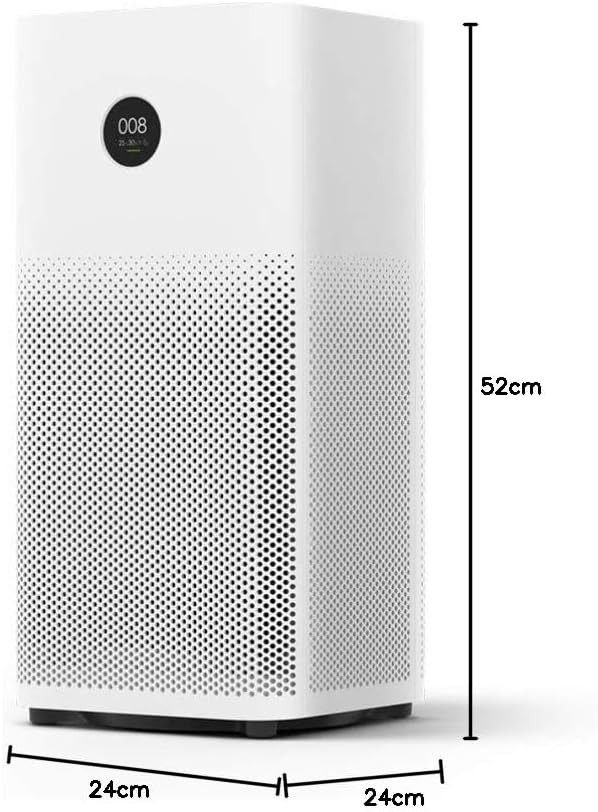
Image: Diagram illustrating the dimensions (height, width, depth) of the Xiaomi Mi Air Purifier 2S.
10. გარანტია და მხარდაჭერა
For detailed warranty information, terms, and conditions, please refer to the warranty card included with your product or visit the official XIAOMI webსაიტი. შეინახეთ თქვენი შესყიდვის ქვითარი, როგორც შეძენის დამადასტურებელი საბუთი ნებისმიერი გარანტიის მოთხოვნის შემთხვევაში.
For technical support, service, or inquiries regarding your Xiaomi Mi Air Purifier 2S, please contact XIAOMI customer service or your local authorized retailer. Contact information can typically be found on the official XIAOMI webსაიტზე ან თქვენი პროდუქტის დოკუმენტაციაში.


