
1. შესავალი
This manual provides essential instructions for the installation, operation, and maintenance of your FSP iFP600 Uninterruptible Power Supply (UPS). Please read this manual thoroughly before installing or operating the unit to ensure proper function and safety. The FSP iFP600 is designed to provide reliable power backup and surge protection for your electronic devices.

სურათი 1.1: წინა view of the FSP iFP600 UPS, showcasinმისი კომპაქტური დიზაინი და ინტეგრირებული LCD დისპლეი.
2. უსაფრთხოების ინსტრუქციები
Please adhere to these important safety guidelines during installation, operation, and maintenance of the UPS:
- არ გახსნათ UPS casinზ. შიგნით მომხმარებლის მიერ შეკეთებადი ნაწილები არ არის. ყველა სახის შეკეთება კვალიფიციურ სერვის პერსონალს მიმართეთ.
- Do not connect appliances that could overload the UPS, such as laser printers, vacuum cleaners, or heaters.
- დარწმუნდით, რომ UPS დაკავშირებულია დამიწებულ ცვლადი დენის წყაროსთან.
- Avoid placing the UPS in direct sunlight, near heat sources, or in environments with excessive dust, humidity, or corrosive substances.
- Position the UPS in a well-ventilated area to prevent overheating.
- In case of fire, use a dry chemical extinguisher. Water can be hazardous.
- The battery inside the UPS is not user-replaceable. Battery replacement should only be performed by qualified personnel.
3. პროდუქტი დასრულდაview
The FSP iFP600 UPS provides reliable power protection for your critical electronics. It features a compact design and an intuitive LCD display for monitoring status.
3.1 პაკეტის შიგთავსი
შეფუთვის გახსნის შემდეგ, დარწმუნდით, რომ ყველა კომპონენტი ადგილზეა და დაუზიანებელია:
- FSP iFP600 UPS Unit
- მომხმარებლის სახელმძღვანელო (ეს დოკუმენტი)
- დენის კაბელი
- USB საკომუნიკაციო კაბელი
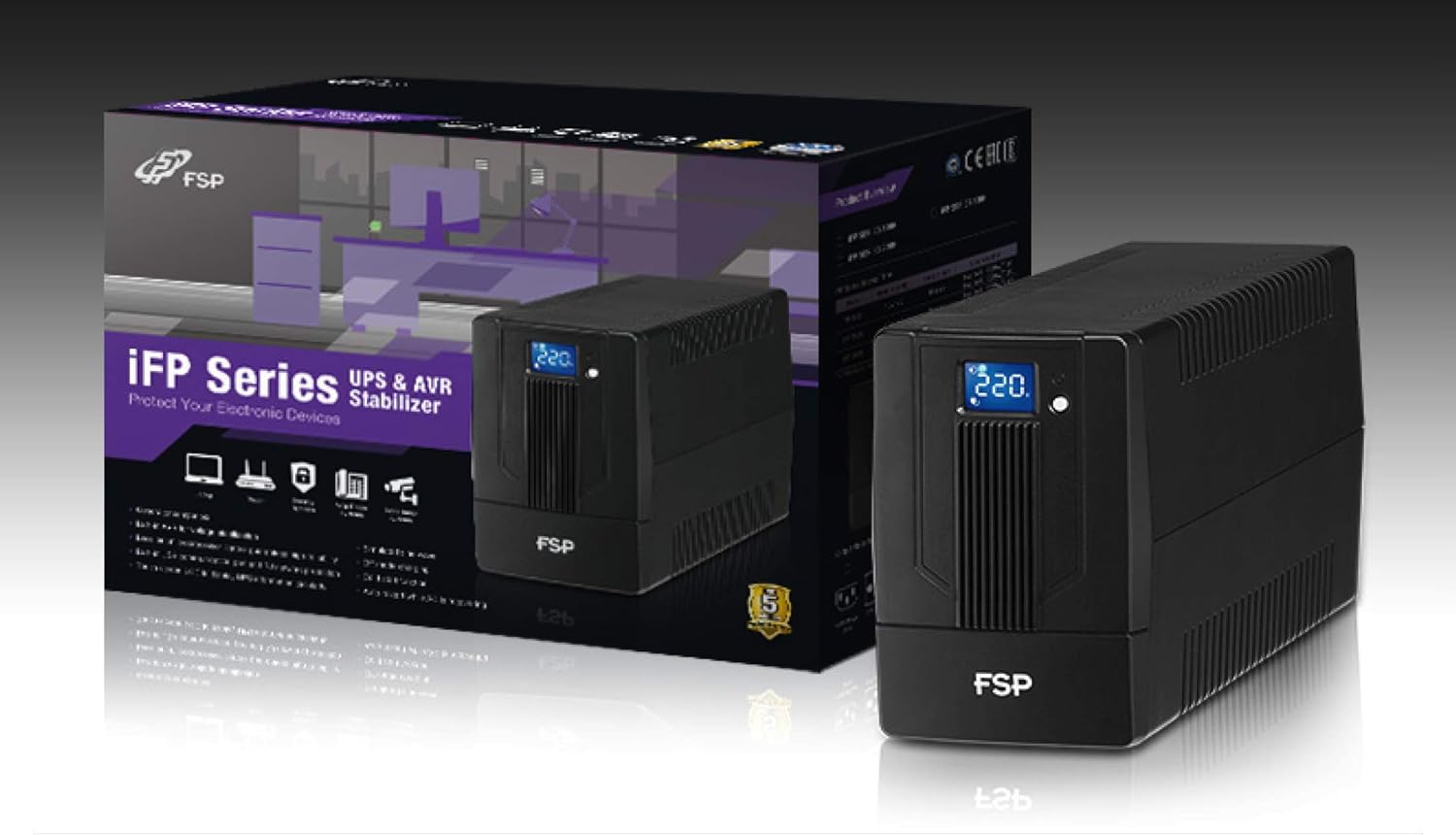
Image 3.1: The FSP iFP600 UPS shown alongside its retail packaging, illustrating the product's presentation.
3.2 უკანა პანელის კომპონენტები
Familiarize yourself with the connections on the rear panel of the UPS:

სურათი 3.2: დეტალური view of the FSP iFP600 UPS rear panel, highlighting connection points.
- განყოფილებები: Two SCHUKO type outlets for connecting protected equipment.
- AC შეყვანა: Connects the UPS to the main utility power.
- Fuse/Breaker: Overcurrent protection for the UPS.
- USB კომუნიკაცია: Port for connecting to a computer for monitoring and management.
- Combo RJ11/RJ45 Surge Protection: Provides surge protection for telephone/network lines.
4. დაყენება და ინსტალაცია
Follow these steps to set up your FSP iFP600 UPS:
- შეფუთვა: ფრთხილად ამოიღეთ UPS შეფუთვიდან. შეამოწმეთ ტრანსპორტირების დროს რაიმე დაზიანება.
- განთავსება: Place the UPS on a flat, stable surface in a clean, cool, and well-ventilated area. Ensure adequate clearance around the unit for airflow.
- საწყისი დატენვა: Connect the UPS to a standard grounded AC outlet using the provided power cord. Allow the unit to charge for at least 4-6 hours before initial use to ensure optimal battery performance. The UPS will charge whether it is turned on or off.
- დამაკავშირებელი აღჭურვილობა: Plug your computer, monitor, and other critical electronic devices into the UPS outlets (A). Do not connect surge suppressors or power strips to the UPS outlets.
- USB კომუნიკაცია (არასავალდებულო): Connect the USB cable from the UPS USB port (D) to your computer's USB port to enable power management software features (software not included, typically downloaded from manufacturer's webსაიტი).
- RJ11/RJ45 Protection (Optional): For surge protection of your telephone or network line, connect the incoming line to the 'IN' port of the Combo RJ11/RJ45 (E) and connect the 'OUT' port to your device.
5. საოპერაციო ინსტრუქციები
5.1 ჩართვა/გამორთვა
- ჩართვა: Press and hold the power button on the front panel for approximately 2 seconds until you hear a beep and the LCD display illuminates.
- გამორთვა: Press and hold the power button for approximately 2 seconds until you hear a beep and the LCD display turns off.
5.2 LCD ეკრანის ინფორმაცია
The FSP iFP600 features an LCD display that provides real-time status information. The display is touch-sensitive for navigating information.

Image 5.1: The LCD display of the FSP iFP600 UPS, indicating voltage output and its touch-screen functionality.
The LCD display typically shows:
- შეყვანის მოცულობაtage
- გამოყვანის ტომიtage
- ბატარეის დატენვის დონე
- დატვირთვის დონე
- Operating Mode (e.g., AC mode, Battery mode)
- Warning/Fault Indicators
5.3 ბატარეის რეჟიმის მუშაობა
When the utility power fails or fluctuates outside acceptable limits, the UPS will automatically switch to battery mode. During battery mode, the UPS will provide power to connected equipment from its internal battery. An audible alarm will sound to indicate battery operation.
6. მოვლა
Proper maintenance ensures the longevity and reliability of your UPS.
- დასუფთავება: Use a soft, dry cloth to clean the exterior of the UPS. Do not use liquid or aerosol cleaners.
- ბატარეის მოვლა: To maximize battery life, ensure the UPS is connected to AC power and fully charged. If the UPS is stored for an extended period, recharge it every three months to prevent battery degradation.
- ბატარეის გამოცვლა: The internal battery (12V / 7Ah x1) is not user-serviceable. Battery replacement should only be performed by FSP-certified service personnel or a qualified technician. Incorrect battery replacement can pose a risk of explosion or injury.
- შენახვა: Store the UPS in a cool, dry place with adequate ventilation. Ensure the battery is fully charged before storage.
7. Დიაგნოსტიკა
Refer to the following table for common issues and their solutions. If the problem persists, contact FSP support.
| სიმპტომი | ხმოვანი სიგნალიზაცია | შესაძლო მიზეზი | გამოსავალი |
|---|---|---|---|
| UPS operating on battery power | Beeps ყოველ 10 წამში | Utility power failure or fluctuation | Save work and shut down equipment if power outage is prolonged. UPS will return to AC mode when power is restored. |
| დაბალი ბატარეის გაფრთხილება | ბიპი ყოველ წამს | ბატარეის დატენვა კრიტიკულად დაბალია | Immediately save work and shut down connected equipment. |
| გადატვირთვის მდგომარეობა | ბიპი ყოველ 0.5 წამში | Connected equipment exceeds UPS capacity | Disconnect non-essential equipment until the alarm stops. Ensure total load is within UPS capacity. |
| UPS-ის ბრალია | განუწყვეტლივ რეკავს | შიდა გაუმართაობა ან გაუმართაობა | Turn off the UPS and disconnect it from the AC outlet. Contact FSP technical support. |
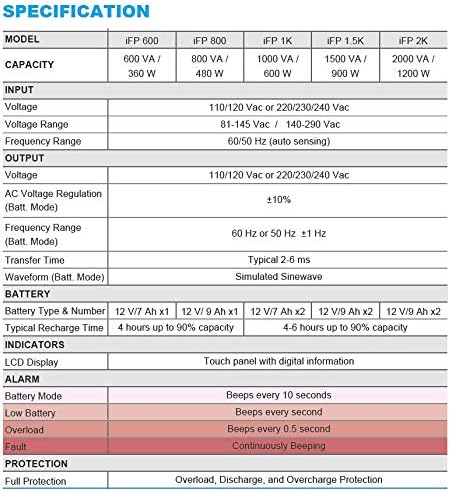
Image 7.1: Excerpt from the FSP iFP series specification table, detailing alarm indicators and their meanings.
8. სპეციფიკაციები
Detailed technical specifications for the FSP iFP600 UPS:
| ფუნქცია | სპეციფიკაცია |
|---|---|
| მოდელი | iFP 600 |
| ტევადობა | 600 VA / 360 W |
| შეყვანის მოცულობაtage | 110/120 Vac or 220/230/240 Vac |
| შეყვანის მოცულობაtage დიაპაზონი | 81-145 Vac / 140-290 Vac |
| შეყვანის სიხშირის დიაპაზონი | 60/50 ჰც (ავტომატური ზონდირება) |
| გამოყვანის ტომიtage | 110/120 Vac or 220/230/240 Vac |
| AC ტომიtagრეგულირება (ბატ. რეჟიმი) | ±10% |
| Output Frequency Range (Batt. Mode) | 60 Hz or 50 Hz ±1 Hz |
| გადაცემის დრო | ტიპიური 2-6 ms |
| ტალღის ფორმა (ბატატ. რეჟიმი) | სიმულირებული Sinewave |
| ბატარეის ტიპი და ნომერი | 12V / 7Ah x1 |
| ტიპიური დატენვის დრო | 4 საათი 90%-მდე დატენვისთვის |
| ინდიკატორები | LCD Display (Touch panel with digital information) |
| დაცვა | Overload, Discharge, and Overcharge Protection |
| ნივთის წონა | 9.24 ფუნტი (4.2 კგ) |
| პროდუქტის ზომები (LxWxH) | 11.81 x 3.98 x 5.59 ინჩი |
| ფერი | შავი |
| მასალა | მეტალი |
9. გარანტია და მხარდაჭერა
FSP products are designed for reliability and performance. For warranty information, please refer to the warranty card included with your product or visit the official FSP website. For technical support, troubleshooting assistance, or service inquiries, please contact FSP customer service through their official channels.
დამატებითი ინფორმაციისა და დამხმარე რესურსების მოძიება შეგიძლიათ შემდეგ ბმულზე: FSP Store on Amazon.