
პროდუქტი დასრულდაview
The PPLEE Emergency Weather Radio is a versatile and essential device designed for emergency preparedness and outdoor activities. It integrates multiple functions including AM/FM/SW/NOAA weather radio reception, a powerful flashlight, a reading lamp, an SOS alarm, and a power bank for charging mobile devices. With five different power sources, this radio ensures reliable operation even during prolonged power outagეს.

Figure 1: The PPLEE Emergency Weather Radio, showcasing its compact design and smartphone charging capability.
უსაფრთხოების ინფორმაცია
გაფრთხილება:
- Do not listen to the radio while charging to prevent crackly radio static.
- Avoid prolonged exposure to water. The device is IPX6 water-resistant but not designed for submersion.
დაწყება
პაკეტის შიგთავსი
დარწმუნდით, რომ შეფუთვაში ყველა ნივთია:
- 1x PPLEE Emergency Weather Radio with 5000mAh Built-in Rechargeable Battery
- 1x Portable Handy Braid Belt
- 1x Carabiner & Compass
- 1x USB დატენვის კაბელი
- 1x Owner's Manual (this document)
საწყისი დატენვა
Before first use, it is recommended to fully charge the radio's internal 5000mAh battery using the USB charging method.
- Connect the provided USB charging cable to the radio's DC IN 5V port.
- USB კაბელის მეორე ბოლო შეაერთეთ სტანდარტულ USB კვების ადაპტერთან (არ მოყვება) ან კომპიუტერის USB პორტთან.
- The charging indicator light will illuminate. The radio is fully charged when the indicator light changes or turns off (refer to the radio's specific charging indicator behavior).
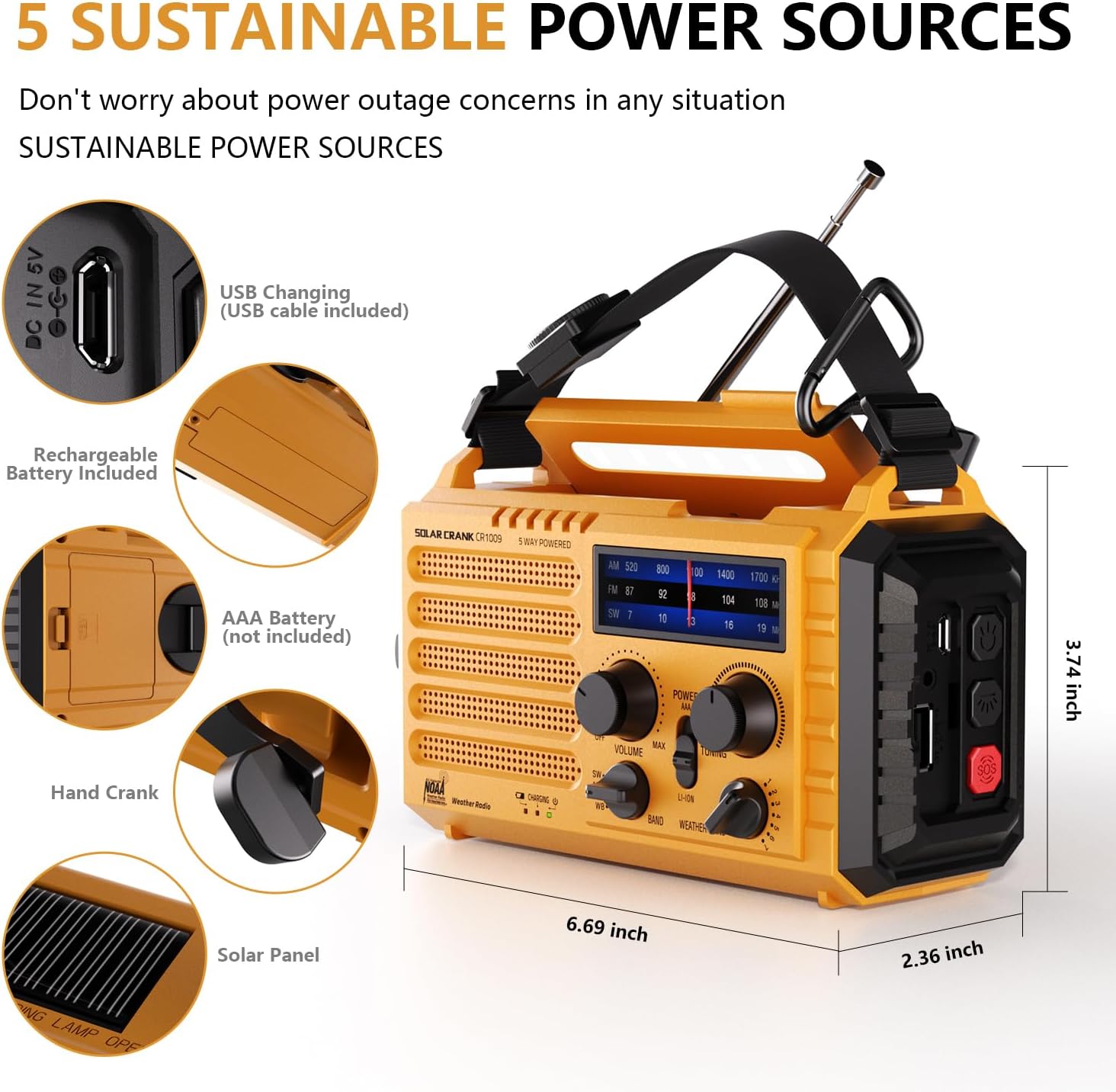
Figure 2: Illustration of the five sustainable power sources for the radio.
ოპერაციული ინსტრუქციები
რადიოს ჩართვა
The radio offers five methods for power:
- ჩაშენებული 5000 mAh დატენვადი ბატარეა: The primary power source.
- USB Input (5V): For charging the internal battery via a USB cable.
- ხელის ამწე: Rotate the hand crank clockwise or counter-clockwise at a steady pace (approx. 130-150 RPM) to generate power. One minute of cranking can provide several minutes of radio use or flashlight operation.
- მზის პანელი: Place the radio in direct sunlight to charge the internal battery. This method is primarily for maintaining charge or slow charging.
- 3x AAA Batteries (Not Included): Insert three AAA batteries into the designated compartment for an alternative power source.
Radio Functions (AM/FM/SW/NOAA)
რადიოს მუშაობისთვის:
- გადაატრიალეთ სიმძლავრე/მოცულობა knob clockwise to turn on the radio and adjust the volume.
- Select the desired band (AM, FM, SW, or WB for NOAA Weather Band) using the BAND სელექტორის შეცვლა.
- Extend the telescopic antenna for optimal reception, especially for FM and SW bands.
- როტაცია TUNING knob to find your desired station. The frequency display will show the current tuning.
- For NOAA Weather Band (WB), select one of the 7 available channels to find your local weather station.

Figure 3: Frequency ranges for AM, FM, SW, and NOAA Weather Band.

Figure 4: The radio provides clear AM/FM reception for entertainment and information.
ყურსასმენის ჯეკი
A 3.5mm headphone jack is provided for private listening. Insert standard headphones (not included) into the jack located on the side of the radio.

Figure 5: The 3.5mm headphone jack allows for personal listening without disturbing others.
ფანარი და კითხვა ლamp
- ფანარი: Press the dedicated flashlight button on the side of the radio to turn on the 3W LED flashlight. Press again to cycle through brightness levels or turn off.
- კითხულობს ლamp: Flip up the solar panel on top of the radio to reveal the 2.5W LED reading lamp. This provides ambient light for reading or general illumination.

Figure 6: The radio features a powerful flashlight and a convenient reading lamp.
SOS სიგნალიზაციის ფუნქცია
საგანგებო სიტუაციის შემთხვევაში, ჩართეთ SOS სიგნალიზაცია:
- დააჭირეთ SOS button (usually red) on the side of the radio.
- The radio will emit a loud siren sound (116dB) and a flashing red light to attract attention.
- Press the SOS button again to deactivate the alarm.

Figure 7: The SOS alarm provides a loud siren and flashing light for emergency signaling.
Power Bank-ის ფუნქცია (გარე მოწყობილობების დატენვა)
The built-in 5000mAh battery can be used to charge external USB-powered devices:
- Connect your smartphone or other small electronic device to the radio's USB OUT port using your device's charging cable.
- რადიო დაიწყებს თქვენი მოწყობილობის დატენვას.
- This feature is particularly useful during power outages to keep essential communication devices operational.

Figure 8: The radio functions as a power bank to charge mobile phones and other small electronics.
მოვლა და მოვლა
- დასუფთავება: გაწმინდეთ რადიო რბილი, დamp ქსოვილი. არ გამოიყენოთ უხეში ქიმიკატები ან აბრაზიული საწმენდები.
- შენახვა: Store the radio in a cool, dry place away from direct sunlight and extreme temperatures. If storing for an extended period, ensure the internal battery is charged to about 50-70% to prolong its lifespan.
- ბატარეის მოვლა: Regularly charge the internal battery, even if not in use, to prevent deep discharge.
- წყლის წინააღმდეგობა: While the radio is IPX6 water-resistant, it is not waterproof. Do not submerge it in water. Protect it from heavy rain or prolonged exposure to moisture.
პრობლემების მოგვარება
| პრობლემა | შესაძლო მიზეზი | გამოსავალი |
|---|---|---|
| რადიო არ ირთვება. | Battery is depleted; Power knob is off. | Charge the internal battery via USB, hand crank, or solar. Ensure the POWER/VOLUME knob is turned on. Check if AAA batteries are inserted correctly and have charge. |
| ცუდი რადიოს მიღება. | ანტენა არ არის გაშლილი; სუსტი სიგნალი; ჩარევა. | Fully extend the telescopic antenna. Try repositioning the radio. Tune slowly to find the clearest signal. |
| ფანარი/საკითხავი lamp არ მუშაობს. | Battery is depleted; Lamp/flashlight button not pressed correctly. | Charge the internal battery. Ensure the respective button is pressed firmly. |
| გარე მოწყობილობების დატენვა შეუძლებელია. | Radio battery is too low; Incorrect cable; Device not compatible. | Ensure the radio's internal battery has sufficient charge. Use the correct USB cable for your device. The radio is designed for small electronic devices. |
| SOS სიგნალიზაცია არ აქტიურდება. | SOS button not pressed correctly. | Press the SOS button firmly. |
სპეციფიკაციები
| ფუნქცია | დეტალი |
|---|---|
| მოდელის ნომერი | PPLEE-1009-Y |
| პროდუქტის ზომები | 6.69 x 3.74 x 2.36 ინჩი (17 x 9.5 x 6 სმ) |
| ნივთის წონა | 1 ფუნტი (0.45 კგ) |
| Battery Type (Internal) | 5000 mAh მრავალჯერადი დატენვის ლითიუმ-იონური ბატარეა |
| External Battery Support | 3x AAA ბატარეები (არ შედის) |
| დენის წყაროები | Hand Crank, Solar Panel, USB Input (5V), Internal Rechargeable Battery, AAA Batteries |
| რადიო ბენდები | AM, FM, Shortwave (SW), NOAA Weather Band (WB) |
| ფანარი სიმძლავრე | 3 W LED |
| კითხულობს ლamp ძალაუფლება | 2.5 W LED |
| SOS Alarm Decibel | 116 დბ |
| დაკავშირება | USB (for charging in/out), 3.5mm Headphone Jack |
| წყლის წინააღმდეგობა | IPX6 (წყლისგან დაცული) |
გარანტია და მხარდაჭერა
For product support, technical assistance, or warranty inquiries, please contact the manufacturer:
მწარმოებელი: PPLEE E-COMMERCE CO.,LTD
Please refer to the contact information provided with your purchase or visit the official PPLEE webსაიტი უახლესი მხარდაჭერის დეტალებისთვის.