
1. შესავალი
This manual provides comprehensive instructions for the IMILAB CMSXJ16A Smart Home Security Camera, a product of XIAOMI. It covers setup, operation, maintenance, and troubleshooting to ensure optimal performance and security monitoring. Please read this manual carefully before using the product and retain it for future reference.
2. პროდუქტი დასრულდაview
2.1 პაკეტის შიგთავსი
დარწმუნდით, რომ შეფუთვაში ყველა ნივთია:
- IMILAB Home Security Camera Basic x 1
- ინსტრუქციის სახელმძღვანელო x 1
- დენის კაბელი x 1
- Power Adapter (UK/EU/US) x 1
- Wall Mounting Package x 1 (includes screws and wall plugs)
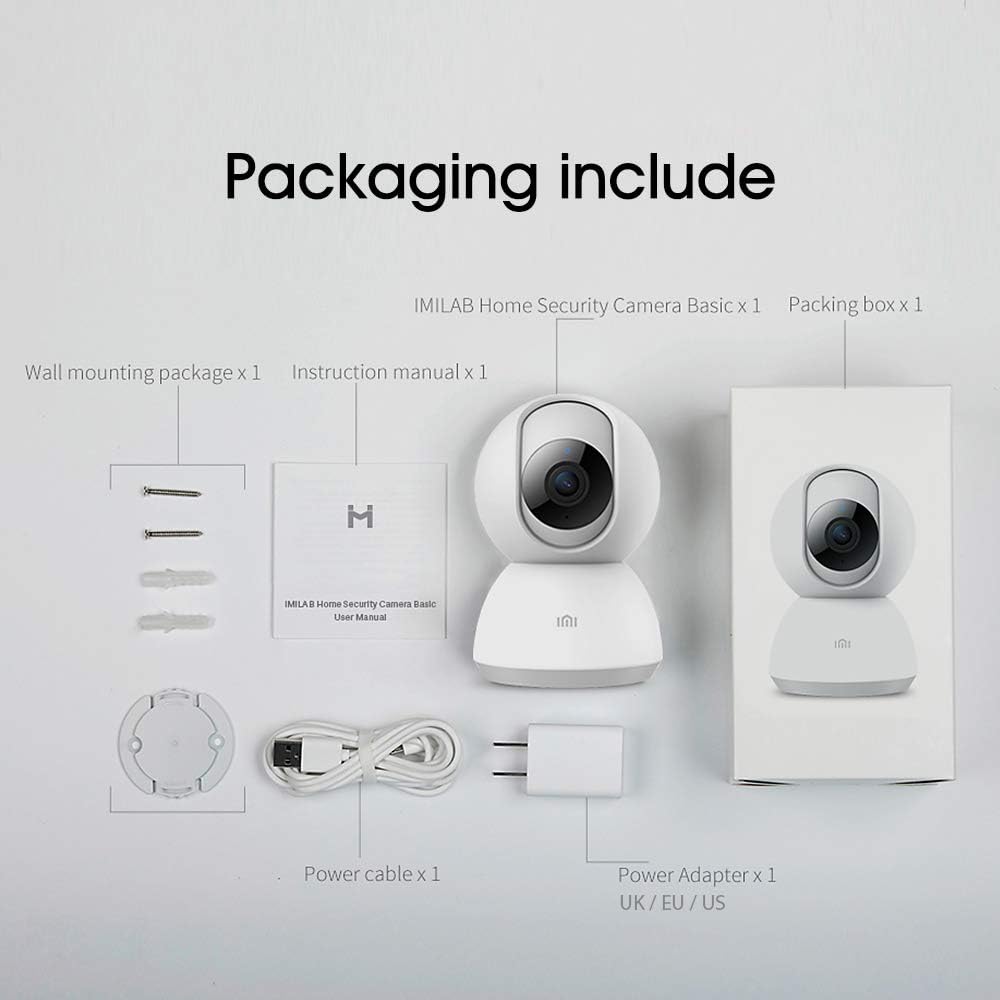
Image: Contents of the IMILAB CMSXJ16A camera package.
2.2 კამერის კომპონენტები
The IMILAB CMSXJ16A camera features a compact, spherical design with a rotating base for 360-degree coverage. Key components include the lens, microphone, speaker, status indicator light, and power port.

სურათი: წინა მხარე view of the IMILAB CMSXJ16A camera.
2.3 ძირითადი მახასიათებლები
- FHD (1080P) Resolution: Provides clear and detailed image quality.
- 360° როტაცია: გთავაზობთ პანორამული viewing for comprehensive area coverage.
- Glare-Free Night Vision: Equipped with F2.1 aperture and 8x 940mm infrared LEDs for a visible distance of 10m.
- True Color Night Vision: Maintains full color in low light conditions, even at 100 lumens.
- AI ადამიანის გამოვლენა: Advanced AI reduces unnecessary alerts by 70% for more accurate notifications.
- Crying Baby Notification: Alerts you to the sound of a crying baby.
- შენახვის მრავალი ვარიანტი: Supports cloud storage, up to 64GB Micro TF card, and NAS storage.
- H.265 Video Encoding: Efficiently compresses video, saving storage space while maintaining quality.
3. დაყენება
3.1 ჩართვა
- Connect the power cable to the camera's power port.
- შეაერთეთ კვების ადაპტერი სტანდარტულ ელექტრო განყოფილებაში.
- The camera will power on, and the status indicator light will begin to flash, indicating it is ready for connection.
3.2 აპლიკაციის ინსტალაცია
Download the official IMILAB Home Security app from your smartphone's app store. The app is compatible with Android 4.4 and above, and iOS 8.0 and above.
- ძიება "IMILAB Home Security" in the Google Play Store (for Android) or Apple App Store (for iOS).
- ჩამოტვირთეთ და დააინსტალირეთ აპლიკაცია.
- გახსენით აპლიკაცია და მიჰყევით ეკრანზე არსებულ ინსტრუქციას ანგარიშის შესაქმნელად ან შესვლისთვის.
3.3 Wi-Fi-თან დაკავშირება
Follow the in-app instructions to connect your camera to your home Wi-Fi network. This typically involves scanning a QR code generated by the app with the camera's lens.
3.4 კამერის დამონტაჟება
The camera supports wall mounting. Use the provided wall mounting package for secure installation.
- შეარჩიეთ მონტაჟისთვის შესაფერისი ადგილი, უზრუნველყოთ თავისუფალი ველი. view და წვდომა დენის განყოფილებაში.
- Use the mounting base as a template to mark drill holes on the wall.
- გაბურღეთ ხვრელები და ჩადეთ კედლის სანთლები.
- Secure the mounting base to the wall with screws.
- Attach the camera to the mounting base.
4. საოპერაციო ინსტრუქციები
4.1 ცოცხალი View და დისტანციური კონტროლი
Once connected, open the IMILAB Home Security app to access the live video feed from your camera. You can remotely control the camera's 360-degree rotation to view different areas of your space.

სურათი: პირდაპირი ეთერი view of the camera feed on mobile devices, demonstrating H.265 encoding efficiency.
4.2 ღამის ხედვა
The camera automatically switches to night vision mode in low light conditions. It features glare-free infrared night vision and true color night vision for clear visibility even in very dim environments.

Image: Demonstration of glare-free and true color night vision capabilities.
4.3 AI Human Detection and Notifications
The camera utilizes AI to detect human movement, significantly reducing false alarms from pets or other non-human movements. You will receive precise notifications on your smartphone when human activity is detected.

Image: AI movement notification interface in the mobile application.
4.4 Crying Baby Detection
Enable the crying baby detection feature in the app to receive alerts if the camera detects the sound of a baby crying, providing an additional layer of monitoring for nurseries.
4.5 ვიდეოჩანაწერი და შენახვა
The camera supports real-time video recording with multiple storage options:
- ღრუბლოვანი საცავი: Subscribe to cloud services for secure off-site storage of your recordings.
- Micro TF Card: Insert a Micro TF card (up to 64GB, not included) into the camera for local storage.
- NAS საცავი: Connect the camera to a Network Attached Storage (NAS) device for expanded local storage capabilities.
4.6 H.265 Video Encoding
The camera uses H.265 video encoding, which allows for more efficient compression of video files. This means you can save the same quality video with approximately 50% less file size compared to H.264, optimizing storage and bandwidth usage.
5. მოვლა
To ensure the longevity and optimal performance of your camera, follow these maintenance guidelines:
- დასუფთავება: ფრთხილად გაწმინდეთ კამერის ლინზა და კორპუსი რბილი, მშრალი ქსოვილით. არ გამოიყენოთ უხეში ქიმიკატები ან აბრაზიული საწმენდები.
- განთავსება: Ensure the camera is placed in a stable environment, away from direct sunlight, extreme temperatures, and high humidity.
- Firmware განახლებები: რეგულარულად შეამოწმეთ აპლიკაცია ხელმისაწვდომი პროგრამული უზრუნველყოფის განახლებებისთვის, რათა დარწმუნდეთ, რომ თქვენს კამერას აქვს უახლესი ფუნქციები და უსაფრთხოების გაუმჯობესებები.
6. Დიაგნოსტიკა
If you encounter issues with your IMILAB CMSXJ16A camera, refer to the following common solutions:
- კამერა არ უკავშირდება: Ensure your Wi-Fi network is 2.4GHz (5GHz is not supported). Check Wi-Fi signal strength. Restart the camera and your router.
- სურათის ცუდი ხარისხი: Clean the camera lens. Ensure adequate lighting in the environment. Check your internet connection speed.
- შეტყობინებები არ არის: Verify that notifications are enabled in both the camera app settings and your smartphone's system settings. Check network connectivity.
- კამერა ხაზგარეშე: Check the power connection. Ensure your Wi-Fi network is active and the camera is within range. Restart the camera.
- Micro TF Card Not Detected: Ensure the card is inserted correctly. Format the card through the app if it's new or has issues. Use a compatible Micro TF card (up to 64GB).
7. სპეციფიკაციები
| ფუნქცია | სპეციფიკაცია |
|---|---|
| მოდელის ნომერი | CMSXJ16A |
| ზომები (L x W x H) | 10.8 x 7.6 x 7.6 სმ |
| წონა | 211 გრამი |
| ვიდეო რეზოლუცია | 1080p (FHD) |
| სფერო View / Angle of View | 360 გრადუსი |
| ღამის ხედვის მანძილი | 10 მეტრი |
| ინფრაწითელი LED-ები | 8 x 940 მმ |
| დიაფრაგმა | F2.1 |
| დაკავშირების ტექნოლოგია | Wired, Wireless (Wi-Fi 2.4GHz) |
| დენის წყარო | Mains Powered (via 5V, 5W adapter) |
| თავსებადი მოწყობილობები | Smartphone (Android 4.4+, iOS 8.0+) |
| შენახვის პარამეტრები | Cloud, Micro TF Card (max 64GB), NAS |
| ვიდეო გადაღების ფორმატი | MP4 (H.265 encoding) |
| შიდა/გარე გამოყენება | შიდა |
| სამონტაჟო ტიპი | კედლის სამაგრი |
8. გარანტია და მხარდაჭერა
გარანტიის შესახებ ინფორმაციისა და ტექნიკური მხარდაჭერისთვის, გთხოვთ, იხილოთ ოფიციალური IMILAB webსაიტზე ან დაუკავშირდით მათ მომხმარებელთა მომსახურების სამსახურს. შეინახეთ თქვენი შესყიდვის ქვითარი, როგორც შეძენის დამადასტურებელი საბუთი გარანტიის მოთხოვნის შემთხვევაში.