
1. შესავალი
Thank you for choosing the Homcloud Wi-Fi LED Strip Controller, Model AS-SL1. This device allows you to control 12-24V RGB + White LED strips via Wi-Fi, offering smart lighting solutions for your home. This manual provides essential information for safe installation, operation, and maintenance of your controller. Please read it thoroughly before use and retain it for future reference.
2. უსაფრთხოების ინფორმაცია
- ელექტროშოკის თავიდან ასაცილებლად, ინსტალაციამდე ან მოვლა-პატრონობამდე დარწმუნდით, რომ დენის წყარო გათიშულია.
- This device is designed for indoor use only. Do not expose it to moisture or extreme temperatures.
- Use only with 12-24V DC power supplies and compatible RGB + White LED strips. Exceeding the specified voltage ან wattage (192 Watts max) can damage the device and LED strips.
- Do not attempt to open or modify the controller. This will void the warranty and may cause damage or injury.
- შეინახეთ ბავშვებისთვის მიუწვდომელ ადგილას.
- Ensure all wiring connections are secure and correctly polarized (positive to positive, negative to negative).
3. პაკეტის შიგთავსი
გთხოვთ, შეამოწმოთ შეფუთვა შემდეგი ნივთებისთვის:
- Homcloud Wi-Fi LED Controller (AS-SL1)
- მომხმარებლის სახელმძღვანელო (ეს დოკუმენტი)
4. პროდუქტი დასრულდაview
The Homcloud AS-SL1 is a compact Wi-Fi controller designed to manage RGB + White LED strips. It features terminal blocks for secure wiring connections and an integrated Wi-Fi module for smart control via a mobile application or voice commands.
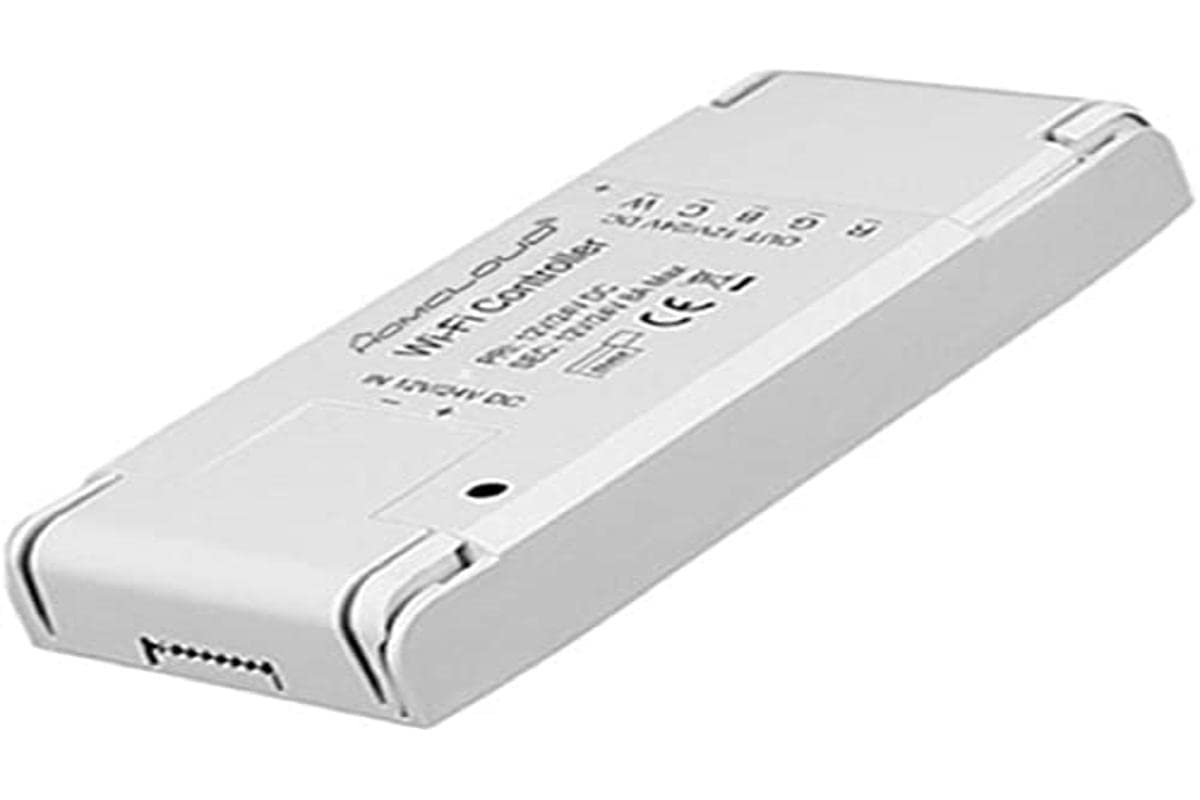
სურათი 1: Homcloud Wi-Fi LED Strip Controller (AS-SL1). This image shows the compact design of the controller with its input and output terminals.
ძირითადი მახასიათებლები:
- Wi-Fi Connectivity (2.4GHz)
- Compatible with 12-24V RGB + White LED Strips
- App Control (via Homcloud app or compatible smart home platforms)
- Voice Control (compatible with smart assistants)
- Programmable Schedules and Timers
- დისტანციური წვდომა
5. დაყენება
5.1 გაყვანილობის მონტაჟი
- კომპონენტების მომზადება: Ensure you have your Homcloud Wi-Fi LED Controller, a compatible 12-24V DC power supply, and an RGB + White LED strip.
- გამორთეთ ელექტროენერგია: Before making any connections, ensure the power supply is unplugged from the mains.
- Connect Power Supply to Controller: Locate the input terminals on the controller (usually marked DC IN, V+, V- or similar). Connect the positive (+) output of your 12-24V DC power supply to the V+ terminal and the negative (-) output to the V- terminal. Ensure connections are secure.
- Connect LED Strip to Controller: Locate the output terminals on the controller (usually marked V+, R, G, B, W or similar). Connect the corresponding wires from your RGB + White LED strip to these terminals.
- LED Strip V+ to Controller V+
- LED Strip R to Controller R
- LED Strip G to Controller G
- LED Strip B to Controller B
- LED Strip W to Controller W
- დაადასტურეთ კავშირები: Double-check all wiring for correct polarity and secure connections. Loose connections can cause malfunctions or damage.
Note: A detailed wiring diagram is typically provided in the physical product packaging. Ensure you follow the specific wiring instructions for your LED strip and power supply.
5.2 აპების დაწყვილება
- ჩამოტვირთეთ აპლიკაცია: Download the "Homcloud" app from your smartphone's app store (iOS or Android).
- რეგისტრაცია/შესვლა: გახსენით აპლიკაცია და დარეგისტრირდით ახალ ანგარიშზე ან შედით არსებულით.
- ჩართვის კონტროლერი: Plug in the power supply to the mains. The LED strip should light up briefly or flash, indicating it's in pairing mode. If not, refer to the app's instructions for resetting the device to pairing mode (often involves cycling power multiple times).
- მოწყობილობის დამატება: In the Homcloud app, tap the "+" icon (usually in the top right corner) to add a new device. Select "Lighting" or "LED Controller" from the device list.
- დაუკავშირდით Wi-Fi-ს: Follow the on-screen instructions to connect the controller to your 2.4GHz Wi-Fi network. Ensure your phone is also connected to the same 2.4GHz network during pairing.
- დაწყვილების სრული სინქრონიზაცია: Once the device is successfully added, you can rename it and begin controlling your LED strip through the app.
6. საოპერაციო ინსტრუქციები
6.1 აპლიკაციის კონტროლი
Once paired, the Homcloud app provides full control over your LED strip:
- ჩართვა/გამორთვა: Toggle the power button to turn the LED strip on or off.
- ფერის შერჩევა: Use the color wheel or predefined color palettes to choose any desired color for RGB LEDs.
- თეთრი სინათლის რეგულირება: Adjust the brightness and color temperature (if supported by your LED strip) of the dedicated white LEDs.
- სიკაშკაშის კონტროლი: Slide the brightness bar to adjust the intensity of the light.
- სცენის რეჟიმები: Select from various pre-programmed scene modes (e.g., Party, Relax, Reading) or create custom scenes.
- მუსიკის სინქრონიზაცია: Some apps offer music synchronization features, allowing the lights to react to sound.
- ტაიმერები და გრაფიკები: Set schedules for the LED strip to turn on/off at specific times or activate certain scenes.
6.2 ხმის კონტროლი
The Homcloud AS-SL1 controller supports voice control through compatible smart assistants (e.g., Amazon Alexa, Google Assistant). To enable voice control:
- ანგარიშის ბმული: In your smart assistant's app (e.g., Alexa app, Google Home app), search for the "Homcloud" skill or service.
- ავტორიზაცია: Link your Homcloud account with your smart assistant account.
- აღმოაჩინეთ მოწყობილობები: Ask your smart assistant to discover new devices. Your LED strip controller should appear.
- ხმოვანი ბრძანებები: ახლა შეგიძლიათ გამოიყენოთ ხმოვანი ბრძანებები, როგორიცაა:
- "Alexa, turn on [LED strip name]"
- "Hey Google, set [LED strip name] to blue"
- "Alexa, dim [LED strip name] to 50%"
7. მოვლა
- დასუფთავება: Disconnect power before cleaning. Use a soft, dry cloth to wipe the controller. Do not use liquid cleaners or solvents.
- გარემო: Ensure the controller is kept in a dry, indoor environment, away from direct sunlight, high temperatures, and corrosive substances.
- კავშირები: პერიოდულად შეამოწმეთ სადენები, რათა დარწმუნდეთ, რომ ისინი საიმედოდ არიან დამაგრებული.
8. Დიაგნოსტიკა
| პრობლემა | შესაძლო მიზეზი | გამოსავალი |
|---|---|---|
| LED ზოლი არ ანათებს. | No power; incorrect wiring; faulty LED strip or power supply. | Check power connection. Verify all wiring connections (V+, V-, R, G, B, W). Test LED strip and power supply separately if possible. |
| Controller cannot connect to Wi-Fi. | Incorrect Wi-Fi password; 5GHz Wi-Fi network; controller not in pairing mode; weak Wi-Fi signal. | Ensure correct 2.4GHz Wi-Fi password. Confirm your router supports 2.4GHz. Reset controller to pairing mode (refer to app instructions). Move controller closer to router. |
| აპლიკაციის კონტროლი არ რეაგირებს. | Poor Wi-Fi connection; app glitch; controller offline. | Check your home Wi-Fi network. Restart the Homcloud app. Power cycle the controller. |
| ხმოვანი კონტროლი არ მუშაობს. | Smart assistant not linked to Homcloud account; device not discovered; incorrect voice command. | Ensure Homcloud skill/service is enabled and linked in your smart assistant app. Ask the assistant to discover devices. Use correct voice commands as listed in section 6.2. |
9. სპეციფიკაციები
| ფუნქცია | დეტალი |
|---|---|
| მოდელის ნომერი | AS-SL1 |
| ბრენდი | ჰომქლაუდი |
| შეყვანის მოცულობაtage | 12-24 ვოლტი DC |
| მაქსიმალური გამომავალი სიმძლავრე | 192 ვატი |
| უკაბელო ტექნოლოგია | Wi-Fi (2.4 გჰც) |
| კონტროლის მეთოდი | აპლიკაციის კონტროლი, ხმის კონტროლი |
| განსაკუთრებული თვისებები | Voice control, remote access, programmable, timer functions |
| გამოყენების გარემო | მხოლოდ შიდა გამოყენება |
| ზომები (L x W x H) | 0.01 x 0.01 x 0.01 სმ (დაახლოებით 0.004 x 0.004 x 0.004 ინჩი) - Note: These dimensions seem unusually small and might be placeholder data. |
| წონა | 10 Grams (approx. 0.35 oz) |
| UPC | 700443260688 |
10. გარანტია და მხარდაჭერა
Specific warranty information for the Homcloud AS-SL1 controller is not provided in the product details. For warranty claims or technical support, please contact your retailer or visit the official Homcloud website. Please have your model number (AS-SL1) and proof of purchase ready when contacting support.