
1. შესავალი
The Aerocool LUXPRO550 is a 550W power supply unit designed for desktop computers, offering reliable and efficient power delivery. This unit is 80 Plus 230V EU Bronze certified, ensuring over 88% efficiency. It features high-quality 105°C Japanese capacitors and a 14cm FDB fan for enhanced durability and optimized thermal performance. This manual provides essential information for the safe and correct installation, operation, and maintenance of your LUXPRO550 power supply.

Image 1.1: The Aerocool LUXPRO550 Power Supply Unit, highlighting its high efficiency and 80 Plus Bronze certification.
2. უსაფრთხოების ზომები
- Always disconnect the power cord from the wall outlet before installing or removing the power supply.
- არ გახსნათ კვების წყარო გasinგ. მაღალი მოცულობაtages are present inside, which can cause electric shock.
- უზრუნველყოს სათანადო დამიწება ელექტრო საფრთხის თავიდან ასაცილებლად.
- დაამონტაჟეთ კვების წყარო კარგად ვენტილირებად ადგილას, სითბოს წყაროებისა და ტენიანობისგან მოშორებით.
- გამოიყენეთ მხოლოდ კვების წყაროსთან ერთად მოწოდებული კაბელები.
- This product is designed for use in computer systems only. Do not use it for any other purpose.
3. ინსტალაციის სახელმძღვანელო
The LUXPRO550 power supply supports all Intel ATX12V formats and features flat, black cables for optimized internal airflow and ease of installation.
3.1. მომზადება ინსტალაციისთვის
- გამორთეთ კომპიუტერი და გამორთეთ დენის კაბელი კედლის სოკეტიდან.
- გახსენით თქვენი კომპიუტერის კორპუსი. კონკრეტული ინსტრუქციებისთვის იხილეთ თქვენი კომპიუტერის კორპუსის სახელმძღვანელო.
- თუ არსებულ კვების ბლოკს ცვლით, გათიშეთ ყველა კაბელი ძველი კვების ბლოკიდან და ამოიღეთ ის კორპუსიდან.
3.2. დენის წყაროს დაყენება
- Carefully place the LUXPRO550 into the power supply bay of your computer case.
- Secure the power supply to the case using the provided screws.
- Connect the 20+4 pin ATX motherboard power connector to your motherboard.
- Connect the 4+4 pin CPU power connector to your motherboard.
- შეაერთეთ SATA კვების კონექტორები თქვენს მეხსიერების დისკებთან (HDD, SSD) და ოპტიკურ დისკებთან.
- Connect PCIe 6+2 pin connectors to your graphics card(s) if required.
- Connect any other peripheral connectors (e.g., Molex) as needed for case fans or other components.
- Ensure all connections are secure. Use cable ties to manage cables for better airflow.
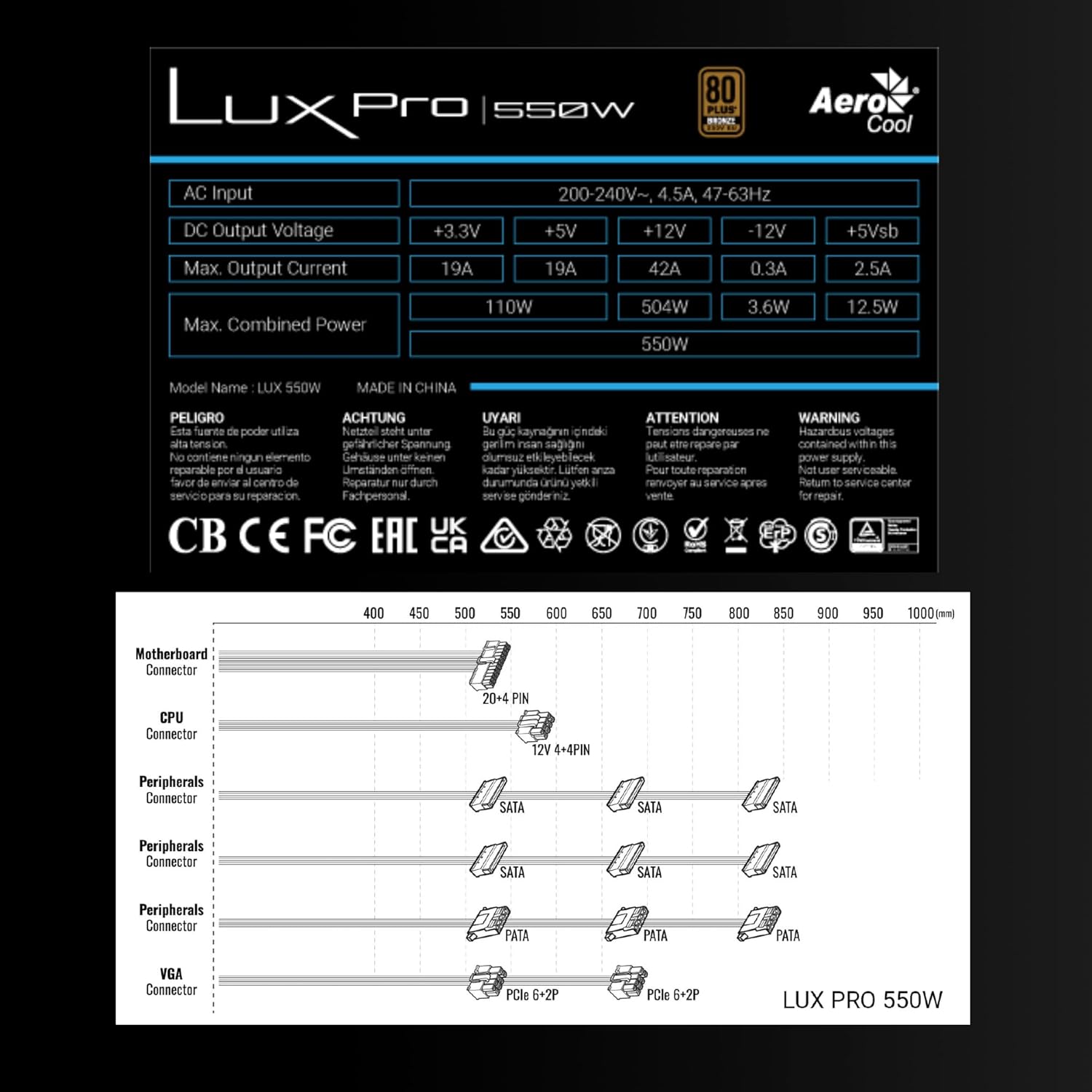
Image 3.1: Connector types and lengths for the LUXPRO550 power supply. This diagram illustrates the available connectors including Motherboard (20+4 PIN), CPU (12V 4+4 PIN), Peripherals (SATA, PATA), and VGA (PCIe 6+2 PIN).
3.3. საბოლოო ნაბიჯები
- დახურეთ თქვენი კომპიუტერის კორპუსი.
- შეაერთეთ AC დენის კაბელი დენის წყაროსთან და შემდეგ კედელზე.
- Flip the power switch on the back of the PSU to the 'ON' position.
- ჩართეთ თქვენი კომპიუტერი.
4. საოპერაციო ინსტრუქციები
The Aerocool LUXPRO550 is designed for continuous and stable operation once correctly installed. Its 80 Plus Bronze certification ensures high energy efficiency, reducing power consumption and heat generation.
4.1. Active PFC Technology
The integrated Active Power Factor Correction (APFC) technology ensures efficient and reliable power distribution, contributing to overall system stability and energy savings.
4.2. ვენტილატორის მუშაობა
The 14cm FDB (Fluid Dynamic Bearing) fan features optimized thermal speed control. It operates silently, starting at less than 700 RPM, and only increases speed as the load approaches 40% at ambient temperatures of 25°C, ensuring quiet operation under typical loads.

Image 4.1: The 14cm FDB fan of the LUXPRO550, illustrating its optimized thermal speed control for efficient cooling.
5. მოვლა
The LUXPRO550 is built with high-quality components, including 105°C Japanese capacitors, designed for maximum reliability and a long operational lifespan with minimal maintenance.

Image 5.1: High-quality 105°C Japanese capacitors, contributing to the power supply's reliability and extended lifespan.
5.1. ზოგადი მოვლა
- Keep the power supply and computer case free from dust. Dust accumulation can hinder cooling and reduce efficiency.
- Use compressed air to gently clean the fan and ventilation grilles periodically. Ensure the computer is powered off and unplugged before cleaning.
- Do not obstruct the airflow around the power supply.
შიგნით მომხმარებლის მიერ შეკეთებადი ნაწილები არ არის. არ სცადოთ მოწყობილობის დამოუკიდებლად გახსნა ან შეკეთება.
6. Დიაგნოსტიკა
If you encounter issues with your LUXPRO550 power supply, please follow these basic troubleshooting steps:
- ძალა არ არის:
- დარწმუნდით, რომ ცვლადი დენის კაბელი საიმედოდ არის შეერთებული როგორც კვების წყაროსთან, ასევე კედლის როზეტთან.
- Check that the power switch on the back of the PSU is in the 'ON' position.
- კედლის სოკეტის ფუნქციონალურობის შესამოწმებლად, სხვა მოწყობილობის შეერთებით შეამოწმეთ.
- სისტემა არ იტვირთება:
- Double-check all power connections to the motherboard, CPU, graphics card, and storage devices.
- Ensure all components are properly seated in their slots.
- If possible, test the power supply with another known working system or test another power supply with your system to isolate the issue.
- არაჩვეულებრივი ხმები:
- A slight hum is normal. If you hear grinding or loud fan noises, ensure the fan is not obstructed by cables or dust.
- თუ ხმაური გაგრძელდა, დაუკავშირდით მომხმარებელთა მხარდაჭერის სამსახურს.
If these steps do not resolve the issue, please contact Aerocool customer support or your retailer for further assistance. Do not attempt to repair the unit yourself.
7. სპეციფიკაციები
| ფუნქცია | სპეციფიკაცია |
|---|---|
| მოდელის სახელი | LUXPRO550 |
| ბრენდი | AeroCool |
| ვატtage | 550 ვატი |
| ეფექტურობის სერტიფიცირება | 80 Plus Bronze 230V EU (over 88% efficiency) |
| ფორმის ფაქტორი | ATX |
| კონდენსატორები | Japanese 105°C |
| ვენტილატორის ტიპი | 14cm FDB (Fluid Dynamic Bearing) with thermal speed control |
| PFC | აქტიური PFC |
| ზომები (LxWxH) | 16 x 15 x 8.5 სმ |
| წონა | 1.4 კგ |
| თავსებადი მოწყობილობები | PC |
7.1. DC გამომავალი ტომიtage მაგიდა
The following table details the DC output voltages and maximum currents for the LUXPRO550:
| DC გამოყვანის მოცულობაtage | +3.3 ვ | +5 ვ | +12 ვ | -12V | +5 ვსბ |
|---|---|---|---|---|---|
| მაქს. გამომავალი დენი | 19A | 19A | 42A | 0.3A | 2.5A |
| მაქს კომბინირებული სიმძლავრე | 110 W | 504 W | 3.6 W | 12.5 W | |
| Total Combined Power | 550 W | ||||
8. გარანტია და მხარდაჭერა
8.1. ინფორმაცია გარანტიის შესახებ
The Aerocool LUXPRO550 power supply comes with an extended 5 წლიანი გარანტია, reflecting its high reliability and the quality of its components, such as the 105°C Japanese capacitors.
გთხოვთ, შეინახოთ თქვენი შეძენის მტკიცებულება გარანტიის პრეტენზიებისთვის.
8.2. მომხმარებელთა მხარდაჭერა
For technical assistance, warranty claims, or any questions regarding your Aerocool LUXPRO550 power supply, please contact Aerocool customer support through their official webსაიტზე ან თქვენს ადგილობრივ საცალო მოვაჭრეზე.
Do not attempt to open or repair the power supply unit, as this will void the warranty.