
Launch CRP239
LAUNCH CRP239 PREMIUM CODE READER SCANNER User Manual
Model: CRP239
1. შესავალი
The LAUNCH CRP239 is an intelligent and networkable automotive diagnostic tool designed for passenger cars. It offers comprehensive OBD II full functionality and rapid testing capabilities for four major vehicle systems: Engine, Automatic Transmission (A/T), Anti-lock Braking System (ABS), and Supplemental Restraint System (SRS). Additionally, the CRP239 includes advanced reset functions such as Oil Reset, Steering Angle Reset, Brake-Pad Reset, Battery Matching, Throttle Adaptation, and Diesel Particulate Filter (DPF) Regeneration, catering to the needs of professional technicians and DIY enthusiasts.
2. უსაფრთხოების ინფორმაცია
Always observe the following safety precautions when operating the LAUNCH CRP239:
- Ensure the vehicle's ignition is off before connecting or disconnecting the diagnostic tool.
- არ გამოიყენოთ ინსტრუმენტი სველ პირობებში ან აალებადი სითხეების ან აირების მახლობლად.
- სატრანსპორტო საშუალებებზე მუშაობისას გამოიყენეთ შესაბამისი პირადი დამცავი აღჭურვილობა, როგორიცაა დამცავი სათვალე.
- კონკრეტული დიაგნოსტიკური პროცედურებისა და უსაფრთხოების გაფრთხილებებისთვის იხილეთ ავტომობილის მომსახურების სახელმძღვანელო.
- Keep the tool away from strong magnetic fields.
- გამოიყენეთ მხოლოდ მოწოდებული კაბელები და აქსესუარები.
3. პაკეტის შიგთავსი
დარწმუნდით, რომ შეფუთვაში ყველა ნივთია:
- LAUNCH CRP239 Main Unit
- OBD II დიაგნოსტიკური კაბელი
- USB კაბელი
- მომხმარებლის სახელმძღვანელო
- ტარების საქმე

Figure 3.1: Contents of the LAUNCH CRP239 package, showing the diagnostic tool, cables, and storage case.
4. პროდუქტი დასრულდაview
The LAUNCH CRP239 features a robust design with a 5.0-inch 720p touch screen for intuitive navigation. It includes physical buttons for common operations and a durable rubber exterior for protection.

სურათი 4.1: წინა view of the LAUNCH CRP239, highlighting the touch screen display and navigation buttons.
4.1. კომპონენტები
- 5.0 დიუმიანი სენსორული ეკრანი: High-resolution display for clear data presentation and touch input.
- ნავიგაციის ღილაკები: Directional pad, OK button, and Return button for menu navigation.
- OBD II Connector: Standard 16-pin connector for vehicle communication.
- USB პორტი: For connecting to a computer for updates or data transfer.
- დენის ინდიკატორი: LED ნათურა, რომელიც მიუთითებს კვების სტატუსზე.
5. დაყენება
Follow these steps for initial setup of your LAUNCH CRP239:
- მოწყობილობის დამუხტვა: Connect the CRP239 to a power source using the provided USB cable to ensure the internal 4000mAh lithium-polymer battery is fully charged before first use.
- ჩართვა: ხანგრძლივად დააჭირეთ ჩართვის ღილაკს მოწყობილობის ჩასართავად.
- ენის შერჩევა: On the initial setup screen, select your preferred language. The device supports multilingual operation.
- Wi-Fi კავშირი: Navigate to the 'Settings' menu and select 'Wi-Fi'. Connect to an available wireless network to enable online updates and diagnostic report sharing.
- პროგრამული უზრუნველყოფის განახლება: It is recommended to perform a software update immediately after connecting to Wi-Fi to ensure you have the latest features and vehicle coverage. Navigate to the 'Update' section and follow the on-screen prompts.

Figure 5.1: The LAUNCH CRP239 with its diagnostic cable connected, ready for vehicle communication.
6. საოპერაციო ინსტრუქციები
The LAUNCH CRP239 provides a comprehensive suite of diagnostic functions. Below are instructions for common operations.
6.1. Connecting to Vehicle
- Locate the vehicle's 16-pin OBD II diagnostic port (usually under the dashboard).
- დარწმუნდით, რომ ავტომობილის ანთება გამორთულია.
- Connect the OBD II diagnostic cable to the vehicle's OBD II port and to the CRP239.
- Turn the vehicle's ignition to the ON position (engine off). The CRP239 will power on automatically.
6.2. მთავარი მენიუს ნავიგაცია
მთავარი მენიუდან შეგიძლიათ სხვადასხვა ფუნქციების გამოყენება:
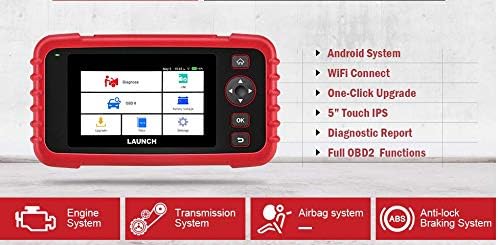
Figure 6.1: The main menu interface of the LAUNCH CRP239, providing access to all primary functions.
- დიაგნოზი: For full system diagnostics (Engine, A/T, ABS, SRS).
- მე/მე: Readiness status for emissions.
- OBD II: Standard OBD II functions (read/clear DTCs, live data, freeze frame, O2 sensor test, etc.).
- გადატვირთვა: Access various maintenance reset functions.
- ბატარეის მოცულობაtage: Displays real-time vehicle battery voltage.
- განახლება: For software and firmware updates via Wi-Fi.
- მონაცემები: Review saved diagnostic data and reports.
- პარამეტრები: Configure device settings such as language, Wi-Fi, and display.
6.3. დიაგნოსტიკური სკანირების ჩატარება
- მთავარი მენიუდან აირჩიეთ "Diagnose".
- The tool will attempt to automatically identify the vehicle via VIN scan. If unsuccessful, you may need to manually select the vehicle make, model, and year.
- Choose the system you wish to diagnose (e.g., Engine, Transmission, ABS, SRS).
- აირჩიეთ "Read Fault Codes" რომ view Diagnostic Trouble Codes (DTCs).
- აირჩიეთ "Clear Fault Codes" to erase DTCs after repairs have been made. Caution: Clearing codes without addressing the underlying issue will result in the codes reappearing.
- აირჩიეთ "Read Data Stream" რომ view სენსორის პირდაპირი მონაცემები.
6.4. გადატვირთვის ფუნქციების გამოყენება
The CRP239 supports several common maintenance reset functions:
- ზეთის გადატვირთვა: ზეთის შეცვლის შემდეგ აღადგენს ზეთის ვარგისიანობის შეხსენებას.
- Steering Angle Reset: Resets the steering angle sensor after alignment or component replacement.
- Brake-Pad Reset (EPB): აღადგენს ელექტრონული სადგომი მუხრუჭის სისტემას სამუხრუჭე ხუნდების შეცვლის შემდეგ.
- Battery Matching (BMS): Registers a new battery with the vehicle's Battery Management System.
- დროსელის ადაპტაცია: ხელახლა სწავლობს დროსელის კორპუსის პოზიციას გაწმენდის ან შეცვლის შემდეგ.
- DPF-ის რეგენერაცია: Initiates the Diesel Particulate Filter regeneration process.
To use a reset function, select "Reset" from the main menu, then choose the desired function and follow the on-screen instructions.
6.5. პროგრამული უზრუნველყოფის განახლებები
The CRP239 supports one-click Wi-Fi updates for software and vehicle coverage, ensuring you always have the latest diagnostic capabilities.
- დარწმუნდით, რომ მოწყობილობა დაკავშირებულია სტაბილურ Wi-Fi ქსელთან.
- მთავარი მენიუდან აირჩიეთ "Update".
- The device will check for available updates. Select the updates you wish to install and confirm.
- Allow the update process to complete without interruption. The device may restart during this process.

Figure 6.2: The update screen on the LAUNCH CRP239, showing available software updates for various vehicle brands.
6.6. Diagnostic Report Generation
The CRP239 can automatically generate diagnostic reports, which can be shared via email.
- After completing a diagnostic session, the tool will prompt you to generate a report.
- Confirm to generate the report.
- ნავიგაცია "Data" მენიუს view saved reports.
- Select a report and choose the option to share via email. Ensure your Wi-Fi is connected and email settings are configured in the 'Settings' menu.
7. მოვლა
Proper maintenance ensures the longevity and optimal performance of your LAUNCH CRP239:
- დასუფთავება: მოწყობილობის გასაწმენდად გამოიყენეთ რბილი, მშრალი ქსოვილი. არ გამოიყენოთ აბრაზიული საწმენდები ან გამხსნელები.
- შენახვა: Store the device in its carrying case in a cool, dry place when not in use. Avoid extreme temperatures.
- ბატარეის მოვლა: Charge the battery regularly, even if the device is not in frequent use, to maintain battery health. Avoid fully discharging the battery for extended periods.
- საკაბელო შემოწმება: Periodically inspect the diagnostic and USB cables for any signs of damage. Replace damaged cables immediately.
8. Დიაგნოსტიკა
This section addresses common issues you might encounter with the LAUNCH CRP239.
| პრობლემა | შესაძლო მიზეზი | გამოსავალი |
|---|---|---|
| მოწყობილობა არ ჩაირთვება. | Low battery; faulty connection to vehicle. | Charge the device fully. Ensure the OBD II cable is securely connected to both the CRP239 and the vehicle. Check vehicle's ignition is ON. |
| მანქანასთან კომუნიკაცია შეუძლებელია. | Incorrect vehicle protocol; faulty OBD II port; damaged cable. | Verify vehicle compatibility. Check the vehicle's OBD II port for power. Try a different vehicle or cable if available. Ensure vehicle ignition is ON. |
| პროგრამული უზრუნველყოფის განახლება ვერ ხერხდება. | არასტაბილური Wi-Fi კავშირი; არასაკმარისი მეხსიერება. | Ensure a strong and stable Wi-Fi connection. Check available storage space on the device. Restart the update process. |
| ეკრანი არ რეაგირებს. | პროგრამული უზრუნველყოფის გაუმართაობა; ფიზიკური დაზიანება. | Perform a soft reset by holding the power button until the device restarts. If the issue persists, contact customer support. |
9. სპეციფიკაციები
| ფუნქცია | დეტალი |
|---|---|
| მოდელი | CRP239 (CREADER PROFESSIONAL 239) |
| ჩვენება | 5.0-inch 720p Touch Screen |
| ბატარეა | 4000mAh დატენვადი ლითიუმ-პოლიმერული ბატარეა (მოყვება) |
| დაკავშირება | OBD II, Wi-Fi, USB |
| ავტომობილის დაფარვა | Domestic, Asian, European vehicles (1996 and newer OBD2) |
| მხარდაჭერილი სისტემები | Engine, Automatic Transmission (A/T), ABS, SRS |
| სპეციალური ფუნქციები | Oil Reset, Steering Angle Reset, Brake-Pad Reset (EPB), Battery Matching (BMS), Throttle Adaptation, DPF Regeneration |
| ზომები | 32.4 x 25.4 x 8 სმ (შეფუთვა) |
| ნივთის წონა | 560 გ |
| ექსტერიერის მასალა | რეზინი |
10. ინფორმაცია გარანტიის შესახებ
The LAUNCH CRP239 comes with a standard manufacturer's warranty. For specific warranty terms and conditions, please refer to the warranty card included in your product package or visit the official Launch webსაიტი. შეინახეთ თქვენი შესყიდვის ქვითარი, როგორც შეძენის დამადასტურებელი საბუთი გარანტიის მოთხოვნის შემთხვევაში.
გაფართოებული გარანტიის ვარიანტები შეიძლება ხელმისაწვდომი იყოს მესამე მხარის მომწოდებლებისგან. მაგ.ample, 1-Year and 2-Year Extended Warranties by Salama Care are offered for this product.
11. მხარდაჭერა
For technical assistance, product inquiries, or support, please contact Launch customer service through their official website or the contact information provided in your product documentation. Ensure you have your product model number (CRP239) and serial number ready when contacting support.
დამატებითი რესურსებისთვის ეწვიეთ Launch Official Webსაიტი.
Ask a question about this manual
Ask about setup, troubleshooting, compatibility, parts, safety, or missing instructions. Manuals+ will review the question and use this page’s manual context to help answer it.