
1. შესავალი
Thank you for choosing the Losei D65 Wireless Earbuds. These earbuds are designed to provide a high-quality audio experience with advanced features such as environmental noise canceling (ENC), individual power display, wireless charging, and IPX7 waterproofing. This manual will guide you through the setup, operation, and maintenance of your new earbuds.
2. რა არის ყუთში
- Wireless Sport Earbuds (1 Pair)
- Charging Case (1 PC)
- Type-C Charging Cable (1 PC)
- Original Ear Caps (1 Pair)
- Spare Ear Caps (6 Pairs)
- მომხმარებლის სახელმძღვანელო (ეს დოკუმენტი)
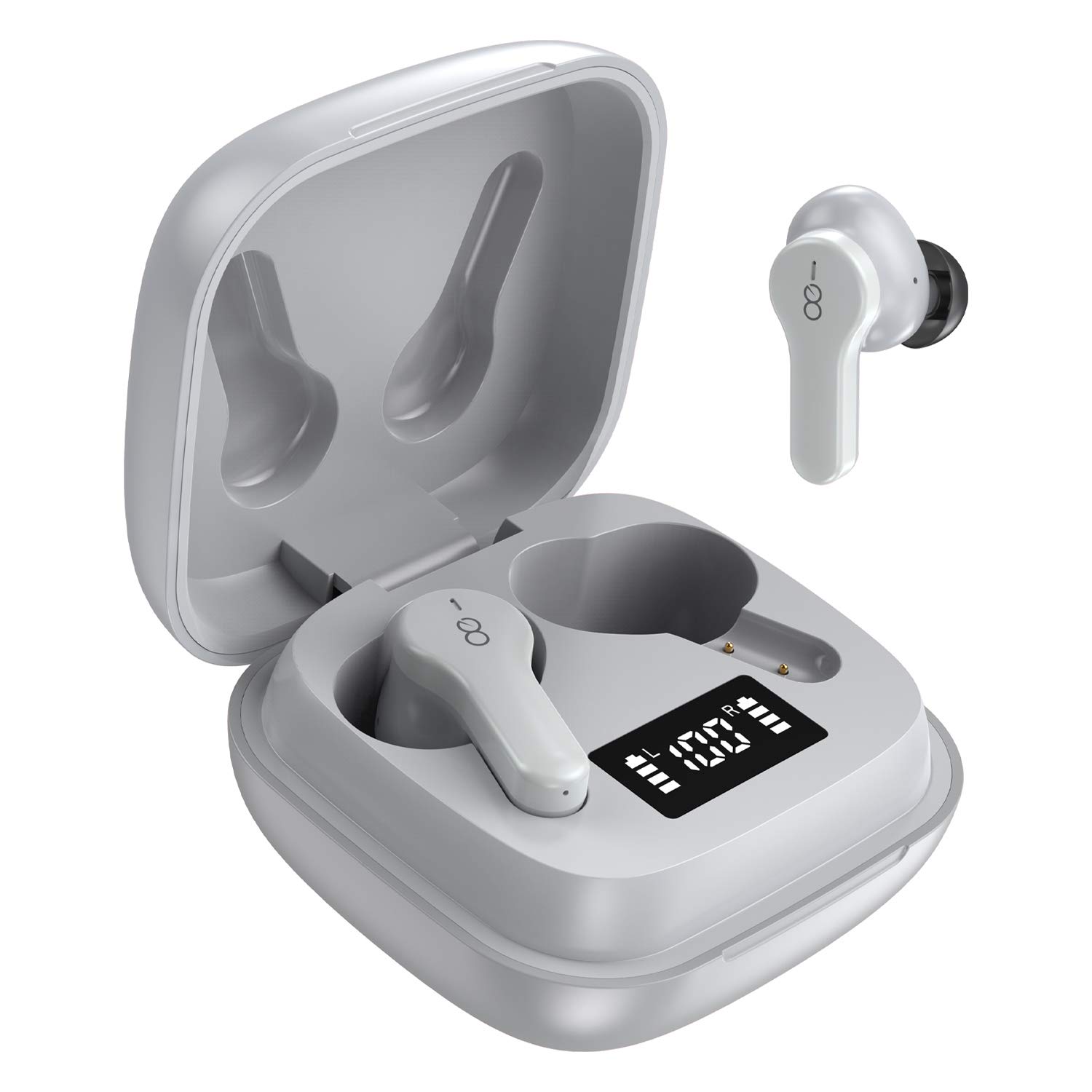
3. პროდუქტი დასრულდაview
The Losei D65 earbuds feature a compact, in-ear design with touch controls. The accompanying charging case provides portable power and includes a digital display to show battery levels for both the case and individual earbuds.
ძირითადი მახასიათებლები:
- Clear Call with 4-Mics Noise Reduction: Built-in 4 microphones with Environmental Noise Canceling (ENC) technology for clear calls.
- Individual Power Display: Digital display on the charging case shows battery percentage for the case and charging status for each earbud.
- Wireless Charging & Extended Playtime: Supports wireless charging and provides up to 30 hours of total playtime with the charging case.
- კომფორტული მორგება და IPX7 წყალგაუმტარი: Ergonomic design with multiple ear tip sizes and IPX7 water resistance for sports and daily use.
- Auto Pairing & Smart Touch Control: Automatic connection to the last paired device and intuitive touch controls for various functions.
4. დაყენება
4.1 ყურსასმენებისა და ქეისის დატენვა
პირველი გამოყენების წინ, სრულად დატენეთ ყურსასმენები და დამტენი ქეისი.
- ყურსასმენების დატენვა: Place the earbuds into the charging case. The marquee lights on the case will indicate charging. They will stop when fully charged.
- Charging the Case (Wired): Connect the provided Type-C charging cable to the charging port on the case and to a USB power source. The digital display will show the battery percentagზრდაasing. A full charge takes approximately 1.5-2 hours.
- Charging the Case (Wireless): Place the charging case on a compatible wireless charging pad (not included). The digital display will indicate charging status.
The charging case's digital display shows the battery percentage (1-100%). The individual earbud power consumption indicators show 4 grids, each representing 25% battery.
4.2 თქვენს მოწყობილობასთან დაწყვილება
The Losei D65 earbuds feature automatic pairing.
- დარწმუნდით, რომ თქვენი მოწყობილობის Bluetooth ჩართულია.
- გახსენით დამტენი ქეისი. ყურსასმენები ავტომატურად ჩაირთვება და დაწყვილების რეჟიმში გადავა.
- On your device, search for Bluetooth devices and select "Losei-D65" from the list.
- დაკავშირების შემდეგ, თქვენ მოისმენთ დადასტურების შეტყობინებას და ყურსასმენები მზად იქნება გამოსაყენებლად.
The earbuds will automatically reconnect to the last paired device when taken out of the charging case.
5. საოპერაციო ინსტრუქციები
5.1 ჭკვიანი სენსორული კონტროლი
The Losei D65 earbuds utilize touch controls for various functions. The sensor area is typically located on the outer surface of each earbud.
- დაკვრა/პაუზა: ერთი შეხებით ორივე ყურსასმენზე.
- შემდეგი სიმღერა: ორჯერ შეეხეთ მარჯვენა ყურსასმენს.
- წინა ჩანაწერი: ორჯერ შეეხეთ მარცხენა ყურსასმენს.
- მოცულობა: სამჯერ შეეხეთ მარჯვენა ყურსასმენს.
- Ხმის დაწევა: სამჯერ შეეხეთ მარცხენა ყურსასმენს.
- ზარის პასუხი/დასრულება: შემომავალი ზარის დროს ერთ ყურსასმენზე ერთხელ შეხება.
- ზარის უარყოფა: შემომავალი ზარის დროს დააჭირეთ და გააჩერეთ რომელიმე ყურსასმენი 2 წამის განმავლობაში.
- ხმოვანი ასისტენტის გააქტიურება: დააჭირეთ და გააჩერეთ რომელიმე ყურსასმენი 3 წამის განმავლობაში (როდესაც ზარს არ ახორციელებთ).
5.2 Multi-Using Modes
The earbuds support different usage scenarios:
- მონო რეჟიმი: Each earbud can be used independently. This is ideal for driving or when you need to be aware of your surroundings. Simply take one earbud out of the case and connect it.
- გაზიარების რეჟიმი: You can share one earbud with another person to listen to the same audio content.
- სტერეო რეჟიმი: Use both earbuds together for a full, immersive stereo sound experience.
6. მოვლა
6.1 დასუფთავება
რეგულარული დასუფთავება ხელს უწყობს ხმის ხარისხისა და ჰიგიენის შენარჩუნებას.
- ყურსასმენებისა და დამტენის ქეისის გასაწმენდად გამოიყენეთ რბილი, მშრალი, უბუშტუკო ქსოვილი.
- ყურის ბალიშების შემთხვევაში, ამოიღეთ ისინი ყურსასმენებიდან და საჭიროების შემთხვევაში გაწმინდეთ რბილი საპნის ხსნარით, შემდეგ კარგად ჩამოიბანეთ და ბოლომდე გააშრეთ ხელახლა დამაგრებამდე.
- არ გამოიყენოთ აბრაზიული საწმენდები, სპირტი ან ქიმიური გამხსნელები.
6.2 შენახვა
როდესაც ყურსასმენები არ იყენებთ, შეინახეთ დამტენ ქეისში, რათა დაიცვათ ისინი და დატენილი იყოს.
- შეინახეთ გრილ, მშრალ ადგილას, ექსტრემალური ტემპერატურისგან მოშორებით.
- მოერიდეთ მზის პირდაპირი სხივების ხანგრძლივ ზემოქმედებას.
6.3 წყლის წინააღმდეგობა (IPX7)
The Losei D65 earbuds are IPX7 waterproof, meaning they can withstand immersion in water up to 1 meter for 30 minutes. This makes them suitable for sports and protection against sweat and rain. However, they are not designed for swimming or prolonged submersion. Ensure the earbuds are dry before placing them back in the charging case to prevent damage.
7. Დიაგნოსტიკა
If you encounter issues with your Losei D65 earbuds, refer to the following common solutions:
- ყურსასმენები არ წყვილდება ან არ უკავშირდება:
- დარწმუნდით, რომ ორივე ყურსასმენი დატენულია.
- გამორთეთ Bluetooth თქვენს მოწყობილობაზე, შემდეგ კი ხელახლა ჩართეთ.
- Forget/delete "Losei-D65" from your device's Bluetooth list and attempt to pair again.
- ორივე ყურსასმენი დააბრუნეთ დამტენ ქეისში, დახურეთ სახურავი, დაელოდეთ რამდენიმე წამი, შემდეგ კი გახსენით სახურავი გადატვირთვისთვის.
- მხოლოდ ერთი ყურსასმენი მუშაობს :(
- დარწმუნდით, რომ ორივე ყურსასმენი დატენულია.
- Place both earbuds back into the charging case, close the lid, wait a few seconds, then open the lid. They should reconnect to each other automatically.
- If the issue persists, try resetting the earbuds as described in the pairing section.
- დაბალი ხმის ხარისხი ან ხმის დაბალი დონე:
- დაარეგულირეთ ხმის დონე როგორც თქვენს მოწყობილობაზე, ასევე ყურსასმენებზე.
- Ensure the ear tips are properly sealed in your ear canal. Try different sized ear tips for a better fit.
- ყურსასმენების დინამიკებიდან და თავისთავებიდან გაწმინდეთ ნებისმიერი ნარჩენი.
- დარწმუნდით, რომ თქვენს მოწყობილობასა და ყურსასმენებს შორის არანაირი დაბრკოლება არ არის.
- დამტენი ქეისი არ იტენება:
- შეამოწმეთ დამტენის კაბელი და კვების ადაპტერი დაზიანებისთვის.
- დარწმუნდით, რომ Type-C კაბელი საიმედოდ არის დაკავშირებული როგორც კორპუსთან, ასევე კვების წყაროსთან.
- If using wireless charging, ensure the case is correctly positioned on a compatible wireless charging pad.
8. სპეციფიკაციები
| მოდელის სახელი | Losei-D65 |
| დაკავშირების ტექნოლოგია | უსადენო (Bluetooth 5.0) |
| ყურის განთავსება | ყურში |
| ხმაურის კონტროლი | Sound Isolation, Environmental Noise Canceling (ENC) |
| წყლის წინააღმდეგობის დონე | IPX7 (წყალგამძლე) |
| კონტროლის ტიპი | შეეხეთ Control |
| ელემენტის ხანგრძლივობა (ყურსასმენები) | 5 საათამდე ერთი დამუხტვით |
| თამაშის საერთო დრო (ქეისით) | 30 საათამდე |
| დატენვის დრო (ქეისი) | დაახლ. 1.5-2 საათი |
| დატენვის ინტერფეისი | Type-C, Wireless Charging |
| თავსებადი მოწყობილობები | Most Bluetooth-enabled devices (Android, iOS, PC, etc.) |
| ნივთის წონა | 0.176 უნცია (თითო ყურსასმენზე) |
| პროდუქტის ზომები | 1.18 x 1.54 x 1.85 ინჩი (დამტენი ქეისი) |
9. გარანტია და მხარდაჭერა
9.1 ინფორმაცია გარანტიის შესახებ
The Losei D65 Wireless Earbuds come with a 12 თვიანი გამოცვლის გარანტია. Additionally, returns are accepted within 30 days for a full refund. This warranty covers manufacturing defects and ensures customer satisfaction.
9.2 მომხმარებელთა მხარდაჭერა
For any questions, issues, or support needs, please contact Losei customer service. Quick-response professional customer service is available to assist you.
Please refer to the product packaging or the official Losei webსაიტი კონკრეტული საკონტაქტო ინფორმაციისთვის.