
შესავალი
Thank you for choosing the Docooler HXSJ A876 Wired Gaming Mouse. This manual provides detailed instructions for setting up, operating, and maintaining your new gaming mouse. Please read this manual carefully before use to ensure optimal performance and longevity of your device.
პროდუქტის მახასიათებლები
- რეგულირებადი DPI: Supports 800, 1600, 3200, and 6400 DPI settings for precise control.
- 7 ფერის მსუნთქავი შუქი: Synchronized lighting provides a dynamic visual effect.
- ერგონომიული დიზაინი: Engineered for comfort during extended use, fitting naturally in the palm.
- გამძლე გადამრთველები: Equipped with high-performance mechanical micro-switches rated for 10 million clicks.
- Anti-slip Scroll Wheel: Designed for smooth and precise scrolling.
- სადენიანი USB კავშირი: Ensures stable and reliable performance.
პაკეტის შიგთავსი
- 1 x Docooler HXSJ A876 Wired Gaming Mouse
- 1 x მომხმარებლის სახელმძღვანელო
დაყენება
- Unpack the Docooler HXSJ A876 Wired Gaming Mouse and its accessories from the packaging.
- იპოვეთ თქვენს კომპიუტერზე (კომპიუტერი ან ლეპტოპი) ხელმისაწვდომი USB პორტი.
- მაუსის USB კონექტორი შეაერთეთ USB პორტში.
- The mouse is plug-and-play and should be automatically recognized by your operating system. No additional drivers are typically required.
ოპერაციული ინსტრუქციები
DPI რეგულირება
The HXSJ A876 mouse features adjustable DPI settings, allowing you to switch sensitivity on the fly. Use the dedicated DPI buttons (DPI Loop + and DPI Loop -) located near the scroll wheel to cycle through the available DPI levels.
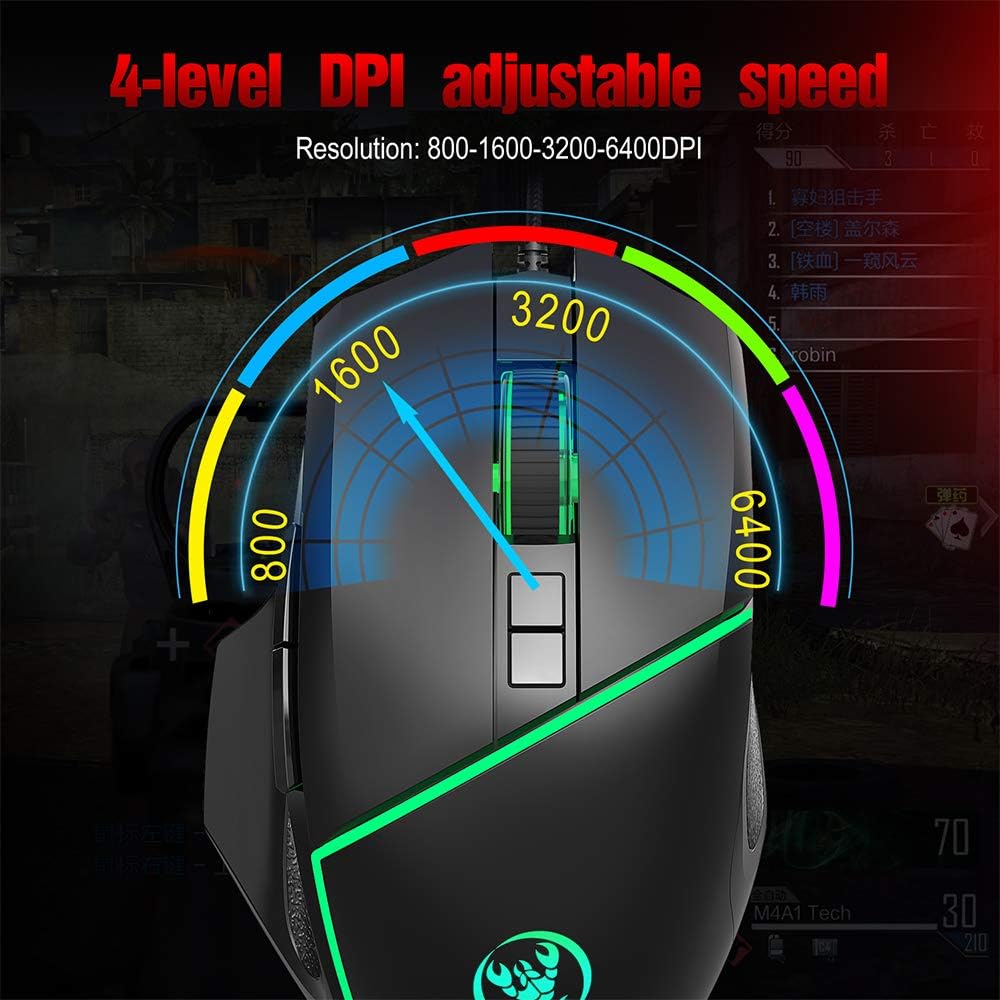
Visual representation of the 4-level adjustable DPI settings on the HXSJ A876 gaming mouse. The graphic indicates how the DPI can be cycled through different resolutions for varied gaming and work needs.
- 800 DPI: Suitable for precise tasks.
- 1600 DPI: A balanced setting for general use.
- 3200 DPI: Increased sensitivity for faster cursor movement.
- 6400 DPI: High sensitivity for rapid movements in gaming.
DPI Indicator Feedback
The mouse provides visual feedback for the current DPI setting:

This image demonstrates the HXSJ A876 gaming mouse on a desk, detailing how to turn the lights on and off by pressing the Mid button + DPI +. It also explains the DPI indicator feedback: red light flashes once for 800 DPI, twice for 1600 DPI, three times for 3200 DPI, and four times for 6400 DPI.
- When 800 DPI is selected, the DPI indicator flashes red once.
- When 1600 DPI is selected, the DPI indicator blinks red twice.
- When 3200 DPI is selected, the DPI indicator blinks red three times.
- When 6400 DPI is selected, the DPI indicator flashes red four times.
ღილაკის ფუნქციები
The HXSJ A876 mouse features a seven-button design for enhanced functionality:

A clear diagram labeling the seven buttons on the HXSJ A876 gaming mouse: Left Button, Right Button, Mid Button (scroll wheel), DPI Loop +, DPI Loop -, Forward Button, Backward Button, and Fire Key. This helps users identify each control.
- მარცხენა ღილაკი: ძირითადი დაწკაპუნების ფუნქცია.
- მარჯვენა ღილაკი: მეორადი დაწკაპუნების ფუნქცია (კონტექსტური მენიუ).
- Mid Button (Scroll Wheel): Scrolls pages up/down; click for middle-click function.
- DPI Loop +: ზრდის DPI მგრძნობელობას.
- DPI Loop -: ამცირებს DPI მგრძნობელობას.
- წინსვლის ღილაკი: წინ გადადის web ბრაუზერები ან file მკვლევარები.
- უკანა ღილაკი: უკან ნავიგაცია web ბრაუზერები ან file მკვლევარები.
- ცეცხლის გასაღები: Programmable button, often used for rapid firing in games.
განათების კონტროლი
To toggle the synchronized 7-color breathing light on or off, press the შუა ღილაკი და DPI + ღილაკი ერთდროულად.

This image displays the HXSJ A876 wired gaming mouse, emphasizing its 6400 DPI high precision capability for stable transmission and accurate analysis. The mouse features a sleek black design with red accents.
მოვლა
- დასუფთავება: მაუსის ზედაპირის გასაწმენდად გამოიყენეთ რბილი, მშრალი ქსოვილი. ჯიუტი ჭუჭყის შემთხვევაში, ოდნავampქსოვილი წყლით დაასველეთ. მოერიდეთ უხეში ქიმიკატების ან აბრაზიული მასალების გამოყენებას.
- შენახვა: შეინახეთ მაუსი სუფთა, მშრალ ადგილას, მოარიდეთ ექსტრემალურ ტემპერატურას და მზის პირდაპირ სხივებს.
- საკაბელო მოვლა: დაზიანების თავიდან ასაცილებლად, მოერიდეთ USB კაბელის ზედმეტად მოღუნვას ან დახვევას.
პრობლემების მოგვარება
- მაუსი არ პასუხობს:
- დარწმუნდით, რომ USB კაბელი საიმედოდ არის შეერთებული მოქმედ USB პორტში.
- სცადეთ მაუსის თქვენს კომპიუტერში სხვა USB პორტში შეერთება.
- გადატვირთეთ კომპიუტერი.
- DPI არ იცვლება:
- Ensure you are pressing the correct DPI adjustment buttons.
- Check if the DPI indicator light provides feedback when buttons are pressed.
- ნათურები არ მუშაობს:
- Ensure the mouse is properly connected to your computer.
- Try toggling the lights using the Mid button + DPI + combination.
სპეციფიკაციები
| ბრენდი | დოქულერი |
| მოდელი | A876 |
| ტიპი | სადენიანი სათამაშო მაუსი |
| მასალა | ABS |
| განათების რეჟიმი | 7-color synchronized breathing light |
| DPI პარამეტრები | 800-1600-3200-6400DPI (Adjustable) |
| ცხოვრების შეცვლა | 10 მილიონი ციკლი |
| კაბელის სიგრძე | დაახლოებით 150 სმ |
| საოპერაციო ტომიtagე/მიმდინარე | DC 5V/100mA |
| ზომები (L x W x H) | 12.5 x 8 x 4 სმ |
| ნივთის წონა | დაახლოებით 138 გრ |
| დაკავშირების ტექნოლოგია | USB |
| მოძრაობის გამოვლენის ტექნოლოგია | ოპტიკური |
| ხელის ორიენტაცია | ორმხრივი |
| რეკომენდებული გამოყენება | Office, Video Gaming |
| თავსებადი მოწყობილობები | პერსონალური კომპიუტერი, ლეპტოპი |

This image shows a hand comfortably gripping the HXSJ A876 gaming mouse, highlighting its ergonomic design. The text indicates that the design is made for a better fit in the palm, ensuring comfort and reducing fatigue during long-term use.

An image depicting the HXSJ A876 gaming mouse in use on a desk, with an overlay indicating a '10,000,000 Times Click Test'. This illustrates the mouse's durability and the longevity of its mechanical switches.
გარანტია და მხარდაჭერა
გარანტიის შესახებ ინფორმაციის ან ტექნიკური მხარდაჭერისთვის, გთხოვთ, იხილოთ შეძენის დროს მოწოდებული დოკუმენტაცია ან დაუკავშირდეთ თქვენს გამყიდველს. შეინახეთ შეძენის დამადასტურებელი საბუთი გარანტიასთან დაკავშირებული ნებისმიერი პრეტენზიისთვის.