
შესავალი
This manual provides essential information for the safe and effective use of your ProForm City L6 Folding Treadmill. Please read all instructions carefully before operating the equipment. Retain this manual for future reference.

Image: The ProForm City L6 Folding Treadmill, showcasinმისი კომპაქტური დიზაინი და კონსოლი.
უსაფრთხოების მნიშვნელოვანი ინფორმაცია
To reduce the risk of serious injury, read all important precautions and instructions in this manual before using the treadmill. ProForm assumes no responsibility for personal injury or property damage sustained by or through the use of this product.
- ნებისმიერი ვარჯიშის პროგრამის დაწყებამდე გაიარეთ კონსულტაცია ექიმთან.
- მოარიდეთ ბავშვები და შინაური ცხოველები სარბენ ბილიკს.
- სარბენი ბილიკი მოათავსეთ ბრტყელ ზედაპირზე, მის უკან მინიმუმ 2 მეტრი (6.5 ფუტი) თავისუფალი ადგილით და თითოეულ მხარეს 0.5 მეტრი (1.6 ფუტი).
- ჩაიცვით შესაბამისი სავარჯიშო ტანსაცმელი და სპორტული ფეხსაცმელი.
- არ გამოიყენოთ სარბენი ბილიკი, თუ დაზიანებულია დენის კაბელი ან შტეფსელი.
- Always hold the handrails when starting or stopping the treadmill.
- არ გადააჭარბოთ მომხმარებლის მიერ დასაშვები მაქსიმალური წონის 113 კგ-ს (250 ფუნტი).
დაყენება
შეფუთვა და განთავსება
Carefully remove all components from the packaging. Place the treadmill on a flat, stable surface. Ensure adequate clearance around the unit for safe operation and maintenance.
Assembly (Folding Mechanism)
The ProForm City L6 features a SpaceSaver Design for compact storage. To prepare for use, carefully unfold the treadmill deck until it locks into place. To fold for storage, lift the deck until it secures in the upright position.
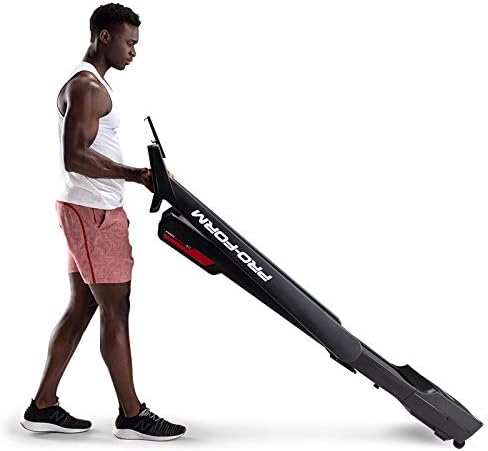
Image: A user demonstrating the folding mechanism of the ProForm City L6 Treadmill for compact storage.
დენის კავშირი
Connect the power cord to a grounded outlet. Ensure the safety key is properly inserted into the console before attempting to power on the treadmill.
iFIT Activation
Your treadmill includes a 30-day iFIT membership. To activate, download the iFIT app on your tablet or smartphone. Connect your device to the treadmill via Bluetooth. Follow the on-screen instructions in the iFIT app to set up your account and access workouts.

Image: The treadmill console with a tablet mounted, showing the iFIT application interface.
ოპერაციული ინსტრუქციები
სარბენი ბილიკის დაწყება
- Ensure the safety key is in place.
- დადექით სარბენი ბილიკის ქამარზე, ფეხები გვერდით მოაჯირებზე დააწყვეთ.
- დააჭირეთ დაწყება ღილაკი. ღვედი დაბალი სიჩქარით დაიწყებს მოძრაობას.
- Gradually increase speed using the სიჩქარე + buttons or Digital QuickSpeed controls.

Image: A user engaged in a running workout on the ProForm City L6 Treadmill.
სიჩქარის რეგულირება
გამოიყენეთ სიჩქარე + და სიჩქარე - buttons on the console to adjust the treadmill's speed. The treadmill offers speeds from 0 to 8 MPH. For iFIT workouts, the trainer may automatically adjust your speed.
Stopping the Treadmill
დააჭირეთ STOP button to gradually slow down and stop the treadmill belt. For an emergency stop, pull the safety key from the console.
დისპლეის გამოყენებით
The 5-inch high-contrast display shows your workout metrics, including distance, speed, estimated calorie burn, and time. When connected to iFIT, enhanced metrics are available through the app.
მოვლა
დასუფთავება
Regularly clean the treadmill with a damp cloth and mild soap. Avoid using abrasive cleaners or solvents. Wipe down the console and handrails after each use to remove sweat and debris.
ქამრის მოვლა
Inspect the walking belt periodically for wear and tear. Ensure the belt is properly centered and tensioned. Refer to the full product manual (if available from manufacturer) for detailed instructions on belt adjustment and lubrication, if required.
გენერალური ინსპექცია
Check all bolts and nuts for tightness regularly. Replace any worn components immediately. Unplug the treadmill before performing any maintenance or cleaning.
პრობლემების მოგვარება
| პრობლემა | შესაძლო მიზეზი | გამოსავალი |
|---|---|---|
| სარბენი ბილიკი არ ირთვება. | Power cord not plugged in; safety key not inserted; circuit breaker tripped. | Ensure power cord is securely plugged in. Insert safety key fully. Check household circuit breaker. |
| სასიარულო ქამარი სრიალებს ან ყოყმანობს. | Belt tension too loose; belt requires lubrication. | Adjust belt tension (refer to manufacturer's detailed guide). Lubricate belt if necessary (use approved silicone lubricant). |
| კონსოლის ეკრანი ცარიელია ან არასტაბილურია. | კაბელის შეერთების გაფუჭება; კვების პრობლემა. | Check all cable connections to the console. Unplug and re-plug the treadmill. |
თუ აქ ჩამოთვლილ პრობლემებს წააწყდებით, ან თუ გადაწყვეტილებები პრობლემას ვერ აგვარებს, დაუკავშირდით მომხმარებელთა მხარდაჭერის სამსახურს.
სპეციფიკაციები
- მოდელი: PFTL28820
- ბრენდი: პროფორმა
- პროდუქტის ზომები: 30.48 x 81.28 x 187.96 სმ (12 x 32 x 74 ინჩი)
- ნივთის წონა: 65.77 კგ (145 ფუნტი)
- მომხმარებლის მაქსიმალური წონა: 250 ფუნტი (113 კგ)
- სიჩქარის დიაპაზონი: 0-8 MPH Digital QuickSpeed Controls
- სარბენი ქამარი: 18" x 47"
- ჩვენება: 5-inch High-Contrast LCD
- ძრავის ცხენის ძალა: 2 HP
- განსაკუთრებული მახასიათებლები: SpaceSaver Design (Foldable), iFIT Bluetooth Connectivity
- დენის წყარო: კაბელიანი ელექტრო

Image: The ProForm City L6 Treadmill with its physical dimensions indicated.
გარანტია
The ProForm City L6 Folding Treadmill is protected by the following warranties:
- ჩარჩო: 10 წლიანი შეზღუდული გარანტია
- ნაწილები და შრომა: 1 წლიანი შეზღუდული გარანტია
This warranty applies to the original owner and is valid only in the country where the product was purchased. For full warranty terms and conditions, please refer to the warranty card included with your product or visit the official ProForm webსაიტი.
მხარდაჭერა
For technical assistance, parts inquiries, or warranty claims, please contact ProForm Customer Service. Have your model number (PFTL28820) and serial number ready when contacting support.
Visit the official ProForm webდამატებითი რესურსების, ხშირად დასმული კითხვებისა და საკონტაქტო ინფორმაციისთვის საიტი: www.proform.com