
Panasonic SCHC410K
Panasonic SCHC410K Compact Stereo System User Manual
Model: SCHC410K
შესავალი
The Panasonic SCHC410K is a compact stereo system designed to integrate seamlessly into modern living spaces. It features advanced audio technologies like Space Tune for optimized sound placement and LincsD-Amp for clear digital music playback. This manual provides essential information for setting up, operating, and maintaining your stereo system.
უსაფრთხოების ინფორმაცია
გთხოვთ, პროდუქტის გამოყენებამდე ყურადღებით წაიკითხოთ ყველა უსაფრთხოების ინსტრუქცია. შეინახეთ ეს სახელმძღვანელო მომავალი მითითებისთვის.
- არ დაუშვათ მოწყობილობა წვიმის ან ტენიანობის ქვეშ.
- არ გახსნათ casinგ; მომსახურებისთვის მიმართეთ კვალიფიციურ პერსონალს.
- უზრუნველყოს სათანადო ვენტილაცია მოწყობილობის გარშემო.
- გამოიყენეთ მხოლოდ მითითებული კვების წყარო.
პაკეტის შიგთავსი
დარწმუნდით, რომ ყველა ნივთი შედის პაკეტში:
- Panasonic SCHC410K Compact Stereo System
- AC დენის კაბელი
- დისტანციური მართვა
- Battery for remote (Alkaline)
- FM შიდა ანტენა
- Wall Mount Bracket and Holder
- მომხმარებლის სახელმძღვანელო (ეს დოკუმენტი)
პროდუქტი დასრულდაview
Familiarize yourself with the components and controls of your stereo system.

სურათი 1: წინა view of the Panasonic SCHC410K, showcasing its sleek black design and central display.
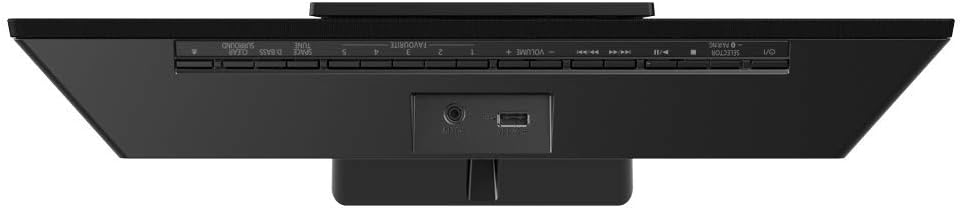
სურათი 2: ზედა view of the system, illustrating the control buttons and rear connectivity ports including USB and AUX-IN.
წინა პანელის კონტროლი:
- ჩვენება: აჩვენებს მიმდინარე რეჟიმს, ტრეკის ინფორმაციას და პარამეტრებს.
- CD უჯრა: აუდიო CD-ების ჩასასმელად.
- დენის ღილაკი: რთავს ან გამორთავს მოწყობილობას.
- მოცულობა +/-: არეგულირებს აუდიო გამომავალი დონეს.
- წყაროს/ფუნქციის ღილაკი: შეყვანის წყაროს არჩევა (CD, FM, Bluetooth, USB, AUX).
- Play/Pause, Skip/Search Buttons: For media playback control.
უკანა პანელის კავშირები:
- AC IN: უერთდება კვების კაბელს.
- AUX-IN: 3.5mm stereo input for external audio devices.
- USB პორტი: აუდიოს დასაკრავად USB მეხსიერების მოწყობილობების დასაკავშირებლად.
- FM ანტენის ტერმინალი: Connects the supplied FM indoor antenna.
დაყენება
1. Placement and Space Tune
The SCHC410K is designed for versatile placement, including wall-mounting. The unique Space Tune function optimizes sound based on its location.
- Near the Wall: For placement close to a wall.
- კედელზე: For wall-mounted installations.
- Near the Corner: For placement in a room corner.
Select the appropriate Space Tune preset in the system settings for optimal audio performance.

Figure 3: The SCHC410K shown in a wall-mounted configuration, highlighting its slim profile.
2. დამაკავშირებელი სიმძლავრე
- Connect the supplied AC power cord to the AC IN terminal on the rear of the unit.
- შეაერთეთ დენის კაბელის მეორე ბოლო კედელში.
3. FM ანტენის შეერთება
- Connect the supplied FM indoor antenna to the FM antenna terminal on the rear of the unit.
- Extend the antenna for better reception.
4. Installing Remote Control Battery
- გახსენით ბატარეის განყოფილება დისტანციური მართვის უკანა მხარეს.
- Insert the supplied alkaline battery, ensuring correct polarity (+/-).
- დახურეთ ბატარეის განყოფილება.
ოპერაციული ინსტრუქციები
ჩართვა/გამორთვა
დააჭირეთ [ᲫᲐᲚᲐ] button on the unit or remote control to turn the system on or off.
წყაროს შერჩევა
დააჭირეთ [ფუნქცია] button on the unit or remote control repeatedly to cycle through available sources: CD, FM, Bluetooth, USB, AUX-IN.
Bluetooth დაწყვილება და დაკვრა
- Select the Bluetooth source. The display will show "PAIRING".
- On your Bluetooth device (e.g., smartphone), enable Bluetooth and search for "SCHC410K".
- Select "SCHC410K" from the list to pair. Once connected, the display will show "CONNECTED".
- Start playing audio on your Bluetooth device.
CD დაკვრა
- აირჩიეთ CD წყარო.
- Gently insert a CD into the CD slot with the label side facing up. The system will automatically load and begin playback.
- გამოიყენეთ [დაკვრა/პაუზა], [SKIP], და [შეჩერება] buttons on the unit or remote for control.
FM რადიოს ტიუნინგი
- აირჩიეთ FM წყარო.
- დააჭირეთ [TUNE +/-] buttons on the remote or unit to manually tune to a station.
- ხანგრძლივად დააჭირეთ [TUNE +/-] for automatic scanning to the next available station.
- სადგურის წინასწარ დასაყენებლად, გადართეთ სასურველ სიხშირეზე და შემდეგ დააჭირეთ [მეხსიერება] followed by a number button (1-5) to save.
USB დაკვრა
- Insert a USB storage device into the USB port on the rear of the unit.
- აირჩიეთ USB წყარო. სისტემა ავტომატურად ამოიცნობს და დაიწყებს თავსებადი აუდიოს დაკვრას. files (MP3, WMA, AAC, WAV).
- Use the playback controls for navigation.
AUX-IN Playback
- Connect an external audio device (e.g., smartphone, MP3 player) to the AUX-IN port using a 3.5mm stereo audio cable (not supplied).
- Select the AUX-IN source.
- დაიწყეთ დაკვრა თქვენს დაკავშირებულ მოწყობილობაზე.
ხმის კორექტირება
- Space Tune: As described in the Setup section, select the appropriate preset (Near the Wall, On the Wall, Near the Corner) to optimize sound based on placement.
- D-Bass: Enhances bass frequencies for a richer sound. Press the [D-BASS] button on the remote to toggle on/off.
- Clear Surround: ქმნის უფრო ფართო ხმებსtagე დააჭირეთ ღილაკს [CLEAR SURROUND] button on the remote to toggle on/off.
მოვლა
Proper care ensures the longevity of your stereo system.
- დასუფთავება: Wipe the unit with a soft, dry cloth. Do not use liquid cleaners or abrasive cloths.
- CD ლინზების მოვლა: Avoid touching the CD lens. If necessary, use a specialized CD lens cleaner disc.
- ვენტილაცია: დარწმუნდით, რომ ვენტილაციის ღიობები არ არის დაბლოკილი, რათა თავიდან აიცილოთ გადახურება.
- შენახვა: If storing the unit for an extended period, disconnect the power cord and remove batteries from the remote control.
პრობლემების მოგვარება
გავრცელებული პრობლემებისა და მათი გადაჭრის გზებისთვის იხილეთ ეს განყოფილება.
| პრობლემა | შესაძლო მიზეზი | გამოსავალი |
|---|---|---|
| არავითარი ძალა | კვების კაბელი საიმედოდ არ არის შეერთებული. | შეამოწმეთ კვების კაბელის კავშირი მოწყობილობასთან და კედლის სოკეტთან. |
| ხმა არ არის | Volume is too low; incorrect source selected. | Increase volume; select the correct input source. |
| Bluetooth დაწყვილება ვერ ხერხდება | Device too far; Bluetooth not enabled on device. | Ensure device is within 10m; enable Bluetooth on device; try re-pairing. |
| ცუდი FM მიღება | ანტენა არ არის გაშლილი ან სწორად არ არის განლაგებული. | Adjust the position of the FM indoor antenna. |
| CD არ უკრავს | CD inserted incorrectly; CD is dirty or scratched. | Re-insert CD correctly; clean or replace CD. |
სპეციფიკაციები
| ფუნქცია | დეტალი |
|---|---|
| მოდელის ნომერი | SCHC410K |
| ბრენდი | Panasonic |
| აუდიო გამოყვანის რეჟიმი | სტერეო |
| სპიკერის კონფიგურაცია | 2.0 Channel (8cm full-range speakers) |
| მხარდაჭერილი აუდიო ფორმატები | CD-DA, MP3, WMA, AAC, WAV |
| დაკავშირება | Bluetooth, USB, AUX-IN |
| ტიუნერის ტექნოლოგია | FM |
| დენის წყარო | კაბელიანი ელექტრო |
| პროდუქტის ზომები (L x W x H) | 42 x 10.2 x 22.5 სმ |
| წონა | 3.2 კგ |
| სამონტაჟო პარამეტრები | კედელზე დასაყენებელი |
| განსაკუთრებული თვისებები | Space Tune, LincsD-Amp, Twisted Acoustic Port |
გარანტია და მხარდაჭერა
გარანტიის შესახებ ინფორმაციისთვის, გთხოვთ, იხილოთ თქვენს პროდუქტთან ერთად მოწოდებული გარანტიის ბარათი ან ეწვიოთ Panasonic-ის ოფიციალურ ვებსაიტს. webთქვენი რეგიონის საიტი. შეინახეთ თქვენი შესყიდვის ქვითარი შეძენის დასადასტურებლად.
For technical support, troubleshooting assistance beyond this manual, or service inquiries, please contact Panasonic Customer Service:
- Panasonic-ის ოფიციალური წარმომადგენელი Webსაიტი: www.panasonic.com
- იხილეთ webსაიტი რეგიონალური საკონტაქტო ნომრებისა და მხარდაჭერის ვარიანტებისთვის.
Ask a question about this manual
Ask about setup, troubleshooting, compatibility, parts, safety, or missing instructions. Manuals+ will review the question and use this page’s manual context to help answer it.