
1. უსაფრთხოების მნიშვნელოვანი ინსტრუქციები
Please read these instructions carefully before using the Homgee SL200 Laminator. Retain this manual for future reference.
- არ გამოიყენოთ ლამინატორი დაზიანებული დენის კაბელით ან შტეფსელით.
- Keep the laminator away from water or other liquids.
- Ensure the laminator is placed on a stable, flat surface with adequate ventilation.
- Do not insert objects other than laminating pouches into the machine.
- გამორთეთ ლამინატორი, როდესაც არ იყენებთ ან გაწმენდის წინ.
- შეინახეთ ბავშვებისთვის მიუწვდომელ ადგილას.
- The laminator surface may become hot during operation. Avoid direct contact.
2. პროდუქტი დასრულდაview
The Homgee SL200 is a compact hot and cold laminator designed for personal, school, and office use. It accommodates documents up to A4 size, providing protection for photos, documents, and cards.

Figure 2.1: Homgee SL200 Laminator in operation, laminating a photo.

სურათი 2.2: ზედა და ქვედა views of the SL200 Laminator, highlighting its design and specifications label.
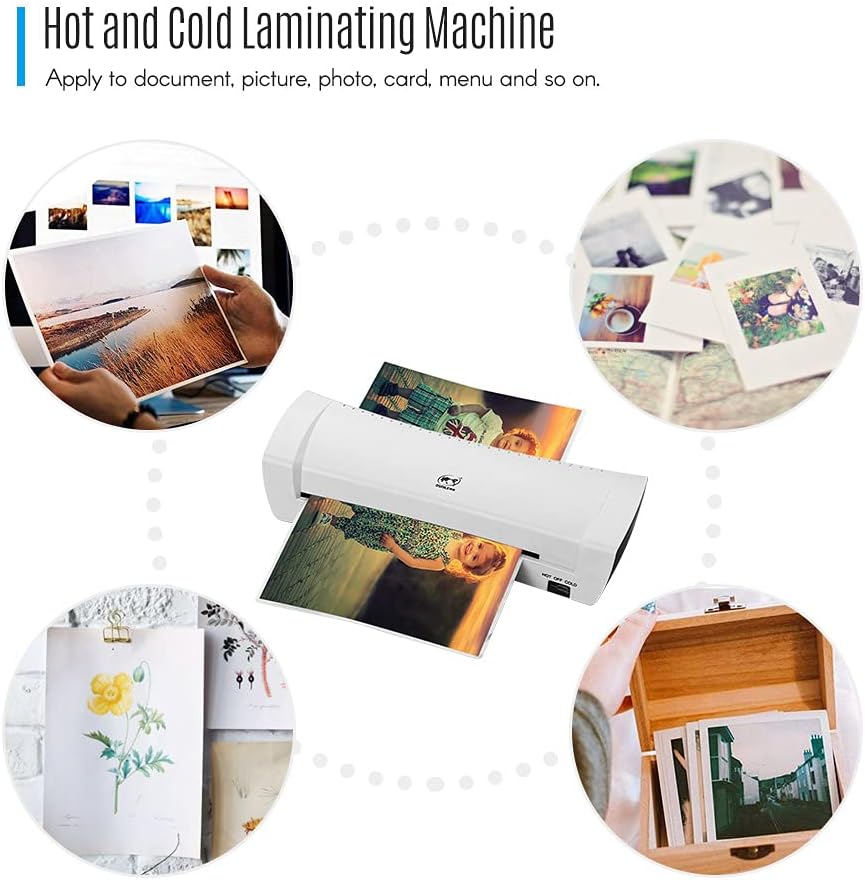
Figure 2.3: Various applications for the laminator, including documents, photos, and cards.
3. დაყენება
- შეფუთვა: Carefully remove the laminator from its packaging. Ensure all components, including the power cord, are present.
- განთავსება: Place the laminator on a stable, flat, and heat-resistant surface. Ensure there is enough space around the machine for proper ventilation and for documents to exit freely.
- დენის კავშირი: შეაერთეთ დენის შტეფსელი შესაფერის ელექტროგადამცემში.

Figure 3.1: The SL200 Laminator with its power cord, ready for connection.
4. საოპერაციო ინსტრუქციები
4.1 ჩართვა და რეჟიმის შერჩევა
Locate the rocker switch on the side of the laminator. This switch controls the power and operating mode.

სურათი 4.1: ახლოდან view of the 'HOT OFF COLD' rocker switch.
4.2 ცხელი ლამინირება
- Switch the rocker to the ცხელი დაყენება.
- Allow the laminator to warm up for approximately 2-4 minutes. The green 'Ready' light will illuminate when the machine has reached the optimal temperature for hot lamination.
- Insert your document, enclosed in a laminating pouch, into the inlet of the machine. Ensure the sealed edge of the pouch is fed first and the document is centered.
- The machine will automatically feed and laminate the document. Retrieve the laminated item from the exit slot.

Figure 4.2: Document insertion for hot lamination, showing the inlet.
4.3 ცივი ლამინირება
- Switch the rocker to the ცივი დაყენება.
- The green 'Ready' light will illuminate immediately. No warm-up time is required for cold lamination.
- Use special cold laminating pouches for this mode. Insert your document, enclosed in a cold laminating pouch, into the inlet.
- The machine will process the document. Retrieve the laminated item from the exit slot.
4.4 Pouch and Document Compatibility
- შესვლის სიგანე: 230mm (A4 size maximum).
- Minimum Pouch Size: Credit card size (54x86mm).
- Maximum Pouch Size: A4.
- Minimum Pouch Thickness: 160 (2*80) micron.
- ჩანთის მაქსიმალური სისქე: 250 (2*125) micron.
- Maximum Lamination Thickness: 0.5 მმ.

Figure 4.3: Visual representation of the laminator's entry width and compatible pouch specifications.
5. მოვლა
- დასუფთავება: გაწმენდის წინ დარწმუნდით, რომ ლამინატორი გამორთულია დენის წყაროდან და სრულად გაცივებულია. გაწმინდეთ გარე ზედაპირი რბილი, მშრალი ქსოვილით. არ გამოიყენოთ აბრაზიული საწმენდები ან გამხსნელები.
- შენახვა: ლამინატორის გამოყენებისას შეინახეთ სუფთა, მშრალ ადგილას.
6. Დიაგნოსტიკა
- Laminator Not Powering On: Check the power cord connection and the electrical outlet. Ensure the rocker switch is in either the 'HOT' or 'COLD' position.
- Laminator Not Heating (Hot Mode): Verify the switch is set to 'HOT'. Allow the full 2-4 minutes for warm-up. If the 'Ready' light does not illuminate, contact customer support.
- Document Jam: If a pouch becomes jammed, immediately switch the laminator to 'OFF' and then to 'COLD' to cool the rollers. The Homgee SL200 features an ABS (Anti-Blocking System) function. If available, press the ABS release button to manually release the jammed pouch. Carefully pull the pouch out.

Figure 6.1: The laminator, indicating the location of the ABS system (if present).
7. სპეციფიკაციები
| ფუნქცია | სპეციფიკაცია |
|---|---|
| მოდელი | SL200 |
| ფერი | თეთრი |
| ლილვაკები | 2 (Hot Shoe) |
| შესვლის სიგანე | 230 მმ |
| Min Pouch Thickness | 160 (2*80) micron |
| Max Pouch Thickness | 250 (2*125) micron |
| Min Pouch Size | Credit Card (54*86mm) |
| Max Pouch Size | A4 |
| Max Lamination Thickness | 0.5 მმ |
| ლამინირების სიჩქარე | 25cm / min |
| გახურების დრო | 2-4 წუთი |
| ენერგიის მოხმარება | 220 W |
| ნივთის ზომა | 35.3 * 12.2 * 7.5 სმ / 13.9 * 4.8 * 2.95 დიუმი |
| ნივთის წონა | 893g / 31.5oz (Product only), 1.05 kg (Package) |
| მწარმოებლის ნაწილის ნომერი | OMGOS2454UKSTOSA |
| UPC | 791877468993 |

Figure 7.1: Physical dimensions of the Homgee SL200 Laminator.
8. გარანტია და მხარდაჭერა
For warranty information or technical support, please refer to the documentation provided with your purchase or contact Homgee customer service through their official website or your retailer. Please have your model number (SL200) and proof of purchase available when contacting support.