

1. შესავალი
This manual provides essential information for the safe and effective use of your Accutime iTIME Kids Smart Watch, Model ITK2005AZ. Please read these instructions thoroughly before initial use and retain them for future reference.
The iTIME Kids Smart Watch is designed for children, offering various features such as a camera, learning games, and activity tracking, without requiring internet connectivity, Wi-Fi, or Bluetooth for core functions, ensuring a secure experience.
2. უსაფრთხოების ინფორმაცია
- დახრჩობის საფრთხე: This device contains small parts. Keep out of reach of very young children.
- ბატარეის უსაფრთხოება: The watch contains a built-in rechargeable lithium-ion battery. Do not attempt to replace the battery yourself. Do not expose the watch to extreme temperatures or dispose of it in fire.
- წყლის წინააღმდეგობა: This watch is not waterproof. Avoid submersion in water or exposure to heavy rain.
- ეკრანის მოვლა: The touchscreen display is fragile. Avoid dropping the watch or subjecting it to strong impacts to prevent screen damage.
- დასუფთავება: გასაწმენდად გამოიყენეთ რბილი, მშრალი ქსოვილი. არ გამოიყენოთ უხეში ქიმიკატები ან აბრაზიული მასალები.
- ზედამხედველობა: გამოყენებისას რეკომენდებულია უფროსების მეთვალყურეობა, განსაკუთრებით მცირეწლოვანი ბავშვებისთვის.
3. პაკეტის შიგთავსი
დარწმუნდით, რომ შეფუთვაში ყველა ნივთია:
- Accutime iTIME Kids Smart Watch (Model: ITK2005AZ)
- USB დამტენი კაბელი
- ინსტრუქციის სახელმძღვანელო


Left: Packaging box for the iTIME Kids Smart Watch. Right: Included USB charging cable.
4. დაყენება
4.1. საწყისი დატენვა
Before first use, fully charge the watch for at least two hours to ensure optimal battery performance. Subsequent charges should be at least one hour.
- Connect the small end of the USB charging cable to the charging port on the side of the watch.
- USB კაბელის უფრო დიდი ბოლო შეაერთეთ სტანდარტულ USB კვების ადაპტერთან (არ მოყვება) ან კომპიუტერის USB პორტთან.
- The watch display will indicate that it is charging.
4.2. ჩართვა/გამორთვა
- ჩართვა: ეკრანის განათებამდე დააჭირეთ და გეჭიროთ ჩართვის ღილაკი (რომელიც, როგორც წესი, საათის გვერდზეა განთავსებული).
- გამორთვა: Press and hold the power button until a power-off option appears on the screen, then tap to confirm. Alternatively, hold the button longer until the screen turns off.
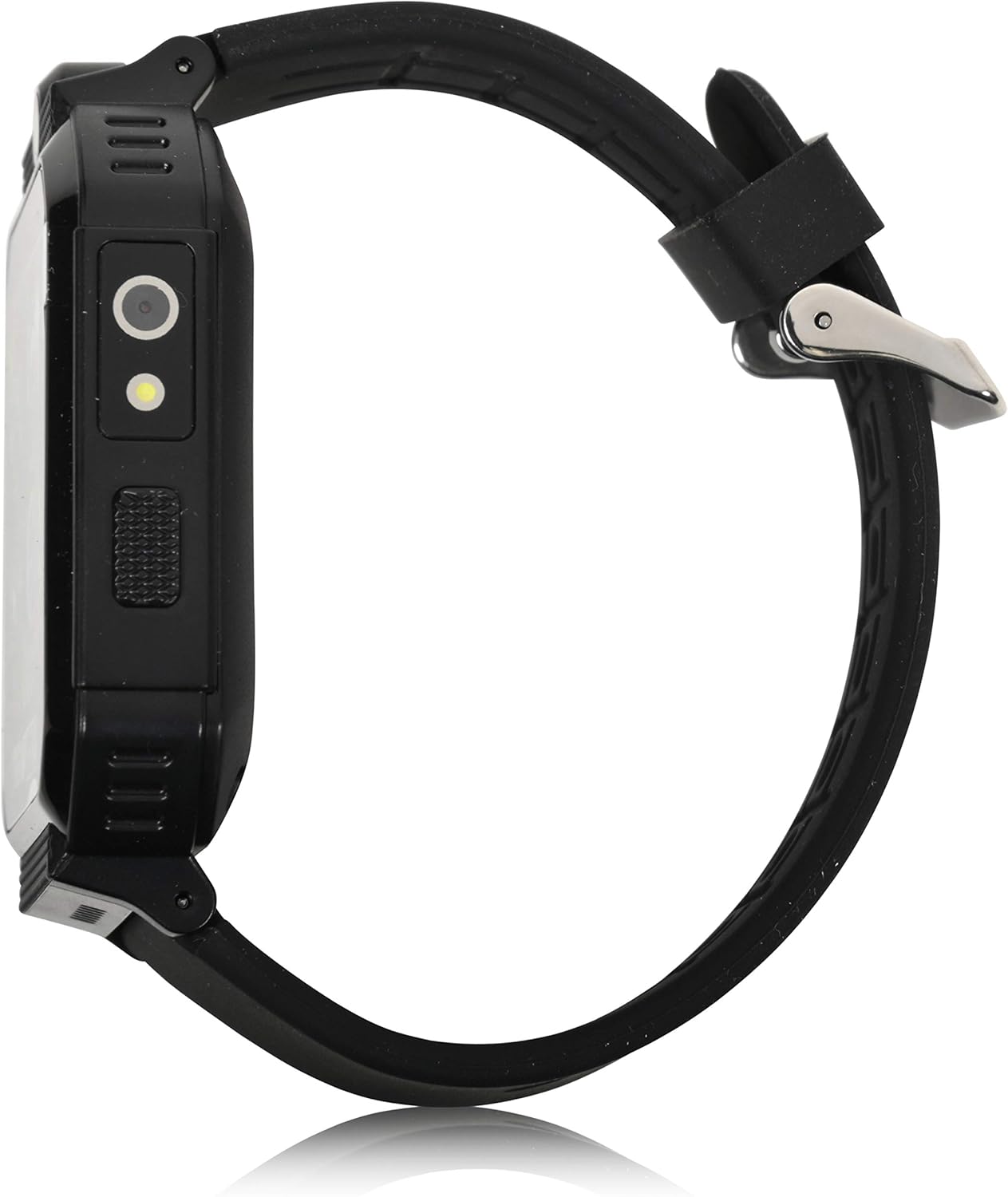
მხარე view of the smartwatch, highlighting the power button and charging port.
5. საოპერაციო ინსტრუქციები
The iTIME Kids Smart Watch features a touchscreen interface for navigation. Swipe left or right to browse through applications and tap an icon to select.
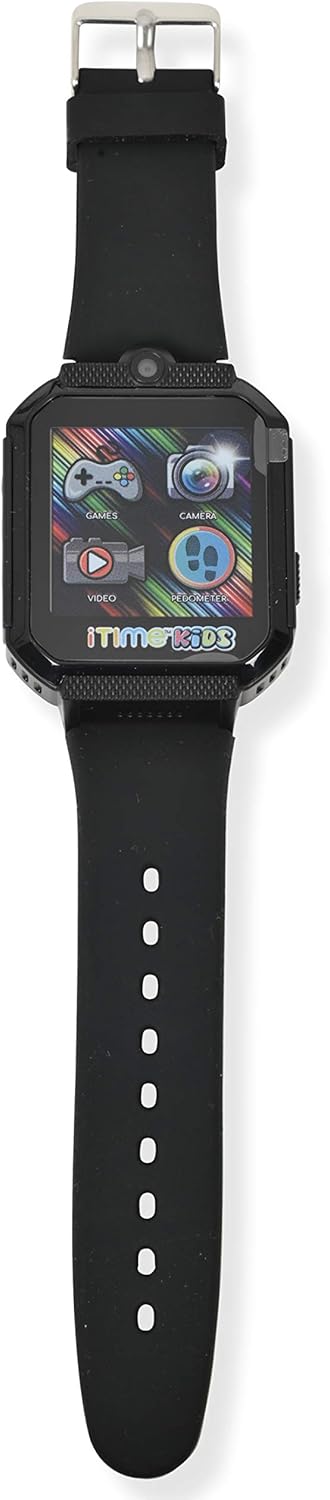
წინა view of the smartwatch display, showing various application icons.
5.1. Time Display and Watch Faces
- The home screen displays the current time.
- To change watch faces, tap and hold on the home screen, then swipe to select a different design.
5.2. Camera and Photo Album
- შეეხეთ კამერა icon to open the selfie camera.
- შეეხეთ ეკრანს ფოტოს გადასაღებად.
- შეეხეთ ფოტო ალბომი ხატი view გადაღებული სურათები.
5.3. თამაშები
- შეეხეთ თამაშები icon to access the preloaded games.
- Select a game from the list and follow the on-screen instructions to play.
5.4. Pedometer and Activity Tracking
- შეეხეთ პედომეტრი ხატი view your step count.
- The watch automatically tracks steps, distance, and estimated calories burned.
5.5. სხვა მახასიათებლები
- ვიდეო პლეერი: შეეხეთ ვიდეო icon to play recorded videos.
- ხმის ჩამწერი: შეეხეთ ხმის ჩამწერი icon to record and playback audio.
- კალკულატორი: Access basic arithmetic functions.
- Მაღვიძარა: დააყენეთ მაღვიძარა შეხსენებებისთვის.
- ფანარი: Activate the built-in flashlight.
- წამზომი: გამოიყენეთ დროის აქტივობებისთვის.
- Body Temperature Sensor: Access the sensor to view real-time body temperature readings.
6. მახასიათებლები დასრულდაview
The Accutime iTIME Kids Smart Watch ITK2005AZ includes the following functionalities:
- სენსორული ეკრანი
- Selfie Camera for photos and videos
- ფოტო ალბომი Viewer
- ვიდეო პლეერი
- ხმის ჩამწერი
- კალკულატორი
- მაღვიძარა
- პედომეტრი საფეხურების მრიცხველი
- კალორიების მრიცხველი
- მანძილის მრიცხველი
- 26 Preloaded Playable Games
- Changeable Watch Faces
- ფანარი
- წამზომი
- Real-time Body Temperature Sensor
- ჩამონტაჟებული მრავალჯერადი დატენვის ბატარეა
7. მოვლა
7.1. დასუფთავება
Wipe the watch and strap with a soft, dry, lint-free cloth. Do not use liquid cleaners or sprays directly on the watch.
7.2. შენახვა
When not in use for extended periods, store the watch in a cool, dry place away from direct sunlight and extreme temperatures. Ensure the battery has some charge before storing to prevent deep discharge.
8. Დიაგნოსტიკა
- Watch does not power on: დარწმუნდით, რომ საათი სრულად არის დატენილი. ჩართვის მცდელობამდე, შეაერთეთ ის დამტენთან მინიმუმ 30 წუთით.
- Screen is unresponsive or frozen: Try restarting the watch by pressing and holding the power button until it powers off, then power it back on.
- ბატარეის ხანგრძლივობა ხანმოკლეა: Ensure the watch is charged for the recommended duration (at least 1 hour for regular use, 2 hours for initial use). Reduce screen brightness or frequency of game use to conserve battery.
- ხმის პრობლემები: Check the volume settings within the watch's menu. If games have separate volume controls, adjust them accordingly.
- დატენვის პრობლემები: Verify that the USB cable is securely connected to both the watch and the power source. Try a different USB port or power adapter.
9. სპეციფიკაციები
| ბრენდი | აკუტიმა |
| მოდელი | ITK2005AZ |
| ჩვენების ტიპი | LCD |
| ეკრანის ზომა | 40 მილიმეტრი |
| ადამიანის ინტერფეისის შეყვანა | სენსორული ეკრანი |
| ბატარეის ტიპი | ლითიუმის იონი (დატენვადი) |
| დატენვის დრო | 1-2 საათი |
| განსაკუთრებული თვისებები | Alarm Clock, Audio Recording, Camera, Pedometer, Time Display, Body Temperature Sensor |
| დაკავშირების ტექნოლოგია | USB (დამუხტვისთვის) |
| უსადენო კომუნიკაციის სტანდარტი | Bluetooth (Note: Product description states no Bluetooth for safety, but specifications list it. For core functions, it does not connect to internet/Wi-Fi/Bluetooth. Bluetooth may be for internal components or specific accessories not advertised for general use.) |

უკან view of the smartwatch, displaying model information.
10. გარანტია და მხარდაჭერა
10.1. ინფორმაცია გარანტიის შესახებ
This Accutime iTIME Kids Smart Watch comes with a ერთწლიანი გარანტია from Accutime Watch Corp. Please retain your proof of purchase for warranty claims.
10.2. მომხმარებელთა მხარდაჭერა
For further assistance, technical support, or warranty inquiries, please contact Accutime Watch Corp. customer service. Refer to the packaging or Accutime's official webსაიტი საკონტაქტო დეტალებისთვის.