
1. შესავალი
The ABB AD1NO-R-15m is an analog time switch designed for daily scheduling with a 15-minute switching interval. This modular device features one normally open (NO) channel and includes a power reserve function to maintain timekeeping during power outages. It is suitable for various electrical scheduling applications.
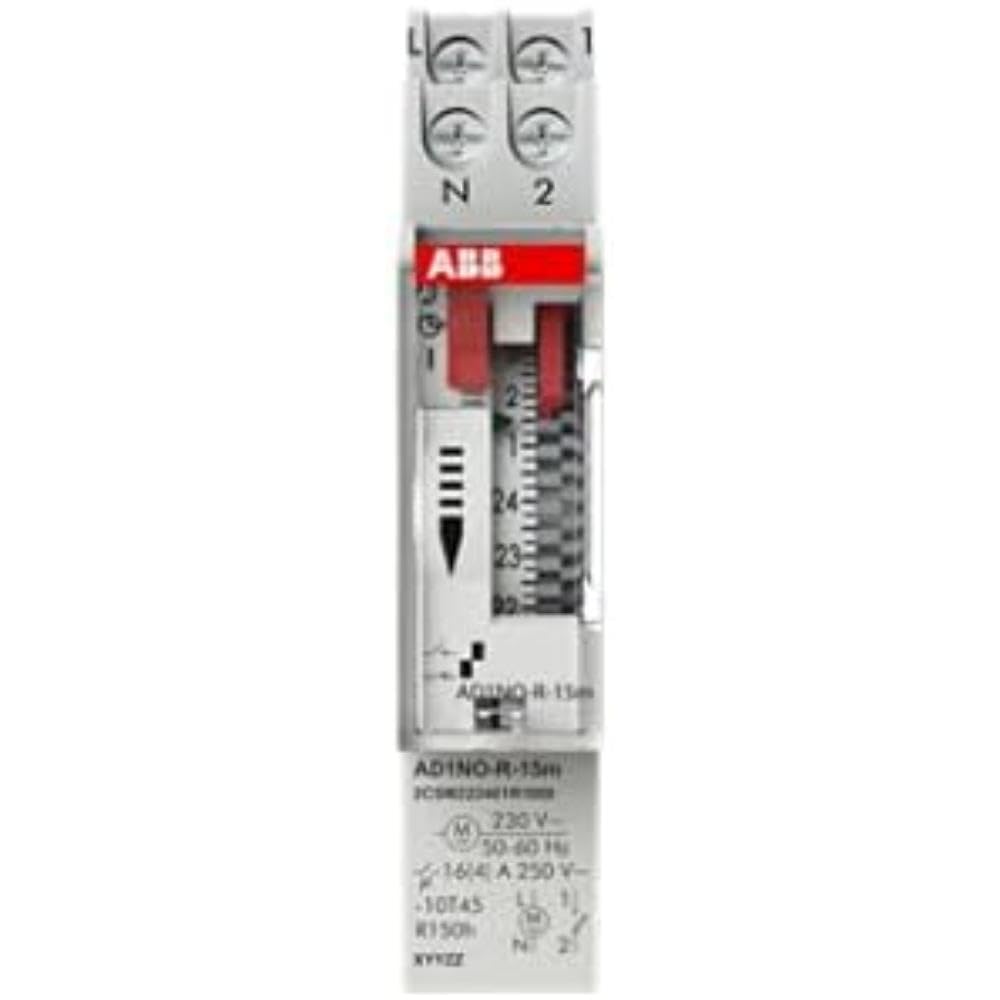
სურათი 1: წინა view of the ABB AD1NO-R-15m Modular Device Switch, highlighting its compact design and control interface.
2. უსაფრთხოების მნიშვნელოვანი ინსტრუქციები
Please read and understand all safety instructions before installing, operating, or maintaining this device. Failure to follow these instructions may result in electric shock, fire, or serious injury.
- მონტაჟი და მოვლა უნდა განხორციელდეს მხოლოდ კვალიფიციური პერსონალის მიერ.
- Disconnect power before installation, maintenance, or servicing to prevent electric shock.
- დარწმუნდით, რომ ყველა გაყვანილობა შეესაბამება ადგილობრივ და ეროვნულ ელექტრო კოდებსა და რეგულაციებს.
- არ ჩართოთ მოწყობილობა, თუ ის დაზიანებული ჩანს.
- ეს მოწყობილობა განკუთვნილია მშრალ გარემოში შიდა გამოყენებისთვის.
3. პროდუქტი დასრულდაview
The AD1NO-R-15m is an analog time switch with the following key features:
- ანალოგური ციფერბლატი: For setting daily schedules.
- 15-Minute Switching: Allows precise control over connected circuits with 15-minute intervals.
- 1 Normally Open (NO) Channel: აკონტროლებს ერთ ელექტრულ წრედს.
- ენერგიის რეზერვი: Maintains timekeeping for a specified duration during power interruptions.
- მოდულური დიზაინი: Suitable for integration into standard electrical panels on a DIN rail.
Note: The power reserve ensures the timer continues to function accurately even if the main power supply is temporarily lost.
4. დაყენება და ინსტალაცია
Follow these steps for proper installation of the AD1NO-R-15m Modular Device Switch:
- დენის გათიშვა: Before beginning, ensure the main power supply to the installation area is completely disconnected at the circuit breaker or fuse box. Verify with a voltage ტესტერი.
- მონტაჟი: Mount the AD1NO-R-15m switch onto a standard DIN rail within an appropriate electrical enclosure. Ensure it is securely fastened.
- გაყვანილობა:
- Connect the incoming phase (L) and neutral (N) wires to the designated input terminals of the time switch.
- Connect the load wire from the output terminal of the time switch to the device you wish to control.
- Ensure all connections are tight and secure. Refer to the wiring diagram printed on the device for specific terminal identification.
- დენის აღდგენა: Once all connections are verified and secure, close the electrical enclosure and restore power to the circuit.
Always consult a qualified electrician for installation if you are unsure or lack experience with electrical wiring.
5. საოპერაციო ინსტრუქციები
To set the time and program the switching schedule:
- დააყენეთ მიმდინარე დრო: Rotate the analog dial clockwise until the current time aligns precisely with the reference arrow or marker on the device's face.
- Program Switching Times: The dial features small segments around its perimeter. Push in the segments corresponding to the times you want the connected circuit to be ON. Pull out segments for OFF periods. Each segment typically represents a 15-minute interval.
- Operating Mode (if applicable): If your model includes a manual override switch (e.g., ON, AUTO, OFF), ensure it is set to "AUTO" for programmed operation.
The internal power reserve will automatically charge when the device is powered, ensuring continued accurate timekeeping during short power outagეს.
6. მოვლა
The AD1NO-R-15m is designed for minimal maintenance. Follow these guidelines to ensure optimal performance:
- დასუფთავება: Keep the device clean and free from dust. Use a dry, soft cloth for cleaning. Do not use liquid cleaners, abrasive materials, or solvents.
- ინსპექტირება: Periodically inspect the wiring connections for tightness and any signs of wear, corrosion, or damage. Ensure all terminals are secure.
- გარემო პირობები: დაზიანების თავიდან ასაცილებლად, დარწმუნდით, რომ სამუშაო გარემო რჩება მითითებულ ტემპერატურასა და ტენიანობაში.
There are no user-serviceable parts inside this device. Do not attempt to open the casinგ, რადგან ეს გააუქმებს გარანტიას და შეიძლება ელექტრო საფრთხის წინაშე დაგაყენოთ.
7. Დიაგნოსტიკა
If you encounter issues with your AD1NO-R-15m switch, refer to the table below for common problems and solutions:
| პრობლემა | შესაძლო მიზეზი | გამოსავალი |
|---|---|---|
| მოწყობილობა არ გადართვის | არ არის კვების წყარო | Check the circuit breaker or fuse. Ensure wiring connections are correct and secure. |
| მოწყობილობა არ გადართვის | არასწორი პროგრამირება | Re-check the dial settings and ensure the correct segments are pushed in or pulled out for desired ON/OFF times. |
| მოწყობილობა არ გადართვის | Manual override engaged | Set the operating mode switch to "AUTO" for programmed operation. |
| დენის გათიშვის შემდეგ დრო არასწორიაtage | Power reserve depleted or faulty | Allow the device to charge its power reserve by keeping it connected to power. If the issue persists, contact customer support. |
If the problem persists after attempting these solutions, please contact ABB customer support for further assistance.
8. ტექნიკური მახასიათებლები
- მოდელი: AD1NO-R-15m
- ნაწილის ნომერი: 2CSM222461R1000
- მწარმოებელი: ნახ
- ტიპი: ანალოგური დროის შეცვლა
- Switching Interval: 15 წუთი
- არხები: 1 ჩვეულებრივ ღია (არა)
- ენერგიის რეზერვი: დიახ
- ნივთის წონა: დაახლოებით 2.82 უნცია (80 გრამი)
- პროდუქტის ზომები: დაახლოებით 3.54 x 0.69 x 2.6 ინჩი (90 x 17.5 x 66 მმ)
- სამონტაჟო ტიპი: DIN Rail (Wall Mount)
- ჩართული კომპონენტები: Modular device switch
- საჭირო ბატარეები: No (features internal power reserve)
- ASIN: B09BP4PFMF
- პირველი ხელმისაწვდომი: 21 წლის 2024 დეკემბერი
შენიშვნა: სპეციფიკაციები შეიძლება შეიცვალოს წინასწარი შეტყობინების გარეშე.
9. გარანტია და მხარდაჭერა
საგარანტიო ინფორმაცია
For detailed warranty terms and conditions, please refer to the official ABB warranty statement provided with your purchase or visit the official ABB webსაიტი. შეინახეთ შეძენის დამადასტურებელი საბუთი გარანტიის მოთხოვნისთვის.
მომხმარებელთა მხარდაჭერა
For technical assistance, troubleshooting, or service inquiries, please contact ABB customer support through their official webსაიტზე ან თქვენი პროდუქტის შეფუთვაში მოცემულ საკონტაქტო ინფორმაციაზე.
ABB-ის ოფიციალური პირი Webსაიტი: www.abb.com