
sofirn A-001
Sofirn HS40 დატენვადი აკუმულატორიamp
მოდელი: A-001
შესავალი
The Sofirn HS40 is a versatile and powerful headlamp designed for various outdoor activities and daily tasks. Featuring a high-performance SST40 LED, it delivers up to 2000 lumens of bright light, ensuring excellent visibility. Its robust construction, IPX8 water resistance, and convenient USB-C charging make it a reliable companion in diverse environments. The magnetic tail cap and two-way clip enhance its utility, allowing it to function as both a headlamp and a handheld or clipped flashlight.

Image: Sofirn HS40 Headlamp with its adjustable headband.
პაკეტის შიგთავსი
- 1x Sofirn HS40 Headlamp
- 1x USB-A to USB-C დამუხტვის კაბელი
- 1x Adjustable Head Band
- 1x Two-way Clip
- 1x 3000mAh 18650 Lithium-Ion Battery (included inside the headlamp)
- 2x სათადარიგო O-რგოლი
- 1x მომხმარებლის სახელმძღვანელო
დაყენება
- ბატარეის დაყენება: მოხსენით თავსახურის უკანა თავსახურიamp. Remove the orange insulating disc from the positive end of the battery. Insert the 18650 battery with the positive (+) end facing towards the head of the lamp. Screw the tail cap back on tightly to ensure proper contact and water resistance.
- Attaching Head Band: გაასრიალეთ თავიamp body into the silicone mount on the adjustable head band. Ensure the headlamp უსაფრთხოდ ზის.
- საწყისი დატენვა: პირველი გამოყენების წინ, სრულად დატენეთ თავიamp. Connect the provided USB-C cable to the charging port on the headlamp and plug the other end into a 5V/2A USB power adapter (not included). The indicator light will show red during charging and turn green when fully charged.

Image: USB-C charging port with red (charging) and green (full) indicator lights.
ოპერაციული ინსტრუქციები
The Sofirn HS40 features both Stepped Mode and Stepless Ramping for brightness control.
ძირითადი ოპერაცია
- ჩართვა/გამორთვა: Single click the side switch to turn the light on or off.
- Change Brightness (Stepped Mode): When the light is on, press and hold the side switch to cycle through Moon, Low, Medium, High. Release the switch to select the desired brightness level.
- ტურბო რეჟიმი: From ON, double-click the side switch to activate Turbo. Double-click again to return to the previous mode.
- მთვარის რეჟიმი: From OFF, press and hold the side switch for 1 second to activate Moonlight mode.
- ჩაკეტვა/განბლოკვა: From OFF, 4 clicks to lock the headlamp. The main LED will flash twice to indicate it is locked. 4 clicks again to unlock. The main LED will flash once to indicate it is unlocked.
Advanced Operation (Stepless Ramping)
- Activate Ramping: From ON, triple-click the side switch to switch between Stepped Mode and Stepless Rampინგ.
- Adjust Brightness (Ramping): In Stepless Ramping mode, press and hold the side switch to smoothly increase or decrease the brightness. Release the switch to set the desired level.
სპეციალური რეჟიმები (სტრობი, SOS, შუქურა)
- From ON, triple-click the side switch to enter Strobe mode.
- While in Strobe mode, double-click to cycle through Strobe, SOS, and Beacon modes.
- Single click to turn off the light.

Image: Visual representation of different brightness levels and their approximate runtimes.
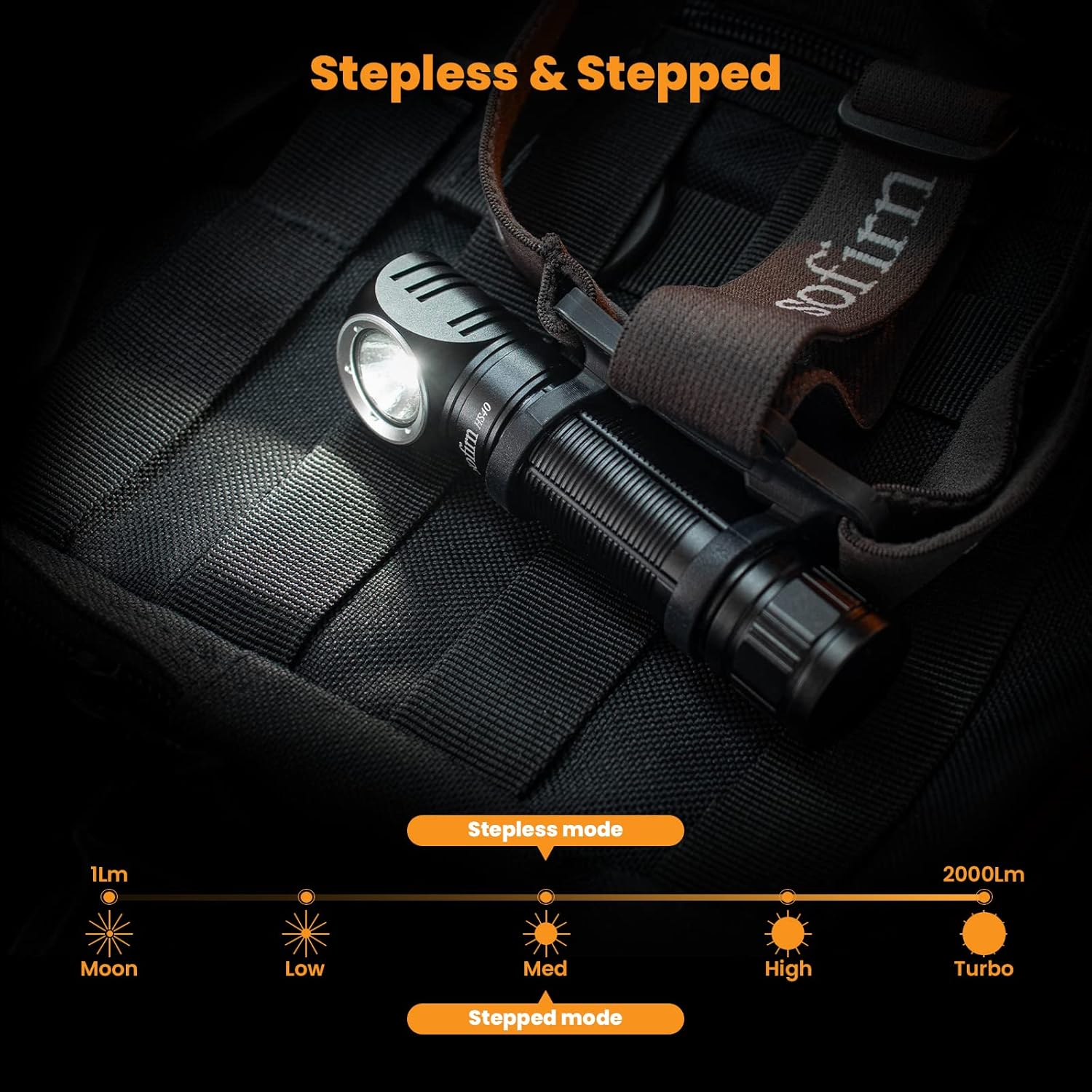
Image: Diagram showing the range of brightness from 1 lumen (Moon) to 2000 lumens (Turbo) in both stepless and stepped modes.
მოვლა
- დამუხტვა: Recharge the battery when the indicator light flashes red, indicating low battery. Use the provided USB-C cable and a compatible 5V/2A adapter.
- დასუფთავება: გაასუფთავეთ თავიamp რბილით, დamp ქსოვილი. არ გამოიყენოთ აბრაზიული გამწმენდები ან გამხსნელები.
- O-ring მოვლა: Periodically lubricate the O-rings with silicone grease to maintain water resistance. Replace O-rings if they appear damaged or worn.
- წყლის წინააღმდეგობა: The HS40 is IPX8 rated, meaning it is protected against continuous immersion in water up to 2 meters. Ensure the USB-C port cover is securely closed before exposing to water.

სურათი: თავიamp is designed to be waterproof, suitable for use in wet conditions.
პრობლემების მოგვარება
- შუქი არ ირთვება:
- დარწმუნდით, რომ აკუმულატორი სწორად არის ჩასმული, დადებითი (+) ბოლო კი თავისკენაა მიმართული.
- Check if the orange insulating disc has been removed from the battery.
- Confirm the tail cap is screwed on tightly.
- თავიamp might be in Lockout Mode. Perform 4 clicks to unlock it.
- Battery may be depleted. Charge the headlamp სრულად.
- შუქი ბუნდოვანია ან ციმციმებს:
- Battery charge is low. Recharge the headlamp.
- Ensure battery contacts are clean. Clean with a cotton swab if necessary.
- დატენვა არ მუშაობს:
- Verify the USB-C cable is properly connected to both the headlamp და დენის წყარო.
- სცადეთ სხვა USB-C კაბელი ან კვების ადაპტერი.
- დარწმუნდით, რომ დამტენი პორტი ნარჩენებისგან თავისუფალია.
სპეციფიკაციები
| ფუნქცია | სპეციფიკაცია |
|---|---|
| ბრენდი | სოფირნი |
| მოდელი | HS40 (A-001) |
| სინათლის წყარო | SST40 LED |
| ფერის ტემპერატურა | 6500 კელვინი |
| მაქსიმალური სიკაშკაშე | 2000 ლუმენი |
| მაქსიმალური სხივის მანძილი | 175 მეტრი |
| დენის წყარო | Battery Powered (1x 18650 Lithium Ion) |
| ბატარეის ტევადობა | 3000 mAh (შედის) |
| დატენვის პორტი | USB Type-C (5V/2A შეყვანა) |
| წყლის წინააღმდეგობა | IPX8 (up to 2 meters underwater, not for diving) |
| მასალა | ალუმინის |
| ნივთის წონა | 65 Grams (headlamp only) / 2.29 ounces |
| პროდუქტის ზომები | 4.72"D x 0.98"W x 0.98"H |
| გაშვების დრო (მაღალი) | 2 საათი |
| გაშვების დრო (საშუალო) | 8 საათი |
| Runtime (Moonlight) | 400 საათი |

Image: Detailed table of modes including Moonlight, Low, Medium, High, Turbo, Strobe, SOS, and Beacon with corresponding lumens, runtimes, and beam distances.
გარანტია და მხარდაჭერა
Sofirn provides responsive and helpful customer service. For any issues, concerns, or warranty claims, please feel free to contact Sofirn customer service for assistance, refund, or replacement.
Please refer to the contact information provided with your product packaging or visit the official Sofirn webსაიტი მხარდაჭერის დეტალებისთვის.
Ask a question about this manual
Ask about setup, troubleshooting, compatibility, parts, safety, or missing instructions. Manuals+ will review the question and use this page’s manual context to help answer it.