
1. პროდუქტი დასრულდაview
The Loolinn Z3 Drone is designed for beginners, offering stable flight and ease of use. It features optical flow positioning technology for intelligent hovering and includes a 720p camera for capturing aerial photos and videos. With three included batteries, users can enjoy extended flight times.

Image 1.1: The Loolinn Z3 Drone, its remote control, and three rechargeable batteries.
2. პაკეტის შიგთავსი
გთხოვთ, დარწმუნდეთ, რომ ქვემოთ ჩამოთვლილი ყველა ნივთი თქვენს პაკეტშია:
- 1 x Loolinn Z3 Drone
- 1 x დისტანციური მართვა
- 1 x მომხმარებლის სახელმძღვანელო
- 1 x სმარტფონის დამჭერი
- 3 x დრონის ბატარეა
- 2 x USB დამტენი კაბელი
- 4 x Rotor Blade Protectors
- 4 x Extra Propellers
- 1 x Screwdriver

Image 2.1: Contents of the Loolinn Z3 Drone package, including the drone, remote, batteries, and accessories.
3. უსაფრთხოების სახელმძღვანელო
Before operating the Loolinn Z3 Drone, please read and adhere to the following safety guidelines to ensure a safe and enjoyable experience:
- Always fly in open areas, away from people, animals, buildings, and obstacles.
- მოერიდეთ ფრენას ძლიერი ქარის ან არასასურველი ამინდის პირობებში.
- დრონთან მუდმივად შეინარჩუნეთ ვიზუალური ხედვის ხაზი.
- Ensure the drone batteries and remote control batteries are fully charged before each flight.
- თითები და თავისუფალი ტანსაცმელი მბრუნავ პროპელერებს მოარიდეთ.
- Do not operate the drone near airports or restricted airspace.
- This product is suitable for ages 14 and up. Adult supervision is recommended for younger users.
4. დაყენება
4.1 აკუმულატორის დატენვა და მონტაჟი
The drone comes with three 1500mAh Lithium Ion batteries. Each battery provides approximately 20 minutes of flight time. Use the provided USB charging cables to charge the drone batteries. A full charge typically takes about 35 minutes per battery.
- Connect the USB charging cable to a power source (e.g., computer USB port, USB wall adapter).
- Connect the battery to the charging cable. The indicator light on the cable will show charging status.
- სრულად დატენვის შემდეგ, გათიშეთ ბატარეა.
- Insert a charged battery into the drone's battery compartment.
The remote control requires 4 AA batteries (not included). Open the battery compartment on the back of the remote and insert the batteries, observing correct polarity.

Image 4.1: The three 1500mAh Lithium Ion batteries included with the Loolinn Z3 Drone.
4.2 პროპელისა და დამცავის მონტაჟი
Attach the propeller guards to the drone's arms by snapping them into place. Ensure they are securely fastened. If replacing propellers, match the propellers marked 'A' with motor 'A' and 'B' with motor 'B'.
4.3 Smartphone Holder Attachment
Attach the smartphone holder to the top of the remote control. This allows you to mount your smartphone to view the drone's camera feed.
4.4 დრონისა და დისტანციური მართვის პულტის დაწყვილება
- განათავსეთ დრონი ბრტყელ, დონის ზედაპირზე.
- ჩართეთ დრონი ჩართვის ღილაკზე დაჭერით. დრონის ინდიკატორის შუქები აინთება.
- ჩართეთ დისტანციური მართვა.
- მარცხენა ჯოისტიკი (დროზელი) ბოლომდე აწიეთ, შემდეგ კი ბოლომდე ჩამოწიეთ. დრონის ინდიკატორები შეწყვეტენ ციმციმს და უწყვეტად ანათებენ, რაც წარმატებულ დაწყვილებაზე მიუთითებს.
4.5 გიროსკოპის კალიბრაცია
After pairing, calibrate the gyroscope for stable flight:
- Ensure the drone is on a flat, level surface.
- Push both joysticks on the remote control down and to the right simultaneously.
- The drone's lights will flash rapidly and then become solid, indicating successful calibration.
5. საოპერაციო ინსტრუქციები
5.1 ფრენის მართვის ძირითადი საშუალებები
- ერთი გასაღებით აფრენა/დაშვება: Press the one-key take-off/landing button (usually marked with an arrow) to automatically take off or land.
- დროსელი (მარცხენა ჯოისტიკი): ასასვლელად მაღლა აწიეთ, დაშვებისთვის კი ქვემოთ ჩამოწიეთ.
- მიმართულების მართვა (მარჯვენა ჯოისტიკი): წინ გადაწევისთვის წინ წაწევა, უკან გადაწევისთვის უკან გადაწევა, მარცხნივ გადაწევისთვის მარცხნივ გადაწევა, მარჯვნივ გადაწევისთვის მარჯვნივ გადაწევა.
- იავ (მარცხენა ჯოისტიკი მარცხნივ/მარჯვნივ): მარცხნივ მოსაბრუნებლად დააჭირეთ მარცხნივ, მარჯვნივ მოსაბრუნებლად დააჭირეთ მარჯვნივ.
5.2 ოპტიკური ნაკადის პოზიციონირება
The Loolinn Z3 Drone is equipped with an optical flow positioning sensor on its underside. This technology helps the drone maintain its position and hover stably, especially in indoor environments or areas with minimal wind. This feature contributes to easier control and clearer image capture.

Image 5.1: The Loolinn Z3 Drone utilizing its optical flow positioning technology for stable flight.
5.3 კამერის მუშაობა
The drone features a 720p camera for capturing photos and videos. To access the camera feed and control, download the dedicated Loolinn drone app on your smartphone and connect via Wi-Fi.
- Download the Loolinn drone app from your smartphone's app store.
- ჩართეთ დრონი.
- Connect your smartphone to the drone's Wi-Fi network (usually named 'Loolinn_XXXX').
- გახსენით აპლიკაცია view კამერის პირდაპირი ტრანსლაცია.
- Use the app interface to take photos or start/stop video recording.

Image 5.2: A smartphone displaying the 720p live video feed from the drone's camera.
5.4 Special Features: 3D Flip
The Loolinn Z3 Drone can perform 3D flips. To execute a flip:
- Fly the drone to a height of at least 2 meters (6.5 feet).
- Press the 3D flip button on the remote control (refer to your remote diagram for exact location).
- Immediately push the right joystick in the desired direction (forward, backward, left, or right) to perform the flip.

Image 5.3: The Loolinn Z3 Drone executing a 3D flip, demonstrating its acrobatic capabilities.
5.5 ფრენის გარემოს გასათვალისწინებელი საკითხები
The Loolinn Z3 Drone is lightweight (approximately 4.65 ounces) and can be sensitive to wind. For optimal performance and control, fly in calm conditions. The maximum control range is approximately 262 feet (80 meters).
6. მოვლა
6.1 ბატარეის მოვლა
- Always use the provided charging cables.
- არ გადატვირთოთ ან გადატვირთოთ ბატარეები.
- შეინახეთ ბატარეები გრილ, მშრალ ადგილას, მზის პირდაპირი სხივებისა და ექსტრემალური ტემპერატურისგან მოშორებით.
- If not used for an extended period, charge batteries to about 50% capacity.
6.2 პროპელერის გამოცვლა
In case of propeller damage, use the included extra propellers and screwdriver for replacement. Ensure the correct 'A' and 'B' propellers are installed on their respective motors.
6.3 დასუფთავება
Use a soft, dry cloth to clean the drone and remote control. Avoid using water or chemical cleaners, which can damage electronic components.
7. Დიაგნოსტიკა
- დრონი არ ირთვება: დარწმუნდით, რომ ბატარეა სრულად დატენილია და სწორად არის ჩასმული.
- დაწყვილების სირთულე: Make sure the drone and remote are turned on and within range. Repeat the pairing steps (Section 4.4).
- არასტაბილური ფრენა: Perform gyroscope calibration (Section 4.5). Avoid flying in windy conditions. Check for damaged propellers.
- Poor camera quality: The camera records at 720p resolution. Ensure good lighting conditions for best results.
- მოკლე ფრენის დრო: დარწმუნდით, რომ ელემენტები სრულად დატენილია. ფრენის დროზე შეიძლება გავლენა იქონიოს აგრესიულმა ფრენამ ან ძლიერმა ქარმა.
- Propeller damage: Replace damaged propellers immediately using the spare parts provided.
- კავშირის დაკარგვა: If the drone loses connection with the remote, it will typically descend and land automatically. Ensure you are within the maximum range of 262 feet.
8. სპეციფიკაციები
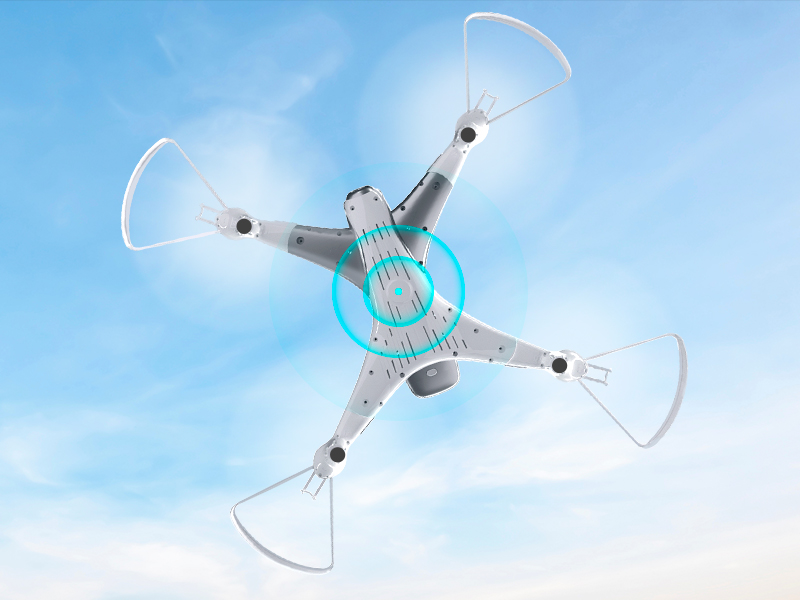
Image 8.1: The Loolinn Z3 Drone's weight measured on an electronic scale.
| ფუნქცია | სპეციფიკაცია |
|---|---|
| ბრენდი | ლოოლინი |
| მოდელის სახელი | Z3 Drone |
| განსაკუთრებული თვისებები | 3 Batteries, 3D Flip, 60 Minutes Long Flight Time (total), Optical Flow Positioning Technology, Stable Flight |
| ასაკობრივი დიაპაზონი (აღწერილობა) | Kids, Teenagers |
| ფერი | თეთრი |
| ვიდეო გადაღების გარჩევადობა | 720p |
| დაკავშირების ტექნოლოგია | Wi-Fi |
| უნარების დონე | დამწყები |
| ნივთის წონა | 4.65 უნცია (დაახლოებით 131.7 გრამი) |
| ბატარეის ტევადობა | 1500 მლნamp საათები (თითო ბატარეაზე) |
| ვიდეო გადაღების ფორმატი | MP4 |
| დისტანციური მართვის ტექნოლოგია | Wi-Fi |
| მაქსიმალური დიაპაზონი | 262 ფუტი (დაახლოებით 80 მეტრი) |
| მასალა | მეტალი, პლასტმასი |
| ბატარეის უჯრედის შემადგენლობა | ლითიუმის იონი |
| მხარდაჭერილი სურათის ფორმატი | JPEG |
| პროდუქტის ზომები | 12.6" სიგრძე x 12.6" სიგანე x 1.97" სიმაღლე |
| UPC | 768492333128 |
9. გარანტია და მხარდაჭერა
Loolinn is committed to providing quality products and customer satisfaction. For any inquiries or support needs, please refer to the following:
- დაბრუნების პოლიტიკა: A full refund is available within 30 days of purchase.
- მომხმარებელთა მომსახურება: Loolinn offers responsive customer service, typically providing replies within 12 hours.
- შემცვლელი ნაწილები: For replacement parts such as propellers, please contact Loolinn customer support or visit their official webსაიტი.
დამატებითი დახმარებისთვის, გთხოვთ, ეწვიოთ Loolinn Store on Amazon.