
შესავალი
This manual provides detailed instructions for setting up, operating, and maintaining your Echo Dot (5th Gen) Kids Owl Edition and Echo Glow bundle. This smart speaker and multicolor smart lamp combination is designed to provide a fun and engaging experience for children, with robust parental controls and access to age-appropriate content.
The Echo Dot Kids offers an improved speaker for clearer vocals and vibrant sound, while the Echo Glow provides customizable lighting to enhance routines and playtime. Both devices integrate seamlessly with Alexa for voice-controlled interactions.
რა არის ყუთში
- Echo Dot (5th Gen) Kids Owl Edition
- Echo Glow multicolor smart lamp
- Glacier white power adapter (15W)
- სწრაფი დაწყების სახელმძღვანელო
- Alexa Guide for kids
დაყენება
Follow these steps to set up your Echo Dot Kids and Echo Glow.
საწყისი ჩართვა
- Plug the power adapter into your Echo Dot (5th Gen) Kids.
- Plug the power adapter into a wall outlet. The light ring on the Echo Dot will turn blue, then orange, indicating it's ready for setup.
- Repeat the process for the Echo Glow.
Wi-Fi-თან დაკავშირება
- ჩამოტვირთეთ Amazon Alexa აპლიკაცია თქვენს სმარტფონზე ან პლანშეტზე.
- გახსენით Alexa აპლიკაცია და შედით თქვენი Amazon ანგარიშით.
- Follow the on-screen instructions to add your new Echo Dot Kids device. The app will guide you through connecting it to your Wi-Fi network.
- Ensure your Wi-Fi network supports 802.11a/b/g/n/ac (2.4 and 5 GHz) networks. Ad-hoc networks are not supported.
Pairing Echo Glow
Once your Echo Dot Kids is set up, you can pair the Echo Glow:
- In the Alexa app, navigate to 'Devices'.
- ახალი მოწყობილობის დასამატებლად შეეხეთ „+“ ხატულას.
- Select 'Light' and then 'Amazon Echo Glow'.
- Follow the app's instructions to discover and pair your Echo Glow.

Image: The Echo Dot (5th Gen) Kids Owl Edition and the Echo Glow lamp, ready for setup.

Image: The Echo Dot Kids Owl Edition and Echo Glow on a surface, with a speech bubble showing the command "Alexa, set a Rainbow Timer for 30 minutes on Charlie's lamp." This illustrates the voice control functionality for the Echo Glow.
ოპერაციული ინსტრუქციები
Your Echo Dot Kids and Echo Glow are designed for intuitive voice control through Alexa.
ხმოვანი ბრძანებები
To interact with your Echo Dot Kids, simply say the wake word "Alexa" followed by your command or question. Alexa will automatically provide kid-friendly responses and filter explicit content.
- მუსიკა: "Alexa, play music." (Streams from Amazon Music, Apple Music, Spotify, etc.)
- ისტორიები: "Alexa, read a bedtime story."
- კითხვები: "Alexa, how far away is the sun?"
- რუტინები: "Alexa, good night." (Can be configured to trigger bedtime routines like dimming lights or playing soothing sounds.)
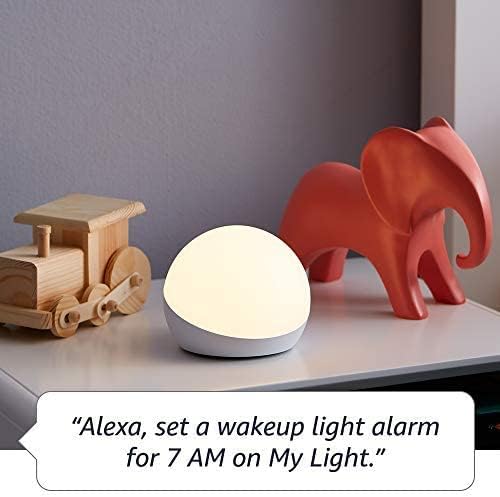
- Timers/Alarms: "Alexa, set a Rainbow Timer for 30 minutes on Charlie's lamp." or "Alexa, set a wakeup light alarm for 7 AM on My Light."
- ზარები: Kids can call parent-approved friends and family.

Image: The Echo Dot Kids Dragon Edition on a surface, with a speech bubble showing the command "Alexa, play music." This demonstrates the device's ability to stream audio content.

Image: The Echo Dot Kids Owl Edition on a desk, with a speech bubble showing the command "Alexa, how far away is the sun?" This highlights the device's capability to answer questions and provide information.
მშობელთა კონტროლი
Manage your child's experience through the Amazon Parent Dashboard. Here you can:
- Set daily time limits for device usage.
- Review აქტივობის ჟურნალები.
- Approve contacts for calls.
- Filter explicit songs and content.
Amazon Kids+ Features
Your bundle includes 1 year of Amazon Kids+, a digital subscription for kids aged 3-12. This provides access to:
- ბავშვებისთვის განკუთვნილი აუდიო წიგნები.
- ინტერაქტიული თამაშები.
- სახალისო დილის რუტინები.
- Alexa-ს საგანმანათლებლო უნარები.

Image: A graphic displaying icons for various age-appropriate content available through Amazon Kids+, including Barbie, Disney, Frozen, and Nat Geo Kids. This illustrates the diverse range of content accessible to children.
მოვლა
დასუფთავება
To clean your Echo Dot Kids and Echo Glow, use a soft, dry, lint-free cloth. Do not use abrasive cleaners or sprays directly on the devices.
პროგრამული უზრუნველყოფის განახლებები
Your Echo Dot Kids receives automatic software security updates. Ensure your device is connected to Wi-Fi to receive these updates, which improve performance and add new features.
კონფიდენციალურობის მახასიათებლები
The Echo Dot Kids is designed with multiple layers of privacy controls:
- მიკროფონის გამორთვის ღილაკი: Press the microphone off button on the top of the device to electronically disconnect the microphones. The light ring will turn red when the microphone is off.
- Wake Word ტექნოლოგია: Alexa devices are designed to detect the wake word only.
- სტრიმინგის ინდიკატორები: Visual indicators show when Alexa is streaming audio to the cloud.
- ხმის ჩაწერის მართვა: თქვენ გაქვთ უნარი view and delete your voice recordings through the Alexa app or Amazon Privacy Hub.
სურათი: ზედა ნაწილი view of the Echo Dot Kids Owl Edition, with a red line through a microphone icon, indicating the microphone is turned off. Below it, text reads: "Press the mic off button to disconnect the microphones."
პრობლემების მოგვარება
საერთო საკითხები და გადაწყვეტილებები
- მოწყობილობა არ პასუხობს: Ensure the device is plugged in and the light ring is active. Try unplugging and re-plugging the power adapter.
- Wi-Fi კავშირი არ არის: Check your Wi-Fi router and ensure it's working. Re-run the Wi-Fi setup process in the Alexa app. Ensure your device is within range of your Wi-Fi network.
- Alexa not hearing commands: Ensure the microphone is not muted (red light ring indicates mute). Speak clearly and at a normal volume.
- Echo Glow not responding: Verify it's plugged in and paired correctly in the Alexa app. Try unpairing and re-pairing if issues persist.
- Content not playing: Verify your Amazon Kids+ subscription is active. Check internet connection.
სპეციფიკაციები
| ფუნქცია | აღწერა |
|---|---|
| ზომა | 3.9" x 3.9" x 3.5" (100 მმ x 100 მმ x 89 მმ) |
| წონა | 10.7 oz (304) |
| აუდიო | 1.73” (44 მმ) წინა დინამიკი, Lossless High Definition |
| Wi-Fi კავშირი | ორზოლიანი Wi-Fi მხარს უჭერს 802.11a/b/g/n/ac (2.4 და 5 GHz) ქსელებს. არ უჭერს მხარს ad-hoc ქსელებს. |
| Bluetooth დაკავშირება | A2DP support for audio streaming, AVRCP for voice control of connected mobile devices. |
| ჭკვიანი სახლის პროტოკოლები | Wi-Fi, Bluetooth დაბალი ენერგიის ბადისებრი. |
| სისტემის მოთხოვნები | Alexa app compatible with Fire OS, Android, and iOS devices, or via web ბრაუზერი. |
| თაობა | Echo Dot (მე-5 თაობა) Kids - გამოშვება 2022 წელს |
| ენა | ალექსა ფლობს ინგლისურ და ესპანურ ენებს. ესპანური არ არის ხელმისაწვდომი Amazon Kids-ში. |
| ასაკობრივი დიაპაზონი | 3 წლიდან და ზემოთ. გაფრთხილება: დახრჩობის საშიშროება - მცირე ზომის ნაწილები. არ არის განკუთვნილი 3 წლამდე ასაკის ბავშვებისთვის. |
| გამოწერა | Includes 1 year of Amazon Kids+. |
გარანტია და მხარდაჭერა
საგარანტიო ინფორმაცია
Your Echo Dot (5th Gen) Kids and Echo Glow bundle comes with a 2-year worry-free guarantee. This warranty covers defects in materials and workmanship under normal use. For detailed terms and conditions, please refer to the warranty information provided with your product or visit the Amazon webსაიტი.
მომხმარებელთა მხარდაჭერა
For further assistance, troubleshooting, or warranty claims, please visit the Amazon customer support website or contact Amazon customer service directly. You can also find more information and FAQs on the Amazon product page for the Echo Dot (5th Gen) Kids and Echo Glow.
Software security updates are guaranteed for at least four years after the device is last available for purchase as a new unit on Amazon webსაიტები.