
შესავალი
The Xiaomi Redmi Pad L83 is a WiFi-only tablet designed for entertainment and productivity. It features a 10.61-inch display, an Octa-Core MediaTek Helio G99 processor, and a large 8000mAh battery. This manual provides essential information to help you set up, operate, and maintain your device.
რა არის ყუთში
Upon unboxing your Xiaomi Redmi Pad, you should find the following items:
- 1 x Xiaomi Redmi Pad L83 Tablet
- 1 x მანქანის დამტენი
- 1 x USB კაბელი
Video: Unboxing and First Review of the Xiaomi Redmi Pad. This video demonstrates the contents of the product packaging and initial impressions of the device.
დაყენება
- ჩართვა: Press and hold the Power button located on the top edge of the tablet until the Xiaomi logo appears.
- საწყისი კონფიგურაცია: მიჰყევით ეკრანზე გამოტანილ მითითებებს ენის, რეგიონის ასარჩევად და Wi-Fi ქსელთან დასაკავშირებლად.
- Google ანგარიშის დაყენება: შედით თქვენი Google ანგარიშით ან შექმენით ახალი, რათა ისარგებლოთ Google სერვისებით და Play Store-ით.
- Ეკრანის დაბლოკვა: Set up a screen lock method (Pattern, PIN, Password, or Face Unlock) for security. Note that Face Unlock is less secure than other methods.
- პროგრამული განახლებები: Ensure your tablet is running the latest software by checking for updates in the Settings menu.
სურათი: წინა მხარე view of the Xiaomi Redmi Pad, showing the display and the location of the SIM/microSD card tray on the side.
ოპერაციული ინსტრუქციები
ჩვენება და აუდიო
The Redmi Pad features a 10.61-inch IPS display with a resolution of 2000x1200 pixels and a 90Hz refresh rate, offering a smooth visual experience. It supports Dolby Atmos audio through its quad speakers, providing immersive sound for media consumption.
- ჩვენება: 10.61-inch, 2000x1200 resolution, 90Hz refresh rate, 400 nits (typ) brightness.
- აუდიო: Quad speakers with Dolby Atmos support for rich sound.
ვიდეო: ყოვლისმომცველი მიმოხილვაview of the Xiaomi Redmi Pad, highlighting its display quality, audio performance, and overall user experience.
შესრულება და თამაშები
Powered by the MediaTek Helio G99 Octa-core processor, the Redmi Pad delivers smooth performance for daily tasks and medium-graphic gaming. It is available with 3GB, 4GB, or 6GB of RAM and 64GB or 128GB of storage, expandable via microSD card.
- პროცესორი: MediaTek Helio G99 Octa-core.
- ოპერატიული მეხსიერება: 3GB, 4GB, or 6GB options.
- შენახვა: 64GB or 128GB, expandable via microSD.
Video: A detailed comparison between the Redmi Pad and Samsung Galaxy Tab S6 Lite 2022, focusing on performance, display, and overall value for money.
Software & Updates
The tablet runs MIUI 13 based on Android 12. Xiaomi promises two major Android updates and three years of security updates, ensuring your device remains up-to-date and secure.
- ოპერაციული სისტემა: Android 12 with MIUI 13.
- განახლებები: Two major Android updates and three years of security updates.
კამერა
The Redmi Pad is equipped with an 8MP rear camera and an 8MP front camera (105° FOV with FocusFrame). Both cameras are suitable for casual photography, video calls, and document scanning.
- უკანა კამერა: 8MP, Full HD Video Recording.
- წინა კამერა: 8MP (FOV - 105°), ideal for video calls.

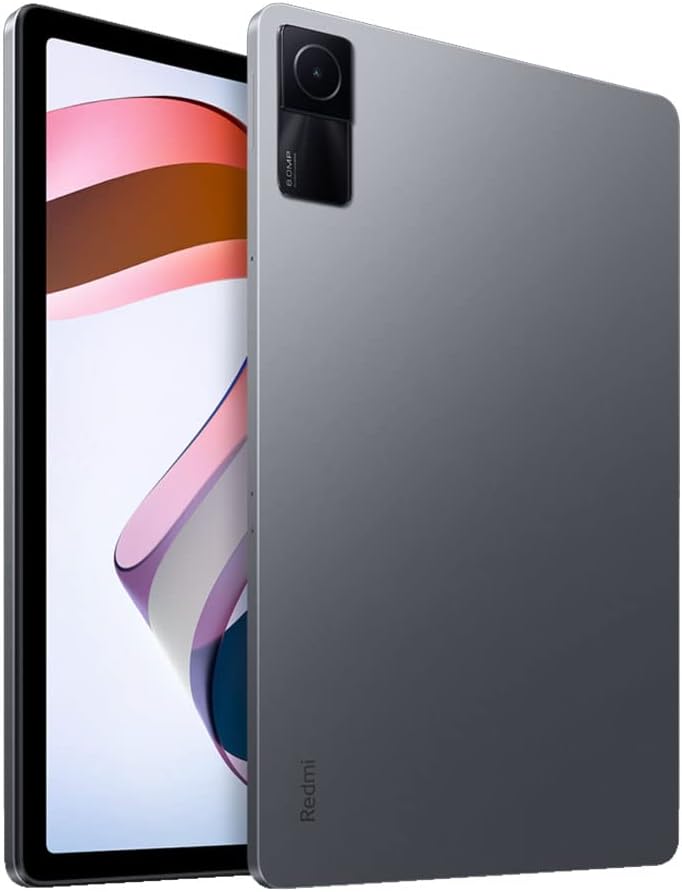
სურათი: უკანა მხარე view of the Xiaomi Redmi Pad, showcasing the single 8MP rear camera module.
ბატარეის ხანგრძლივობა
With an 8000mAh battery, the Redmi Pad offers extended usage times, making it suitable for long commutes or entertainment sessions. It supports 18W fast charging.
- ბატარეის მოცულობა: 8000 mAh.
- დამუხტვა: 18W fast charging.
მოვლა
- დასუფთავება: ეკრანისა და კორპუსის გასაწმენდად გამოიყენეთ რბილი, უბუშტო ქსოვილი. მოერიდეთ უხეში ქიმიკატების გამოყენებას.
- პროგრამული განახლებები: ოპტიმალური მუშაობისა და უსაფრთხოების უზრუნველსაყოფად, რეგულარულად შეამოწმეთ და დააინსტალირეთ სისტემის განახლებები.
- შენახვის მენეჯმენტი: პერიოდულად გაწმინდეთ არასაჭირო files and apps to free up storage space and improve device speed.
- ბატარეის მოვლა: Avoid extreme temperatures and fully draining the battery frequently to prolong its lifespan.
პრობლემების მოგვარება
- მოწყობილობა არ რეაგირებს: If the tablet becomes unresponsive, press and hold the Power button for about 10 seconds to force a restart.
- Wi-Fi კავშირის პრობლემები: Try restarting your Wi-Fi router and the tablet. If the issue persists, forget the network in Wi-Fi settings and reconnect.
- აპლიკაციის ავარია: Clear the cache and data of the problematic app in Settings > Apps. If it continues, uninstall and reinstall the app.
- ნელი შესრულება: Close background apps, clear cache, and ensure sufficient free storage. Consider a factory reset as a last resort (back up your data first).
- დაუკავშირდით მხარდაჭერას: For persistent issues, refer to the Xiaomi support webსაიტი ან დაუკავშირდით მომხმარებელთა მომსახურებას.
პროდუქტის სპეციფიკაციები
| ფუნქცია | სპეციფიკაცია |
|---|---|
| ბრენდი | XIAOMI |
| მოდელის სახელი | Redmi Pad |
| მოდელის ნომერი | L83 |
| ეკრანის ზომა | 10.61 ინჩი |
| ჩვენების გარჩევადობა | 2000x1200 |
| განახლების სიჩქარის ჩვენება | 90 ჰც |
| პროცესორი | MediaTek Helio G99 რვაბირთვიანი (2.2 GHz) |
| RAM მეხსიერება | 4 GB (available in 3GB, 4GB, 6GB variants) |
| შენახვის მოცულობა | 128 GB (available in 64GB, 128GB variants) |
| ოპერაციული სისტემა | Android 12 (MIUI 13) |
| უკანა კამერა | 8 დეპუტატი |
| წინა კამერა | 8 მეგაპიქსელი (105° ხედვის კუთხე) |
| ბატარეის ტევადობა | 8000 mAh |
| დაკავშირება | Wi-Fi 5, Bluetooth v5.3, USB-C |
| აუდიო | Quad Speakers, Dolby Atmos supported |
გარანტია და მხარდაჭერა
The Xiaomi Redmi Pad L83 comes with a limited warranty. For detailed warranty terms and conditions, please refer to the warranty card included in the box or visit the official Xiaomi support webსაიტი.
ტექნიკური მხარდაჭერის, პრობლემების მოგვარების დახმარების ან მომსახურების მოთხოვნისთვის, გთხოვთ, დაუკავშირდეთ Xiaomi-ს მომხმარებელთა მხარდაჭერის სამსახურს მათი ოფიციალური არხებით.