
PRORECK SP-15
PRORECK SP-15 აკუმულატორიანი დინამიკი და Stage მონიტორის მომხმარებლის სახელმძღვანელო
მოდელი: SP-15
შესავალი
Thank you for choosing the PRORECK SP-15 15-inch 1400W P.M.P.O Stereo Powered Stage Monitor and PA Speaker. This versatile audio system is designed to deliver powerful and clear sound for a wide range of applications, including churches, weddings, conferences, ballrooms, and live performances. Featuring a built-in Digital Signal Processor (DSP), Bluetooth 5.0 connectivity, and multiple input channels, the SP-15 offers exceptional flexibility and control over your audio. Please read this manual thoroughly before operating the unit to ensure proper use and to maximize its performance and longevity.
უსაფრთხოების ინფორმაცია
ელექტროშოკის, ხანძრის ან დაზიანების თავიდან ასაცილებლად ყოველთვის დაიცავით შემდეგი უსაფრთხოების ზომები:
- დენის წყარო: შეაერთეთ მოწყობილობა მხოლოდ მითითებულ დენის წყაროსთან.tagე. დარწმუნდით, რომ კვების კაბელი არ არის დაზიანებული ან მოჭერილი.
- ვენტილაცია: Do not block ventilation openings. Ensure adequate airflow around the speaker to prevent overheating.
- წყალი და ტენიანობა: არ დატოვოთ მოწყობილობა წვიმის ან ტენიანობის ზემოქმედების ქვეშ. არ დადოთ მასზე სითხით სავსე ნივთები, მაგალითად, ვაზები.
- სითბოს წყაროები: მოწყობილობა მოარიდეთ სითბოს წყაროებს, როგორიცაა რადიატორები, გამათბობლები, ღუმელები ან სხვა მოწყობილობები (მათ შორის ampგამხსნელები), რომლებიც წარმოქმნიან სითბოს.
- დასუფთავება: გაწმენდის წინ გამორთეთ მოწყობილობა დენის წყაროდან. გამოიყენეთ მხოლოდ მშრალი ქსოვილი.
- მომსახურება: არ სცადოთ ამ პროდუქტის დამოუკიდებლად მომსახურება. ყველა სახის მომსახურებისთვის მიმართეთ კვალიფიციურ სერვის პერსონალს. მომსახურება საჭიროა მაშინ, როდესაც მოწყობილობა რაიმე ფორმით დაზიანებულია, მაგალითად, დაზიანებულია კვების კაბელი ან შტეფსელი, სითხე დაიღვარა ან რაიმე საგნები ჩავარდა მოწყობილობაში, მოწყობილობა წვიმის ან ტენიანობის ზემოქმედების ქვეშ მოექცა, ნორმალურად არ მუშაობს ან დაეცა.
- განთავსება: Place the speaker on a stable, flat surface or a suitable speaker stand. Avoid placing it in unstable positions where it could fall and cause injury or damage.
პაკეტის შიგთავსი
გთხოვთ, შეამოწმოთ, რომ ყველა ნივთი შეფუთვაშია:
- PRORECK SP-15 Powered PA Speaker
- Power Cord (5-inch, 3-prong)
- მომხმარებლის სახელმძღვანელო (ეს დოკუმენტი)
პროდუქტი დასრულდაview
წინა და გვერდითი View
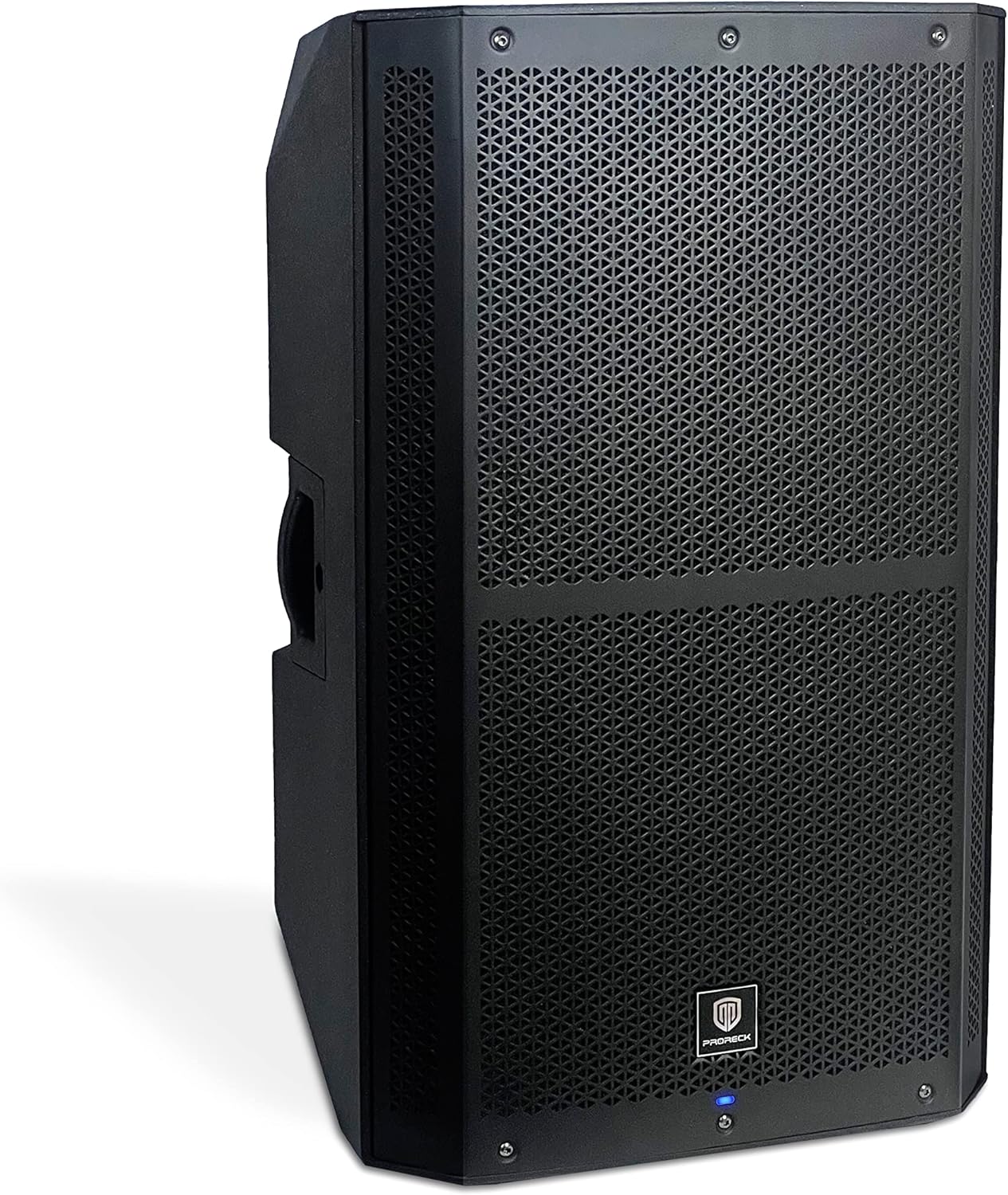
სურათი 1: წინა და გვერდითი view of the PRORECK SP-15 speaker, showcasing its robust polypropylene enclosure and front grille.

სურათი 2: მხარე view of the PRORECK SP-15, highlighting the integrated handle for easy transport.
The PRORECK SP-15 features a durable polypropylene construction designed to reduce resonance and enhance sound quality. It includes an integrated handle for convenient portability. The front grille protects the 15-inch woofer and 1.75-inch horn coil, which are engineered for powerful and clear audio output.

Figure 3: Illustration of the 15-inch woofer with 3-inch voice coil and 1.75-inch horn coil for enhanced sound.
Rear Panel and Controls (4-Channel Mixer)

სურათი 4: დეტალური view of the PRORECK SP-15's rear panel, showing the 4-channel mixer and DSP controls.

Figure 5: Full rear panel view, including power input and switch.
The rear panel houses all the essential inputs, outputs, and controls for the SP-15. It features a comprehensive 4-channel mixer with a built-in Digital Signal Processor (DSP) for precise audio adjustments.
- DSP USB SET: USB port for DSP settings and updates.
- Bluetooth Switch Button: ააქტიურებს/გამორთავს Bluetooth-ის დაწყვილების რეჟიმს.
- სტერეო RCA შეყვანა: RCA გამომავალი მოწყობილობების დასაკავშირებლად.
- XLR Mix Output: For connecting to another speaker or mixer.
- LED ეკრანი: Shows DSP menu, levels, and settings.
- Function Selection Knob (DSP CONTROL): Navigates and selects options within the DSP menu.
- 1/4"/XLR Combo Aux/Line Input: Versatile input for auxiliary or line-level signals.
- 1/4"/XLR Combo Mic/Line Input: Versatile input for microphone or line-level signals.
- Line/Mic Switch button: Toggles input sensitivity between line and microphone levels for the combo inputs.
- მოპოვების მართვის ღილაკი: Adjusts the input gain for connected devices.
დაყენება
საწყისი განთავსება
The PRORECK SP-15 can function as both a traditional PA speaker and a stage monitor. Its design allows for flexible placement:
- PA Speaker Mode: For general sound reinforcement, place the speaker upright on a flat, stable surface or mount it on a compatible speaker stand.
- Stage Monitor Mode: For use as a floor monitor, position the speaker on its side, utilizing its angled design to direct sound towards the performer.

Figure 6: The PRORECK SP-15 configured as a PA speaker (left) and a stage monitor (right).
დენის კავშირი
- დარწმუნდით, რომ უკანა პანელზე დენის ჩამრთველი „გამორთულ“ პოზიციაზეა.
- Connect the provided 3-prong power cord to the AC inlet on the rear panel of the speaker.
- შეაერთეთ დენის კაბელის მეორე ბოლო დამიწებულ ელექტრო განყოფილებაში.
აუდიო წყაროების დაკავშირება
The SP-15 offers multiple input options:
- Microphones/Line-level Instruments: Use the 1/4"/XLR Combo Mic/Line Input (8). Ensure the Line/Mic Switch button (9) is set appropriately for your source.
- Auxiliary/Line-level Devices: Use the 1/4"/XLR Combo Aux/Line Input (7).
- RCA Devices: Connect devices like CD players or DJ mixers to the Stereo RCA Input (3).
- Bluetooth მოწყობილობები: For wireless audio streaming, refer to the "Bluetooth Pairing" section under Operating Instructions.
After connecting your sources, you can use the XLR Mix Output (4) to link the SP-15 to another powered speaker or a main mixer, expanding your sound system.
ოპერაციული ინსტრუქციები
ჩართვა/გამორთვა
- Before powering on, ensure all gain control knobs are turned down to their minimum setting.
- Flip the power switch on the rear panel to the "ON" position. The LED display screen (5) will illuminate.
- Slowly increase the Gain Control Knob (10) for your active input to the desired listening level.
- To power off, turn down all gain controls, then flip the power switch to the "OFF" position.
Using the DSP Processor
The built-in Digital Signal Processor (DSP) allows for advanced sound customization:
- Press the Function Selection Knob (DSP CONTROL) (6) to enter the DSP menu on the LED Display Screen (5).
- Rotate the knob to navigate through the menu options (e.g., EQ settings, crossover, delay, presets).
- Press the knob again to select an option.
- Rotate the knob to adjust the selected parameter.
- Press the knob to confirm the setting or exit the sub-menu.
- The DSP allows you to set up your speaker with personal sound styles, optimizing it for different environments or audio content.
Bluetooth დაწყვილება
The SP-15 features Bluetooth 5.0 for wireless audio streaming:
- Press the Bluetooth Switch Button (2) on the rear panel. The LED display will indicate Bluetooth pairing mode (e.g., "BT Pairing").
- On your Bluetooth-enabled device (e.g., smartphone, tablet), go to its Bluetooth settings and search for available devices.
- Select "PRORECK SP-15" from the list.
- Once connected, the LED display will confirm the successful pairing.
- You can now stream audio wirelessly from your device to the SP-15.

Figure 7: Illustrates Bluetooth connectivity between a smartphone and the PRORECK SP-15 speaker.
Using as PA Speaker or Stage მონიტორი
The SP-15 is designed for dual functionality:
- PA Speaker: იდეალურია amplifying sound to a large audience. Position upright on a stand or flat surface.
- Stage მონიტორი: Perfect for musicians to hear themselves on stage. Position on its side with the angled design facing the performer.
The 1400W peak power and 3-inch voice coil ensure penetrating sound, capable of accommodating up to 100 persons in a typical setting.
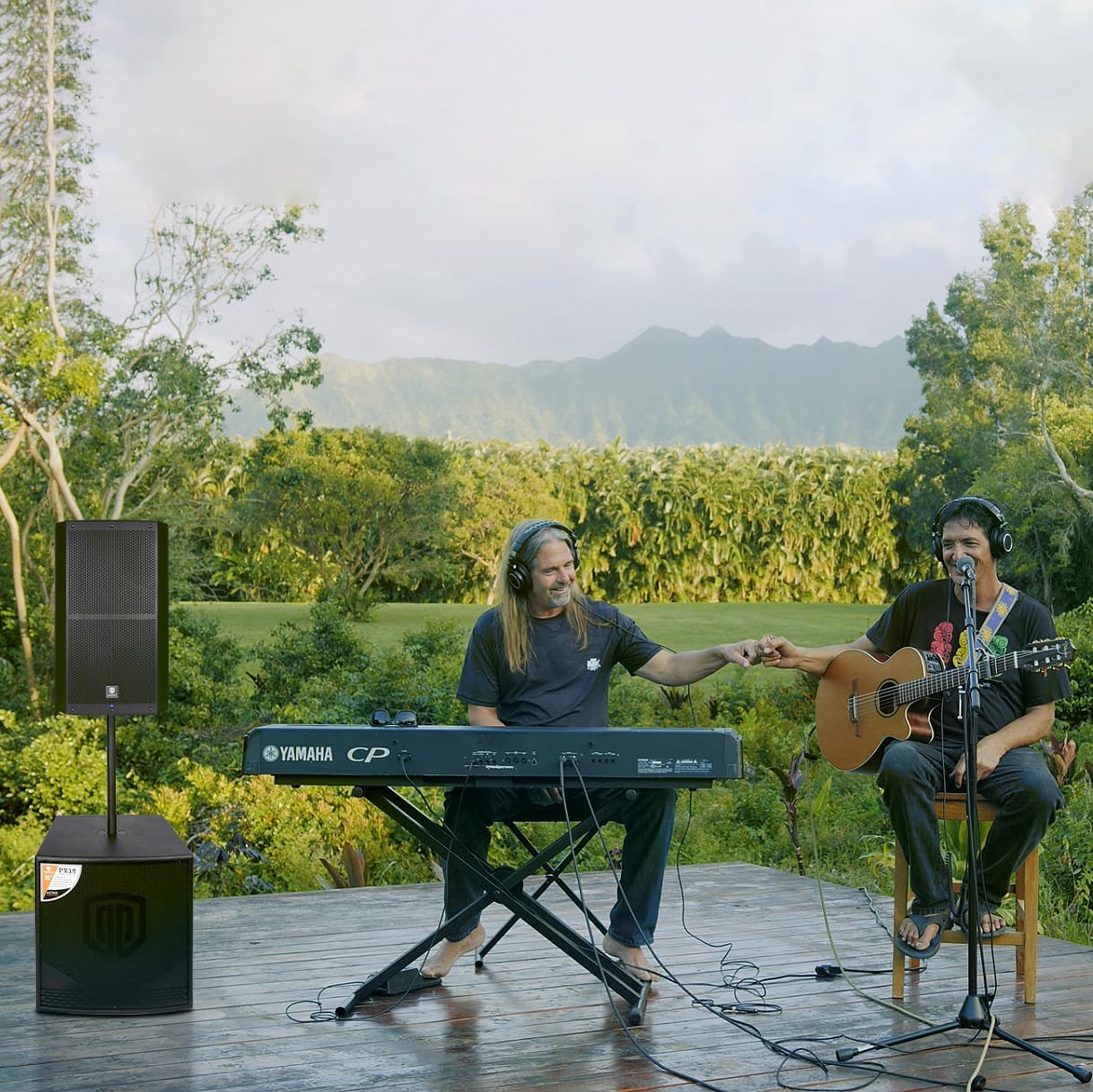
Figure 8: The PRORECK SP-15 being used in an outdoor musical performance, demonstrating its versatility.
მოვლა
- დასუფთავება: გაწმენდის წინ ყოველთვის გამორთეთ დინამიკი. გარე ზედაპირის გასაწმენდად გამოიყენეთ რბილი, მშრალი ქსოვილი. არ გამოიყენოთ აბრაზიული საწმენდები, ცვილები ან გამხსნელები.
- შენახვა: If storing the speaker for an extended period, keep it in a cool, dry place, away from direct sunlight and extreme temperatures.
- ვენტილაცია: რეგულარულად შეამოწმეთ, რომ ვენტილაციის ღიობები მტვრისა და ნარჩენებისგან თავისუფალია, რათა უზრუნველყოთ სითბოს სათანადო გაფრქვევა.
- კაბელები: Inspect power and audio cables periodically for any signs of wear or damage. Replace damaged cables immediately.
პრობლემების მოგვარება
| პრობლემა | შესაძლო მიზეზი | გამოსავალი |
|---|---|---|
| არავითარი ძალა | Power cord not connected; Power outlet faulty; Power switch off; Blown fuse. | Ensure power cord is securely connected. Try a different outlet. Turn power switch ON. Check and replace fuse if necessary (T5A fuse). |
| ხმის გამომავალი არ არის | Input gain too low; Incorrect input selected; Audio cable faulty; Source device not playing; Bluetooth not paired. | Increase gain control. Verify correct input connection. Test with a different audio cable. Ensure source device is playing audio. Re-pair Bluetooth device. |
| დამახინჯებული ხმა | Input gain too high; Source signal too strong; DSP settings incorrect. | Reduce input gain. Lower output volume on source device. Adjust DSP settings (e.g., EQ, limiters). |
| Bluetooth არ უკავშირდება | Speaker not in pairing mode; Device too far; Interference; Device already connected to another speaker. | Press Bluetooth switch button to enter pairing mode. Move device closer to speaker. Reduce interference from other wireless devices. Disconnect from other Bluetooth devices. |
| გუგუნის ან ზუზუნის ხმაური | დამიწების მარყუჟი; გაუმართავი კაბელი; სხვა ელექტრონიკის ჩარევა. | დარწმუნდით, რომ ყველა მოწყობილობა ერთსა და იმავე ელექტრულ წრედშია. სცადეთ სხვადასხვა კაბელები. დინამიკი სხვა ელექტრონული მოწყობილობებისგან მოშორებით გადაიტანეთ. |
სპეციფიკაციები
| ფუნქცია | დეტალი |
|---|---|
| მოდელის სახელი | SP-15 |
| სპიკერის ტიპი | Monitor / Powered PA Speaker |
| Ampუფრო ცოცხალი ტიპი | CLASS D BI-Ampუფრო ცოცხალი |
| დინამიკის მაქსიმალური გამომავალი სიმძლავრე | 1400 Watts (P.M.P.O) |
| ვუფერის დიამეტრი | 15 Inches (with 3-inch voice coil) |
| Horn Coil Size | 1.75 ინჩი |
| სიხშირის დიაპაზონი | 40Hz - 18kHz |
| დაფარვის კუთხეები | 120° x 60° |
| დაკავშირების ტექნოლოგია | Bluetooth 5.0, Auxiliary, USB, XLR |
| შეყვანები | Stereo RCA, XLR 1/4-inch combo Aux/Line, XLR 1/4-inch combo Mic/Line |
| შედეგები | XLR Mix Output |
| მასალა | პოლიპროპილენი (PP) |
| ფერი | შავი |
| პროდუქტის ზომები (D x W x H) | 18" x 19" x 30" (45.7სმ x 48.3სმ x 76.2სმ) |
| პაკეტის წონა | 23.3 კგ / 51.5 ლბს |
| დენის წყარო | კაბელიანი ელექტრო |
| განსაკუთრებული თვისებები | Built-in Digital Signal Processor (DSP) |

Figure 9: Dimensions of the PRORECK SP-15 speaker (15 inch / 380mm width, 16.5 inch / 420mm depth, 27 inch / 690mm height).
გარანტია და მხარდაჭერა
The PRORECK SP-15 comes with a limited warranty. For specific details regarding warranty coverage, duration, and terms, please refer to the warranty card included with your product or visit the official PRORECK website. For technical support, troubleshooting assistance beyond this manual, or service inquiries, please contact PRORECK customer service through their official channels. You can often find contact information on the PRORECK webსაიტზე ან პროდუქტის შეფუთვაზე.
PRORECK Official Store: Visit PRORECK Store on Amazon
Ask a question about this manual
Ask about setup, troubleshooting, compatibility, parts, safety, or missing instructions. Manuals+ will review the question and use this page’s manual context to help answer it.