
შესავალი
The D-Link DMS-108 is an 8-Port 2.5GB Unmanaged Multi-Gigabit Switch designed to enhance network performance for devices requiring high-speed data transfer. This switch is ideal for connecting 2.5G NAS, 2.5G PCIe Adapters, 2.5G Servers, gaming PCs, and Wi-Fi 6 Access Points with 2.5G WAN ports. It features a durable metal housing, fanless design for silent operation, and supports energy-efficient Ethernet (EEE) to reduce power consumption.
This manual provides instructions for setting up, operating, maintaining, and troubleshooting your DMS-108 switch.
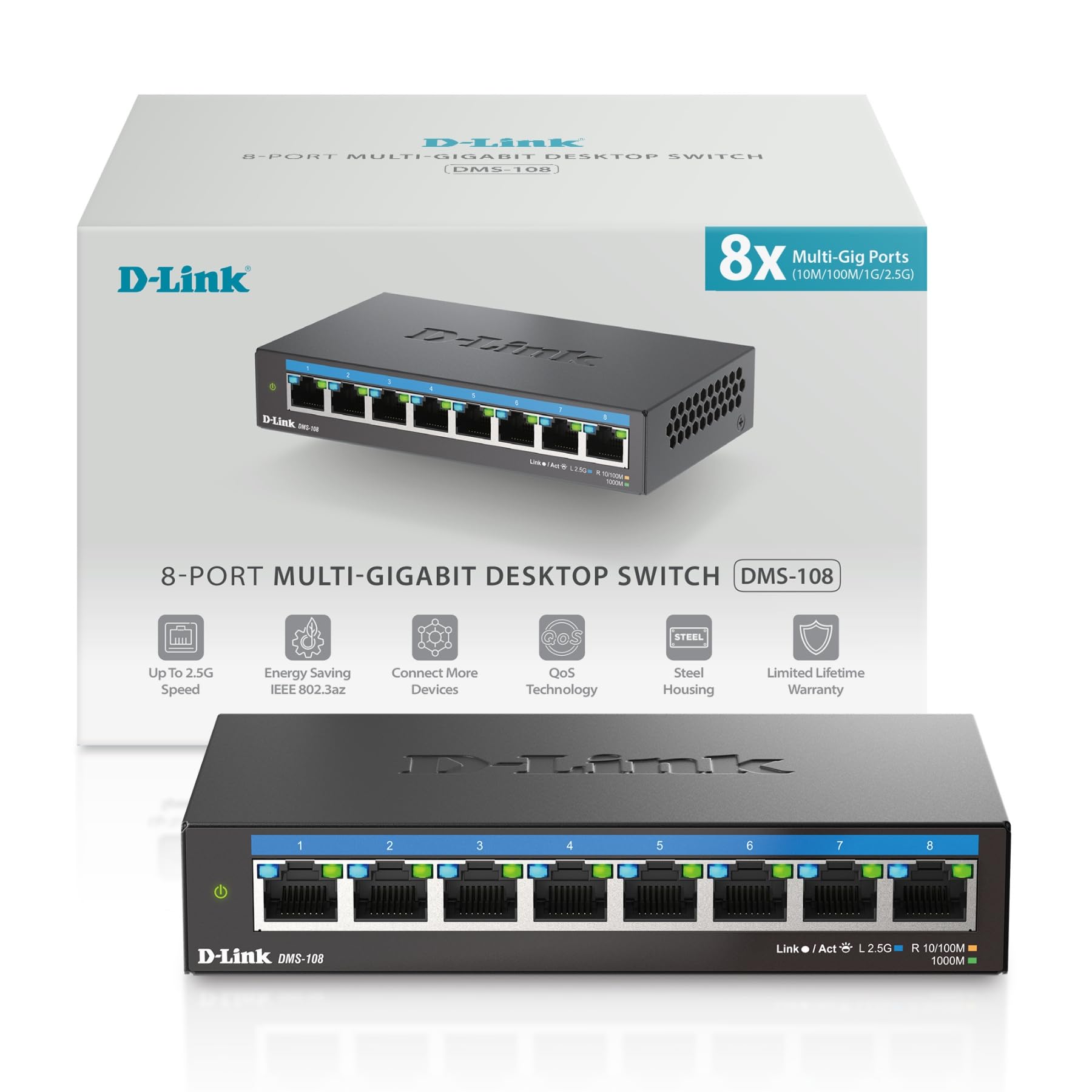 სურათი: წინა მხარე view of the D-Link DMS-108 switch, showing 8 Ethernet ports and LED indicators.
პაკეტის შიგთავსი
დარწმუნდით, რომ თქვენი პაკეტი შეიცავს შემდეგ ელემენტებს:
- D-Link DMS-108 8-Port 2.5GB Unmanaged Multi-Gigabit Switch
- დენის ადაპტერი
- სწრაფი ინსტალაციის სახელმძღვანელო (QIG)
If any items are missing or damaged, please contact your local D-Link reseller for assistance.
დაყენება
ფიზიკური ინსტალაცია
The DMS-108 switch can be placed on a desktop or mounted on a wall. Ensure the installation location provides adequate ventilation and is free from excessive heat, humidity, or electromagnetic interference.
გადამრთველის დაკავშირება
- დენის კავშირი: Connect the provided power adapter to the power input port on the rear panel of the DMS-108 switch. Plug the other end of the power adapter into a standard electrical outlet. The power LED on the front panel will illuminate.
 Image: Rear panel of the DMS-108, highlighting the power input (12V===1A), ground screw (SWITCH GND), and Kensington lock slot.
 - ქსელური მოწყობილობის კავშირი: Connect your network devices (e.g., computers, NAS, Wi-Fi 6 APs, gaming consoles) to any of the 8 available 2.5 Gigabit Ethernet ports using standard Ethernet cables (Cat5e or Cat6 recommended for optimal performance).
 Image: The D-Link DMS-108 switch demonstrating compatibility with existing Cat5e and Cat6 cables for 2.5x faster transfer rates.
The DMS-108 is a plug-and-play device, requiring no software installation or configuration. It will automatically detect the link speeds of connected devices (100Mb/1G/2.5G) and adjust for optimal performance.
გადამრთველის მუშაობა
LED ინდიკატორები
The front panel of the DMS-108 features LED indicators for each port and for power status. These LEDs provide visual feedback on the switch's operation:
- დენის LED: Indicates if the switch is powered on.
- კავშირის/მოქმედების LED-ები (თითო პორტზე):
- Solid Green: Indicates a stable 2.5G network link.
- Solid Blue: Indicates a stable 1G network link.
- Solid Amber: Indicates a stable 100Mb network link.
- Flashing: Indicates network activity (data transmission).
- გამორთულია: ბმული ან მოწყობილობა არ არის დაკავშირებული.
 სურათი: დეტალური view of the DMS-108's front panel, highlighting the Link/Act LEDs for each of the 8 ports.
ძირითადი მახასიათებლები
- ავტომატური მოლაპარაკება: Automatically senses the link speeds of connected devices (100Mb/1G/2.5G) and adjusts for compatibility and optimal performance.
- მომსახურების ხარისხი (QoS): Allows network traffic to be classified into 8 priority levels, ensuring critical data (e.g., gaming, video streaming) receives preferential treatment.
- ნაკადის კონტროლი: Helps minimize dropped packets during periods of high network congestion, leading to more reliable connections.
- IGMP Snooping: Optimizes multicast data streams, which is beneficial for bandwidth-intensive applications like IPTV, by forwarding multicast traffic only to ports that have requested it.
- Energy-Efficient Ethernet (EEE) (IEEE 802.3az): Reduces power consumption during periods of low network activity, conserving energy and lowering operational costs.
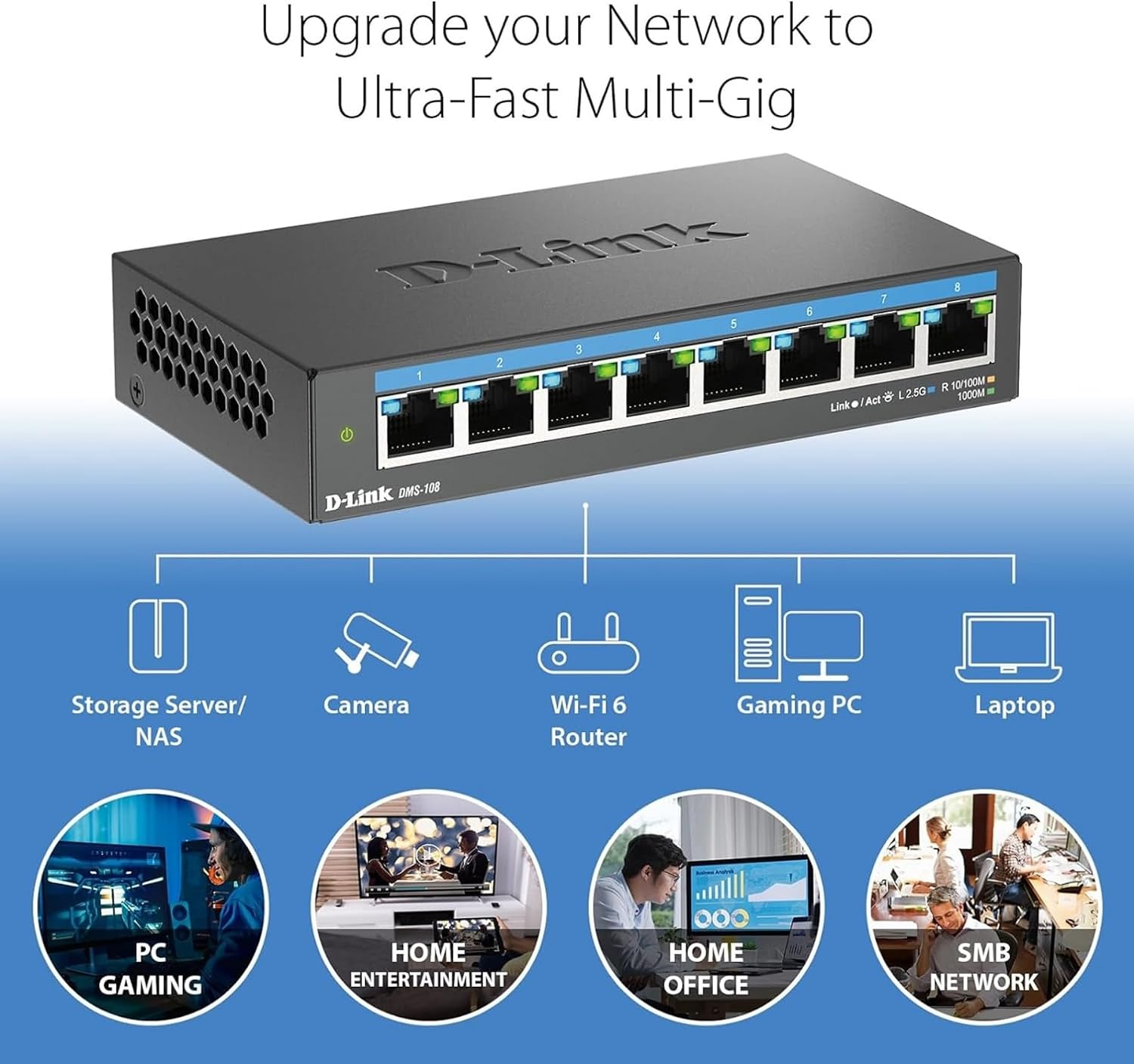 Image: An illustration demonstrating how the DMS-108 switch can upgrade a network to ultra-fast multi-gigabit speeds by connecting various devices.
 Image: The DMS-108 switch highlighting its durable metal casing, silent fanless design, energy-efficient features, and D-Link's 35+ years of experience.
მოვლა
To ensure optimal performance and longevity of your D-Link DMS-108 switch, follow these maintenance guidelines:
- ვენტილაცია: Ensure the switch is placed in a location with adequate airflow. Do not block the ventilation holes on the sides of the device.
- დასუფთავება: Periodically clean the exterior of the switch with a soft, dry cloth. Avoid using liquid or aerosol cleaners, as they may damage the device.
- საკაბელო მენეჯმენტი: სიგნალის დეგრადაციის თავიდან ასაცილებლად, ქსელის კაბელები ორგანიზებულად და მოღუნვის გარეშე შეინახეთ.
- ელექტრომომარაგება: Use only the power adapter provided with the switch. If the power adapter is damaged, contact D-Link support for a replacement.
- Firmware განახლებები: As an unmanaged switch, the DMS-108 typically does not require firmware updates. However, always refer to the D-Link support website for any specific recommendations.
პრობლემების მოგვარება
If you encounter issues with your DMS-108 switch, refer to the following troubleshooting tips:
- ძალა არ არის:
- Check if the power adapter is securely connected to the switch and the electrical outlet.
- Verify that the electrical outlet is functioning correctly by plugging in another device.
- Ensure the power LED on the switch is illuminated.
- No Link on a Port:
- დარწმუნდით, რომ Ethernet კაბელი საიმედოდ არის დაკავშირებული როგორც კომუტატორის პორტთან, ასევე დაკავშირებულ მოწყობილობასთან.
- Verify that the connected device is powered on and its network adapter is enabled.
- გაუმართავი კაბელის გამოსარიცხად სცადეთ სხვა Ethernet კაბელი.
- კომუტატორზე სხვა პორტით გამოსცადე.
- Check the Link/Act LED for the specific port. If it's off, there's no active connection.
- ნელი ქსელის სიჩქარე:
- Ensure you are using Cat5e or Cat6 Ethernet cables for 2.5G connections. Older cables (e.g., Cat5) may limit speed.
- Verify that your connected devices support 2.5G Ethernet. The switch will operate at the highest common speed.
- Check the Link/Act LED color for the port to confirm the negotiated speed (Green for 2.5G, Blue for 1G, Amber for 100Mb).
- Reduce network congestion by limiting simultaneous bandwidth-intensive activities.
- წყვეტილი კავშირი:
- შეამოწმეთ ყველა საკაბელო შეერთება ფხვიერებაზე ან დაზიანებაზე.
- Ensure the switch is not overheating. Provide adequate ventilation.
- მოერიდეთ გადამრთველის განთავსებას ძლიერი ელექტრომაგნიტური ჩარევის წყაროებთან ახლოს.
If problems persist, contact D-Link Technical Support for further assistance.
სპეციფიკაციები
| ფუნქცია | აღწერა |
|---|---|
| ბრენდი | დ-ლინკი |
| მოდელის ნომერი | DMS-108 |
| პორტების რაოდენობა | 8 |
| ინტერფეისი | RJ45 |
| მონაცემთა გადაცემის სიჩქარე | Up to 40 Gigabits Per Second (Switching Capacity) |
| გადამრთველის ტიპი | Multi-speed or Multi-gigabit Store-and-Forward |
| Case Material Type | მეტალი |
| ფერი | შავი |
| ელემენტის ზომები (L x W x H) | 5.71" სიგრძე x 3.34" სიგანე x 1.1" სიმაღლე |
| ნივთის წონა | 0.77 ფუნტი |
| ზედა ტემპერატურის რეიტინგი | 40 გრადუსი ცელსიუსით |
| მოყვება კომპონენტები | Device, Power Supply, QIG |
| UPC | 790069470509 |
საგარანტიო ინფორმაცია
The D-Link DMS-108 switch comes with a Limited Warranty. For detailed information regarding the terms and conditions of your warranty, please refer to the official D-Link webსაიტზე ან თქვენს პროდუქტთან ერთად მოწოდებულ საგარანტიო ბარათზე.
Optional protection plans may be available for purchase, offering extended coverage beyond the standard manufacturer's warranty. Please check with your retailer for details on available protection plans.
მხარდაჭერა
For technical support, product registration, or to download the latest documentation and software, please visit the official D-Link support webსაიტი:
You can also find additional resources and frequently asked questions on the D-Link webსაიტი.
პროდუქტის ვიდეო
Watch the official D-Link video for an overview of D-Link Switch Solutions for various environments.