
1. შესავალი
This manual provides instructions for the proper use and care of your Docooler Portable USB Cassette Player. This device allows you to play audio cassettes and convert their content into digital MP3 files via a USB connection to a computer. Please read this manual thoroughly before operating the device to ensure optimal performance and longevity.
2. პროდუქტი დასრულდაview
The Docooler Portable USB Cassette Player is a compact, handheld device designed for playing and digitizing audio cassettes. It features a transparent casing, allowing visibility of the internal mechanism.
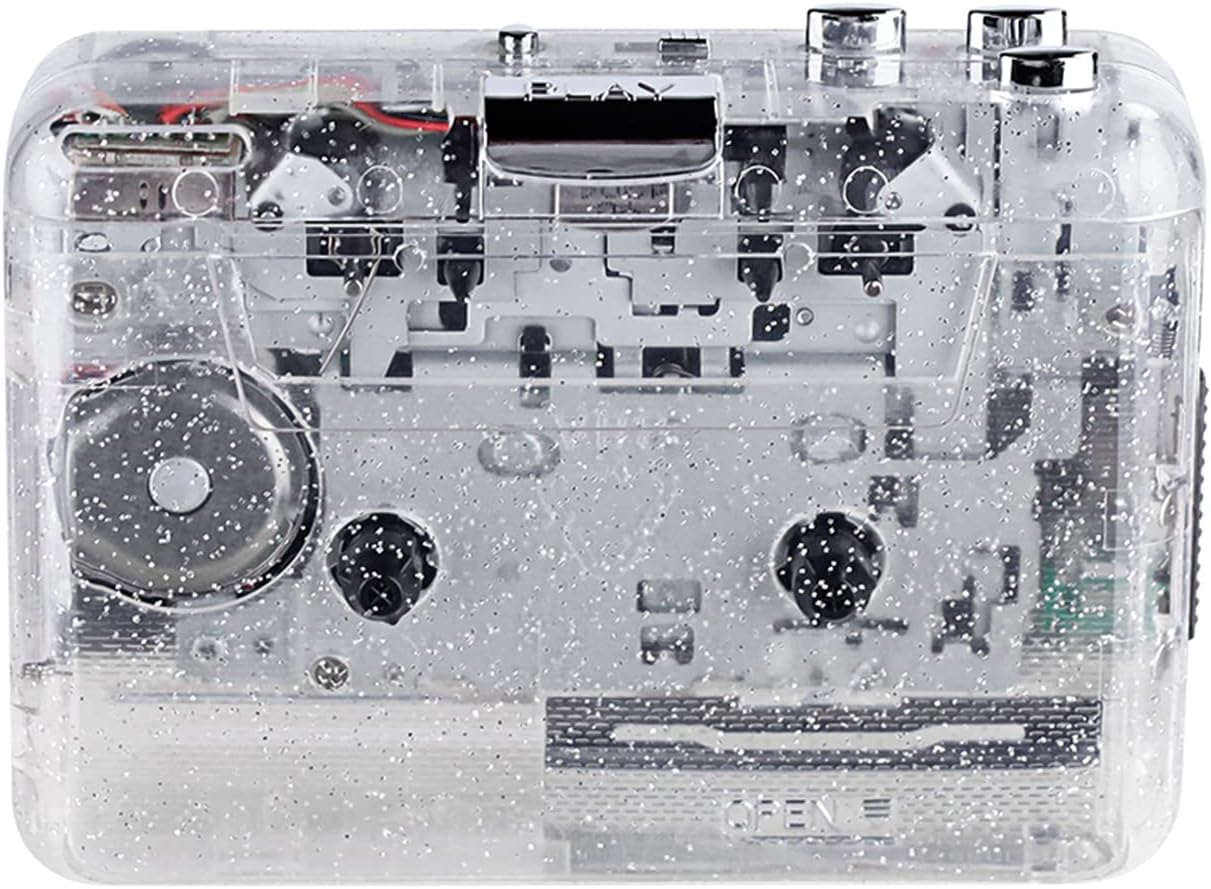
სურათი 1: წინა view of the Docooler Portable USB Cassette Player, showcasing its transparent design.

Figure 2: Various angles of the cassette player, including top, side, and open views.
პაკეტის შიგთავსი:
- Docooler Portable USB Cassette Player
- USB კაბელი
- მომხმარებლის სახელმძღვანელო (ეს დოკუმენტი)
- Headphones (may vary by package)
3. დაყენება
3.1 დენის წყარო
The cassette player can be powered by either batteries or a USB connection.
ბატარეის დაყენება:
- იპოვნეთ ბატარეის განყოფილება მოწყობილობაზე.
- გახსენით ბატარეის განყოფილების საფარი.
- Insert 2 x AA batteries (not included), ensuring correct polarity (+/-).
- უსაფრთხოდ დახურეთ ბატარეის განყოფილების საფარი.
USB სიმძლავრე:
Connect the provided USB cable to the player's USB port and the other end to a powered USB port on your computer or a USB wall adapter. The device will draw power from the USB connection.
4. საოპერაციო ინსტრუქციები
4.1 Playing a Cassette Tape
- გახსენით კასეტის განყოფილების საფარი.
- Insert an audio cassette tape with the open edge facing upwards.
- Close the cassette compartment cover firmly.
- Connect headphones or external speakers to the 3.5mm audio output jack.
- დააჭირეთ ითამაშე ღილაკი დაკვრის დასაწყებად.
- გამოიყენეთ STOP ღილაკი დაკვრის შესაჩერებლად.
- გამოიყენეთ FF (სწრაფი გადახვევა) და REW (გადახვევა) buttons to navigate through the tape.
- Adjust the volume using the volume control dial.
- The "DIR" button allows you to quickly flip the tape direction. The "play mode" button can be used to reverse playback once or an unlimited number of times.

Figure 3: The cassette player in use, demonstrating tape insertion and playback setup.

Figure 4: Users listening to audio through headphones connected to the cassette player.
4.2 Converting Tapes to MP3 Files
The Docooler Portable USB Cassette Player can convert your analog cassette audio into digital MP3 files. This process requires a computer and compatible audio recording software (not included).
- Ensure the cassette player is powered (via batteries or USB).
- Connect the cassette player to your computer using the provided USB cable.
- Install and open your preferred audio recording software on your computer. Software such as Audacity (free and open-source) is commonly used for this purpose.
- Configure your recording software to recognize the cassette player as an audio input device.
- Insert the cassette tape you wish to convert into the player.
- Start recording in your software, then press the ითამაშე button on the cassette player.
- Monitor the recording process. Once the tape has finished playing, stop the recording in your software.
- Save the recorded audio as an MP3 file თქვენს კომპიუტერში.

Figure 5: Illustration of the process to convert cassette audio to MP3 files using the player and a computer.
5. მოვლა
5.1 მოწყობილობის გაწმენდა
- გაწმინდეთ პლეერის გარე ზედაპირი რბილი, მშრალი ქსოვილით.
- Do not use liquid cleaners or abrasive materials, as they may damage the surface.
- Periodically clean the tape heads and pinch rollers using a cotton swab lightly dampიზოპროპილის სპირტით გამდიდრებული ოპტიმალური ხმის ხარისხის უზრუნველსაყოფად და ფირის დაზიანების თავიდან ასაცილებლად.
5.2 შენახვა
- When not in use for extended periods, remove batteries to prevent leakage.
- შეინახეთ ფლეიერი გრილ, მშრალ ადგილას, მზის პირდაპირი სხივებისა და ექსტრემალური ტემპერატურისგან მოშორებით.
6. Დიაგნოსტიკა
| პრობლემა | შესაძლო მიზეზი | გამოსავალი |
|---|---|---|
| არავითარი ძალა | Dead batteries; USB cable not connected properly. | შეცვალეთ ელემენტები; დარწმუნდით, რომ USB კაბელი საიმედოდ არის დაკავშირებული. |
| ხმა არ არის | Headphones/speakers not connected; volume too low; dirty tape heads. | Connect audio output device; increase volume; clean tape heads. |
| Poor sound quality (hissing, muffled) | Dirty tape heads; worn-out tape; low battery. | Clean tape heads; try a different tape; replace batteries. |
| Tape not playing or moving | Tape jammed; mechanism issue; low battery. | Check tape for damage; replace batteries. |
| Cannot convert to MP3 | USB connection issue; software not configured correctly; no recording software. | Ensure USB is connected; check software settings; install compatible recording software. |
7. სპეციფიკაციები
- მოდელი: B0C69FDZF6
- ელექტრომომარაგება: 2 x AA Batteries or USB 5V DC
- ინტერფეისი: USB 2.0
- აუდიო გამომავალი: 3.5 მმ სტერეო ჯეკი
- ზომები: 7.2 x 5.91 x 1.54 ინჩი (დაახ.)
- წონა: 9.6 უნცია (დაახლოებით)
- მწარმოებელი: დოქულერი
8. უსაფრთხოების ინფორმაცია
- არ დაუშვათ მოწყობილობის წყალთან ან ჭარბ ტენიანობასთან შეხება.
- მოერიდეთ მოწყობილობის ჩამოვარდნას ან ძლიერ ზემოქმედებას.
- არ სცადოთ მოწყობილობის დამოუკიდებლად დაშლა ან შეკეთება. მიმართეთ კვალიფიციურ სერვის პერსონალს.
- შეინახეთ ბავშვებისთვის მიუწვდომელ ადგილას.
- გადაყარეთ ბატარეები ადგილობრივი წესების შესაბამისად.
9. გარანტია და დახმარება
For warranty information or technical support, please refer to the documentation included with your purchase or contact Docooler customer service through their official website or the retailer where the product was purchased. Please have your model number (B0C69FDZF6) and purchase date available when contacting support.