
1. შესავალი
The CALEX Smart Home Indoor Ambiance Aroma Diffuser 590100500 is designed to enhance your indoor environment by improving air quality, diffusing pleasant aromas, and providing ambient lighting. This smart device integrates seamlessly into your smart home ecosystem, offering control through the Calex app, voice commands, and programmable features.
ძირითადი მახასიათებლები მოიცავს:
- Aroma diffusion with essential oils.
- Realistic flame effect for ambiance.
- Adjustable ambient lighting with 16 million color options.
- Smart control via Calex app (timers, programmable scenarios).
- Voice control compatibility with Google Assistant, Siri, and Amazon Alexa.
- 300ml water tank capacity with automatic shut-off.
2. უსაფრთხოების ინფორმაცია
Please read all safety instructions before using the device to prevent injury or damage.
- Always place the diffuser on a stable, flat surface away from direct sunlight, heat sources, and electronic devices.
- Do not exceed the maximum water fill line (300ml) to prevent overflow.
- გამოიყენეთ მხოლოდ სუფთა ონკანის წყალი ან გამოხდილი წყალი. არ გამოიყენოთ ცხელი წყალი.
- Only use 100% pure, water-soluble essential oils. Other oils or corrosive liquids may damage the device.
- შეინახეთ მოწყობილობა ბავშვებისა და შინაური ცხოველებისთვის მიუწვდომელ ადგილას.
- Do not cover the mist outlet during operation.
- გაწმენდის ან შევსების წინ გამორთეთ მოწყობილობა დენის წყაროდან.
- The device features an automatic shut-off function when the water tank is empty, and sends a notification to your phone.
- A built-in safety configuration will cause the diffuser to flash if the remaining water in the tank needs to cool down after a maximum of 72 hours of continuous operation.
- Do not attempt to repair or modify the device yourself. Contact customer support for assistance.
3. პაკეტის შიგთავსი
დარწმუნდით, რომ შეფუთვაში ყველა ნივთია:
- CALEX Smart Home Indoor Ambiance Aroma Diffuser (Model 5901000500)
- დენის ადაპტერი
- მომხმარებლის სახელმძღვანელო
4. პროდუქტი დასრულდაview
Familiarize yourself with the components of your aroma diffuser.
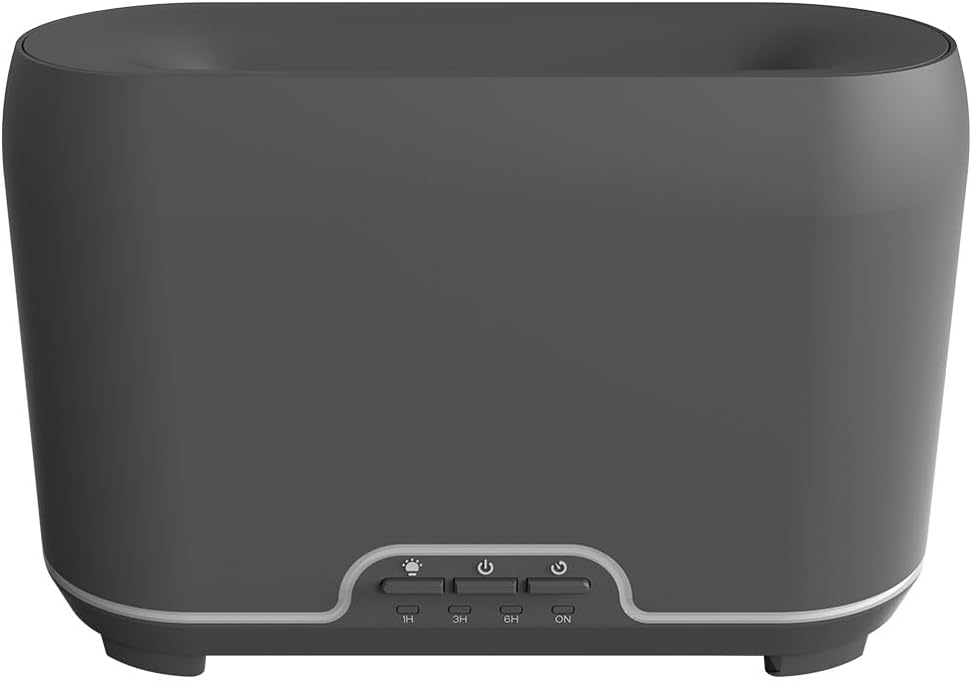
სურათი: წინა მხარე view of the CALEX Smart Home Aroma Diffuser, showing the control panel with buttons for light, power, and timer settings (1H, 3H, 6H, ON).

Image: The CALEX Smart Home Aroma Diffuser operating on a wooden table, displaying its ambient flame effect and mist output.
The diffuser typically consists of a water tank, an ultrasonic plate, a mist outlet, and a control panel with buttons for power, light, and timer functions. The power input port is usually located at the back or bottom of the device.
5. დაყენება
მიჰყევით ამ ნაბიჯებს საწყისი დაყენებისთვის:
- განთავსება: მოათავსეთ დიფუზორი ბრტყელ, სტაბილურ ზედაპირზე.
- გახსენით სახურავი: ფრთხილად ამოიღეთ დიფუზორის ზედა საფარი.
- წყლის ავზის შევსება: Fill the water tank with clean water up to the 300ml maximum fill line. Do not overfill.
- დაამატეთ ეთერზეთი: დაამატეთ თქვენთვის სასურველი ეთერზეთის რამდენიმე წვეთი პირდაპირ წყლის ავზში.
- დახურეთ სახურავი: უსაფრთხოდ შეცვალეთ ზედა საფარი.
- დაკავშირება ძალა: Plug the power adapter into the diffuser's power input port, then plug the adapter into a wall outlet.
- ჩამოტვირთეთ Calex აპლიკაცია: Download the free Calex Smart app from your smartphone's app store (available for iOS and Android).
- დაუკავშირდით WiFi-ს: Follow the in-app instructions to connect your diffuser to your home WiFi network. Ensure your WiFi is 2.4GHz.
6. საოპერაციო ინსტრუქციები
The CALEX Smart Home Aroma Diffuser can be operated via the Calex app or its integrated control buttons.
6.1 Using the Calex Smart App
The Calex app provides full control over your diffuser's functions:
- ჩართვა/გამორთვა: Turn the diffuser on or off remotely.
- ნისლის კონტროლი: Adjust the mist output level.
- სინათლის კონტროლი: Change the ambient light color from over 16 million options, adjust brightness, and select lighting modes.
- ცეცხლოვანი ეფექტი: Activate or deactivate the flame effect.
- ტაიმერები: Set schedules for the diffuser to turn on or off automatically.
- Programmable Scenarios: Create custom scenarios based on time, weather, or other smart home triggers.
- შეტყობინებები: Receive alerts when the water tank is empty.
6.2 ხმის კონტროლი
Integrate your diffuser with voice assistants for hands-free control:
- Google ასისტენტი: Link your Calex account in the Google Home app. Use commands like "Hey Google, turn on the diffuser."
- Siri: Create custom shortcuts in the Apple Home app or through the Calex app for Siri commands.
- Amazon Alexa: Enable the Calex skill in the Alexa app. Use commands like "Alexa, set diffuser light to blue."
6.3 Manual Control Buttons
The control panel on the diffuser allows for basic operation:
- დენის ღილაკი: Press once to turn on/off the mist and flame effect.
- სინათლის ღილაკი: Press to cycle through light colors or turn the light on/off.
- Timer Buttons (1H, 3H, 6H, ON): Select a desired operating duration. The diffuser will automatically shut off after the selected time. 'ON' typically means continuous operation until water runs out or manually turned off.
7. მოვლა
რეგულარული გაწმენდა უზრუნველყოფს ოპტიმალურ მუშაობას და ახანგრძლივებს თქვენი დიფუზორის სიცოცხლის ხანგრძლივობას.
- ყოველდღიური დასუფთავება: After each use, empty any remaining water from the tank. Wipe the inside of the tank with a clean, soft cloth.
- ყოველკვირეული გაწმენდა: For a more thorough clean, unplug the device. Add a small amount of white vinegar (about 10ml) to the water tank and let it sit for 10-15 minutes to dissolve mineral buildup. Gently wipe the ultrasonic plate with a cotton swab or soft brush. Rinse the tank thoroughly with clean water, avoiding the air outlet.
- გარე წმენდა: დიფუზორის გარე ზედაპირი გაწმინდეთ რბილი, დ...amp ქსოვილი. არ გამოიყენოთ აბრაზიული გამწმენდები ან გამხსნელები.
- Ensure the device is completely dry before refilling or storing.
8. Დიაგნოსტიკა
თუ პრობლემებს წააწყდებით, იხილეთ შემდეგი გავრცელებული პრობლემები და მათი გადაჭრის გზები:
| პრობლემა | შესაძლო მიზეზი | გამოსავალი |
|---|---|---|
| არა ნისლი ან სუსტი ნისლი | წყლის დაბალი დონე ულტრაბგერითი ფირფიტა ჭუჭყიანი ნისლის გამოსასვლელი დაბლოკილია | Refill water to the appropriate level. გაწმინდეთ ულტრაბგერითი ფირფიტა მოვლის ინსტრუქციის შესაბამისად. Ensure the mist outlet is clear. |
| მოწყობილობა არ ირთვება | არავითარი ძალა წყლის ავზი ცარიელია მოწყობილობის გაუმართაობა | შეამოწმეთ დენის შეერთება და კედლის სოკეტი. შეავსეთ წყლის ავზი. დაუკავშირდით მომხმარებელთა მხარდაჭერას, თუ პრობლემა შენარჩუნებულია. |
| აპის კავშირის პრობლემები | არასწორი WiFi პაროლი როუტერი ძალიან შორსაა 2.4GHz vs 5GHz WiFi | გადაამოწმეთ WiFi-ის პაროლი. Move diffuser closer to the router. Ensure your router is broadcasting a 2.4GHz network and connect to it. |
| ცეცხლოვანი ეფექტი არ მუშაობს | Feature deactivated in app მოწყობილობის გაუმართაობა | Check app settings to ensure flame effect is enabled. დაუკავშირდით მომხმარებელთა მხარდაჭერას. |
9. სპეციფიკაციები
| ფუნქცია | სპეციფიკაცია |
|---|---|
| მოდელის ნომერი | 5901000500 |
| ბრენდი | CALEX |
| ტევადობა | 300 მილილიტრი |
| მასალა | პლასტიკური |
| ავტომატური გამორთვა | დიახ |
| დაკავშირება | WiFi (2.4 GHz) |
| კონტროლის მეთოდები | Calex Smart App, Voice Control (Google Assistant, Siri, Amazon Alexa), Manual Buttons |
| სინათლის პარამეტრები | 16 მილიონი ფერი |
| რეკომენდებული გამოყენების არეალი | Medium space |
| საერთაშორისო სტატიის კოდი (EAN/UPC) | 08712879157090 |
10. გარანტია და მხარდაჭერა
გარანტიის შესახებ ინფორმაციის ან ტექნიკური მხარდაჭერისთვის, გთხოვთ, იხილოთ თქვენს შენაძენთან ერთად მოწოდებული დოკუმენტაცია ან პირდაპირ დაუკავშირდეთ საცალო მოვაჭრეს/მწარმოებელს. შეინახეთ შეძენის დამადასტურებელი საბუთი გარანტიის მოთხოვნებისთვის.