
შესავალი
This manual provides comprehensive instructions for the safe and proper installation, operation, and maintenance of your Mount-It! MI-397 Long Arm Full Motion TV Wall Mount. Please read this manual thoroughly before beginning installation and retain it for future reference. This wall mount is designed to securely hold televisions ranging from 40 to 80 inches, with a maximum weight capacity of 121 lbs, and supports VESA patterns up to 600x400mm. Its full motion capabilities, including an extra-long 38.5-inch extension, allow for optimal viewing angles in various room configurations.
ძირითადი მახასიათებლები
- Extra Long Extension: The articulating arm extends up to 38.5 inches from the wall, providing flexible viewშეყვანის ვარიანტები.
- Wide TV Compatibility: Designed for 40-80 inch LCD/LED/OLED Plasma TVs with VESA patterns including 200x200, 300x200, 300x300, 400x200, 400x300, 400x400, 600x200, and 600x400.
- მაღალი წონის ტევადობა: Safely supports TVs weighing up to 121 pounds.
- Full Motion Adjustability: Features 180° swivel and a +5/-10° tilt option for customized viewing კუთხეები.
- მარტივი ინსტალაცია: Includes a heavy-duty arm design and a large wall plate for mounting on 16-inch or 24-inch apart studs. Offers 3° micro-leveling adjustments post-installation.
- გამძლე კონსტრუქცია: Made from high-strength alloy steel for reliability and longevity.

Image: The Mount-It! MI-397 TV Wall Mount shown fully extended, demonstrating its impressive reach from the wall.
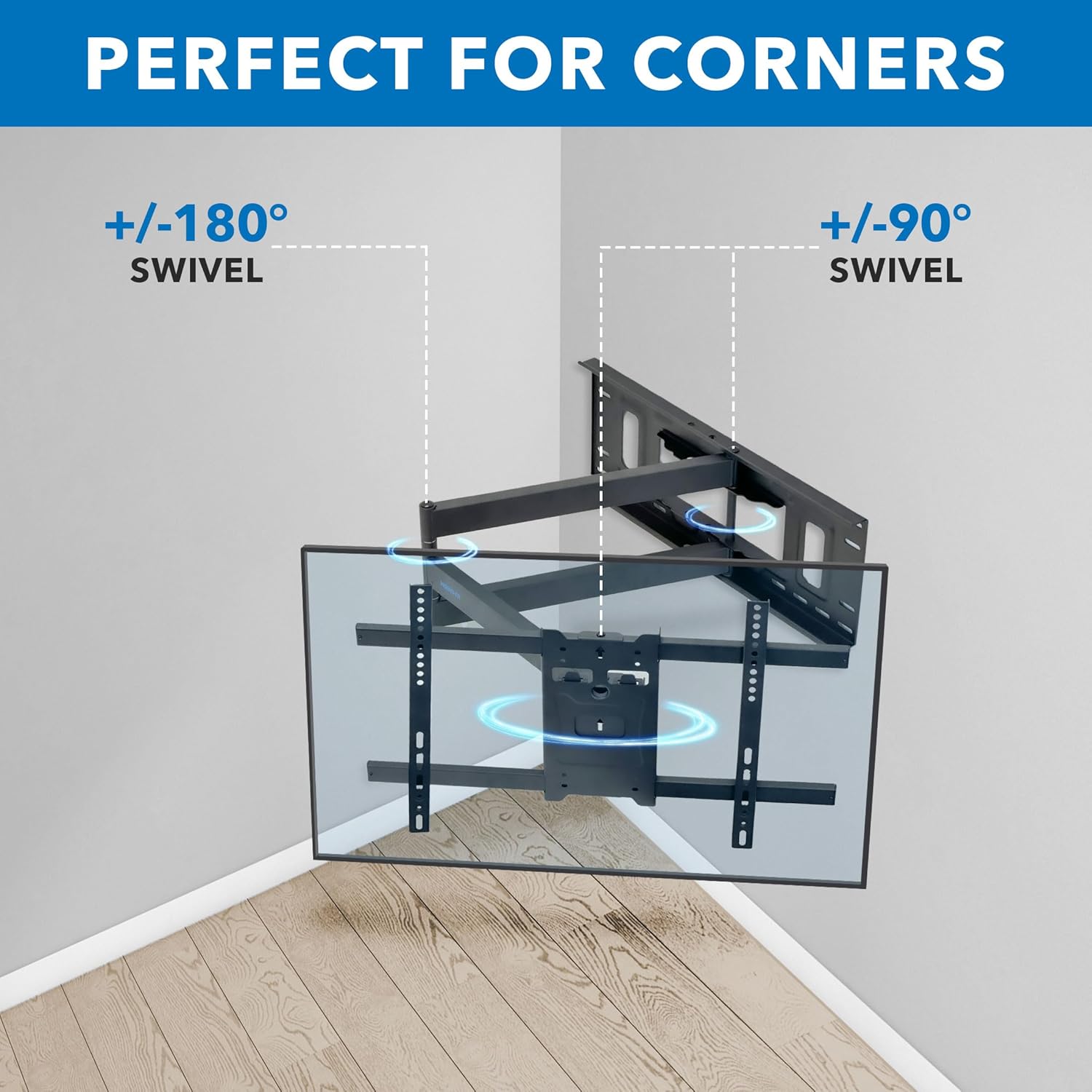
Image: The TV mount positioned in a corner, highlighting its versatility and swivel function for optimal viewსხვადასხვა კუთხით.
სპეციფიკაციები
| ატრიბუტი | დეტალი |
|---|---|
| მოდელის ნომერი | MI-397 |
| სამონტაჟო ტიპი | კედლის სამაგრი |
| მოძრაობის ტიპი | Articulating, Swivel, Full Motion, Tilt |
| ბრენდი | დაამაუნტე! |
| მასალა | შენადნობის ფოლადი |
| ფერი | შავი |
| თავსებადი მოწყობილობები | ტელევიზია |
| Minimum Supported Screen Size | 40 ინჩი |
| Maximum Supported Screen Size | 80 ინჩი |
| მაქსიმალური წონის ტევადობა | 121 ფუნტი |
| VESA თავსებადობა | 200x200, 300x200, 300x300, 400x200, 400x300, 400x400, 600x200, 600x400 |
| მაქსიმალური დახრის კუთხე | 10 გრადუსი |
| კედლიდან გაფართოება | 38.5 ინჩამდე |

Image: Visual representation of VESA compatibility ranges and the 121 lb weight capacity of the mount.

Image: Technical drawing showing the dimensions of the wall plate, arm extension, and TV mounting plate.
დაყენება და ინსტალაცია
Before beginning, ensure you have all necessary tools and hardware. It is recommended to have a second person assist with the installation, especially when mounting the TV.
1. Prepare the Wall Plate
- ხის საკინძების დამონტაჟებისთვის: Use a stud finder to locate the center of your wood studs. Hold the wall template at the desired installation height and mark the locations for the four lag screws on the center of the studs. Drill 1/4-inch pilot holes at these marked locations.
- For Concrete or Brick Installation: Hold the wall template at the desired installation height and mark the locations for the five lag screws, ensuring marks are not on mortar joints. Drill 2/5-inch pilot holes to a depth of 3.7 inches. Clear any dust from the holes and insert the provided concrete anchors.

Image: The extra-wide wall plate designed to accommodate both 16-inch and 24-inch stud spacing for flexible installation.
2. კედლის ფირფიტის დამონტაჟება
- Carefully hold the wall mount over the drilled holes.
- Secure the mount to the wall using the provided lag screws and washers. Ensure all screws are tightened securely.
3. Attach VESA Arms to TV
- Place your TV face down on a soft, clean surface.
- Using the appropriate size mounting bolts, spacers, and washers (refer to your TV's manual for correct bolt size), attach the two VESA arms to the back of your TV. Ensure they are securely fastened.
4. Hang the TV on the Mount
- With assistance, carefully lift the TV and hang it onto the mount arms.
- Attach the safety clips to the bottom of the VESA arms and secure them in place using the safety bolts to prevent accidental dislodging.
ინსტალაციის ვიდეო გზამკვლევი
Video: Official Mount-It! installation guide for the MI-397 articulating TV wall mount. This video demonstrates the step-by-step process for securely mounting the unit to your wall and attaching your television.
ტელევიზორის სამაგრის მართვა
The Mount-It! MI-397 offers full motion capabilities to achieve your desired viewგამოცდილება.
დახრის რეგულირება
- To adjust the tilt angle (+5/-10°), loosen the tilt adjustment nuts located on the TV mounting plate.
- Adjust the TV to the desired vertical angle.
- Tighten the tilt adjustment nuts securely to lock the TV in position.
ბრუნვისა და გაფართოების რეგულირება
- Gently pull or push the TV to extend or retract the arm up to 38.5 inches from the wall.
- Swivel the TV left or right up to 180° to achieve the perfect horizontal viewing angle. The mount's design allows for smooth movement.
ნიველირების რეგულირება
- To make micro-leveling adjustments (up to 3°), loosen the two nuts located behind the rectangular VESA plate.
- Adjust the TV until it is perfectly level.
- Tighten the two nuts again to secure the TV in its leveled position.

Image: The TV mount extended from the wall, illustrating its maximum extension and the available tilt range.

Image: The TV mount showcasing its full motion capabilities, including swivel and leveling adjustments for a perfect viewგამოცდილება.
მახასიათებლები დასრულდაview ვიდეო
Video: Official Mount-It! features overview for the MI-397 articulating TV wall mount. This video highlights the key functionalities such as extension, swivel, and tilt.
მოვლა
To ensure the longevity and safe operation of your TV wall mount, follow these maintenance guidelines:
- რეგულარული შემოწმება: პერიოდულად შეამოწმეთ ყველა ხრახნი და შეერთება, რათა დარწმუნდეთ, რომ ისინი მჭიდროდ და საიმედოდ არის დამაგრებული. დროთა განმავლობაში, ვიბრაციამ ან ხშირმა რეგულირებამ შეიძლება გამოიწვიოს შესაკრავების მოდუნება.
- დასუფთავება: Clean the mount with a soft, dry cloth. Avoid using abrasive cleaners or solvents, as these can damage the finish.
- გლუვი ოპერაცია: If the articulating arm or swivel joints become stiff, a small amount of silicone-based lubricant can be applied to the moving parts. Do not use oil-based lubricants, as they may attract dust and debris.
- წონის შეზღუდვები: Never exceed the maximum weight capacity of 121 lbs or the specified TV size range (40-80 inches).
პრობლემების მოგვარება
If you encounter issues with your Mount-It! MI-397 TV wall mount, refer to the following common solutions:
- ტელევიზორი არ არის ჰორიზონტალური: If the TV appears unlevel after installation or adjustment, use the micro-leveling adjustment feature as described in the Operating section. Ensure the two nuts behind the VESA plate are loosened, adjust the TV, and then re-tighten them.
- Difficulty Moving/Swiveling: Check for any obstructions behind the TV or mount. Ensure all pivot points are free from debris. If stiffness persists, apply a small amount of silicone lubricant to the joints.
- მთა ფხვიერად გამოიყურება: Immediately check all lag screws securing the wall plate to the wall and all bolts connecting the VESA arms to the TV. Tighten any loose fasteners. If the issue persists, consult a professional installer.
- დაკარგული აპარატურა: If any hardware components are missing or damaged, do not proceed with installation. Contact Mount-It! customer support for replacement parts.
გარანტია და მომხმარებელთა მხარდაჭერა
The Mount-It! MI-397 Long Arm TV Mount comes with a სიცოცხლის გარანტია, reflecting our commitment to quality and durability.
If you have any questions, require assistance with installation, or need to claim your warranty, please contact our knowledgeable and responsive US-based customer support team during standard business hours. You can find contact information on the official Mount-It! webსაიტზე ან თქვენი შესყიდვის დოკუმენტაციის მეშვეობით.
For additional products and solutions, visit the Mount-It! Store.


