
Thomson 43QA2S13

THOMSON 43-inch QLED Smart Android TV
მომხმარებლის სახელმძღვანელო
Model: 43QA2S13
1. პროდუქტი დასრულდაview
The THOMSON 43-inch QLED Smart Android TV (Model 43QA2S13) offers an immersive viewing experience with its Ultra High Definition (UHD) display and QLED technology. Enjoy vibrant colors and sharp details, four times more precise than Full HD. This smart TV integrates Android TV, providing access to a vast library of applications, intelligent voice control with Google Assistant, and built-in Chromecast for seamless content streaming. Its sleek, frameless design on three sides ensures a captivating visual experience.

სურათი 1.1: წინა view of the THOMSON 43-inch QLED Smart Android TV, showcasinმისი ნათელი ეკრანი და თხელი ჩარჩოები.
2. დაყენების გზამკვლევი
2.1 შეფუთვა
ფრთხილად ამოიღეთ ტელევიზორი და ყველა აქსესუარი შეფუთვიდან. შეინახეთ შესაფუთი მასალები მომავალი ტრანსპორტირების ან შენახვისთვის.
2.2 სადგამის აწყობა / კედელზე დამონტაჟება
Your TV comes with two stand feet for tabletop placement.
- სადგამის ფეხები ტელევიზორის ქვედა ნაწილში მითითებულ ჭრილებზე მოწოდებული ხრახნების გამოყენებით მიამაგრეთ. დარწმუნდით, რომ ისინი საიმედოდ არის დამაგრებული.
- For wall mounting, use a VESA compatible wall mount (200x200 mm, not included). Refer to the wall mount's instructions for proper installation.

სურათი 2.1: წინა view of the TV with its two stand feet attached.

სურათი 2.2: მხარე პროfile ტელევიზორის სურათი, რომელიც მის თხელ დიზაინს აჩვენებს.

სურათი 2.3: Diagram illustrating the TV's dimensions (102.3 cm width, 59 cm height with stand, 30 cm depth with stand).
2.3 მოწყობილობების დაკავშირება
გარე მოწყობილობები ტელევიზორს შესაბამისი პორტების გამოყენებით შეაერთეთ.
- HDMI (x3): Blu-ray ფლეერების, სათამაშო კონსოლების, სეტ-ტოპ ბოქსების და ა.შ. შესაერთებლად.
- USB (x2): მედიის დასაკრავად USB მეხსიერების მოწყობილობების დასაკავშირებლად.
- LAN: სადენიანი ინტერნეტ კავშირისთვის.
- Audio Out (Digital Optical): საუნდბარებთან ან სახლის კინოთეატრის სისტემებთან დასაკავშირებლად.
- სატელიტი (DVB-S2): For satellite antenna connection.
- Antenna (DVB-T2/C):): For terrestrial or cable antenna connection.
- AV შეყვანა: For connecting older devices with composite video/audio outputs.
- საერთო ინტერფეისი (CI+): For inserting a CAM module and smart card for encrypted channels.

სურათი 2.4: უკანა view of the TV, illustrating the various input and output ports available for connectivity.
2.4 საწყისი დაყენება
After connecting the power cable and turning on the TV, follow the on-screen instructions for the initial setup:
- აირჩიეთ თქვენთვის სასურველი ენა.
- დაუკავშირდით თქვენს Wi-Fi ქსელს ან გამოიყენეთ სადენიანი LAN კავშირი.
- Android TV-ის ფუნქციებსა და აპლიკაციებზე წვდომისთვის შედით თქვენი Google ანგარიშით.
- Scan for available TV channels using the built-in triple tuner.
- Accept terms and conditions to complete the setup.
3. თქვენი ტელევიზორის მართვა
3.1 დისტანციური მართვა
The ergonomic, backlit remote control provides easy navigation and access to all TV functions.
- Google ასისტენტის ღილაკი: Press to activate voice control and search for content, control smart home devices, or get information.
- Favorites Button: Customize this button to quickly launch your most-used application with a single click.
- The backlight ensures visibility even in dim lighting conditions.

სურათი 3.1: A user interacting with the TV using the Google Assistant voice command feature on the remote control.
3.2 Android TV ფუნქციები
Your THOMSON TV runs on Android TV, offering a rich entertainment experience.
- აპის წვდომა: Browse and download over 400,000 movies and TV shows from various applications available on the Google Play Store (e.g., Netflix, Prime Video, Disney+, YouTube, Spotify, Apple TV).
- ჩაშენებული Chromecast: Wirelessly stream movies, music, and videos from compatible devices (smartphones, tablets, computers) directly to your TV.
- Google ასისტენტი: Use voice commands to search for content, control playback, adjust settings, and manage smart home devices.

სურათი 3.2: The Android TV home screen, displaying popular streaming service applications and content recommendations.
3.3 სურათისა და ხმის ხარისხი
Experience superior visual and audio performance with advanced technologies.
- QLED ტექნოლოგია: Delivers vibrant and realistic colors through Quantum Dots, enhancing brightness and color accuracy.
- 4K UHD გარჩევადობა: Provides incredibly sharp and detailed images with 3840 x 2160 pixels.
- HDR (High Dynamic Range) with Dolby Vision: Improves contrast, brightness, and color reproduction for a more realistic and immersive picture, especially in scenes with extreme light and shadow.
- Dolby აუდიო: Creates a dynamic and immersive sound experience.
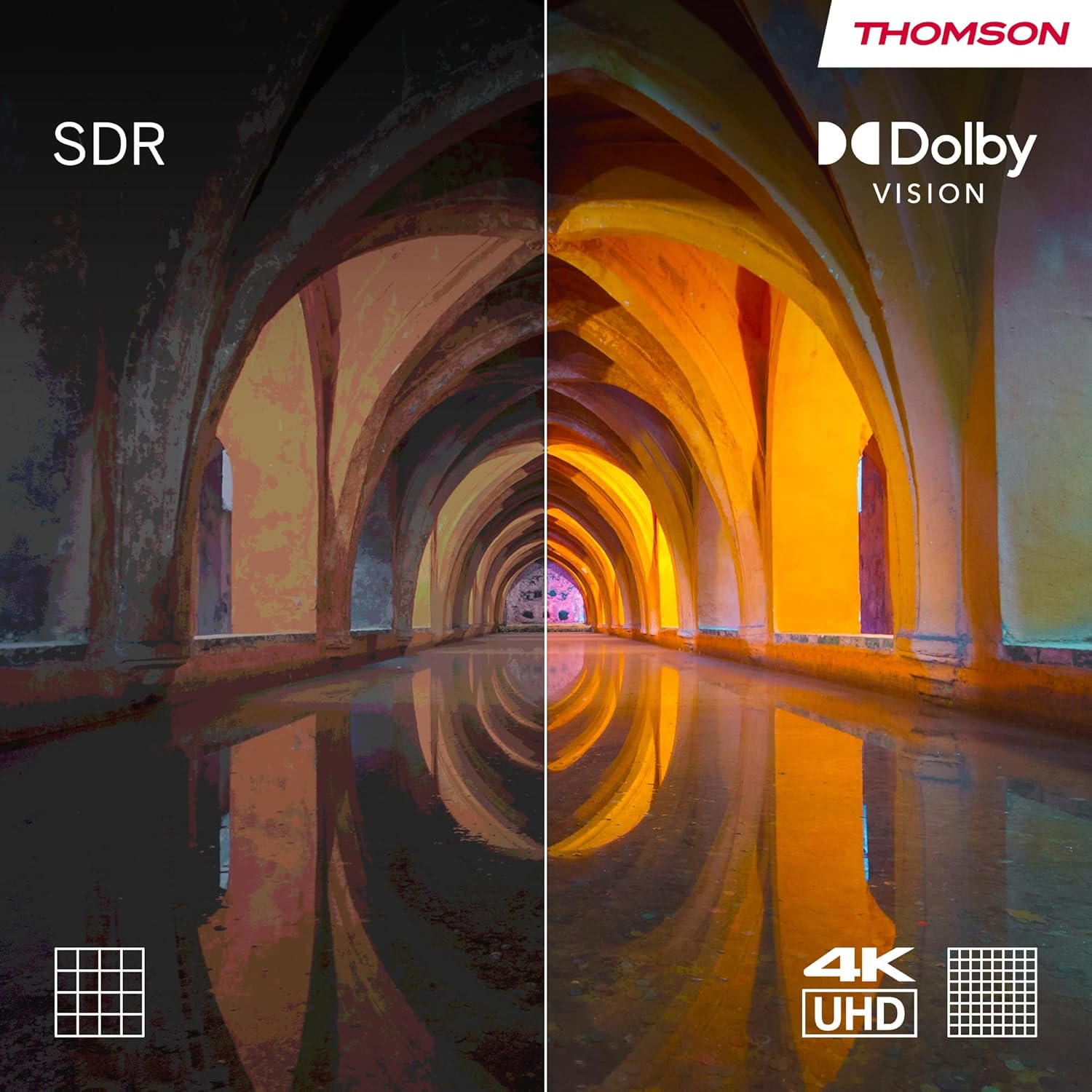
სურათი 3.3: Visual comparison demonstrating the enhanced contrast and color depth provided by Dolby Vision compared to standard dynamic range (SDR).

სურათი 3.4: An illustration depicting the immersive, multi-dimensional sound experience created by Dolby Atmos technology.
4. მოვლა
სათანადო მოვლა უზრუნველყოფს თქვენი ტელევიზორის ხანგრძლივ მუშაობას და ოპტიმალურ მუშაობას.
- ეკრანის გაწმენდა: Gently wipe the screen with a soft, lint-free cloth. For stubborn marks, use a screen-cleaning solution specifically designed for electronics, applied to the cloth, not directly to the screen.
- კაბინეტის დასუფთავება: Use a soft, dry cloth to clean the TV's cabinet. Avoid using abrasive cleaners or solvents.
- პროგრამული განახლებები: Ensure your TV's software is up-to-date. The TV will typically notify you of available updates. You can also check manually in the settings menu. Regular updates improve performance and security.
- ენერგიის მენეჯმენტი: For optimal performance and to clear temporary data, it is recommended to occasionally power off the TV completely (unplug from the wall) for a few minutes, especially if you notice any slowdowns.
5. Დიაგნოსტიკა
თუ თქვენს ტელევიზორთან დაკავშირებით პრობლემები შეგექმნათ, იხილეთ შემდეგი გავრცელებული პრობლემები და მათი გადაჭრის გზები.
| პრობლემა | შესაძლო მიზეზი / გამოსავალი |
|---|---|
| არ არის ძალა |
|
| სურათი არ არის / შავი ეკრანი |
|
| ხმა არ არის |
|
| დისტანციური მართვა არ პასუხობს |
|
| ქსელთან კავშირის საკითხები |
|
უფრო რთული საკითხების შემთხვევაში, გთხოვთ, იხილოთ მხარდაჭერის განყოფილება ან დაუკავშირდეთ მომხმარებელთა მომსახურების სამსახურს.
6. სპეციფიკაციები
| ფუნქცია | დეტალი |
|---|---|
| ბრენდი | ტომსონი |
| მოდელის ნომერი | 43QA2S13 |
| ეკრანის ზომა | 43 ინჩი (109 სმ) |
| ჩვენების ტექნოლოგია | QLED |
| რეზოლუცია | 3840 x 2160 პიქსელი (4K UHD) |
| განახლების სიხშირე | 60 ჰც |
| ოპერაციული სისტემა | Android TV |
| განსაკუთრებული თვისებები | Chromecast built-in, Google Assistant, HDR (Dolby Vision), Dolby Audio |
| დაკავშირება | 3x HDMI, 2x USB, Wi-Fi, Bluetooth, LAN, Digital Optical Audio Out, AV In |
| ტიუნერი | DVB-C/S2/T2 (Triple Tuner) |
| ხმის კონფიგურაცია | 2.0 |
| პროდუქტის ზომები (L x W x H) | 102.3 x 30 x 166.7 სმ (სადგამით) |
| წონა | 6.3 კგ |
| VESA Wall Mount Support | 200x200 mm (mount not included) |
6.1 ენერგოეფექტურობა
This product has an energy efficiency rating of F.

სურათი 6.1: EU Energy Label for the THOMSON 43QA2S13 TV, showing its energy efficiency class F.
დამატებითი ინფორმაციისთვის ეწვიეთ EPREL მონაცემთა ბაზას: https://eprel.ec.europa.eu/qr/1471757
7. გარანტია და მხარდაჭერა
Your THOMSON 43-inch QLED Smart Android TV comes with a comprehensive 3 წლიანი მწარმოებლის გარანტია, demonstrating our commitment to quality and reliability.
For technical assistance, troubleshooting beyond this manual, or warranty claims, please contact THOMSON customer support.
- მწარმოებელი: სტრიმიVIEW GMBH
- Refer to the official THOMSON website or your purchase documentation for the most up-to-date contact information and support resources in your region.
Ask a question about this manual
Ask about setup, troubleshooting, compatibility, parts, safety, or missing instructions. Manuals+ will review the question and use this page’s manual context to help answer it.