
FSP HG2-850-G5T
FSP Hydro G PRO 850W კვების ბლოკის მომხმარებლის სახელმძღვანელო
Model: HG2-850-G5T
1. შესავალი
This manual provides detailed instructions for the installation, operation, and maintenance of your FSP Hydro G PRO 850W Power Supply. This unit is an 80 Plus Gold certified, fully modular power supply compliant with ATX 3.1 and PCIe 5.1 standards, featuring a native 12V-2X6 connector.

სურათი: წინა მხარე view of the FSP Hydro G PRO 850W Power Supply.
2. ძირითადი მახასიათებლები
- ATX 3.1 & PCIe 5.1 Compliance: Designed to meet the latest ATX 3.1 and PCIe 5.1 specifications, including a native 12V-2X6 connector and cable for next-generation hardware.
- 80+ ოქროს სერტიფიკატი: Ensures high power efficiency, operating at a minimum of 90% efficiency at 50% load, reducing electricity consumption and heat generation.
- Full Modular Design: Allows for flexible cable management by connecting only the necessary cables, improving airflow and reducing clutter within the PC case.
- Off-Wet Technology (Conformal Coating): Features an exclusive conformal coating for enhanced reliability and performance in challenging environments, tested to function effectively in up to 95% relative humidity.
- კომპაქტური ზომა: With a length of 150mm, the power supply offers a smaller footprint, facilitating easier installation in various PC chassis.
- Exceptional Quiet Operation with Eco Switch: Includes an Eco switch that, when activated, optimizes power consumption and allows the fan to remain off under 30% load, providing a silent computing experience.
3. დაყენება და ინსტალაცია
Before installation, ensure your system components are compatible with an 850W power supply and that your PC case has adequate space for the unit (dimensions: 150mm L x 150mm W x 86mm H).
3.1 შეფუთვა და შემოწმება
Carefully remove the power supply and all modular cables from the packaging. Inspect for any visible damage. If any damage is found, contact your retailer or FSP support immediately.
3.2 კვების წყაროს დამონტაჟება
- Position the power supply in the designated PSU bay of your PC case. Ensure the fan is oriented correctly for optimal airflow (typically facing downwards if your case has a bottom vent, or upwards if not).
- Secure the power supply to the case using the provided screws.
3.3 Connecting Modular Cables
The FSP Hydro G PRO is fully modular, allowing you to connect only the cables required for your system. Refer to the image below for the connector layout on the power supply unit.
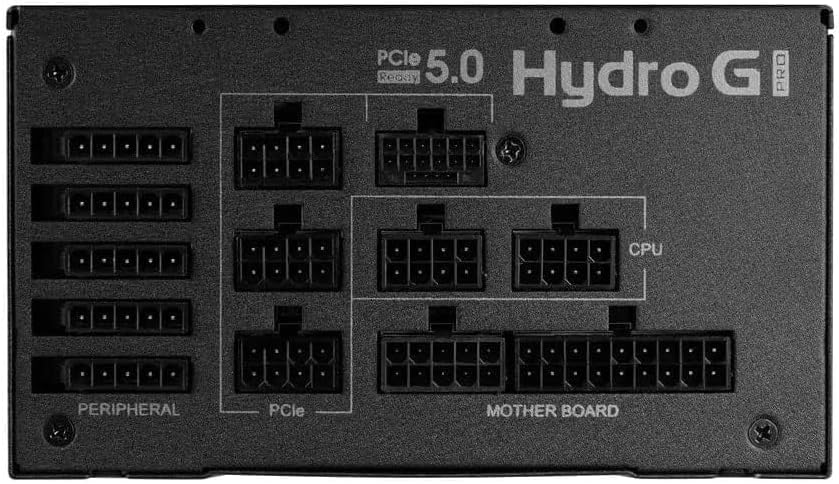
Image: Modular connector panel of the FSP Hydro G PRO power supply, showing clearly labeled ports for Motherboard, CPU, PCIe, and Peripheral connections.
- დედაპლატის კვება: 24-პინიანი ATX კაბელი დააკავშირეთ დედაპლატას.
- CPU სიმძლავრე: Connect the 8-pin (4+4 pin) EPS/CPU cables to your motherboard's CPU power connectors. Modern motherboards may require one or two such connectors.
- PCIe Power (Graphics Cards): Use the appropriate PCIe cables for your graphics card(s). This unit includes a native 12V-2X6 connector for compatible PCIe 5.1 graphics cards. For older cards, use the standard 6+2 pin PCIe connectors.
- პერიფერიული კვება: Connect SATA power cables for storage drives (SSDs, HDDs) and other peripherals. Use Molex connectors for older devices or case fans if needed.
Ensure all connections are secure and properly seated. Route cables neatly to improve airflow and aesthetics.
4. საოპერაციო ინსტრუქციები
4.1 საწყისი ჩართვა
- After all internal connections are made, connect the AC power cord to the power supply and then to a wall outlet.
- Flip the main power switch on the back of the power supply to the 'ON' position.
- სისტემის დასაწყებად დააჭირეთ კომპიუტერის კორპუსზე არსებულ ჩართვის ღილაკს.
4.2 Eco Switch Functionality
The FSP Hydro G PRO features an Eco switch located on the rear panel. This switch controls the fan's operation based on load.

სურათი: უკანა view of the FSP Hydro G PRO power supply, highlighting the Eco switch for fan control.
- When the Eco switch is ON, the power supply fan will not operate under low load (below 30%), providing a silent experience during low power consumption. The fan will automatically activate when the load exceeds 30% to maintain optimal cooling.
- When the Eco switch is გამორთულია, the power supply fan will operate continuously, regardless of the load, providing constant airflow.
5. მოვლა
The FSP Hydro G PRO power supply is designed for long-term reliability with minimal maintenance.

Image: Illustration of internal components protected by conformal coating.
- მტვრის მოცილება: Periodically inspect the power supply's fan intake and exhaust vents for dust accumulation. Use compressed air to gently clear any dust to ensure proper airflow and cooling. Ensure the power supply is turned off and unplugged before cleaning.
- კონფორმული საფარი: The unit features an "Off-Wet Technology" conformal coating, providing protection against dust, moisture, and stains. This reduces the need for frequent internal cleaning in typical environments.
6. Დიაგნოსტიკა
If you encounter issues with your FSP Hydro G PRO power supply, consider the following steps:
- ძალა არ არის:
- დარწმუნდით, რომ ცვლადი დენის კაბელი საიმედოდ არის შეერთებული როგორც კვების წყაროსთან, ასევე კედლის როზეტთან.
- Verify that the main power switch on the back of the power supply is in the 'ON' position.
- Check all modular cables (24-pin ATX, CPU, PCIe, etc.) are firmly seated in both the power supply and the respective components.
- შეამოწმეთ კედლის სოკეტი სხვა მოწყობილობით, რათა დარწმუნდეთ, რომ ის კვებას აწვდის.
- სისტემის არასტაბილურობა/შემთხვევითი გამორთვა:
- დარწმუნდით, რომ თქვენი სისტემის ენერგომოხმარება არ აღემატება კვების წყაროს 850 ვატს.
- Check for proper ventilation around the power supply and within the PC case to prevent overheating.
- Verify that all power connectors are correctly installed and not loose.
- Fan Not Spinning (Eco Mode):
- If the Eco switch is ON, the fan is designed not to spin under low load (below 30%). This is normal operation. The fan will activate automatically when the system load increases.
- If the Eco switch is OFF and the fan is not spinning, ensure the power supply is receiving power and is not faulty.
If issues persist after performing these checks, contact FSP customer support or your retailer for further assistance.
7. სპეციფიკაციები
| ფუნქცია | დეტალი |
|---|---|
| მოდელის სახელი | HG2-850-G5T |
| გამომავალი ვატიtage | 850 ვატი |
| 80+ სერტიფიკაცია | ოქრო |
| ATX ვერსია | 3.1 |
| PCIe ვერსია | 5.1 (with 12V-2X6 connector) |
| ფორმის ფაქტორი | ATX |
| მოდულარულობა | სრული მოდულური |
| გაგრილების მეთოდი | Air (with Eco fan control) |
| პროდუქტის ზომები (L x W x H) | 150 მმ x 150 მმ x 86 მმ (6 x 6 x 3.5 ინჩი) |
| ნივთის წონა | 3.38 კილოგრამი (7.44 ფუნტი) |
| მწარმოებელი | FSP Group INC |
8. გარანტია და მხარდაჭერა
The FSP Hydro G PRO 850W Power Supply comes with a 10 წლიანი გარანტია, ensuring long-term reliability and peace of mind. For warranty claims, technical support, or any product-related inquiries, please contact FSP customer service through their official webსაიტზე ან თქვენს შეძენის წერტილში.
გთხოვთ, შეინახოთ შეძენის დამადასტურებელი საბუთი გარანტიის დასადასტურებლად.
Ask a question about this manual
Ask about setup, troubleshooting, compatibility, parts, safety, or missing instructions. Manuals+ will review the question and use this page’s manual context to help answer it.