
1. შესავალი
This manual provides detailed instructions for the operation and maintenance of the LAUNCH CRP129E Plus OBD2 Scanner. Please read this manual thoroughly before using the device to ensure proper and safe operation. The CRP129E Plus is a comprehensive diagnostic tool designed for automotive professionals and enthusiasts, offering full system diagnostics and various service reset functions.
2. პროდუქტი დასრულდაview
2.1. მოწყობილობის კომპონენტები
The LAUNCH CRP129E Plus features a user-friendly interface with a 5-inch touchscreen and physical buttons for navigation.

სურათი 2.1: The LAUNCH CRP129E Plus OBD2 Scanner and its protective carrying case.
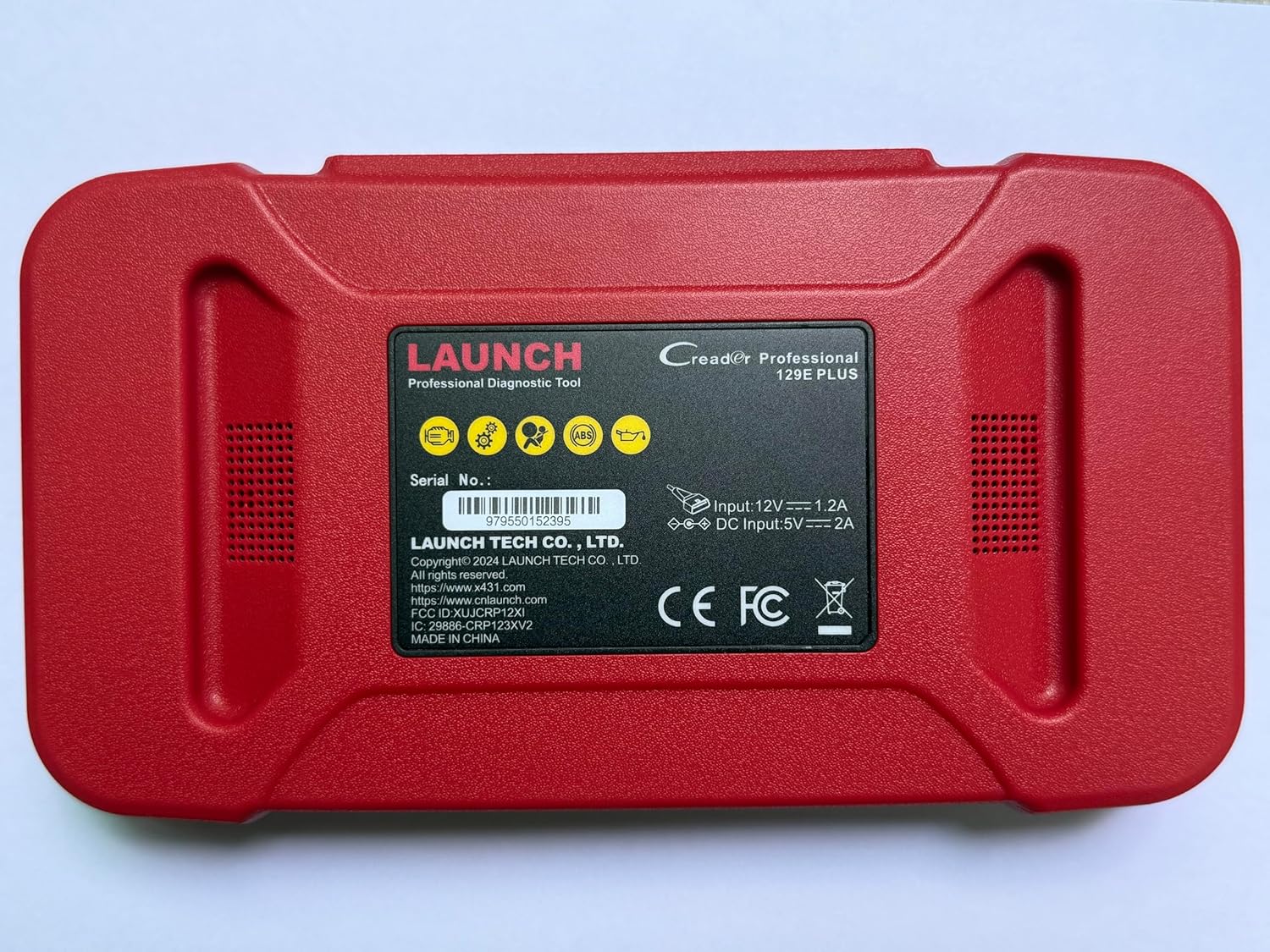
სურათი 2.2: უკანა view of the CRP129E Plus, displaying input voltage, current specifications, and serial number (e.g., 979550152395).
2.2. პაკეტის შიგთავსი
ყუთის გახსნისას, დარწმუნდით, რომ ქვემოთ ჩამოთვლილი ყველა ნივთი ხელთ არის:
- CRP129E PLUS OBD2 Scanner (x1)
- OBDII Cable (x1)
- 5V DC Charging Cable (x1)
- მომხმარებლის სახელმძღვანელო (x1)
- სწრაფი დაწყების სახელმძღვანელო (x1)
- ჩანთა (x1)

სურათი 2.3: Visual representation of the CRP129E Plus package contents.
3. დაყენება და პირველადი გამოყენება
3.1. მოწყობილობის დატენვა
Before first use, ensure the device is fully charged using the provided 5V DC charging cable. Connect the cable to the device and a suitable power source.
3.2. ჩართვა/გამორთვა
- ჩართვა: დააჭირეთ და გააჩერეთ ჩართვის ღილაკი ეკრანის განათებამდე.
- Გამორთვა: Press and hold the power button, then select "Power Off" from the options.
3.3. Connecting to Vehicle
Locate the vehicle's OBDII port, typically under the dashboard on the driver's side. Connect the provided OBDII cable from the CRP129E Plus to the vehicle's OBDII port. Ensure the vehicle's ignition is in the ON position (engine off or running, depending on the diagnostic task).
3.4. Wi-Fi Connection and Updates
The CRP129E Plus supports one-click Wi-Fi updates. Connect the device to a stable Wi-Fi network to download the latest software and vehicle data. Regular updates ensure compatibility with new vehicle models and improved diagnostic functions.
- From the main menu, tap "Settings".
- Select "WLAN" and connect to an available network.
- Return to the main menu and tap "Upgrade".
- Select the desired software updates and tap "Update".

სურათი 3.1: The device interface showing options for updates, DTC lookup, live data stream, and battery test.
4. საოპერაციო ინსტრუქციები
4.1. ავტომატური VIN სკანირება
The device can automatically identify vehicle information. After connecting to the vehicle, select "Diagnose" and the device will attempt an Auto VIN scan to quickly identify the vehicle's make, model, and year.

სურათი 4.1: Visual representation of the Auto VIN scan process and systems covered by diagnosis.
4.2. სისტემის სრული დიაგნოსტიკა
The CRP129E Plus can access and diagnose all available vehicle systems. This includes, but is not limited to, Engine, ABS, SRS, SAS, TCM, TPMS, Body, Chassis, Powertrain, Fuel System, and Lighting System.
- მთავარი მენიუდან აირჩიეთ "დიაგნოსტიკა".
- Choose "Health Report" or select specific systems for diagnosis.
- The device will scan for Diagnostic Trouble Codes (DTCs) and display results.
- You can read fault codes, clear fault codes, and view live data streams.

სურათი 4.2: დასრულდაview of the comprehensive system diagnostic capabilities.
4.3. OBD2 Functions
The device supports all 10 modes of OBDII testing for emissions-related issues.
- DTC-ების წაკითხვა/გასუფთავება: დიაგნოსტიკური პრობლემების კოდების აღდგენა და წაშლა.
- პირდაპირი მონაცემების ნაკადი: View real-time data from the vehicle's sensors.
- I/M მზადყოფნა: შეამოწმეთ გამონაბოლქვთან დაკავშირებული მონიტორების სტატუსი.
- ჩარჩოს მონაცემების გაყინვა: View ავტომობილის მდგომარეობის სურათი, როდესაც გაუმართაობის კოდი დაყენებული იყო.
- O2 სენსორის ტესტი: O2 სენსორის მონიტორის ტესტის შედეგების მიღება.
- ბორტ მონიტორის ტესტი: გამონაბოლქვთან დაკავშირებული ძრავის კომპონენტების შედეგების მოძიება.
- EVAP სისტემის ტესტი: დაიწყეთ აორთქლების ემისიის სისტემის ტესტირება.
- ინფორმაცია ავტომობილის შესახებ: მიიღეთ ავტომობილის საიდენტიფიკაციო ნომერი (VIN), კალიბრაციის ID და კალიბრაციის დამადასტურებელი ნომერი (CVN).
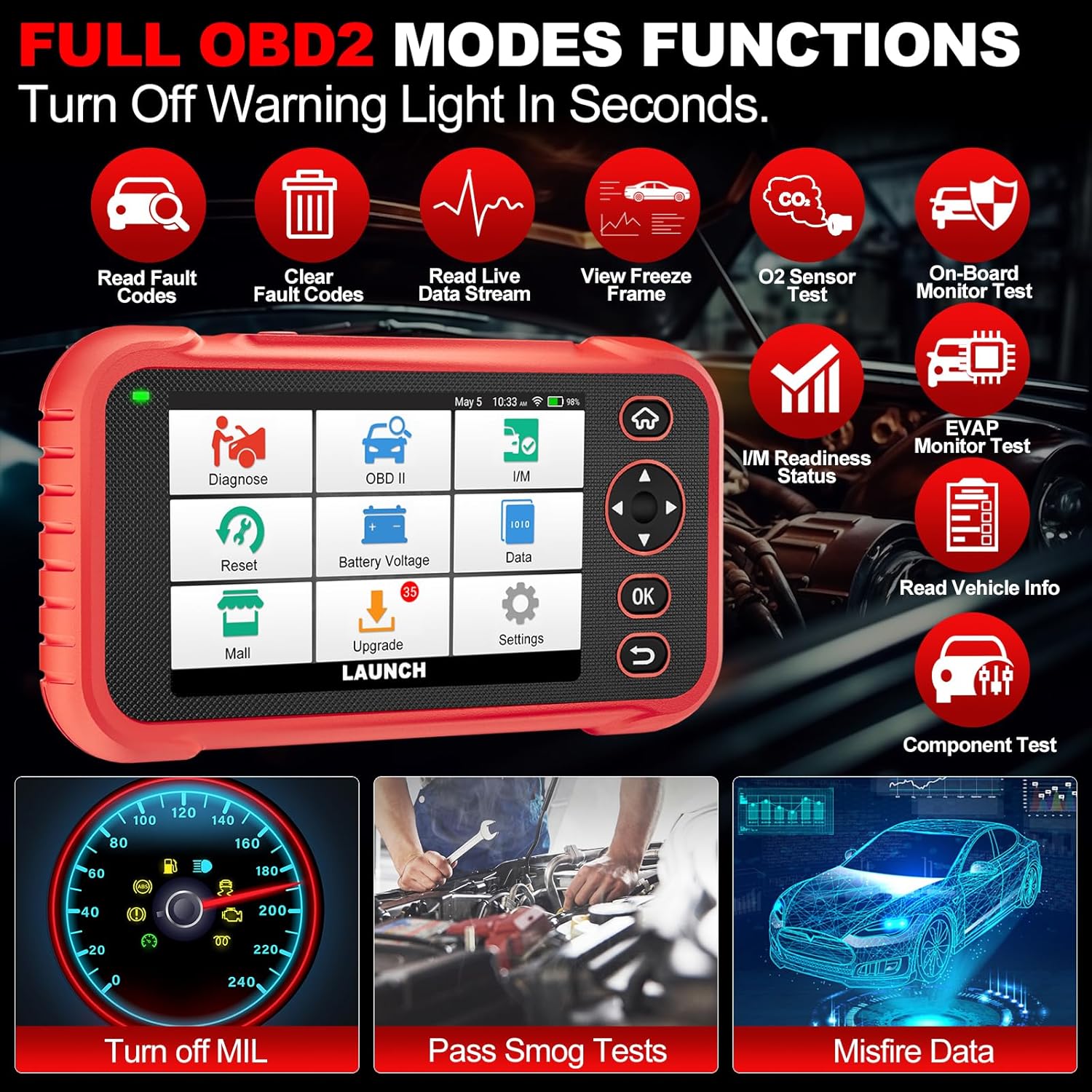
სურათი 4.3: Main menu options for OBD2 functions.
4.4. Service Reset Functions
The CRP129E Plus offers 12+ essential service reset functions for common maintenance tasks.
- ზეთის გადატვირთვა: ზეთის შეცვლის შემდეგ აღადგენს ზეთის სიცოცხლის ხანგრძლივობის სისტემას.
- დროსელის ადაპტაცია: დროსელის აქტივატორების ინიციალიზაცია ნაგულისხმევ მდგომარეობაში.
- Adblue-ს გადატვირთვა: Resets the urea after the diesel exhaust fluid (AdBlue) is replaced or refilled.
- სათავეamp შესატყვისი: Calibrates the adaptive front lighting system.
- TPMS გადატვირთვა: Resets tire pressure monitoring system sensors.
- SAS-ის გადატვირთვა: ახდენს საჭის კუთხის სენსორის კალიბრაციას.
- Battery Matching (BMS Reset): Registers new battery replacement.
- A/F გადატვირთვა: არეგულირებს ჰაერის/საწვავის თანაფარდობის პარამეტრებს.
- DPF-ის რეგენერაცია: აშორებს DPF ფილტრს ნაწილაკებისგან.
- ინჟექტორის კოდირება: აკოდირებს ინჟექტორის ახალ ნომრებს ECU-ზე.
- EPB-ის გადატვირთვა: ელექტრონული სადგომი მუხრუჭის ხუნდების გადატვირთვა შეცვლის შემდეგ.
- ABS სისხლდენა: Performs bleeding of the brake system.

სურათი 4.4: დასრულდაview of available service reset functions.
4.5. Live Data Graphing and Recording
The device can display live data streams in merged quadrant graphs, allowing for comprehensive analysis of up to four parameters simultaneously. Data can also be recorded and played back for further review.

სურათი 4.5: Example of 4-in-1 live data graphing and diagnostic report generation.
4.6. ბატარეის ტtage ტესტი
Monitor the vehicle's battery voltage in real-time to assess its status and identify potential issues.

სურათი 4.6: ბატარეის მოცულობაtage test interface and other diagnostic support features.
5. მოვლა
- დასუფთავება: მოწყობილობის გასაწმენდად გამოიყენეთ რბილი, მშრალი ქსოვილი. მოერიდეთ აბრაზიული საწმენდი საშუალებების ან გამხსნელების გამოყენებას.
- შენახვა: Store the device in its carrying case in a cool, dry place when not in use.
- პროგრამული განახლებები: Regularly check for and install software updates via Wi-Fi to ensure optimal performance and vehicle compatibility.
- ბატარეის მოვლა: Avoid fully discharging the battery frequently. Charge the device regularly, even if not in active use, to maintain battery health.
6. Დიაგნოსტიკა
| პრობლემა | შესაძლო მიზეზი | გამოსავალი |
|---|---|---|
| მოწყობილობა არ ჩაირთვება. | დაბალი ბატარეა; გაუმართავი ჩართვის ღილაკი. | Charge the device for at least 30 minutes. If issue persists, contact support. |
| მანქანასთან კომუნიკაციის შეცდომა. | Loose OBDII connection; vehicle ignition off; incompatible vehicle protocol. | Ensure cable is securely connected. Turn ignition to ON. Verify vehicle compatibility. |
| Unable to update software. | No Wi-Fi connection; unstable internet; insufficient storage. | Check Wi-Fi connection. Ensure stable internet. Free up storage if necessary. |
| ეკრანი არ რეაგირებს. | პროგრამული უზრუნველყოფის გაუმართაობა; ფიზიკური დაზიანება. | გადატვირთეთ მოწყობილობა. თუ პრობლემა გაგრძელდა, დაუკავშირდით მხარდაჭერის სამსახურს. |
7. სპეციფიკაციები
- მოდელი: CRP129E PLUS
- ოპერაციული სისტემა: Android 7.0
- ჩვენება: 5 დიუმიანი სენსორული ეკრანი
- მეხსიერება: 16 GB
- ბატარეა: 6100 mAh
- დაკავშირება: Wi-Fi
- ზომები: 7.09 x 6.3 x 2.36 ინჩი
- ნივთის წონა: 2.27 ფუნტი
- მხარდაჭერილი ოქმები: OBDII/EOBD
- ავტომობილის დაფარვა: Over 85 brands (1996-2025)
- UPC: 884508007774

სურათი 7.1: Summary of key hardware and software specifications.

სურათი 7.2: Extensive vehicle brand coverage and multi-language support.
8. გარანტია და მხარდაჭერა
The LAUNCH CRP129E Plus comes with a manufacturer's warranty. Please refer to the official LAUNCH webკონკრეტული გარანტიის პირობებისთვის იხილეთ საიტი ან თქვენი შეძენის დოკუმენტაცია.
- გარანტია: 5 Years (as per product information)
- Return/Replace Policy: 90 Days (as per product information)
- ტექნიკური მხარდაჭერა: 24/7 technical support is available. For assistance, please contact LAUNCH customer service.
- ონლაინ გამოხმაურება: The device supports online feedback for quick resolution of diagnostic issues.
For further assistance or to provide feedback, please visit the official LAUNCH support channels.