
Hiwill HW210
Hiwill HW210 Soundbar with Subwoofer 2.1 Surround Sound System User Manual
მოდელი: HW210
1. შესავალი
Thank you for choosing the Hiwill HW210 Soundbar with Subwoofer. This 2.1 channel surround sound system is designed to enhance your audio experience for televisions, PCs, gaming consoles, and other compatible devices. This manual provides detailed instructions for setup, operation, and maintenance to ensure optimal performance and longevity of your product. Please read this manual thoroughly before use and retain it for future reference.

Image 1.1: The Hiwill HW210 Soundbar and Subwoofer system, shown with a television for illustrative purposes.
2. უსაფრთხოების ინფორმაცია
ელექტროშოკის, ხანძრის ან მოწყობილობის დაზიანების რისკის შესამცირებლად, გთხოვთ, დაიცვათ შემდეგი უსაფრთხოების ზომები:
- არ დაუშვათ ეს მოწყობილობა წვიმის ან ტენიანობის ქვეშ.
- მოწყობილობაზე არ დადოთ სითხით სავსე ნივთები, მაგალითად, ვაზები.
- უზრუნველყავით სათანადო ვენტილაცია. არ დაბლოკოთ ვენტილაციის ღიობები.
- არ დააინსტალიროთ სითბოს წყაროსთან ახლოს, როგორიცაა რადიატორები, სითბოს რეგისტრები, ღუმელები ან სხვა მოწყობილობა (მათ შორის ampგამხსნელები), რომლებიც წარმოქმნიან სითბოს.
- დაიცავით ელექტროგადამცემი კაბელი სიარულიდან ან ჩახშობისგან, განსაკუთრებით საცავებში, მოსახერხებელ ჭურჭელში და მოწყობილობიდან გამოსასვლელ წერტილში.
- გამოიყენეთ მხოლოდ მწარმოებლის მიერ მითითებული დანართები/აქსესუარები.
- გამორთეთ ეს მოწყობილობა ელვისებური ქარიშხლის დროს ან დიდი ხნის განმავლობაში გამოუყენებლობისას.
- მიმართეთ ყველა მომსახურება კვალიფიციურ მომსახურე პერსონალს. სერვისი საჭიროა, როდესაც აპარატი რაიმე ფორმით დაზიანებულია, მაგალითად, დაზიანებულია კვების კაბელი ან შტეფსელი, დაიღვარა სითხე ან ჩავარდა მოწყობილობაში საგნები, აპარატი წვიმს ან ტენიანობას ექვემდებარება, ნორმალურად არ მუშაობს. , ან ჩამოაგდეს.
3. პაკეტის შიგთავსი
გთხოვთ, შეამოწმოთ, რომ ყველა ნივთი ადგილზეა და კარგ მდგომარეობაშია:
- Hiwill Soundbar
- სადენიანი საბვუფერი
- დისტანციური მართვა
- დენის ადაპტერი
- Optical Cable (may vary by region)
- AUX Cable (may vary by region)
- Wall Mounting Kit (screws, anchors)
- მომხმარებლის სახელმძღვანელო (ეს დოკუმენტი)
4. პროდუქტი დასრულდაview
4.1 Soundbar Features
- Ultra-slim design (3.8 cm height)
- Integrated orbital aluminum diaphragm speakers
- Built-in HiFi and DSP technology for immersive 3D surround sound
- Maximum output power: 120 Watts
- ხმის წნევის დონე: 106 დბ
- Bluetooth 5.3 for wireless streaming
- Multiple input options: HDMI ARC, Optical, AUX, USB
- 3 adjustable EQ modes: Game, Movie, Music
- Adjustable bass and treble levels
4.2 Subwoofer Features
- 9-liter capacity for deep, resonant bass
- Wired connection to the soundbar for stable audio transmission
4.3 კონტროლი და ინდიკატორები
The soundbar features an integrated display and control buttons, typically located on the top or front panel. The remote control provides full functionality.
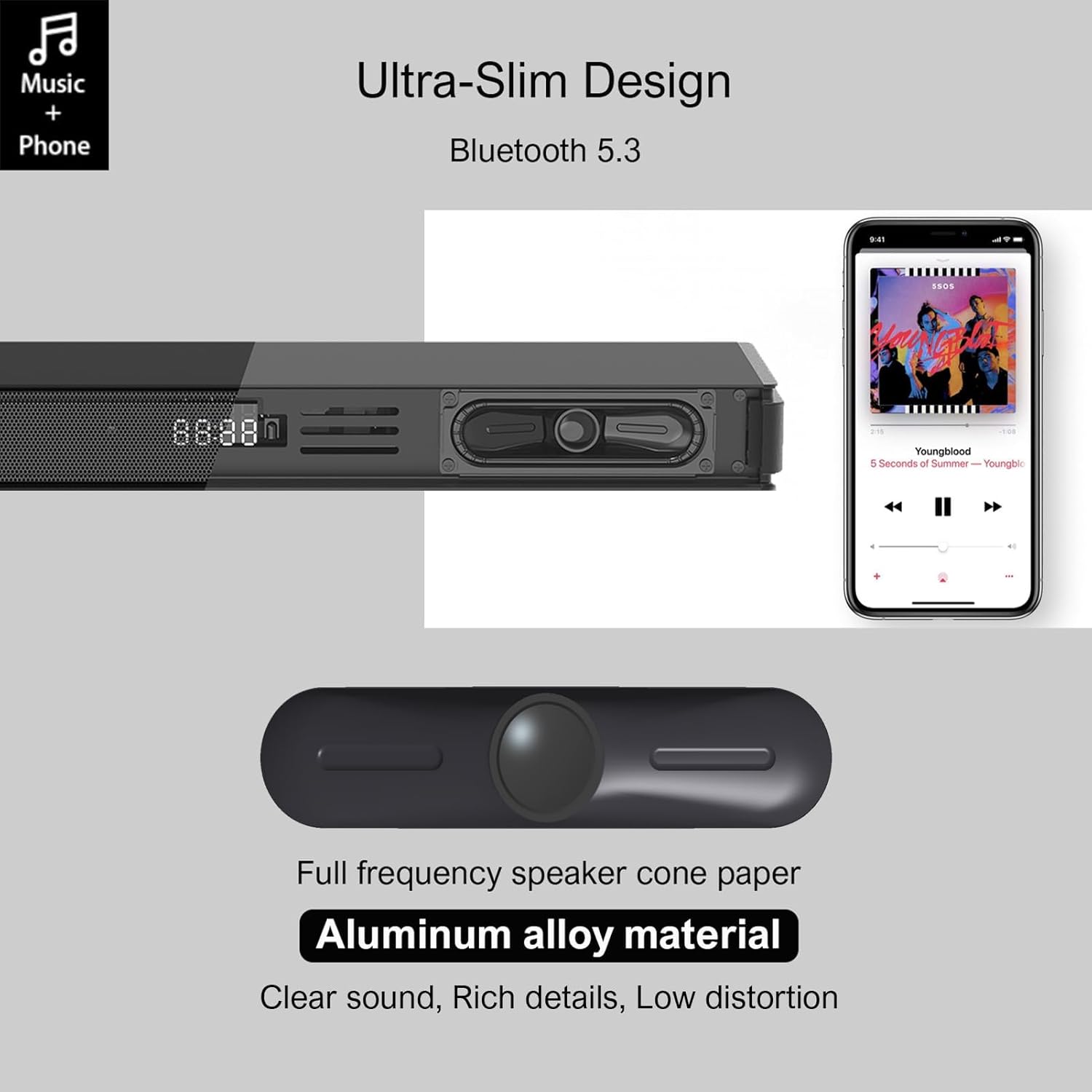
Image 4.1: Detail of the soundbar's ultra-slim design, showing the front display and integrated speakers.
4.4 უკანა პანელის კავშირები
The rear panel of the soundbar provides various ports for connecting to your audio sources and power.

სურათი 4.2: უკანა view of the soundbar showing input ports: AUX, HDMI ARC, USB, Optical, Subwoofer Out, and DC In.
- AUX (3.5 მმ): For connecting devices with a 3.5mm audio output.
- ARC (HDMI): For connecting to a TV's HDMI ARC port. Supports CEC for unified control.
- USB: აუდიოს დასაკრავად files USB დისკიდან.
- ᲝᲞᲢᲘᲙᲣᲠᲘ: For connecting to a TV or other device with an optical audio output.
- SUB OUT: სადენიანი საბვუფერის დასაკავშირებლად.
- DC IN: კვების ადაპტერის დასაკავშირებლად.
5. დაყენება
5.1 განთავსების ვარიანტები
The Hiwill HW210 soundbar offers flexible placement options to suit your home entertainment setup.

Image 5.1: Illustrates placing the soundbar on a tabletop in front of the TV or mounting it on the wall below the TV.
- მაგიდის განთავსება: Place the soundbar on a stable, flat surface directly in front of your TV. Ensure it does not obstruct the TV's remote sensor.
- კედელზე მონტაჟი: The soundbar can be mounted on the wall below your TV. Use the provided wall mounting kit and follow these steps:
- Mark the desired mounting positions on the wall, ensuring the soundbar is centered with your TV.
- გაბურღეთ საპილოტე ხვრელები მონიშნულ პოზიციებზე.
- Insert wall anchors (if necessary for your wall type).
- Secure the mounting brackets (if separate) or the soundbar directly using screws.
- საბვუფერის განთავსება: Place the subwoofer on the floor near the soundbar. Experiment with placement to find the best bass response for your room.
5.2 დენთან დაკავშირება
- Connect the power adapter to the DC IN port on the soundbar's rear panel.
- შეაერთეთ დენის ადაპტერის მეორე ბოლო კედლის განყოფილებაში.
- Connect the wired subwoofer cable to the SUB OUT port on the soundbar.
5.3 აუდიო წყაროებთან დაკავშირება
Choose one of the following connection methods based on your device:
- HDMI ARC (რეკომენდებულია ტელევიზორებისთვის):
- Connect one end of an HDMI cable (not included) to the ARC port on the soundbar.
- მეორე ბოლო შეაერთეთ თქვენი ტელევიზორის HDMI ARC პორტთან.
- Ensure HDMI CEC is enabled in your TV's settings for unified control.
- ოპტიკური:
- Connect the optical cable (included) to the OPTICAL port on the soundbar.
- Connect the other end to the optical audio output port on your TV or other device.
- Ensure your TV's audio output is set to "PCM" if you experience no sound.
- AUX (3.5 მმ):
- Connect the 3.5mm AUX cable (included) to the AUX port on the soundbar.
- Connect the other end to the headphone jack or AUX output of your device.
- USB:
- ჩადეთ USB ფლეშ დრაივი, რომელიც შეიცავს აუდიოს fileშედით USB პორტში ხმის ზოლზე.
6. საოპერაციო ინსტრუქციები
6.1 ჩართვა/გამორთვა
- დააჭირეთ ძალაუფლება ღილაკი საუნდბარზე ან დისტანციურ მართვაზე მოწყობილობის ჩასართავად ან გამოსართავად.
6.2 შეყვანის წყაროს არჩევა
- დააჭირეთ შეყვანა button on the remote control or the soundbar to cycle through available input sources (ARC, OPT, AUX, USB, BT). The selected input will be displayed on the soundbar's screen.
6.3 Bluetooth დაწყვილება
- Turn on the soundbar and select the "BT" input source. The soundbar will enter pairing mode, indicated by a flashing "BT" on the display.
- თქვენს მობილურ მოწყობილობაზე ჩართეთ Bluetooth და მოძებნეთ ხელმისაწვდომი მოწყობილობები.
- Select "Hiwill HW210" (or similar name) from the list of devices.
- Once paired, the soundbar will emit a confirmation tone, and "BT" will stop flashing.
- To disconnect, turn off Bluetooth on your device or select a different input source on the soundbar.
6.4 ხმის კონტროლი
- გამოიყენეთ ხმის გაზრდა (+) და Ხმის დაწევა (-) buttons on the soundbar or remote control to adjust the master volume.
- დააჭირეთ დადუმება პულტზე ღილაკი ხმის ჩასართავად ან გამოსართავად.
6.5 EQ Modes and Tone Adjustment
The soundbar features three preset equalizer modes and adjustable bass/treble settings.

Image 6.1: Visual representation of the three equalizer modes: Game, Movie, and Music, optimized for different audio content.
- დააჭირეთ EQ button on the remote control to cycle through the preset modes: თამაში, ფილმი, და მუსიკა.
- გამოიყენეთ ბასი +/- buttons on the remote control to adjust the bass level.
- გამოიყენეთ ტრიპლე +/- buttons on the remote control to adjust the treble level.
7. მოვლა
- დასუფთავება: Use a soft, dry cloth to clean the surface of the soundbar and subwoofer. Do not use liquid cleaners or abrasive materials.
- შენახვა: თუ მოწყობილობას დიდი ხნის განმავლობაში ინახავთ, გამორთეთ ის დენის წყაროდან და შეინახეთ გრილ, მშრალ ადგილას.
- მოერიდეთ დაბრკოლებებს: Ensure that the speaker grilles and ventilation openings are not blocked by dust or other objects.
8. Დიაგნოსტიკა
| პრობლემა | შესაძლო მიზეზი | გამოსავალი |
|---|---|---|
| არავითარი ძალა | დენის კაბელი არ არის შეერთებული; დენის წყარო არ არის აქტიური | დარწმუნდით, რომ კვების კაბელი საიმედოდ არის შეერთებული; სცადეთ სხვა კვების წყარო. |
| ხმა არ არის | Incorrect input source selected; Volume too low; Cables not connected properly; TV audio output settings incorrect. | Select the correct input source; Increase volume; Check all audio cables are securely connected; For Optical/ARC, ensure TV audio output is set to PCM. |
| Bluetooth დაწყვილება ვერ ხერხდება | საუნდბარი დაწყვილების რეჟიმში არ არის; მოწყობილობა ძალიან შორს არის; ჩარევა. | Ensure soundbar is in BT mode and flashing; Move device closer; Turn off other Bluetooth devices. |
| დისტანციური მართვა არ მუშაობს | ელემენტები დაიცალა; დაბრკოლება პულტსა და საუნდ პანელს შორის. | Replace remote control batteries; Ensure clear line of sight to the soundbar's sensor. |
| ხმის ცუდი ხარისხი | Incorrect EQ mode; Source audio quality; Cable issues. | Adjust EQ modes and bass/treble settings; Try a different audio source; Check/replace audio cables. |
9. სპეციფიკაციები
| მოდელის სახელი | Hiwill HW210 Soundbar |
| სპიკერის ტიპი | ხმის ზოლი სადენიანი საბვუფერით |
| Surround ხმის კონფიგურაცია | 2.1 არხი |
| დინამიკის მაქსიმალური გამომავალი სიმძლავრე | 120 ვატი |
| დაკავშირების ტექნოლოგია | Bluetooth 5.3, HDMI ARC, AUX (3.5mm), USB, Optical |
| აუდიო გამოყვანის რეჟიმი | გარს |
| განსაკუთრებული თვისებები | High-resolution audio support, 3 EQ modes, Adjustable Bass/Treble, Wall-mountable |
| რეკომენდებული გამოყენება | TV, Gaming Consoles, Computers, Smartphones, Tablets, Music Players, DVD Players, Home Theater |
10. გარანტია და მხარდაჭერა
Hiwill products are designed and manufactured to the highest quality standards. For detailed warranty information, please refer to the warranty card included in your package or visit the official Hiwill website. If you encounter any issues or require technical assistance, please contact Hiwill customer support through the contact information provided on the product packaging or webსაიტი.
Please have your model number (HW210) and purchase date ready when contacting support.