
1. პროდუქტი დასრულდაview
The OPTIMA QUAD12 ORANGETOP Lithium Battery is a high-performance powersports battery designed with advanced HYPERCORE LITHIUM Cell Technology. It features a built-in Engine Start Reserve (CPR) and a sophisticated Battery Management System (BMS) for optimal performance and longevity. The patented POWERLINK system provides convenient battery control, status monitoring, and charging capabilities.

Image 1.1: OPTIMA QUAD12 ORANGETOP Lithium Battery connected to its Powerlink cable.
This battery is engineered for broad fitment with quad terminals and includes necessary spacers for secure installation. It offers 380 Cranking Amps and a 4.5AH capacity, making it a reliable power source for various powersports applications.
2. უსაფრთხოების ინფორმაცია
Always prioritize safety when handling batteries. Failure to follow these instructions can result in serious injury or property damage.
- თვალის დაცვა: ბატარეებთან მუშაობისას ყოველთვის გამოიყენეთ შესაბამისი თვალის დამცავი.
- ხელთათმანები: Wear insulated gloves to prevent electrical shock and protect against chemical exposure.
- ვენტილაცია: უზრუნველყავით სამუშაო ადგილის ადეკვატური ვენტილაცია.
- მოწევა აკრძალულია/ღია ცეცხლი: აკუმულატორს მოარიდეთ ნაპერწკლები, ალი და კვამლის წყაროები.
- მოკლე ჩართვა: Avoid short-circuiting battery terminals. Do not place metal objects on the battery.
- დამუხტვა: Use only chargers specifically designed for lithium iron phosphate (LiFePO4) batteries. Using an incompatible charger can cause damage or fire.
- განკარგვა: ელემენტები გადააგდეთ ადგილობრივი რეგულაციების შესაბამისად. არ დაწვათ.
- ბავშვები: შეინახეთ ბატარეები ბავშვებისთვის მიუწვდომელ ადგილას.
3. პაკეტის შიგთავსი
ინსტალაციის დაწყებამდე დარწმუნდით, რომ ყველა კომპონენტი შეფუთვაშია.
- OPTIMA QUAD12 ORANGETOP Lithium Battery
- POWERLINK Cable with LED display
- Fitment Spacers (various sizes)
- Terminal Bolts and Nuts
- მომხმარებლის სახელმძღვანელო

Image 3.1: The complete package contents, including the battery, Powerlink cable, fitment spacers, and hardware.
4. დაყენება და ინსტალაცია
Proper installation is crucial for the battery's performance and safety.
- მომზადება: Ensure the vehicle's ignition is off and disconnect the negative (-) terminal of the old battery first, followed by the positive (+) terminal. Remove the old battery.
- მორგება: The QUAD12 features quad terminals for versatile installation. Use the provided fitment spacers to ensure a snug and secure fit in your battery tray. A loose battery can be damaged by vibration.
- ტერმინალის კავშირი: Connect the positive (+) terminal of the OPTIMA QUAD12 battery first, then the negative (-) terminal. Ensure connections are tight and secure using the provided hardware.
- POWERLINK Cable Installation: Connect the POWERLINK cable to the designated port on the battery. This cable is essential for the battery's functionality, including the CPR feature and status display. Route the cable securely to an accessible location on your vehicle.
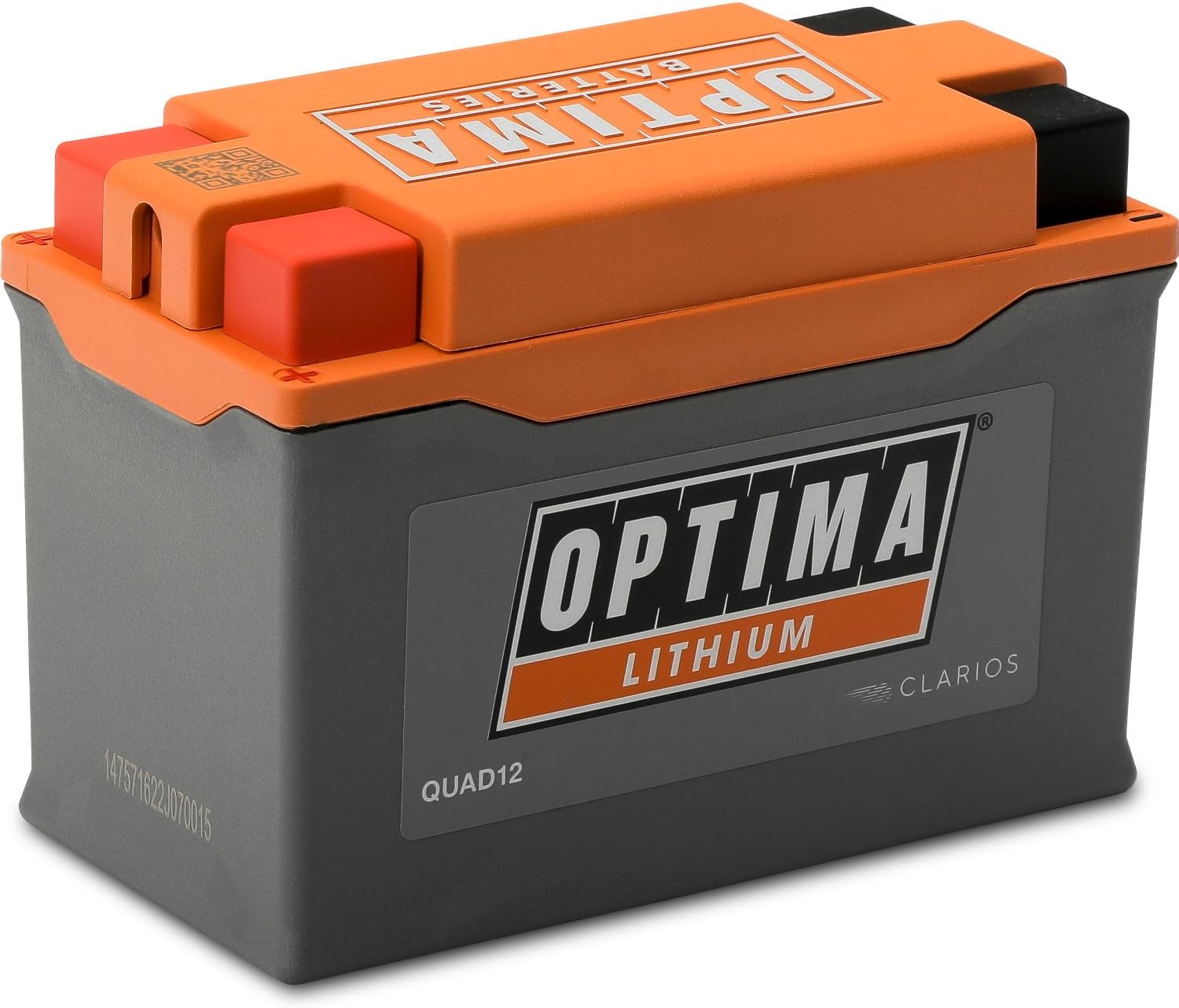
Image 4.1: The OPTIMA QUAD12 battery, designed with quad terminals for flexible installation.
5. ოპერაცია
The OPTIMA QUAD12 ORANGETOP Lithium Battery incorporates several advanced features for enhanced user experience.
5.1. POWERLINK System
The patented POWERLINK system provides a convenient connection for OPTIMA lithium-enabled maintainers and chargers. It also features a state-of-charge indicator, allowing you to monitor the battery's condition.

Image 5.1: The OPTIMA POWERLINK system provides convenient battery control, status, and charging.
5.2. OPTIMA CPR (Engine Start Reserve)
The OPTIMA CPR feature automatically disconnects the battery from parasitic key-off loads when the voltage drops below a critical level. This reserves enough power to start your vehicle, preventing you from being stranded. To activate the reserve, press the button on the POWERLINK cable.
5.3. შენახვის რეჟიმი
The POWERLINK system allows you to toggle the battery into storage mode. This feature helps prolong battery life by optimizing its state for long periods of inactivity. Consult the POWERLINK cable's instructions for specific steps to engage storage mode.
5.4. ბატარეის მართვის სისტემა (BMS)
An advanced microprocessor-controlled BMS continuously monitors and controls all battery functions automatically. This includes balancing the state-of-charge of individual cells, protecting against overcharge, over-discharge, and over-current conditions, and managing temperature.

Image 5.2: Key advantages of the ORANGETOP battery, including its microprocessor-controlled management system and IP67 rating.
6. მოვლა
Proper maintenance ensures the longevity and optimal performance of your OPTIMA QUAD12 battery.
- რეგულარული შემოწმება: Periodically check battery terminals for corrosion and ensure connections are tight.
- დასუფთავება: Keep the battery clean and dry. Use a damp cloth to wipe down the exterior. Do not use solvents or harsh chemicals.
- დამუხტვა: If the battery requires charging, use only a charger compatible with lithium iron phosphate (LiFePO4) batteries. The POWERLINK cable provides a convenient charging port.
- შენახვა: For extended periods of inactivity, engage the battery's storage mode via the POWERLINK cable. Store the battery in a cool, dry place.
7. Დიაგნოსტიკა
This section addresses common issues you might encounter with your OPTIMA QUAD12 battery.
| პრობლემა | შესაძლო მიზეზი | გამოსავალი |
|---|---|---|
| Vehicle does not start (no power) | Battery discharged below starting voltage. | Activate OPTIMA CPR via the POWERLINK cable button. If still no start, charge the battery. |
| POWERLINK LED display is off | POWERLINK cable not connected or faulty. Battery completely discharged. | Ensure POWERLINK cable is securely connected. If battery is completely discharged, it may require a specific recovery charge from a compatible charger. |
| ბატარეა არ იტენება | Parasitic draw from vehicle. Faulty charging system (regulator/rectifier). Battery fault. | Check vehicle for parasitic draws. Have vehicle's charging system inspected by a professional. Contact OPTIMA support if issues persist. |
| Battery appears physically damaged | დარტყმა ან არასათანადო მოპყრობა. | Do not use a damaged battery. Contact OPTIMA support for assistance. |
If you encounter issues not listed here or if solutions do not resolve the problem, please contact OPTIMA customer support.
8. სპეციფიკაციები
| ფუნქცია | სპეციფიკაცია |
|---|---|
| ბრენდი | OPTIMA |
| მოდელის ნომერი | QUAD12 |
| ტექნიკა | ლითიუმის რკინის ფოსფატი (LiFePO4) |
| კრეკინგი Amps | 380 CA |
| ტევადობა | ახ. წ. 4.5 წ |
| ნომინალური ტომიtage | 12 ვ |
| ნივთის წონა | 2.4 ფუნტი |
| პროდუქტის ზომები (L x W x H) | 5.24 x 2.72 x 3.66 ინჩი |
| ტერმინალები | ოთხკუთხა ტერმინალი |
| მახასიათებლები | Built-in Engine Start Reserve (CPR), BMS, POWERLINK Cable, IP67 Rating |
| ცვლის OEM ნაწილების ნომრებს | BTX9-BS, BTZ10S, BT12B-4, BT12A-BS, B14A-A2, B14L-A2, BT9B-4, BTX14AH, B14-A2, BTX14AH-BS, B14-B2, B12A-A, B9-B, B12AL-A, B14L-B2, B7C-A, B10L-B2, B10L-A2, B12AL-A2, BT12B-BS, B12C-A, B9L-B, 12N7D-3B, B10L-B, B14L-A1, B12A-B, B14A-A1, B10A-A2, B9A-A, BTX14AHL-BS, B7-A, 12N9-4B-1, SB14L-B2, B7L-B, BTX14AHL, 12N73BY, BTX9, YTX9-BS, YTZ10S, YT12B-4, YT12A-BS, YB14A-A2, YB14L-A2, YT9B-4, YTX14AH, YB14-A2, YTX14AH-BS, YB14-B2, YB12A-A, YB9-B, YB12AL-A, YB14L-B2, YB7C-A, YB10L-B2, YB10L-A2, YB12AL-A2, YT12B-BS, YB12C-A, YB9L-B, 12N7D-3B, YB10L-B, YB14L-A1, YB12A-B, YB14A-A1, YB10A-A2, YB9A-A, YTX14AHL-BS, YB7-A, 12N9-4B-1, YB14L-B2, YB7L-B, YTX14AHL, 12N7-3B, YTX9 |
| UPC | 721112916835 |

Image 8.1: Physical dimensions of the OPTIMA QUAD12 ORANGETOP Lithium Battery.
9. გარანტია და მხარდაჭერა
For warranty information and customer support, please refer to the official OPTIMA Batteries webსაიტზე ან პირდაპირ დაუკავშირდით მათ მომხმარებელთა მომსახურების სამსახურს. შეინახეთ შეძენის დამადასტურებელი საბუთი გარანტიის მოთხოვნებისთვის.
OPTIMA Batteries Contact Information:
გთხოვთ ეწვიოთ www.optimabatteries.com უახლესი დახმარების რესურსებისა და საკონტაქტო ინფორმაციისთვის.