
Svetaecho A100
Svetaecho A100 Dual Controller Charger Station User Manual
Model: A100 | Brand: Svetaecho
პროდუქტი დასრულდაview
The Svetaecho A100 Dual Controller Charger Station is designed to provide efficient and convenient charging for your Xbox controllers. Featuring a unique robot helmet-inspired design with LED indicators, it ensures your controllers are always ready for extended gaming sessions. This kit includes two high-capacity 5520mWh rechargeable battery packs, eliminating the need for disposable batteries.

Image: The Svetaecho A100 Dual Controller Charger Station, showcasing its design with two Xbox controllers docked and two rechargeable battery packs.
რა არის ყუთში
- 2 x 5520mWh Xbox One Rechargeable Batteries
- 1 x Charger Dock for Xbox Series X Rechargeable Battery Pack
- 1 x USB-C დამტენი კაბელი
- 4 x Battery Covers (for various Xbox controller models)
- 1 x მომხმარებლის სახელმძღვანელო

სურათი: სრული view of all items included in the package: the charging dock, two rechargeable batteries, a USB-C cable, and four different battery covers.
დაყენების ინსტრუქციები
- ბატარეის პაკეტების დაყენება:
Open the battery compartment on your Xbox controller. Insert one of the provided 5520mWh rechargeable battery packs, ensuring proper alignment with the contacts. Close the compartment with the appropriate battery cover for your controller model.

Image: Visual instructions demonstrating how to remove the old battery cover, insert the new rechargeable battery pack, and attach the compatible battery cover.
- დამტენი სადგურის დაკავშირება:
Connect the included USB-C charging cable to the port on the back of the charger dock. Plug the other end of the USB-C cable into a compatible USB power source (e.g., Xbox console, USB wall adapter).
- Place Controllers on Dock:
Carefully place your Xbox controllers onto the charging slots of the dock. Ensure the controllers are seated correctly and the charging contacts align. The robot helmet's LED indicators will illuminate to show the charging status.
ოპერაციული ინსტრუქციები
LED ინდიკატორები
The charger station features clear LED indicators on the robot helmet design to show the charging status of each controller:
- Red Breathing Light: მიუთითებს, რომ კონტროლერი ამჟამად იტენება.
- მყარი მწვანე შუქი: Indicates that the controller is fully charged or in standby mode.
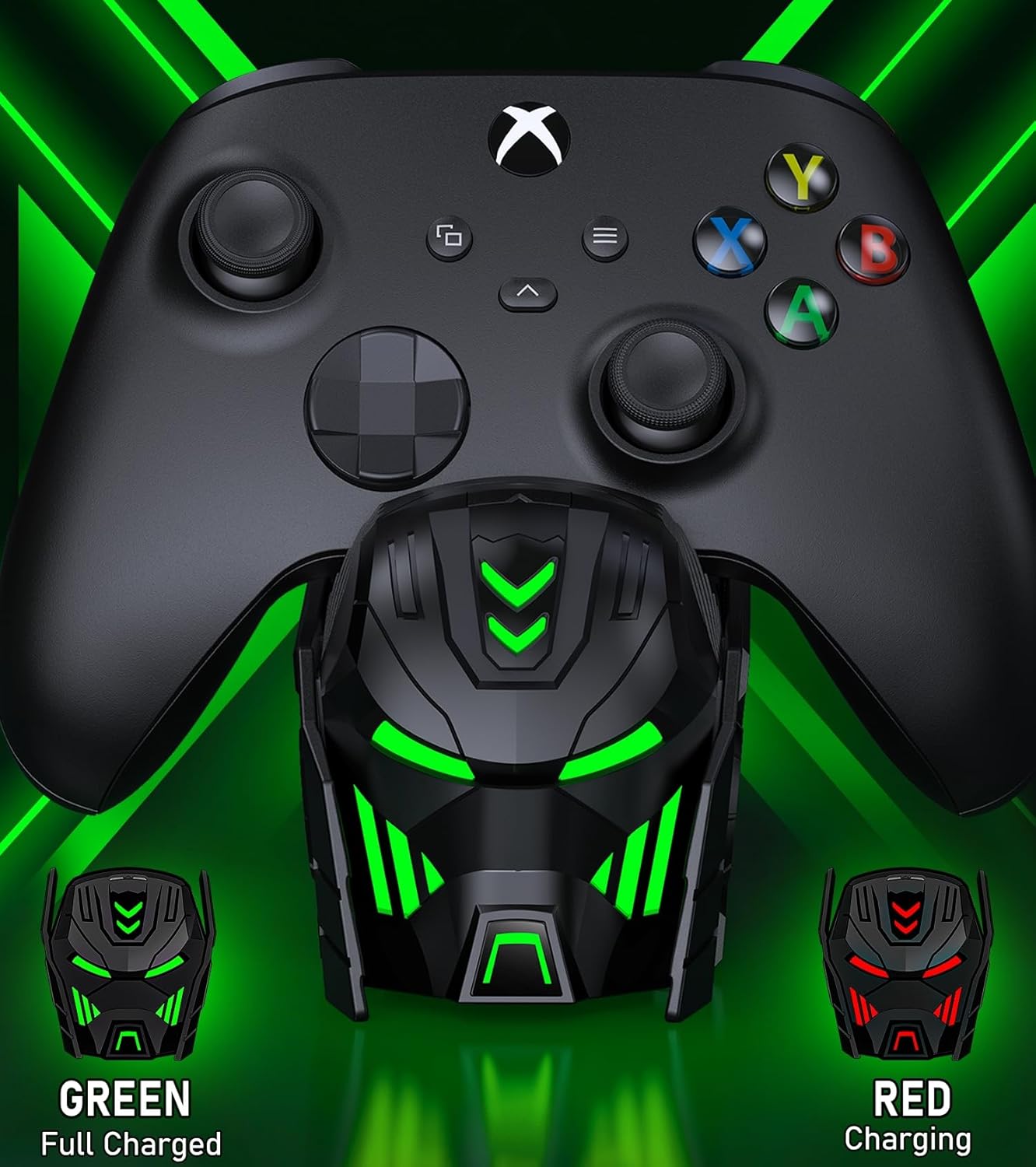
Image: Close-up of the charger station's robot helmet face, illustrating the red light for charging and the green light for a fully charged or standby state.
სინათლის კონტროლის ღილაკი
A touch button is integrated into the design, allowing you to control the LED ambient light. You can switch between charging indicators (red/green) or turn the LED lights off completely.
პროდუქტის მახასიათებლები და უპირატესობები
- გახანგრძლივებული სათამაშო დრო: Each 5520mWh battery pack provides 18-25 hours of continuous playtime, ensuring uninterrupted gaming sessions.
- სწრაფი დატენვა: It takes approximately 4-5 hours to fully charge both battery packs simultaneously.
- ბატარეის ხანგრძლივი ხანგრძლივობა: The rechargeable batteries can be recharged up to 2000 times, offering a cost-effective and environmentally friendly alternative to disposable AA batteries.
- ინტელექტუალური დაცვა: Built with an intelligent charging board, the dock provides overheating, short-circuit, over-voltage, and over-current protection to safeguard your batteries and controllers.
- ელეგანტური დიზაინი: The robot helmet-inspired aesthetic with cool LED ambient light adds a unique and appealing look to your gaming setup.

Image: Key performance metrics of the charger, highlighting its fast charging, high battery capacity, and long playing time.
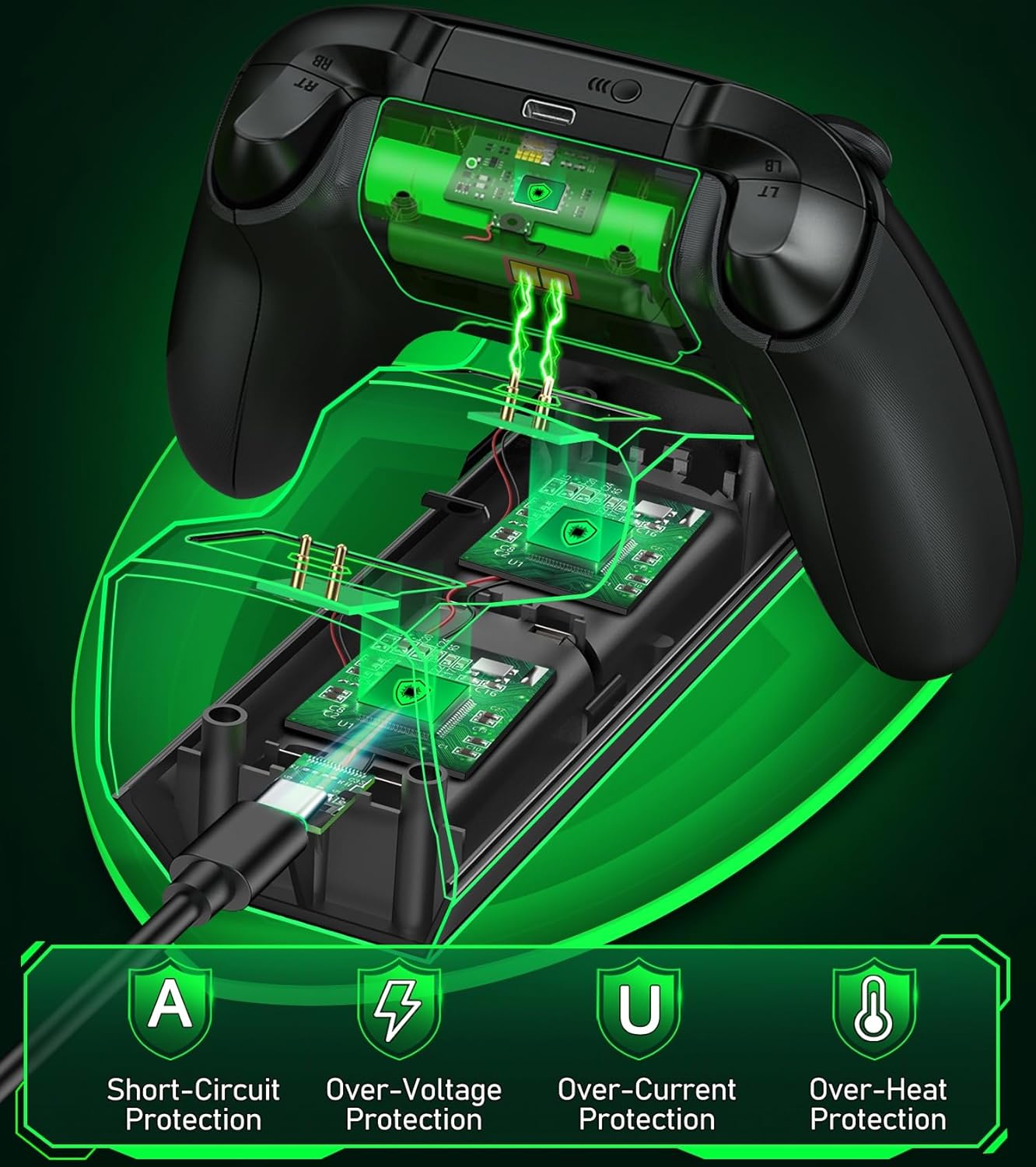
Image: A visual representation of the multiple safety protections integrated into the charging station, including short-circuit, over-voltage, over-current, and over-heat protection.
თავსებადობა
The Svetaecho A100 Dual Controller Charger Station is compatible with a wide range of Xbox controllers, including:
- Xbox Series X/S Controllers
- Xbox One Controllers
- Xbox One X Controllers
- Xbox One S Controllers
- Xbox Elite Controllers

Image: A compatibility chart illustrating different Xbox controller models and the corresponding battery covers provided for each, ensuring broad compatibility.
მოვლა
- Keep the charging station and batteries dry and clean.
- Wipe surfaces with a soft, dry cloth. Avoid using abrasive cleaners or solvents.
- შეინახეთ გრილ, მშრალ ადგილას, მზის პირდაპირი სხივებისა და ექსტრემალური ტემპერატურისგან მოშორებით.
- Do not disassemble the product or attempt repairs yourself. Contact customer support if issues arise.
პრობლემების მოგვარება
- Controllers not charging:
- Ensure the USB-C cable is securely connected to both the charging station and the power source.
- Verify that the power source is active and providing sufficient power.
- Check if the battery packs are correctly inserted into the controllers and the controllers are properly seated on the charging dock.
- Ensure the charging contacts on both the controller and the dock are clean and free of debris.
- LED ინდიკატორები არ მუშაობს:
- Press the light control button to ensure the LEDs are not turned off.
- Confirm the charging station is receiving power.
- Short battery life after charging:
- Ensure the batteries are fully charged (solid green LED).
- ბატარეის მუშაობა შეიძლება დროთა განმავლობაში გაუარესდეს ხანგრძლივი გამოყენებისას.
სპეციფიკაციები
| ფუნქცია | დეტალი |
|---|---|
| მოდელის ნომერი | A100 |
| ბატარეის ტევადობა | 2 x 5520mWh |
| დატენვის დრო | დაახლ. 4-5 საათი |
| თამაშის დრო ერთ დატენვაზე | 18-25 საათი |
| დატენვის ციკლები | 2000-მდე |
| შეყვანა | USB-C |
| პროდუქტის ზომები | 7.99 x 3.5 x 2.83 ინჩი |
| ნივთის წონა | 15.2 უნცია |
| მწარმოებელი | სვეტაეჩო |
ოფიციალური პროდუქტის ვიდეო
Video: An official product video from Svetaecho demonstrating the features and functionality of the Xbox Controller Charger Station with Robot Helmet design, including LED indicators, battery storage, and fast charging capabilities.
გარანტია და მხარდაჭერა
For warranty information and customer support, please refer to the warranty card included in your package or visit the official Svetaecho store on Amazon:
დაცვის გეგმები ასევე ხელმისაწვდომია გაფართოებული დაფარვისთვის:
- 2-წლიანი დაცვის გეგმა: შეძენა შესაძლებელია.
- 3-წლიანი დაცვის გეგმა: შეძენა შესაძლებელია.
- სრული დაცვა: ყოველთვიური გეგმა, რომელიც მოიცავს წარსულ და მომავალ შესყიდვებს.
Ask a question about this manual
Ask about setup, troubleshooting, compatibility, parts, safety, or missing instructions. Manuals+ will review the question and use this page’s manual context to help answer it.