
1. შესავალი
Thank you for choosing the RIGOL DS1102Z-E Digital Oscilloscope. This manual provides essential information for the safe and efficient use of your device. Please read it thoroughly before operation and keep it for future reference.
The DS1102Z-E is a high-performance digital oscilloscope designed for various applications including research and development, education, maintenance, and industrial testing. It features a 100 MHz bandwidth, 1 GSa/s sample rate, and a 24 Mpts memory depth, enabling precise analysis of complex waveforms.
2. პროდუქტი დასრულდაview
The RIGOL DS1102Z-E is a versatile measurement instrument integrating a frequency counter and supporting protocol decoding for RS232/UART, I2C, and SPI. It also includes FFT analysis and automatic measurement functions to enhance testing efficiency.
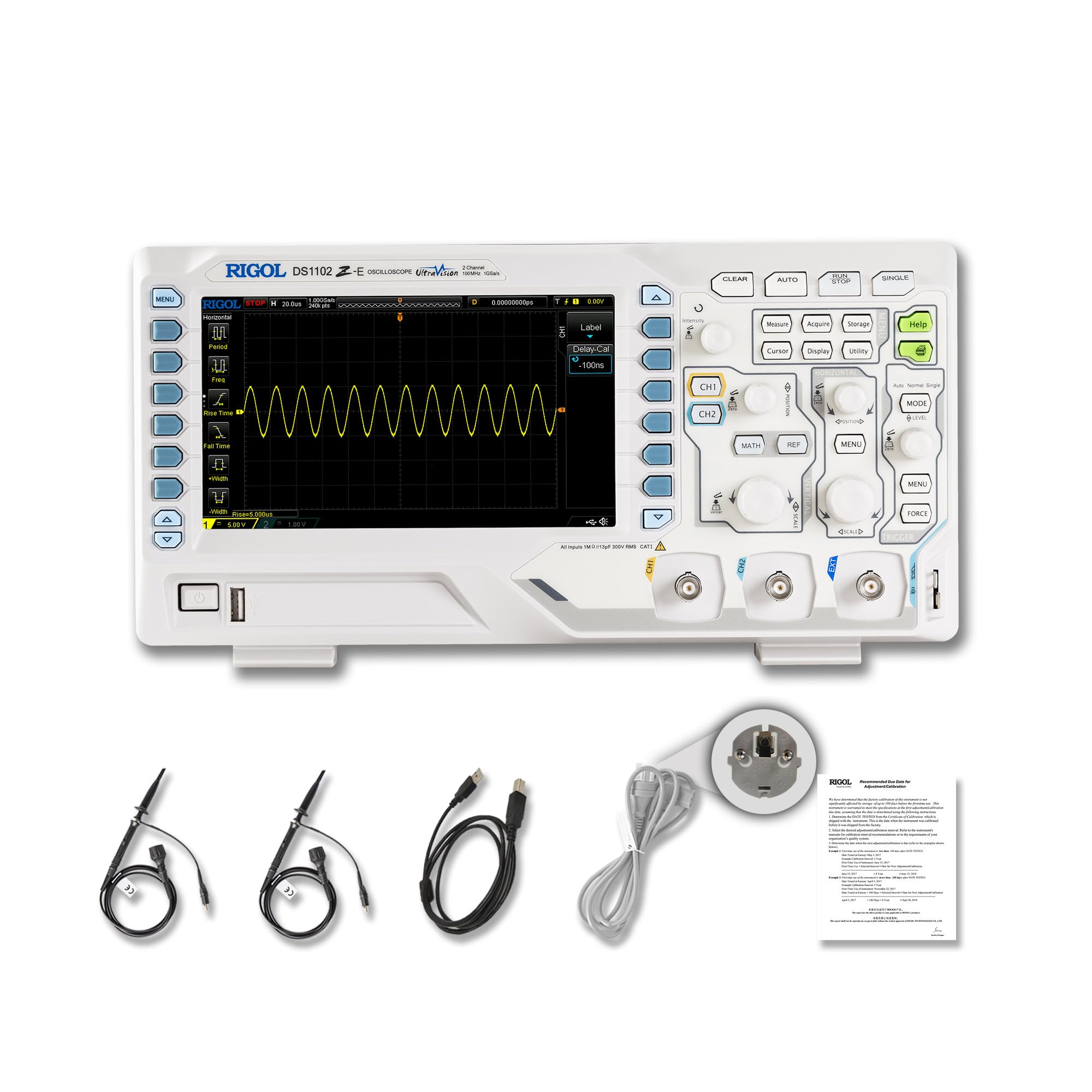
სურათი 2.1: წინა view of the RIGOL DS1102Z-E Digital Oscilloscope.
2.1 ძირითადი მახასიათებლები
- 100 MHz Bandwidth, 1 GSa/s Sample შეფასება: Captures signals with high precision.
- 24 Mpts Memory Depth: Allows for extended signal capture and detailed waveform analysis.
- Multi-function Measurement Device: Includes frequency counter, protocol decoding (RS232/UART, I2C, SPI), FFT analysis, and automatic measurement functions.
- Waveform Recording and Playback: Records signal variations and replays them for fault identification.
- მაღალი გარჩევადობის ეკრანი: 7-inch TFT screen with 256-level grayscale, offering a phosphor-like display effect for clear waveform details.
- Remote Control & Secondary Development Support: Equipped with USB and LAN ports for PC remote control, compatible with SCPI commands, LabVIEW, Visual Basic და Visual C++.
2.2 რა არის ყუთში

Figure 2.2: Contents included with the DS1102Z-E Oscilloscope.
- 1x Main Unit (DS1102Z-E Digital Oscilloscope)
- 2x Passive Probes (150MHz)
- 1x Power Cable (EU plug)
- 1x USB A-B Cable
- 1x საგარანტიო ბარათი
- 1x Calibration Certificate
- 1x Declaration of Conformity
3. დაყენება
Follow these steps to set up your RIGOL DS1102Z-E oscilloscope:
- შეფუთვა: Carefully remove all components from the packaging. Inspect the device for any signs of damage.
- დენის კავშირი: Connect the provided power cable to the oscilloscope's power input and then to a suitable AC power outlet.
- ზონდის კავშირი: Connect the passive probes to the BNC input connectors (CH1, CH2) on the front panel. Ensure a secure connection.
- დამიწება: Always ensure the oscilloscope is properly grounded through the power cable.
- USB/LAN კავშირი (არასავალდებულო): If you plan to use remote control or secondary development, connect the USB cable to a PC or the LAN cable to your network.

სურათი 3.1: დასრულდაview of the oscilloscope's physical dimensions and ports.
4. საოპერაციო ინსტრუქციები
This section covers the basic operation of your oscilloscope.
4.1 ჩართვა/გამორთვა
- ჩართვა: Press the power button located on the front panel. The device will perform a self-test and display the main interface.
- Გამორთვა: ხანგრძლივად დააჭირეთ ჩართვის ღილაკს, სანამ მოწყობილობა არ გამოირთვება.
4.2 ტალღის ფორმის ძირითადი ჩვენება
After powering on, connect a signal to one of the input channels (e.g., CH1). Adjust the vertical scale (Volts/Div) and horizontal scale (Time/Div) knobs to display the waveform clearly. Use the AUTO button for automatic setup of the waveform display.

სურათი 4.1: მაგample of a waveform displayed on the oscilloscope screen.
4.3 გაფართოებული ფუნქცია
- საზომი ფუნქციები: დააჭირეთ გაზომეთ button to access automatic measurements like frequency, period, peak-to-peak voltagე და ა.შ.
- გამშვები სისტემა: Use the trigger controls to stabilize repetitive waveforms. Adjust the trigger level and mode (Edge, Pulse, Video, Slope, etc.) as needed.
- Waveform Recording: The oscilloscope allows recording and replaying waveforms. Access this feature through the menu to capture transient events.
- Protocol Decoding: For serial bus analysis (RS232/UART, I2C, SPI), configure the decoding settings via the menu.
- FFT ანალიზი: Perform Fast Fourier Transform (FFT) to analyze the frequency components of your signal.

Figure 4.2: Complex waveform analysis with measurement data.

Figure 4.3: Multiple waveforms displayed simultaneously for comparison.
5. მოვლა
სათანადო მოვლა უზრუნველყოფს თქვენი ოსცილოსკოპის ხანგრძლივობას და სიზუსტეს.
- დასუფთავება: ოსცილოსკოპის გარე ზედაპირის გასაწმენდად გამოიყენეთ რბილი, მშრალი ქსოვილი. ჯიუტი ჭუჭყის შემთხვევაში, ოდნავamp cloth with mild detergent can be used. Avoid abrasive cleaners or solvents.
- ეკრანის მოვლა: Clean the display screen with a soft, lint-free cloth. Do not use excessive force or harsh chemicals.
- შენახვა: When not in use, store the oscilloscope in a clean, dry environment, away from direct sunlight, extreme temperatures, and excessive dust.
- ზონდის მოვლა: Handle probes carefully. Avoid bending or stressing the probe tips. Store them properly to prevent damage.
- კალიბრაცია: For optimal performance, periodic calibration by qualified personnel is recommended. Refer to the official RIGOL website for calibration services.
6. Დიაგნოსტიკა
ეს განყოფილება გთავაზობთ გადაწყვეტილებებს იმ გავრცელებული პრობლემებისთვის, რომლებსაც შეიძლება წააწყდეთ.
| პრობლემა | შესაძლო მიზეზი | გამოსავალი |
|---|---|---|
| No power when turned on. | Power cable not connected, power outlet faulty, or power button issue. | Check power cable connection. Test the power outlet. Ensure the power button is fully pressed. |
| No waveform displayed. | No signal input, probe not connected correctly, vertical/horizontal scale incorrect, or trigger not set. | Verify signal source. Check probe connections. Adjust Volts/Div and Time/Div. Press AUTO or adjust trigger settings. |
| Waveform is unstable. | Incorrect trigger settings. | Adjust trigger level, mode, and source to stabilize the waveform. |
| დისტანციური მართვა არ მუშაობს. | USB/LAN cable issue, incorrect network settings, or software driver not installed. | Check cable connections. Verify network configuration. Install necessary drivers and software (e.g., UltraScope). |
If the problem persists, please contact RIGOL technical support.
7. სპეციფიკაციები
Detailed technical specifications for the RIGOL DS1102Z-E Digital Oscilloscope.

Figure 7.1: Visual representation of key technical specifications.
| ფუნქცია | სპეციფიკაცია |
|---|---|
| ბრენდი | რიგოლი |
| მოდელი | DS1102Z-E |
| გამტარუნარიანობა | 100 MHz |
| არხები | 2 Channels + EXT |
| Sample კურსი | 1 GSa/s |
| მეხსიერების სიღრმე | 24 Mpts |
| ტალღის ფორმის აღების სიხშირე | 30,000 wfms/s |
| ვერტიკალური რეზოლუცია | 8 ბიტიანი |
| მინიმალური მგრძნობელობა | 1 mV/div |
| Minimum Time Base | 2 ns/div |
| დეკოდირების მხარდაჭერა | RS232/UART, I2C, SPI |
| FFT ანალიზი | სტანდარტული |
| ჩვენება | 7 დიუმიანი TFT (800x480) |
| დაკავშირება | USB Host, USB Device, LAN |
| დენის წყარო | AC ადაპტერი |
| ფერი | რუხი / თეთრი |
| ნივთის წონა | 2.9 კგ |
| ზომები (L x W x H) | 31.31 x 16.08 x 12.24 სანტიმეტრი |
| შესაბამისი სტანდარტები | CE, RoHS |
| მწარმოებლის ნაწილის ნომერი | DS1102Z-E |
| წარმოშობის ქვეყანა | ჩინეთი |
8. გარანტია და მხარდაჭერა
RIGOL is committed to providing high-quality products and excellent customer service.
- გარანტია: The RIGOL DS1102Z-E Digital Oscilloscope comes with a 3 წლიანი გარანტია შეძენის დღიდან. ეს გარანტია მოიცავს დეფექტებს მასალასა და სამუშაოზე ნორმალური გამოყენებისას.
- ტექნიკური მხარდაჭერა: RIGOL offers 24/7 ტექნიკური მხარდაჭერა to assist you with any questions or issues you may encounter. Please refer to the official RIGOL webსაიტი საკონტაქტო ინფორმაციისა და დახმარების რესურსებისთვის.
- ონლაინ რესურსები: Visit the official RIGOL website for product documentation, software updates (e.g., UltraScope), and additional support materials.

Figure 8.1: RIGOL oscilloscopes support multiple languages for user convenience.