
1. შესავალი და უსაფრთხოების ინფორმაცია
This manual provides essential instructions for the installation, operation, and maintenance of your GAMEMAX GX-850 80 Plus Gold Fully Modular Power Supply. Please read this manual thoroughly before installation and retain it for future reference.
1.1 მნიშვნელოვანი უსაფრთხოების გაფრთხილება
- ელექტრული დარტყმის საშიშროება: კვების წყაროები შეიცავს მაღალი ძაბვისtage components. Do not open the power supply unit. There are no user-serviceable parts inside. Opening the unit will void the warranty.
- სათანადო დამიწება: Ensure your computer system is properly grounded to prevent electrical hazards.
- გამორთეთ ელექტროენერგია: Always disconnect the AC power cord from the wall outlet before installing, removing, or servicing the power supply or any other computer components.
- ვენტილაცია: უზრუნველყავით დენის წყაროს გარშემო საკმარისი ვენტილაცია. არ დაბლოკოთ ვენტილაციის ღიობები.
- ტენიანობა და ტემპერატურა: Do not operate the power supply in high humidity or high-temperature environments. Keep it away from water and heat sources.
- პროფესიონალური ინსტალაცია: If you are unsure about any installation steps, seek assistance from a qualified technician.
2. პაკეტის შიგთავსი
Verify that all items are present in your GAMEMAX GX-850 package:
- GAMEMAX GX-850 80 Plus Gold Fully Modular Power Supply
- Modular Cable Set (including ATX 24-pin, CPU 8-pin, PCIe 6+2-pin, SATA, Peripheral 4-pin cables)
- AC დენის კაბელი
- სამონტაჟო ხრახნები
- მომხმარებლის სახელმძღვანელო (ეს დოკუმენტი)
3. პროდუქტი დასრულდაview
The GAMEMAX GX-850 is an 850-watt 80 Plus Gold certified fully modular power supply designed for desktop computers. It features an LLC and DC-DC circuit design for high efficiency and stable power delivery, along with an ultra-quiet FDB (Fluid Dynamic Bearing) fan for optimal cooling and low noise.
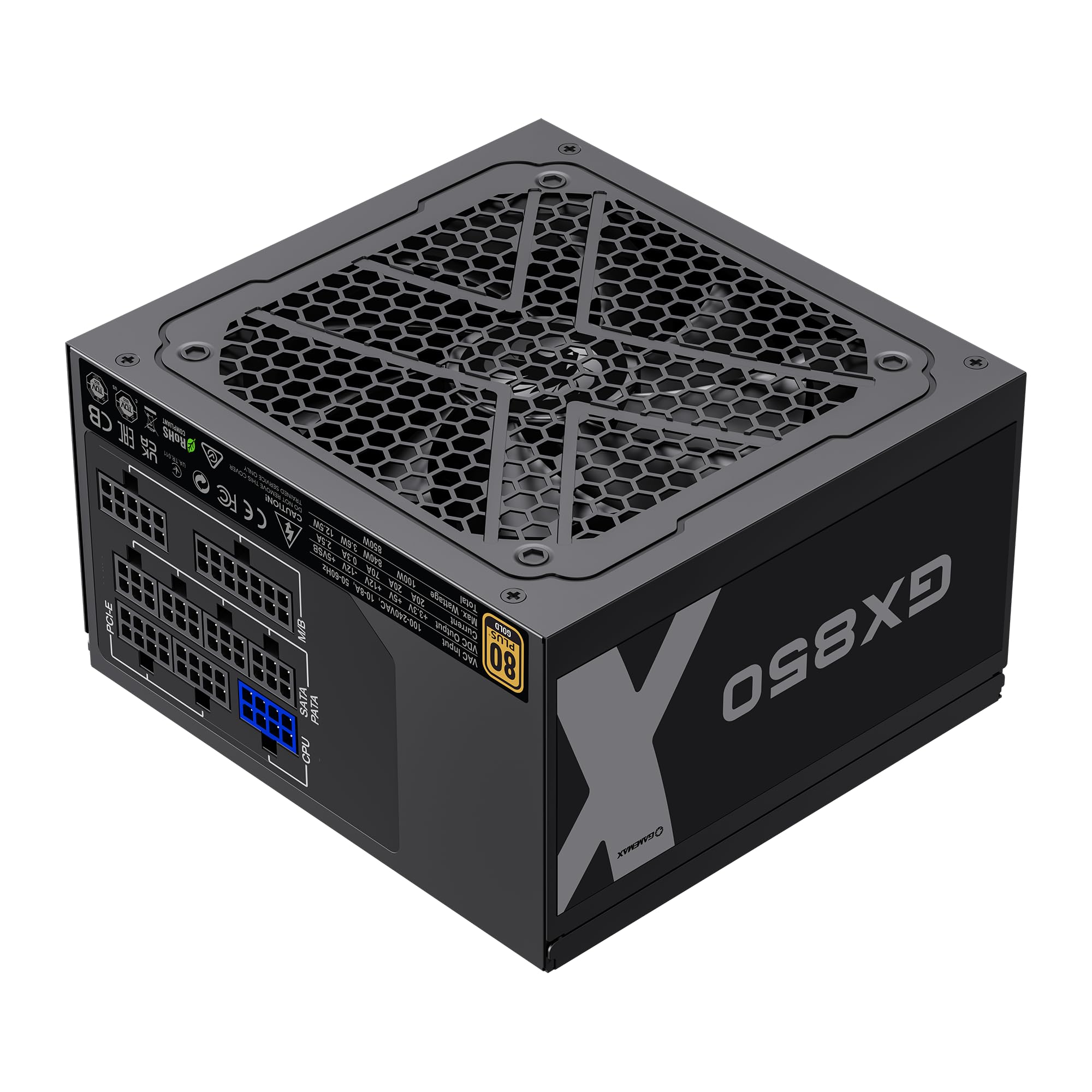
Image: The GAMEMAX GX-850 80 Plus Gold Fully Modular Power Supply, showcasinმისი შავი საფარი და მოდულური დიზაინი.
3.1 ძირითადი მახასიათებლები
- 80+ ოქროს სერტიფიკატი: უზრუნველყოფს მაღალ ენერგოეფექტურობას, ამცირებს გათბობისა და ექსპლუატაციის ხარჯებს.
- LLC+DC-DC Circuit: Advanced circuit design for stable voltage output and improved efficiency.
- სრულად მოდულური დიზაინი: Allows for custom cable management, reducing clutter and improving airflow.
- FDB Fan: Ultra-quiet temperature-controlled Fluid Dynamic Bearing fan for silent operation and extended lifespan.
- 105℃ Mainstream Capacitor: High-quality capacitors ensure long life and smooth power output.
- ყოვლისმომცველი დაცვა: Features SIX levels of protection: Over Temperature Protection (OTP), Over Current Protection (OCP), Short Circuit Protection (SCP), Over Voltage Protection (OVP), Under Voltage Protection (UVP), and Over Power Protection (OPP).
4. დაყენება და ინსტალაცია
Follow these steps to properly install your GAMEMAX GX-850 power supply into your computer system.
4.1 ინსტალაციის ეტაპები
- მოამზადეთ თქვენი სისტემა: დარწმუნდით, რომ თქვენი კომპიუტერი სრულად გამორთულია და დენის წყაროდან არ არის გამორთული. გახსენით კომპიუტერის კორპუსი.
- ძველი კვების ბლოკის ამოღება (ასეთის არსებობის შემთხვევაში): გათიშეთ ყველა კაბელი თქვენი ძველი კვების წყაროდან და ამოიღეთ ის კორპუსიდან.
- ახალი კვების ბლოკის დამონტაჟება: Carefully place the GAMEMAX GX-850 into the power supply bay of your computer case. Secure it with the provided mounting screws. Ensure the fan is facing the correct direction for optimal airflow (typically facing down if your case has a bottom vent, or up if it's a top-mounted PSU).
- მოდულური კაბელების შეერთება: Identify the necessary cables for your components. Connect the modular cables to the corresponding ports on the power supply first, then route them to your components.
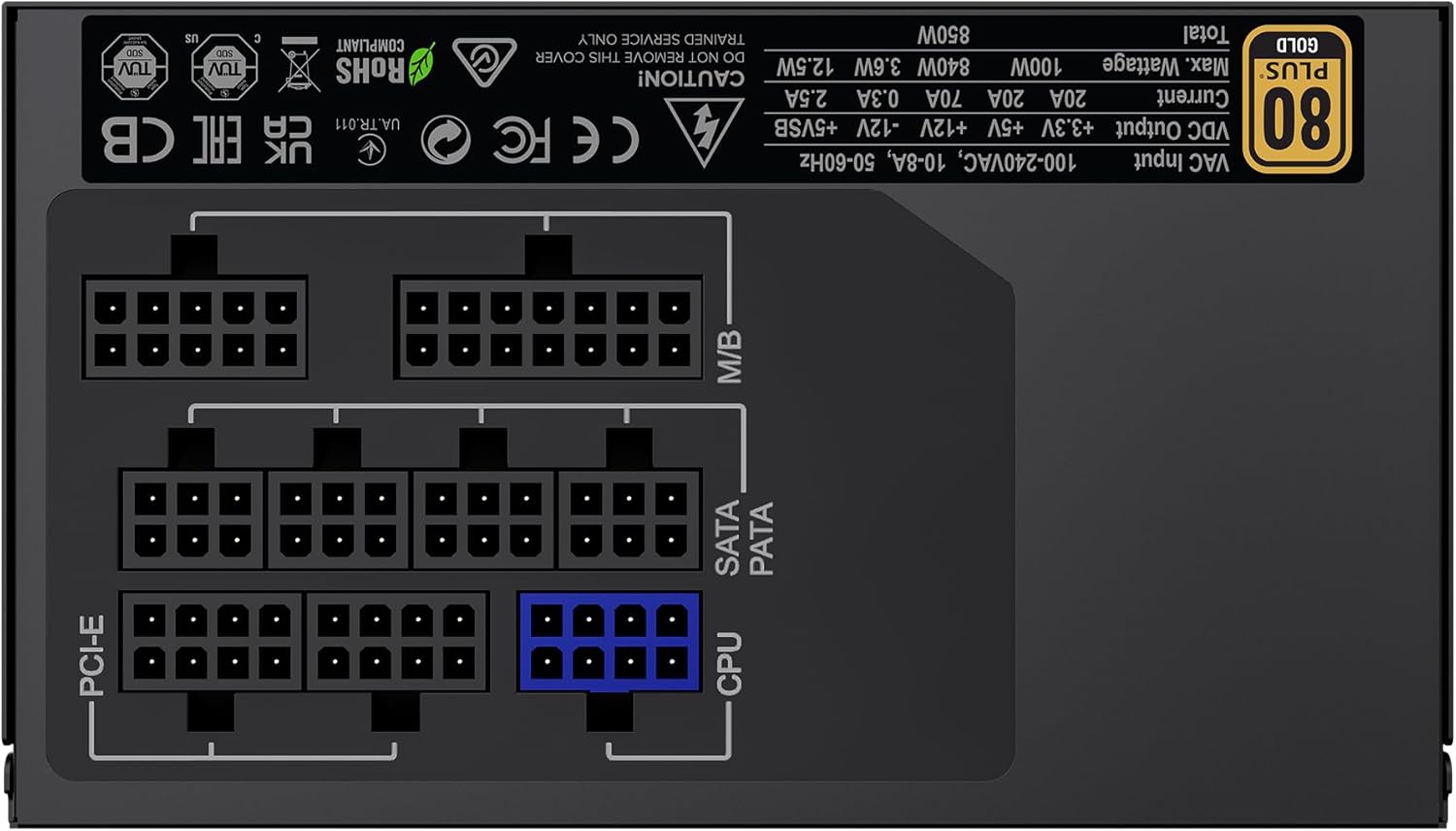
სურათი: უკანა view of the GAMEMAX GX-850 showing the fully modular cable connection ports for PCI-e, M/B (Motherboard), SATA/PATA, and CPU cables.
- Motherboard (M/B): 24-პინიანი ATX კაბელი დააკავშირეთ დედაპლატას.
- CPU: Connect the 8-pin (or 4+4-pin) CPU power cable to the CPU power connector on your motherboard.
- Graphics Cards (PCI-e): Connect the 6+2-pin PCIe power cables to your graphics card(s). Use separate cables for each connector if your GPU requires multiple.
- Storage Devices (SATA): შეაერთეთ SATA კვების კაბელები თქვენს SSD-ებს, HDD-ებს და ოპტიკურ დისკებს.
- Peripherals (PATA/Molex): Connect peripheral power cables to any other devices requiring them (e.g., fan controllers, older drives).
- საკაბელო მენეჯმენტი: Route cables neatly to improve airflow and aesthetics.
- დახურეთ ქეისი და შეაერთეთ ცვლადი დენის წყარო: Close your computer case. Connect the AC power cord to the power supply and then to a grounded wall outlet.
5. საოპერაციო ინსტრუქციები
After successful installation, follow these steps to operate your system.
- დენის შეცვლა: დარწმუნდით, რომ კვების წყაროს უკანა მხარეს არსებული ჩამრთველი „ჩართულ“ (I) პოზიციაზეა.
- სისტემის ჩართვა: სისტემის ჩასართავად დააჭირეთ კომპიუტერის კორპუსზე არსებულ ჩართვის ღილაკს.
- System Power Off: To turn off your system, use the operating system's shutdown procedure. For a hard shutdown, hold the case power button for several seconds. For complete power disconnection, switch the PSU's power switch to 'OFF' (O) and unplug the AC cord.
6. მოვლა
რეგულარული მოვლა უზრუნველყოფს თქვენი კვების წყაროს ხანგრძლივ მუშაობას და ოპტიმალურ მუშაობას.
- მტვრისგან გაწმენდა: Periodically clean the power supply's fan and ventilation grilles using compressed air to prevent dust buildup, which can impede cooling. Ensure the system is powered off and unplugged before cleaning.
- საკაბელო შემოწმება: Occasionally check all modular cable connections to ensure they are securely seated.
- გარემო პირობები: Maintain a clean, dry, and well-ventilated environment for your computer.
7. Დიაგნოსტიკა
თუ თქვენს კვების წყაროსთან დაკავშირებით პრობლემები შეგექმნათ, იხილეთ შემდეგი გავრცელებული პრობლემების მოგვარების ნაბიჯები:
- ძალა არ არის:
- Ensure the AC power cord is securely plugged into both the wall outlet and the power supply.
- შეამოწმეთ, რომ კვების ბლოკის უკანა მხარეს დენის ჩამრთველი „ჩართულ“ (I) პოზიციაზე იყოს.
- Verify that the 24-pin ATX and 8-pin CPU power cables are correctly and firmly connected to the motherboard.
- კედლის სოკეტი სხვა მოწყობილობით შეამოწმეთ, რომ მასში დენია.
- სისტემის არასტაბილურობა/შემთხვევითი გამორთვა:
- დარწმუნდით, რომ ყველა მოდულური კაბელი სრულად არის ჩასმული როგორც კვების ბლოკის, ასევე კომპონენტის ბოლოებში.
- Check for proper ventilation and ensure the PSU fan is spinning. Overheating can cause shutdowns.
- If you have recently added new components, ensure your 850W power supply is sufficient for the total system wattage.
- ვენტილატორი არ ბრუნავს:
- The GX-850 features a temperature-controlled fan. It may not spin at low loads or temperatures. This is normal operation.
- If the fan does not spin under load and the PSU feels hot, ensure there are no obstructions and consider contacting support.
If problems persist after performing these steps, contact GAMEMAX customer support or your retailer for further assistance.
8. სპეციფიკაციები
Detailed technical specifications for the GAMEMAX GX-850 80 Plus Gold Power Supply:
| ფუნქცია | სპეციფიკაცია |
|---|---|
| მოდელის სახელი | GX-850 Modular |
| ბრენდი | GAMEMAX |
| გამომავალი ვატიtage | 850 ვატი |
| ფორმის ფაქტორი | ATX |
| ეფექტურობის სერტიფიცირება | 80 პლუს ოქრო |
| ელექტრომომარაგების დიზაინი | სრული მოდულური |
| გაგრილების მეთოდი | Air (FDB Fan) |
| ფანების რაოდენობა | 1 |
| მინიმალური შეყვანის მოცულობაtage | 115 ვოლტი |
| მაქსიმალური შეყვანის მოცულობაtage | 240 ვოლტი (AC) |
| ზედა ტემპერატურის რეიტინგი | 105 Degrees Celsius (Capacitors) |
| თავსებადი მოწყობილობები | დესკტოპ კომპიუტერი |
| კონექტორის ტიპები | ATX, PCI-e, SATA |
9. გარანტია და მხარდაჭერა
GAMEMAX products are manufactured to high-quality standards. For warranty information, please refer to the warranty card included with your product or visit the official GAMEMAX webსაიტი. გარანტიის პირობები შეიძლება განსხვავდებოდეს რეგიონისა და გამყიდველის მიხედვით.
For technical support or further inquiries, please contact GAMEMAX customer service through their official webსაიტზე ან თქვენი საცალო მოვაჭრის მიერ მოწოდებული საკონტაქტო ინფორმაცია.