
BINNUNE BW01
BINNUNE Wireless Gaming Headset User Manual
მოდელი: BW01
ბრენდი: BINNUNE
შესავალი
Thank you for choosing the BINNUNE Wireless Gaming Headset. This manual provides detailed instructions on how to set up, operate, and maintain your headset to ensure optimal performance and a superior gaming experience. Please read this manual thoroughly before using the product.
რა არის ყუთში
Upon unboxing your BINNUNE Wireless Gaming Headset, please verify that all the following components are included:
- BINNUNE Wireless Gaming Headset (Blue)
- 2.4 GHz USB Dongle
- 3.5 მმ აუდიო კაბელი
- USB დამტენი კაბელი
- მომხმარებლის სახელმძღვანელო (ეს დოკუმენტი)

Image: The BINNUNE Wireless Gaming Headset in blue, accompanied by its 2.4GHz USB dongle and a 3.5mm audio jack. These are the primary components included in the product package.
პროდუქტი დასრულდაview
Familiarize yourself with the key features and components of your BINNUNE Wireless Gaming Headset:
- რეგულირებადი თავსაბურავი: კომფორტული მორგებისთვის.
- რბილი ყურსასმენები: Large-size memory foam earmuffs (110mm diameter, 45mm thickness) made of breathable PU leather and mesh material for extended comfort.
- 50 მმ დრაივერები: High-performance 50mm driver units for clear and rich stereo sound.
- Unidirectional Noise-Canceling Microphone: A 120° adjustable boom mic designed to filter out background noise for clear communication.
- On-Headset Controls: Buttons for power, volume adjustment, and microphone mute.

სურათი: დეტალური view of the BINNUNE Wireless Gaming Headset's unidirectional boom microphone, highlighting its flexible design and noise-canceling capabilities.

Image: An exploded diagram illustrating the internal components of the 50mm audio drivers within the BINNUNE headset, emphasizing their design for rich, full-range sound.
დაყენება
ყურსასმენის დატენვა
Before first use, fully charge the headset. A full charge takes approximately 3 hours. A 10-minute quick charge can provide up to 3 hours of battery life. The headset offers up to 80 hours of continuous use in 2.4GHz mode and up to 120 hours in Bluetooth mode.
- Connect the USB charging cable to the headset's charging port.
- USB კაბელის მეორე ბოლო შეაერთეთ თავსებად USB კვების წყაროსთან (მაგ., კომპიუტერის USB პორტი, USB კედლის ადაპტერი).
- The LED indicator on the headset will show charging status (refer to the headset's LED guide for specific indications).

Image: The BINNUNE Wireless Gaming Headset displayed alongside a visual representation of its impressive 120-hour battery life, indicating extended usage time.
დაკავშირების პარამეტრები
Your BINNUNE headset supports three connection modes:
- 2.4GHz Wireless (USB Dongle): Provides ultra-low latency (15ms) for gaming. Ideal for PS5, PS4, PC, and Mac.
- Bluetooth 5.3: For wireless connection to mobile phones, tablets, PC, and Mac.
- 3.5mm Wired Connection: Universal compatibility with any device featuring a 3.5mm audio jack.
2.4GHz Wireless Connection (for PS5, PS4, PC, Mac)
- Insert the 2.4GHz USB dongle into an available USB port on your PS5, PS4, PC, or Mac.
- Power on the headset. It will automatically attempt to connect to the dongle.
- Once connected, the LED indicator on the headset will confirm the connection (refer to LED guide).
- On your device, ensure the BINNUNE headset is selected as the audio output and input device.
Bluetooth 5.3 Connection (for PC, Mac, Mobile Phone, Tablet)
- Ensure the headset is powered on and in Bluetooth pairing mode (usually indicated by a blinking LED). If not, double-press the power button to switch to Bluetooth mode.
- On your device (PC, Mac, mobile phone, tablet), go to Bluetooth settings and search for available devices.
- Select "BINNUNE BW01" (or similar) from the list of found devices to pair.
- Once paired, the LED indicator will show a solid light (refer to LED guide).
3.5mm Wired Connection (for All Platforms)
- 3.5 მმ-იანი აუდიო კაბელის ერთი ბოლო ყურსასმენის 3.5 მმ-იან პორტს შეაერთეთ.
- Connect the other end of the 3.5mm audio cable to the 3.5mm audio jack on your device (e.g., PS4/PS5 controller, PC, mobile phone).
- The headset will function in passive wired mode. Note that some headset features (like LED lighting or specific controls) may be limited in wired mode.
Note: The BINNUNE Wireless Gaming Headset is not compatible with Xbox consoles.
თავსებადობა დასრულდაview
The following table provides a quick reference for device compatibility across different connection modes:

Image: A visual compatibility chart detailing which devices (PC, PS4/PS5 Console, PS4/PS5 Controller, Switch, Cell Phone, Tablet) support sound, microphone, and microphone mute functions across 2.4GHz Wireless (USB Dongle), Bluetooth 5.3, and 3.5mm Wired connection modes.
ოპერაციული ინსტრუქციები
ჩართვა/გამორთვა
- ჩართვა: დააჭირეთ და გააჩერეთ ჩართვის ღილაკი დაახლოებით 3 წამის განმავლობაში, სანამ LED ინდიკატორი არ აინთება.
- Გამორთვა: დააჭირეთ და გააჩერეთ ჩართვის ღილაკი დაახლოებით 3 წამის განმავლობაში, სანამ LED ინდიკატორი არ გაქრება.
Switching Between 2.4GHz and Bluetooth Modes
The headset supports simultaneous wireless operation, allowing quick toggling between 2.4GHz and Bluetooth modes.
- რეჟიმების გადართვა: Double-press the Power button. The headset will switch between 2.4GHz wireless mode and Bluetooth mode.
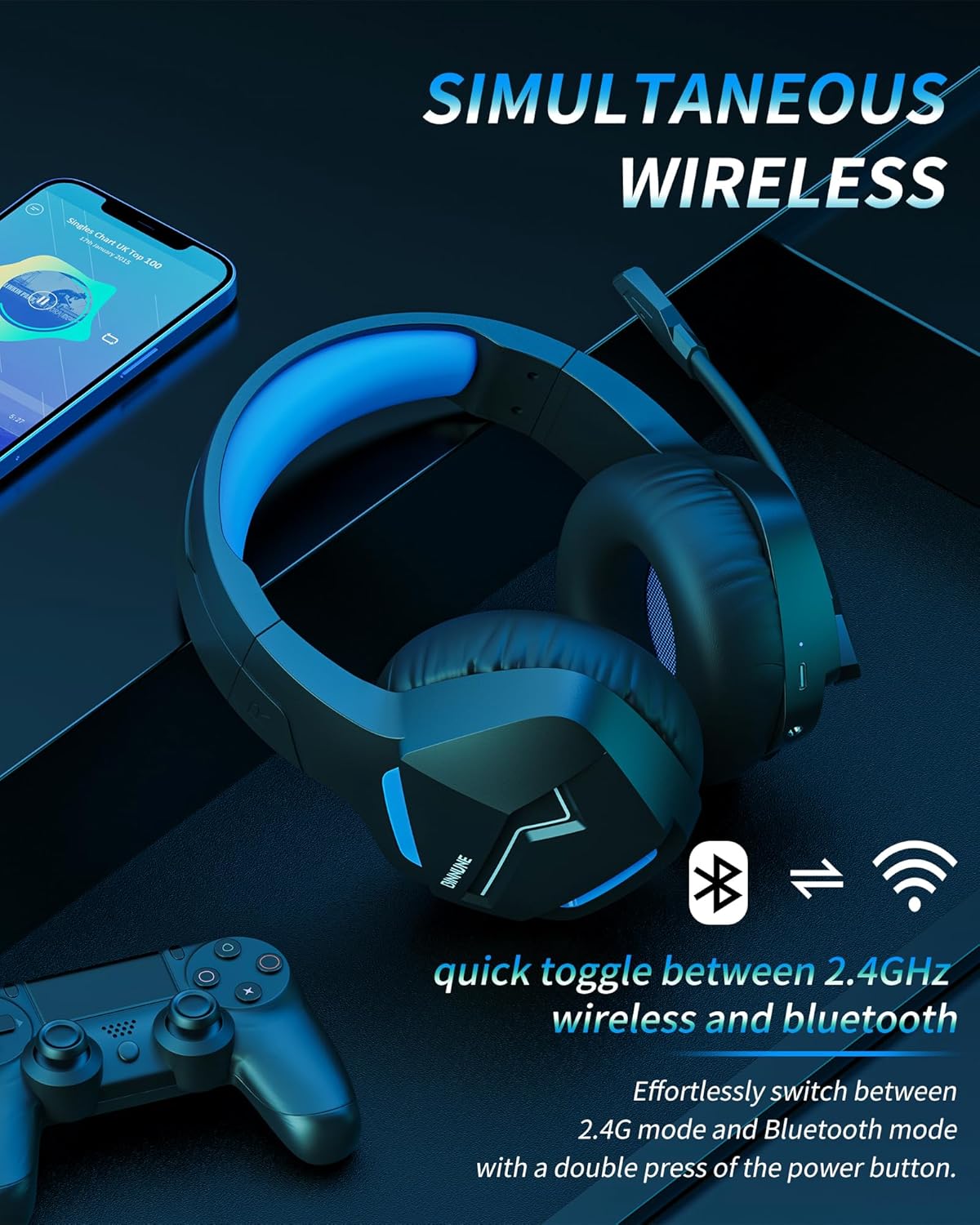
Image: The BINNUNE Wireless Gaming Headset shown with icons representing both 2.4GHz wireless and Bluetooth connectivity, indicating its ability to switch between these modes for versatile use.
ხმის კონტროლი
- მოცულობის გაზრდა: დააჭირეთ ხმის გაზრდის (+) ღილაკს.
- მოცულობის შემცირება: დააჭირეთ ხმის დაწევის ღილაკს (-).
მიკროფონის კონტროლი
- მიკროფონის დადუმება/მოხსნა: Press the Microphone Mute button. A red LED on the microphone tip usually indicates it is muted.
- მიკროფონის პოზიციის დარეგულირება: The 120° adjustable memory line microphone can be freely shaped and adjusted to your ideal angle.
სათამაშო შესრულება
The headset is designed for an immersive gaming experience with features like:
- Accurate Sound Positioning: The 50mm drivers provide clear and rich stereo sound, allowing you to accurately pinpoint in-game sounds like footsteps and environmental details.
- დაბალი შეყოვნება: The 2.4GHz wireless technology ensures an ultra-low latency of 15ms, providing synchronized audio and video for competitive gaming.
Image: A gamer immersed in a game, wearing the BINNUNE headset, highlighting the benefits of low latency and stable wireless connection for an enhanced gaming experience.
მოვლა
Proper maintenance ensures the longevity and performance of your BINNUNE Wireless Gaming Headset.
- დასუფთავება:
- Use a soft, dry, lint-free cloth to clean the headset's surfaces.
- For earmuffs, gently wipe with a slightly damp ქსოვილით და გამოყენებამდე გააშრეთ ჰაერზე სრულად.
- არ გამოიყენოთ უხეში ქიმიკატები, გამწმენდი გამხსნელები ან ძლიერი სარეცხი საშუალებები.
- შენახვა:
- შეინახეთ ყურსასმენი გრილ, მშრალ ადგილას, მოარიდეთ მზის პირდაპირ სხივებს და ექსტრემალურ ტემპერატურას.
- მოერიდეთ ყურსასმენზე მძიმე საგნების დადებას.
- ბატარეის მოვლა:
- მოერიდეთ ბატარეის ხშირ სრულ დაცლას.
- If storing for a long period, charge the headset to about 50% every few months to preserve battery health.
პრობლემების მოგვარება
If you encounter issues with your BINNUNE Wireless Gaming Headset, please refer to the following common solutions:
| პრობლემა | შესაძლო მიზეზი | გამოსავალი |
|---|---|---|
| ხმა არ არის / დაბალი ხმა |
|
|
| მიკროფონი არ მუშაობს |
|
|
| Connection Issues (Intermittent/No Connection) |
|
|
| Headset Not Compatible with Xbox |
|
|
სპეციფიკაციები
Detailed technical specifications for the BINNUNE Wireless Gaming Headset (Model: BW01):
| ფუნქცია | დეტალი |
|---|---|
| მოდელის სახელი | BW01 |
| დაკავშირების ტექნოლოგია | Wireless (2.4GHz USB Dongle, Bluetooth 5.3), Wired (3.5mm Jack) |
| უსადენო საკომუნიკაციო ტექნოლოგია | Bluetooth 5.3 |
| Bluetooth დიაპაზონი | 10 მეტრამდე (33 ფუტი) |
| აუდიო შეყოვნება (2.4 გჰც) | 15ms (Ultra Stable 2.4GHz Wireless Connection) |
| აუდიო დრაივერის ტიპი | დინამიური დრაივერი |
| აუდიო დრაივერის ზომა | 50 მილიმეტრი |
| სიხშირის პასუხი | 20 ჰც - 20,000 ჰც |
| მგრძნობელობა | 96 დბ |
| მიკროფონი | Unidirectional Noise-Canceling Mic (120° adjustable) |
| ბატარეის ხანგრძლივობა | Up to 80 hours (2.4GHz mode), Up to 120 hours (Bluetooth mode) |
| დატენვის დრო | დაახლ. 3 საათი სრული დატენვისთვის |
| ყურსასმენის ფორმა | Oval (110mm diameter, 45mm thickness memory foam) |
| მასალა | Plastic (headset), PU leather and mesh (earmuffs) |
| ნივთის წონა | 10.7 უნცია (დაახლოებით 303 გრამი) |
| პროდუქტის ზომები | 8.27 x 7.48 x 4.33 ინჩი |
| თავსებადი მოწყობილობები | Gaming Consoles (PS4, PS5), Laptops, PC, Mac, Mobile Phones, Tablets |
| კონტროლის ტიპი | ღილაკის კონტროლი |
| მოყვება კომპონენტები | User Manual, 2.4GHz USB Dongle, 3.5mm Audio Cable, USB Charging Cable |
საგარანტიო ინფორმაცია
BINNUNE products are manufactured with high-quality standards. While specific warranty details are not provided in this manual, BINNUNE typically offers a limited warranty against defects in materials and workmanship. For detailed warranty terms, conditions, and registration, please refer to the official BINNUNE webსაიტი ან დაუკავშირდით მომხმარებელთა მხარდაჭერას.
მომხმარებელთა მხარდაჭერა
For further assistance, technical support, or inquiries regarding your BINNUNE Wireless Gaming Headset, please contact BINNUNE customer support through the following channels:
- Official BINNUNE Webსაიტი: Visit the official BINNUNE webსაიტი ხშირად დასმული კითხვებისთვის, დამხმარე რესურსებისა და საკონტაქტო ფორმებისთვის.
- ამაზონის მაღაზია: თქვენ ასევე შეგიძლიათ ეწვიოთ BINNUNE Store on Amazon პროდუქტის შესახებ ინფორმაციისა და გამყიდველთან დაკავშირების ვარიანტებისთვის.
Please have your product model (BW01) and purchase details ready when contacting support.
Ask a question about this manual
Ask about setup, troubleshooting, compatibility, parts, safety, or missing instructions. Manuals+ will review the question and use this page’s manual context to help answer it.