1. პროდუქტი დასრულდაview
This replacement remote control is designed for use with various Pioneer Smart 4K LCD LED HDTV models. It is pre-programmed and requires no additional setup or coding. Simply insert batteries, and it is ready for immediate use.
პაკეტის შიგთავსი:
- 1 x ჩანაცვლებითი დისტანციური მართვის პულტი
Note: Batteries and a separate instruction manual are not included in the package.
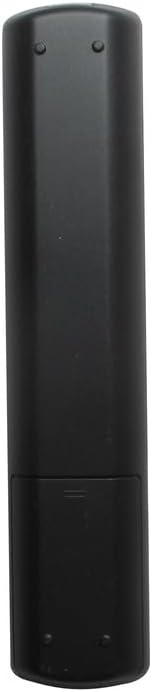
სურათი 1.1: წინა view of the Generic replacement remote control. This image displays the full layout of the remote's buttons, including power, channel, volume, navigation, and smart TV function buttons.
2. დაყენება და ბატარეის მონტაჟი
This remote control is designed for immediate use without any programming. The only setup required is the installation of batteries.
- Obtain Batteries: Purchase two (2) new AAA batteries from a local retailer. These are not included with the remote control.
- გახსენით ბატარეის განყოფილება: Locate the battery compartment cover on the back of the remote control. Gently slide the cover downwards or press the latch (if present) to open it.
- ჩადეთ ბატარეები: Insert the two AAA batteries into the compartment, ensuring that the positive (+) and negative (-) terminals align correctly with the markings inside the compartment. Incorrect insertion can prevent the remote from functioning.
- ბატარეის განყოფილების დახურვა: ბატარეის განყოფილების საფარი უკან, სანამ არ დააწკაპუნებს.
- ტესტი დისტანციური: Point the remote control towards your Pioneer TV and press the Power button. The TV should respond. If not, recheck battery orientation or replace with new batteries.
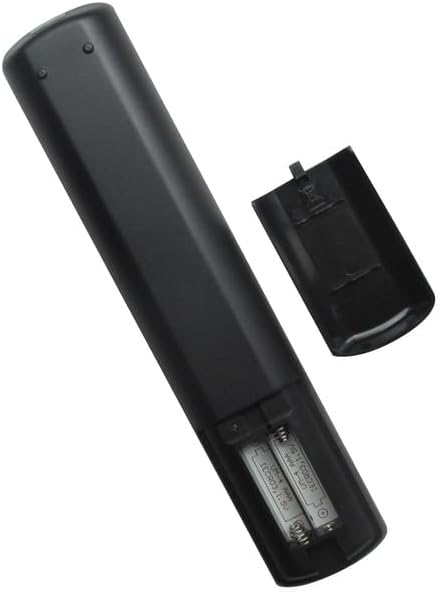
სურათი 2.1: უკანა მხარე view of the remote control with the battery compartment open. This image illustrates the correct placement of AAA batteries within the remote's battery compartment.
3. საოპერაციო ინსტრუქციები
Once batteries are installed, the remote control is ready to operate your compatible Pioneer TV. Point the remote directly at the TV's infrared receiver for optimal performance.
ძირითადი ფუნქციები:
- დენის ღილაკი: რთავს ან გამორთავს ტელევიზორს.
- Channel Buttons (CH+/CH-): ცვლის ტელევიზორის არხს ზემოთ ან ქვემოთ.
- Volume Buttons (VOL+/VOL-): ზრდის ან ამცირებს ტელევიზორის ხმას.
- მუნჯი ღილაკი: დადუმდა ან მოხსნის ტელევიზორის აუდიოს.
- შეყვანის/წყაროს ღილაკი: ციკლურად გადადის ხელმისაწვდომ შეყვანის წყაროებს შორის (HDMI, AV და ა.შ.).
- ნავიგაციის ღილაკები (ზემოთ, ქვემოთ, მარცხნივ, მარჯვნივ, OK/Enter): Used to navigate menus and select options on the TV screen.
- მენიუს ღილაკი: ხსნის ტელევიზორის მთავარ მენიუს.
- გასვლის/უკან დაბრუნების ღილაკი: Closes menus or returns to the previous screen.
- ნომრის ღილაკები (0-9): პირდაპირ შეიყვანს არხის ნომრებს.
For specific advanced functions or smart TV features, refer to your Pioneer TV's original user manual, as button labels and functions may vary slightly depending on the TV model.
4. მოვლა
ბატარეის გამოცვლა:
- შეცვალეთ ელემენტები, როდესაც პულტის რეაგირება ნელდება ან შეწყვეტს მუშაობას.
- Always replace both batteries at the same time with new AAA batteries.
- არ აურიოთ ძველი და ახალი ბატარეები, ან სხვადასხვა ტიპის ბატარეები.
- თუ დისტანციური მართვის პულტი დიდი ხნის განმავლობაში არ გამოიყენება, ამოიღეთ ელემენტები გაჟონვის თავიდან ასაცილებლად.
დასუფთავება:
- გაწმინდეთ დისტანციური მართვის პულტი რბილი, მშრალი ქსოვილით.
- არ გამოიყენოთ თხევადი საწმენდი საშუალებები, სპრეი ან აბრაზიული მასალები, რადგან მათ შეუძლიათ დააზიანონ დისტანციური მართვის ზედაპირი ან შიდა კომპონენტები.
5. Დიაგნოსტიკა
-
დისტანციური არ მუშაობს:
- დარწმუნდით, რომ ბატარეები სწორად არის ჩასმული სწორი პოლარობით (+/-).
- ძველი ელემენტები შეცვალეთ ახალი AAA ელემენტებით.
- Check for any obstructions between the remote and the TV's infrared receiver.
- Ensure you are within a reasonable range and pointing the remote directly at the TV.
-
გარკვეული ღილაკები არ რეაგირებენ:
- This remote is a generic replacement. While it supports primary functions, some highly specific or advanced smart TV features might require the original TV remote.
- გაწმინდეთ პულტის ზედაპირი, განსაკუთრებით უმოქმედო ღილაკების გარშემო, ჭუჭყისა და ნარჩენების მოსაშორებლად.
6. სპეციფიკაციები
| ბრენდი | გენერიკული |
| მწარმოებელი | გენერიკული |
| თავსებადი მოწყობილობები | Pioneer Television models: PLE-43S05FHD, PLE-55S05FHD, PLE-43S07FHD, PLE-2405HD, PLE-55S06UHD |
| მხარდაჭერილი მოწყობილობების მაქსიმალური რაოდენობა | 1 (One Television) |
| სპეციალური ფუნქცია | პროგრამირება არ არის საჭირო |
| დენის წყარო | 2 x AAA ბატარეები (არ მოყვება) |
7. გარანტია და მხარდაჭერა
No specific warranty information is provided for this generic replacement remote control. For any issues or inquiries, please refer to the retailer from whom the product was purchased.
As this is a generic replacement, direct manufacturer support may not be available. Please consult your TV's original manual for detailed information regarding your television's functions.


