
1. შესავალი
მადლობა შენაძენისთვისasing the Edifier R990BT Bluetooth Computer Speakers. These 2.0 active bookshelf speakers are designed to provide high-quality audio for your PC, smartphone, tablet, and other compatible devices. Featuring Bluetooth V5.4 connectivity and dual RCA inputs, the R990BT offers versatile audio options in a classic MDF enclosure. Please read this manual thoroughly to ensure proper setup and optimal performance of your speakers.
2. პაკეტის შიგთავსი
გთხოვთ, დარწმუნდეთ, რომ ყველა ნივთი შეფუთვაშია:
- Edifier R990BT Active Bookshelf Speakers (1 Pair)
- დინამიკის დამაკავშირებელი კაბელი
- RCA to RCA Audio Cable
- 3.5 მმ RCA აუდიო კაბელი
- დენის კაბელი
- სწრაფი დაწყების სახელმძღვანელო
3. დაყენება
3.1 დინამიკის განლაგება
Place the speakers on a stable, flat surface such as a desk or shelf. For optimal stereo imaging, position the speakers equidistant from your listening position, forming an equilateral triangle. Ensure there is adequate space behind the speakers for cable connections and ventilation.

Image: Edifier R990BT speakers positioned on a desk, demonstrating typical placement for computer use.
3.2 დინამიკების შეერთება
- Connect the Passive Speaker: Use the included speaker connection cable to link the active speaker (with controls) to the passive speaker. Ensure the correct polarity (+ to + and - to -) for proper sound reproduction.
- დაკავშირება დენის წყაროსთან: Plug the power cable into the active speaker's power input and then into a wall outlet.
3.3 აუდიო წყაროების დაკავშირება
The R990BT speakers support both wired (RCA) and wireless (Bluetooth) connections.
Wired Connection (RCA)
The speakers feature two sets of RCA input ports (Line In 1 and Line In 2) for connecting two different wired audio devices simultaneously.
- Use the RCA to RCA cable to connect devices with RCA outputs (e.g., CD player, turntable with pre-amp).
- Use the 3.5mm to RCA cable to connect devices with a 3.5mm audio jack (e.g., computer, smartphone, tablet).

Image: Close-up of the rear panel of the active speaker, highlighting the dual RCA input ports (Line In 1 and Line In 2) and the power input.
Bluetooth კავშირი
The R990BT features Bluetooth V5.4 for wireless audio streaming.
- Turn on the speakers.
- Press the volume/input knob on the rear panel to select the Bluetooth input. The indicator light will flash blue.
- თქვენს აუდიო მოწყობილობაზე (სმარტფონი, პლანშეტი, კომპიუტერი) ჩართეთ Bluetooth და მოძებნეთ ხელმისაწვდომი მოწყობილობები.
- Select "EDIFIER R990BT" from the list to pair. The indicator light will turn solid blue once connected.

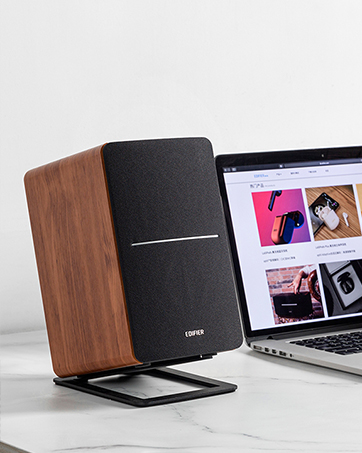
Image: A single Edifier R990BT speaker on a desk next to a laptop, symbolizing the ease of Bluetooth connectivity.
4. საოპერაციო ინსტრუქციები
4.1 ჩართვა/გამორთვა
The power switch is located on the rear panel of the active speaker. Flip the switch to the 'ON' position to power on the speakers. Flip to 'OFF' to power off.
4.2 ხმის კონტროლი
The large knob on the rear panel of the active speaker controls the master volume. Rotate clockwise to increase volume and counter-clockwise to decrease volume.
სურათი: დეტალური view of the multi-function control knob on the rear of the speaker, used for volume adjustment and input selection.
4.3 შეყვანის შერჩევა
Press the volume/input knob on the rear panel to cycle through the available audio inputs: Line In 1, Line In 2, and Bluetooth. The indicator light will change color or flash to indicate the selected input mode.
- Line In 1 / Line In 2: Solid green or red indicator (depending on model/firmware).
- Bluetooth: Flashing blue (pairing mode) or solid blue (connected).
4.4 Using the Edifier ConneX App
For enhanced control and customization, download the Edifier ConneX mobile application. The app allows you to adjust equalization settings and access additional features for your R990BT speakers.
- Download the Edifier ConneX app from your device's app store.
- Ensure your speakers are powered on and connected via Bluetooth to your mobile device.
- Open the app and follow the on-screen instructions to connect to your R990BT speakers.

Image: The official logo for the Edifier ConneX mobile application.
5. მოვლა
5.1 დასუფთავება
To maintain the appearance and performance of your speakers:
- გაწმინდეთ დინამიკის კარადები რბილი, მშრალი ქსოვილით.
- არ გამოიყენოთ თხევადი საწმენდი საშუალებები, აეროზოლები ან აბრაზიული ქიმიკატები, რადგან მათ შეიძლება დააზიანონ საფარი ან შიდა კომპონენტები.
- Gently brush dust from the speaker grilles using a soft brush or vacuum cleaner with a brush attachment.
5.2 შენახვა
If storing the speakers for an extended period, ensure they are powered off and disconnected from the power source. Store them in a cool, dry place away from direct sunlight and extreme temperatures.
6. Დიაგნოსტიკა
If you encounter any issues with your Edifier R990BT speakers, please refer to the following common problems and solutions:
| პრობლემა | შესაძლო მიზეზი | გამოსავალი |
|---|---|---|
| ხმა არ არის |
|
|
| დამახინჯებული ხმა |
|
|
| Bluetooth not connecting/disconnecting |
|
|
| Difficulty switching inputs |
|
|
7. სპეციფიკაციები
Detailed technical specifications for the Edifier R990BT speakers:
- მოდელის სახელი: R990BT
- სპიკერის ტიპი: წიგნის თარო
- სამონტაჟო ტიპი: Shelf Mount/Tabletop Mount
- მასალა: MDF (საშუალო სიმკვრივის ბოჭკოვანი დაფა)
- კავშირის ტექნოლოგია: Bluetooth V5.4, Wired (Dual RCA)
- აუდიო გამომავალი რეჟიმი: სტერეო (2.0)
- დინამიკის მაქსიმალური გამომავალი სიმძლავრე: 24 ვატი (RMS)
- ვუფერის დიამეტრი: 4 ინჩი
- ტვიტერის დიამეტრი: 1 ინჩი
- სიხშირის პასუხი: 18 KHz (Upper limit, typical for compact speakers)
- სიგნალისა და ხმაურის თანაფარდობა: 85 დბ
- კონტროლის მეთოდი: Touch (via rear knob)
- დენის წყარო: Corded Electric (100-240V ~ 50/60Hz)
- პროდუქტის ზომები: 11.5" სიღრმე x 7.5" სიგანე x 17" სიმაღლე (თითო დინამიკზე, დაახლოებით)
- ნივთის წონა: 7.94 Pounds (per speaker, approximate)
- ფერი: შავი
- თავსებადი მოწყობილობები: Devices with Bluetooth technology, devices with RCA or 3.5mm audio output.
8. გარანტია და მხარდაჭერა
8.1 ინფორმაცია გარანტიის შესახებ
The Edifier R990BT speakers come with a Limited Warranty. Please refer to the warranty card included in your package or visit the official Edifier website for detailed terms and conditions regarding your product's warranty coverage.
8.2 მომხმარებელთა მხარდაჭერა
For technical assistance, troubleshooting, or general inquiries, please contact Edifier customer support. Contact details can typically be found on the official Edifier website or in your product's Quick Start Guide.
ონლაინ დახმარება: ეწვიეთ www.edifier.com ხშირად დასმული კითხვების, დამხმარე რესურსების და საკონტაქტო ინფორმაციისთვის.