
Nsoela HP28112
Nsoela Cordless Heating Pad HP28112 User Manual
Model: HP28112 | Brand: Nsoela
შესავალი
This manual provides detailed instructions for the safe and effective use of your Nsoela Cordless Heating Pad, Model HP28112. Please read this manual thoroughly before operating the device and retain it for future reference.

სურათი: ოვერview of the Nsoela Cordless Heating Pad, showing the main belt, the portable power bank, charging cables, and the product packaging.
უსაფრთხოების მნიშვნელოვანი ინსტრუქციები
გაფრთხილება: To reduce the risk of burns, electric shock, fire, or injury to persons, this product must be used in accordance with the following instructions:
- არ გამოიყენოთ ძილის დროს.
- Never use on infants, children, incapacitated individuals, or persons insensitive to heat.
- არ გამოიყენოთ მგრძნობიარე კანის ადგილებში.
- Do not use pins or other metallic means to fasten this product.
- Never pull this product by the supply cord.
- არ გამოიყენოთ თუ პროდუქტი სველია.
- Inspect the product before each use. Discard if there are any signs of deterioration or damage.
- Keep out of reach of pets.
- Consult a physician before use if you have any medical conditions, including but not limited to diabetes, circulatory problems, or nerve damage.
- Do not use with liniments, salves, or ointments, especially those containing heat-producing ingredients, as skin burns could result.
- This product is for personal use only and not intended for medical use.
პაკეტის შიგთავსი
გახსნისას, გთხოვთ, შეამოწმოთ შეფუთვის შიგთავსი, რათა დარწმუნდეთ, რომ ყველა ნივთი ადგილზეა:

Image: All components included in the Nsoela Cordless Heating Pad package, laid out neatly. This includes the main heated waist belt, an extension belt, a portable power bank (charging treasure), a USB A charging extension cable, a Type-C USB charging cable, and an instruction manual.
- Heated Massage Belt x1
- Extension Belt x1
- Portable Power Bank (Charging Treasure) x1
- USB A Charging Extension Cable x1
- Type-C USB დამტენი კაბელი x1
- ინსტრუქციის სახელმძღვანელო x1
პროდუქტი დასრულდაview
Familiarize yourself with the main components of your Nsoela Cordless Heating Pad:

Image: Close-up of the control panel on the Nsoela Cordless Heating Pad. Labels point to the Heating Button, Massage Button, USB Interface, and Power Bank Storage Bag.
- გათბობის ღილაკი: Controls the heating function and temperature levels.
- მასაჟის ღილაკი: Controls the vibration massage function and modes.
- USB ინტერფეისი: For connecting the portable power bank.
- Power Bank Storage Bag: Securely holds the portable power bank.
- რეგულირებადი ქამარი: Allows for a comfortable and secure fit around the waist.
დაყენება
- დამუხტეთ Power Bank: Before first use, fully charge the portable power bank using the provided Type-C USB charging cable and a compatible 5V power adapter (not included).
- Insert Power Bank: Place the fully charged portable power bank into the designated Power Bank Storage Bag on the heating pad.
- დააკავშირეთ კვების ბლოკი: Connect the portable power bank to the USB Interface on the heating pad using the USB A charging extension cable.
- მორგების მორგება: Wrap the heating pad around your waist. Use the extension belt if needed to achieve a comfortable and snug fit. The belt is adjustable up to 60 inches.

Image: A user wearing the Nsoela Cordless Heating Pad, with an illustration showing the portable power bank connected to the belt's USB interface. Another inset shows the USB extension cable connected to a 5V power adapter for charging or continuous power.
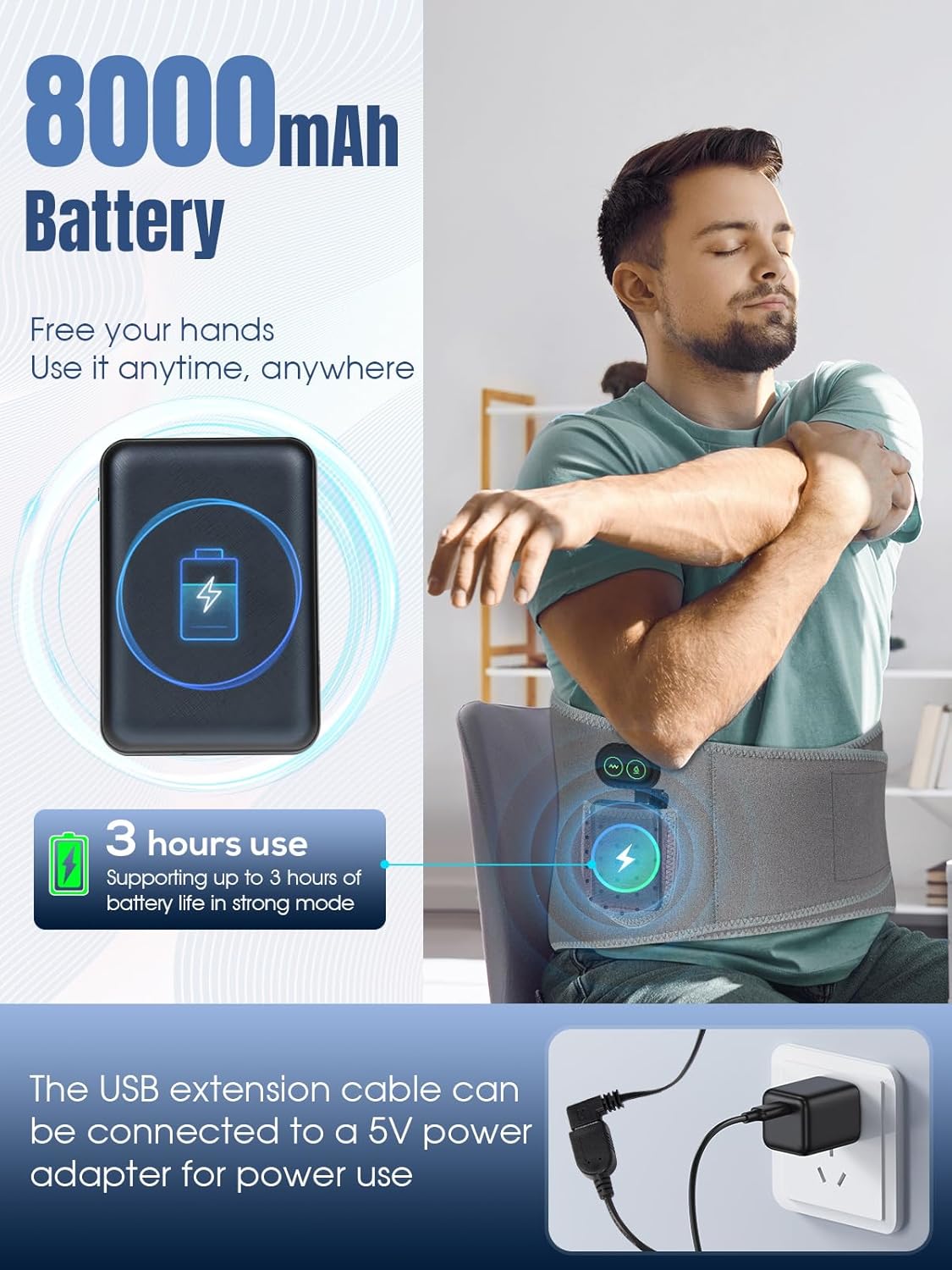
Image: A person sitting in a meditative pose wearing the Nsoela Cordless Heating Pad, demonstrating its adjustable size. An illustration highlights the extension belt and the overall length of the belt (60 inches).
ოპერაციული ინსტრუქციები
ჩართვა/გამორთვა
- To power on, press and hold either the Heating Button or the Massage Button for a few seconds until the indicator light illuminates.
- To power off, press and hold the active button (Heating or Massage) for a few seconds until the indicator light turns off.
გათბობის ფუნქცია

Image: A woman relaxing on a couch wearing the Nsoela Cordless Heating Pad, with an overlay illustrating the three heating levels: Gentle Mode (40℃~45℃), Warmth Mode (45℃~55℃), and Hot Mode (55℃~60℃).
დააჭირეთ გათბობის ღილაკი repeatedly to cycle through the three available heating levels:
- ნაზი რეჟიმი: 40℃ - 45℃
- Warmth Mode: 45℃ - 55℃
- ცხელი რეჟიმი: 55℃ - 60℃
The intelligent temperature control maintains the selected heat level. The heating function can operate independently or simultaneously with the massage function.
ვიბრაციული მასაჟის ფუნქცია

Image: A close-up of the Nsoela Cordless Heating Pad's massage area, showing three vibration massage modes: Soft Mode, Moderate Mode, and Strong Mode, each with a distinct waveform illustration. Below, 'Before' and 'After' images show a person experiencing back pain and then relaxing, implying relief.
დააჭირეთ მასაჟის ღილაკი repeatedly to cycle through the three available vibration massage modes:
- რბილი რეჟიმი: Gentle vibration.
- Moderate Mode: Medium intensity vibration.
- ძლიერი რეჟიმი: Intense vibration.
These modes simulate various massage techniques. The massage function can operate independently or simultaneously with the heating function.

Image: A man relaxing in bed with the Nsoela Cordless Heating Pad. A graph illustrates noise levels, indicating the product operates at less than 60dB in strong mode, comparable to speech noise. A tip advises keeping the belt close to the waist to minimize noise.
The device operates at less than 60dB even in strong mode, ensuring a quiet environment. For optimal quietness, ensure the belt is snug against your body.
მოვლა და მოვლა
- დასუფთავება: Disconnect the power bank before cleaning. Wipe the surface of the heating pad with a soft, damp cloth. Do not immerse the product in water or use harsh cleaning agents. Allow to air dry completely before storage or next use.
- შენახვა: Store the heating pad in a cool, dry place, away from direct sunlight and moisture. Ensure the power bank is removed or disconnected.
- ბატარეის მოვლა: To prolong the life of the portable power bank, avoid fully discharging it frequently. Charge it regularly, even if not in use for extended periods.
პრობლემების მოგვარება
| პრობლემა | შესაძლო მიზეზი | გამოსავალი |
|---|---|---|
| მოწყობილობა არ ჩართულია. | Power bank is not charged or not connected properly. | Ensure the power bank is fully charged and securely connected to the USB interface. Press and hold the power button for a few seconds. |
| გათბობის ფუნქცია არ მუშაობს. | Heating function not activated or low power. | Press the Heating Button to cycle through modes. Ensure the power bank has sufficient charge. |
| ვიბრაციის ფუნქცია არ მუშაობს. | Vibration function not activated or low power. | Press the Massage Button to cycle through modes. Ensure the power bank has sufficient charge. |
| მოწყობილობა მოულოდნელად გამოირთვება. | Low battery on the portable power bank. | Recharge the portable power bank. |
სპეციფიკაციები
- მოდელის სახელი: HP28112
- ბრენდი: ნსოელა
- მასალა: ქსოვილი
- ფერი: რუხი
- ნივთის წონა: 0.91 კგ
- გათბობის ელემენტები: 1
- პარამეტრების რაოდენობა: 3 (Heat), 3 (Vibration)
- გათბობის დონეები: 40-45 ℃, 45-55 ℃, 55-60 ℃
- ელექტრომომარაგება: 8000mAh Portable Power Bank (included)
- რეგულირებადი ზომა: Up to 60 inches (with extension belt)
- ხმაურის დონე: Less than 60dB (in strong mode)
- UPC: 702602405633
გარანტია და მხარდაჭერა
For warranty information and customer support, please refer to the documentation included with your purchase or contact Nsoela customer service directly. Keep your proof of purchase for warranty claims.
Ask a question about this manual
Ask about setup, troubleshooting, compatibility, parts, safety, or missing instructions. Manuals+ will review the question and use this page’s manual context to help answer it.