
1. შესავალი
This manual provides detailed instructions for the setup, operation, and maintenance of your nuphy Field75 HE Magnetic Switch Gaming Keyboard. Please read this manual thoroughly to ensure proper use and to maximize your keyboard's performance.
2. პაკეტის შიგთავსი
დარწმუნდით, რომ თქვენს პაკეტში ყველა ნივთია:
- 1 x Field75 HE Magnetic Switch Gaming Keyboard
- 1 x USB Cable (1.5m / 59 inches)
- 1 x Keycap/Switch Puller
- 4 დამატებითი კლავიშის საკეტი
- 1 x Quick Guide/Poster
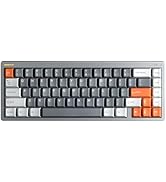
3. პროდუქტი დასრულდაview
The nuphy Field75 HE is an 83-key wired gaming keyboard featuring magnetic switches and Hall Effect Sensors for enhanced performance. It includes a volume control knob, customizable buttons, and RGB backlighting.

ძირითადი მახასიათებლები:
- Magnetic Switches & Hall Effect Sensors: Provides faster response times and adjustable actuation points.
- სწრაფი ტრიგერი: Allows for quick key resets and re-triggers, enhancing gaming performance.
- 8000 Hz Polling Rate: Ensures minimal input latency for a responsive experience.
- რეგულირებადი გააქტიურება: Customize key travel from 0.1mm to 3.3mm (Magnetic Jade switches).
- NuPhyIO Customization Software: Web-based tool for comprehensive key binding, trigger settings, and lighting adjustments.
- Dynamic Keystroke: Assign up to four functions to a single key press and release.
- სამი რეჟიმი: Easily switch between different configurations for various operating systems or applications using the 'shifter' switch.
- RGB განათება: Customizable per-key RGB lighting for visual customization.
- ხმის კონტროლის ღილაკი: Dedicated knob for convenient audio adjustment.
- 8 Customizable Buttons: Additional G-keys for macros and custom functions.


4. დაყენება
Follow these steps to set up your nuphy Field75 HE keyboard:
- ამოალაგეთ კლავიატურა: ფრთხილად ამოიღეთ კლავიატურა და ყველა აქსესუარი შეფუთვიდან.
- შეაერთეთ USB კაბელი: Insert the USB-C end of the provided cable into the port on the keyboard. Connect the other end (USB-A) to an available USB port on your computer.
- სისტემის ამოცნობა: თქვენმა კომპიუტერმა ავტომატურად უნდა აღმოაჩინოს და დააინსტალიროს კლავიატურისთვის საჭირო დრაივერები. ამას შეიძლება რამდენიმე წუთი დასჭირდეს.
- საწყისი ტესტი: Open a text editor or browser and test typing to ensure all keys are functioning correctly.
5. საოპერაციო ინსტრუქციები
5.1. ძირითადი ფუნქციები
- აკრეფა: ტექსტის შეყვანისთვის გამოიყენეთ სტანდარტული QWERTY განლაგება.
- ფუნქციური კლავიშები (F1-F12): Access multimedia controls or system functions by pressing the Fn key in combination with the F-keys.
- ხმის კონტროლის ღილაკი: Rotate the knob on the top left to adjust system volume. Press the knob to mute/unmute.
5.2. რეჟიმის შერჩევა
The Field75 HE features a 'shifter' switch (M1, M2, M3) to select between three customizable modes. Each mode can store different key bindings, lighting settings, and trigger parameters.

5.3. Customization with NuPhyIO
The NuPhyIO Console is a web-based tool that allows for extensive customization of your keyboard. Access it via nuphy.io.

Within NuPhyIO, you can:
- რეგულირებადი გააქტიურება: Set the actuation point for each key within the 0.1-3.3mm range.
- სწრაფი ტრიგერი: Configure the trigger and re-trigger points for keys, allowing for faster, more responsive inputs. The shortest re-trigger distance is 0.02mm.
- Dynamic Keystroke: Assign up to four different functions to a single key based on its press and release stagეს.
- Key Bindings: Remap any key to a different function or macro.
- განათების ეფექტები: Customize RGB backlighting patterns, colors, and brightness.
- Save Layers: Store global configurations as layers, which can be activated via the mode switch.
5.4. G-Keys
The Field75 HE includes four dedicated G-keys (G1-G4) on the left side of the keyboard. These keys are fully programmable via the NuPhyIO Console to execute macros or specific functions.
6. მოვლა
სათანადო მოვლა უზრუნველყოფს თქვენი კლავიატურის ხანგრძლივობას და მუშაობას:
- დასუფთავება: Regularly clean the keyboard with a soft, dry cloth. For deeper cleaning, use a can of compressed air to remove dust and debris from between the keycaps.
- კლავიშის მოხსნა: Use the provided keycap puller to carefully remove keycaps for cleaning or replacement. Avoid using excessive force.
- გადამრთველის მოვლა: The magnetic switches are designed for durability. Avoid exposing them to liquids or extreme temperatures.
- საკაბელო მენეჯმენტი: დაზიანების თავიდან ასაცილებლად, დარწმუნდით, რომ USB კაბელი არ არის გადაღუნული ან დაჭიმული.
7. Დიაგნოსტიკა
If you encounter issues with your nuphy Field75 HE keyboard, refer to the following common problems and solutions:
| პრობლემა | შესაძლო მიზეზი | გამოსავალი |
|---|---|---|
| კლავიატურა არ პასუხობს | USB კავშირის გაწყვეტა, გაუმართავი კაბელი, დრაივერის პრობლემა. | Check USB cable connection. Try a different USB port. Restart your computer. Try a different USB cable. |
| Keys not registering inputs | Dust/debris under keycap, software conflict, incorrect actuation setting. | Remove keycap and clean switch area. Check NuPhyIO for actuation settings. Test on another computer. |
| უკანა განათება არ მუშაობს | Lighting disabled, software setting, power issue. | Check lighting settings in NuPhyIO. Ensure keyboard is properly powered. |
| Custom settings not applied | Settings not saved, incorrect mode selected. | Ensure settings are saved in NuPhyIO. Verify the correct mode (M1, M2, or M3) is selected on the keyboard. |
If the problem persists after attempting these solutions, please contact nuphy customer support for further assistance.
8. სპეციფიკაციები
Detailed specifications for the nuphy Field75 HE Magnetic Switch Gaming Keyboard:
- მოდელი: სფერო75 HE
- დაკავშირება: სადენიანი (USB-C)
- გადამრთველები: Magnetic Jade (Linear)
- Actuation Range: 0.1 - 3.3 მმ
- Initial Force: 30±7 გფ
- End Force: 50±7 გფ
- Bottom-out Magnetic Flux: 700 ± 80 Gs
- სიცოცხლის ხანგრძლივობა: 100 მილიონი დაწკაპუნებით
- გამოკითხვის მაჩვენებელი: 8000 ჰც
- უკანა განათება: RGB
- ზომები: 14.66 x 5.62 x 1.59 ინჩი (372.3 x 142.8 x 40.4 მმ)
- ნივთის წონა: 2.65 ფუნტი
- თავსებადი მოწყობილობები: ლეპტოპი, კომპიუტერი, პლანშეტი
- ოპერაციული სისტემები: Windows, macOS, Linux

9. გარანტია და მხარდაჭერა
The nuphy Field75 HE Magnetic Switch Gaming Keyboard comes with a standard manufacturer's warranty. For specific warranty terms and conditions, please refer to the warranty card included in your package or visit the official nuphy webსაიტი.
For technical support, troubleshooting assistance, or any inquiries regarding your product, please contact nuphy customer support through their official website or designated support channels. Keep your purchase receipt and product serial number handy when contacting support.
Official nuphy webსაიტი: nuphy.com