
1. შესავალი
Thank you for choosing the 5 Core 4-Channel Audio Mixer (Model MX 4CH ORG). This compact and versatile mixer is designed for various audio applications, including DJ setups, studio recording, karaoke, and live streaming. It features multiple input options, phantom power, Bluetooth connectivity, a USB audio interface, and built-in effects to enhance your sound. Please read this manual thoroughly to ensure proper setup, operation, and longevity of your device.
2. უსაფრთხოების მნიშვნელოვანი ინსტრუქციები
- მოწყობილობის მუშაობის დაწყებამდე ყურადღებით წაიკითხეთ ეს ინსტრუქციები.
- შეინახეთ ეს სახელმძღვანელო მომავალი მითითებისთვის.
- გაითვალისწინეთ ყველა გაფრთხილება პროდუქტზე და საოპერაციო ინსტრუქციებში.
- მიჰყევით ყველა ინსტრუქციას.
- არ გამოიყენოთ ეს მოწყობილობა წყალთან ახლოს.
- გაწმინდეთ მხოლოდ მშრალი ქსოვილით.
- არ დაბლოკოთ ვენტილაციის ღიობები. დაამონტაჟეთ მწარმოებლის ინსტრუქციის შესაბამისად.
- არ დააინსტალიროთ სითბოს წყაროსთან ახლოს, როგორიცაა რადიატორები, სითბოს რეგისტრები, ღუმელები ან სხვა მოწყობილობა (მათ შორის ampგამხსნელები), რომლებიც წარმოქმნიან სითბოს.
- არ დაამარცხოთ პოლარიზებული ან დამიწების ტიპის დანამატის უსაფრთხოების დანიშნულება. პოლარიზებულ დანამატს აქვს ორი პირი, რომელთაგან ერთი მეორეზე ფართოა. დამიწების ტიპის შტეფსელს აქვს ორი პირი და მესამე დამიწების ღერი. ფართო დანა ან მესამე ღერი მოწოდებულია თქვენი უსაფრთხოებისთვის. თუ მოწოდებული შტეფსელი არ ჯდება თქვენს განყოფილებაში, მიმართეთ ელექტრიკოსს მოძველებული განყოფილების შესაცვლელად.
- დაიცავით დენის კაბელი სიარულისგან ან დაჭიმვისგან, განსაკუთრებით შტეფსელებთან, მოსახერხებელ კონტეინერებთან და იმ ადგილას, სადაც ისინი გამოდიან აპარატიდან.
- გამოიყენეთ მხოლოდ მწარმოებლის მიერ მითითებული დანართები/აქსესუარები.
- გამორთეთ ეს მოწყობილობა ელვისებური ქარიშხლის დროს ან დიდი ხნის განმავლობაში გამოუყენებლობისას.
- მიმართეთ ყველა მომსახურება კვალიფიციურ მომსახურე პერსონალს. სერვისი საჭიროა, როდესაც აპარატი რაიმე ფორმით დაზიანებულია, მაგალითად, დაზიანებულია კვების კაბელი ან შტეფსელი, დაიღვარა სითხე ან ჩავარდა მოწყობილობაში საგნები, აპარატი წვიმს ან ტენიანობას ექვემდებარება, ნორმალურად არ მუშაობს. , ან ჩამოაგდეს.
3. პროდუქტი დასრულდაview
The 5 Core 4-Channel Audio Mixer is a compact and powerful tool for audio enthusiasts. It features a user-friendly interface with clearly labeled controls for easy operation.
3.1 ძირითადი მახასიათებლები
- 4-Channel Mixing: Two mono channels and two stereo channels for versatile input options.
- XLR & 1/4" Inputs: Supports both balanced XLR and unbalanced 1/4" inputs.
- +48V Phantom სიმძლავრე: Provides power for condenser microphones on mono channels.
- Bluetooth 5.4 დაკავშირება: თავსებადი მოწყობილობებიდან უწყვეტი უკაბელო აუდიო სტრიმინგი.
- USB აუდიო ინტერფეისი: Connects to a computer for direct recording and playback.
- 2 ზოლიანი ექვალაიზერი: High and Low frequency controls on each channel for sound shaping.
- შეფერხების ეფექტები: Built-in delay and repeat effects to add depth to your mix.
- კომპაქტური და პორტატული დიზაინი: Lightweight and easy to transport for various setups.
3.2 Mixer Layout and Controls
Familiarize yourself with the various inputs, outputs, and controls on your mixer. Refer to the diagram below for a visual guide.
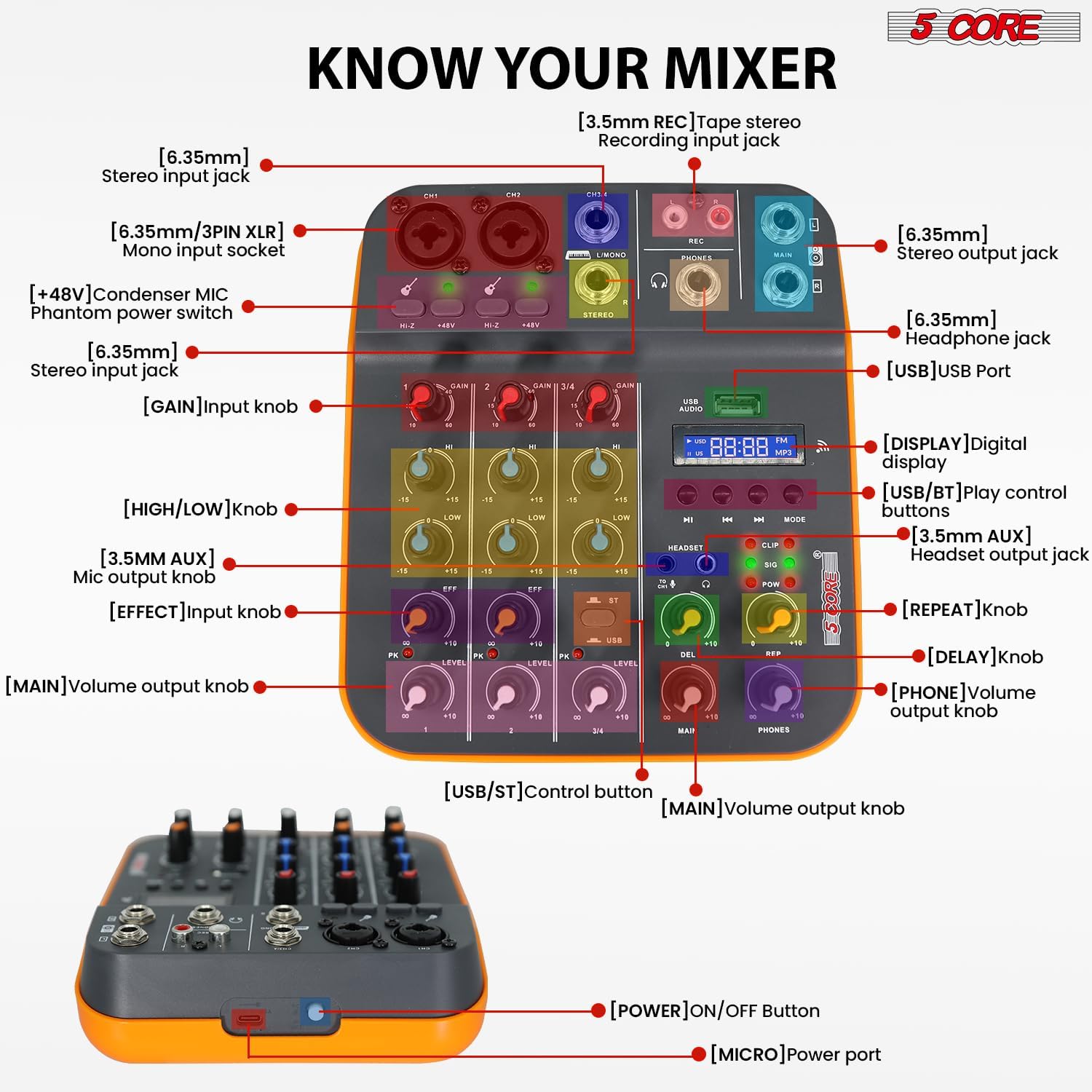
Figure 3.2.1: Front Panel Layout and Controls. This image displays the top view of the 5 Core 4-Channel Audio Mixer with various components labeled, including XLR/1/4" mono input sockets, stereo input jacks, REC output, MAIN output, PHONES output, USB port, digital display, and control knobs for GAIN, HIGH, LOW, EFF (Effect), LEVEL, DEL (Delay), REP (Repeat), MAIN, and PHONES volume. Also shown are the +48V phantom power switches and HI-Z switches.
- [6.35mm/3PIN XLR] Mono input socket: For connecting microphones or mono instruments.
- [HI-Z] Switch: For high impedance inputs, typically for guitars.
- [+48V] Condenser MIC Phantom power switch: ააქტიურებს კონდენსატორული მიკროფონების ფანტომურ კვებას.
- [6.35mm] Stereo input jack: For connecting stereo line-level devices.
- [GAIN] Input knob: არეგულირებს შეყვანის მგრძნობელობას თითოეული არხისთვის.
- [HIGH/LOW] knob: 2-ზოლიანი ეკვალაიზერი მაღალი და დაბალი სიხშირეების რეგულირებისთვის.
- [EFF] Effect knob: Controls the amount of effect applied to the channel.
- [LEVEL] Main volume output knob: Adjusts the overall volume of each channel.
- [USB] USB Port: For connecting to a computer or USB drive.
- [DISPLAY] Digital display: აჩვენებს მიმდინარე რეჟიმს და ტრეკის ინფორმაციას.
- [USB/BT] Play control buttons: Controls for USB/Bluetooth playback (Play/Pause, Skip, Mode).
- [HEADSET] Headset output jack: ყურსასმენების დასაკავშირებლად.
- [DEL] Delay knob: არეგულირებს ეფექტის დაყოვნების დროს.
- [REP] Repeat knob: არეგულირებს დაყოვნების ეფექტის გამეორებების რაოდენობას.
- [MAIN] Volume output knob: Controls the overall main output volume.
- [PHONES] Volume output knob: Controls the headphone output volume.
- [POWER] ON/OFF Button: Located on the side/rear for turning the unit on/off.
- [MICRO] Power port: USB power input.
4. დაყენების გზამკვლევი
4.1 მიქსერის ჩართვა
The mixer can be powered in three ways:
- კომპიუტერი: Connect the mixer to a computer's USB port using a USB cable.
- დენის ადაპტერი: Use a standard USB power adapter (not included) to connect to a wall outlet.
- დენის ბანკი: For portable use, connect to a power bank (not included).
Ensure the power source provides sufficient voltage (5V/2A recommended). Once connected, press the [POWER] ON/OFF button to turn on the mixer.
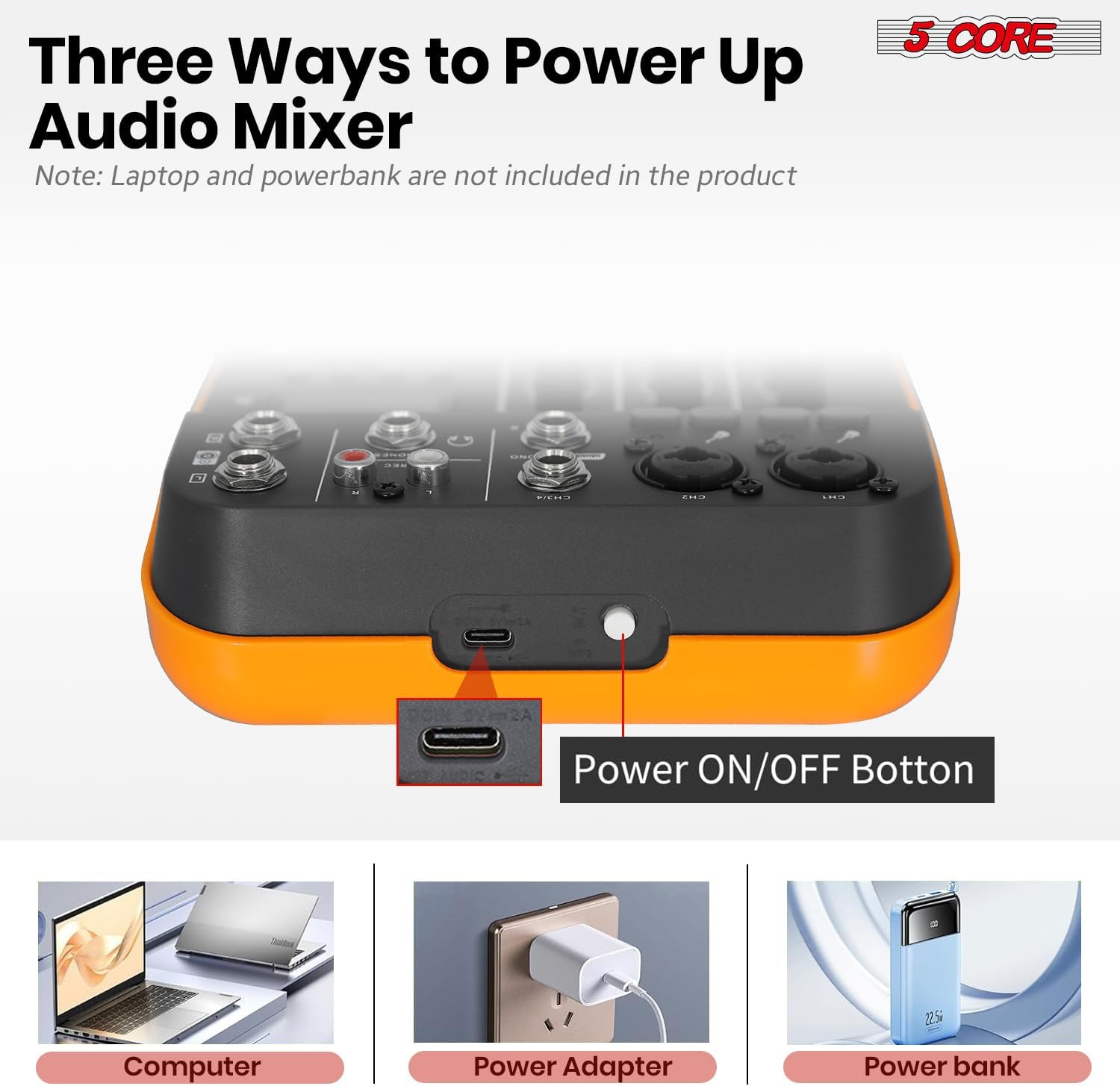
Figure 4.1.1: Powering Options for the Audio Mixer. This image illustrates connecting the mixer to a laptop, a wall adapter, and a power bank for power supply.
4.2 მიკროფონებისა და ინსტრუმენტების შეერთება
- Mono Inputs (CH1, CH2): Use XLR or 1/4" cables to connect microphones or mono instruments.
- ფანტომი ძალა: For condenser microphones, press the +48 ვ switch on the respective channel. The indicator light will illuminate. Caution: Do not activate +48V phantom power for dynamic microphones or ribbon microphones unless specified by the manufacturer, as it may cause damage.
- High Impedance (HI-Z): If connecting a guitar or bass directly, press the HI-Z switch for optimal signal.
- Stereo Inputs (CH3/4): Use 1/4" cables to connect stereo line-level devices such as keyboards, media players, or other mixers.

Figure 4.2.1: Phantom Power and Input Connections. This image highlights the +48V phantom power switch and the XLR/1/4" combo inputs for microphones and instruments.
4.3 Connecting to a Computer for Recording (USB Audio Interface)
The mixer features a built-in USB audio interface for direct connection to your computer, enabling recording and playback.
- Connect the mixer's USB port to your computer using a USB cable.
- Your computer should automatically detect the mixer as an audio device. No special drivers are usually required for basic functionality.
- Open your preferred Digital Audio Workstation (DAW) software (e.g., Audacity, GarageBand, Ableton Live).
- In your DAW's audio settings, select the mixer as your input and output device.
- You can now record audio from the mixer into your computer and play back audio from your computer through the mixer.

Figure 4.3.1: USB Audio Interface for PC Recording. This image depicts the mixer connected to a laptop, demonstrating its use as an audio interface for music production.

Figure 4.3.2: Computer to Mixer Audio Signal Flow. This diagram shows how computer music signals can be sent to the audio mixer and how audio mixer signals can be recorded by a computer program, with an emphasis on switching to PC mode.
4.4 Bluetooth კავშირი
The mixer supports Bluetooth 5.4 for wireless audio streaming from your smartphone, tablet, or other Bluetooth-enabled devices.
- დააჭირეთ MODE button on the mixer until "BT" appears on the digital display.
- On your Bluetooth device, search for available devices and select "5 CORE MIXER" (or similar name).
- Once paired, you can stream audio wirelessly to the mixer. Use the play control buttons (PLAY/PAUSE, SKIP) on the mixer to control playback.

Figure 4.4.1: Seamless Wireless Connectivity. This image illustrates the mixer's Bluetooth capability, showing it connected to a smartphone for wireless music streaming.
4.5 გამომავალი კავშირები
- Main Output (MAIN): შეაერთეთ თქვენს მთავარ დინამიკებთან ან amplifier using 1/4" cables.
- Headphone Output (PHONES): Connect your headphones to the 1/4" headphone jack for monitoring.
- REC Output (REC): Use for dedicated recording devices.

Figure 4.5.1: Versatile Compatibility. This image demonstrates the mixer's ability to connect with a wide range of audio equipment, including headphones, smartphones, power amplifiers, and wireless microphones.
5. საოპერაციო ინსტრუქციები
5.1 ძირითადი შერევა
- Set GAIN: დაარეგულირეთ მოგება knob for each input channel to achieve an optimal input level. Avoid clipping (indicated by the PK/CLIP light).
- ეკვალაიზერის რეგულირება: გამოიყენეთ მაღალი და დაბალი knobs to shape the tone of each channel.
- ეფექტების გამოყენება: გადაატრიალეთ EFF knob to send a portion of the channel's signal to the built-in effects processor.
- Set Channel Level: დაარეგულირეთ დონე knob for each channel to balance the mix.
- სამაგისტრო მოცულობა: Control the overall output volume using the მთავარი მოცულობის ღილაკი.
5.2 Using Delay Effects
The mixer includes built-in delay and repeat effects.
- DEL (Delay): Adjust this knob to control the delay time.
- REP (გამეორება): Adjust this knob to control the number of repetitions for the delay effect.
- უზრუნველყოს EFF knob on the desired channel is turned up to send signal to the effects processor.
5.3 USB/MP3 Playback
ჩადეთ USB დისკი, რომელიც შეიცავს MP3-ს files into the USB port. Use the play control buttons (PLAY/PAUSE, SKIP, MODE) to navigate and play tracks. The digital display will show track information.
5.4 მონიტორინგი
დააკავშირეთ ყურსასმენები ტელეფონები jack and adjust the ტელეფონები volume knob to monitor your mix without affecting the main output.
6. მოვლა
- დასუფთავება: Use a soft, dry cloth to clean the mixer's surface. Do not use liquid cleaners or solvents.
- შენახვა: შეინახეთ მიქსერი გრილ, მშრალ ადგილას, მოარიდეთ მზის პირდაპირ სხივებს და ექსტრემალურ ტემპერატურას.
- დამუშავება: მოერიდეთ მიქსერის დავარდნას ან ძლიერ დარტყმებს.
- ვენტილაცია: დარწმუნდით, რომ ვენტილაციის ღიობები არ არის დაბლოკილი გადახურების თავიდან ასაცილებლად.
7. Დიაგნოსტიკა
7.1 ხმის გამომავალი არ არის
- Check if the mixer is powered on.
- Ensure all cables are securely connected to the correct inputs and outputs.
- გადაამოწმეთ, რომ მთავარი volume and individual channel დონე knobs are turned up.
- Check the volume levels on your connected speakers or ampმაცოცხლებელი.
- If using headphones, ensure the ტელეფონები volume knob is turned up.
7.2 Microphone Not Working / Low Volume
- Ensure the microphone is connected to a mono input (CH1 or CH2).
- დაარეგულირეთ მოგება knob for the microphone channel.
- If using a condenser microphone, ensure +48 ვ phantom power is activated for that channel.
- Test the microphone with another device to confirm it is functional.
7.3 Bluetooth კავშირის პრობლემები
- Ensure the mixer is in Bluetooth mode (display shows "BT").
- Make sure your Bluetooth device is within range and Bluetooth is enabled.
- სცადეთ მოწყობილობის დაწყვილების გაუქმება და ხელახლა დაწყვილება.
- Ensure no other devices are actively connected to the mixer via Bluetooth.
7.4 Recording Issues via USB
- Verify the USB cable is properly connected between the mixer and your computer.
- Check your computer's sound settings and your DAW's audio preferences to ensure the mixer is selected as the input device.
- დაარეგულირეთ მთავარი output level on the mixer, as this often controls the signal sent to the USB output.
8. სპეციფიკაციები
| ფუნქცია | დეტალი |
|---|---|
| ბრენდი | 5 ბირთვი |
| მოდელი | MX 4CH ORG |
| არხი No. | 4 (2 მონო, 2 სტერეო) |
| მასალის ტიპი | პლასტიკური |
| ტtage | 100-240V (Input), 5V (Operating) |
| Bluetooth ვერსია | 5.4 |
| კომპიუტერის ჩაწერა | დიახ (USB-ის საშუალებით) |
| ექვალაიზერი | 2-Band EQ (High, Low) per channel |
| მოჩვენებითი სიმძლავრე | +48 ვ |
| USB კავშირი | Yes (Audio Interface, MP3 Playback) |
| ეფექტები | Delay, Repeat |
| სიხშირის პასუხი | 20Hz - 20KHz |
| პროდუქტის ზომები | 3"D x 8"W x 9"H |
| UPC | 810144135113 |
9. გარანტია და დახმარება
ამ პროდუქტს მოყვება ა 1 თვიანი გარანტია from the date of purchase. For warranty claims or technical support, please contact 5 Core customer service through the retailer where the product was purchased or visit the official 5 Core webსაიტი საკონტაქტო ინფორმაციისთვის.
გთხოვთ, შეინახოთ შეძენის დამადასტურებელი საბუთი გარანტიის დასადასტურებლად.
10. პროდუქტის ვიდეოები
10.1 5 Core Audio Mixer 4 Channel DJ Soundboard Overview
ეს ვიდეო სწრაფ მიმოხილვას იძლევაview of the 5 Core 4-Channel Audio Mixer, highlighting its key features such as 2 mono and 2 stereo channels, Bluetooth 5.4, USB connectivity, MP3 playback, +48V phantom power, 2-band EQ, and delay effects. It demonstrates the mixer's suitability for recording, mixing, and performance.
10.2 Audio Mixer USB Interface XLR Mixing Console 4 Channel Features
This video showcases the 5 Core 4-Channel Audio Mixer, emphasizing its 2 mono and 2 stereo channels, Bluetooth 5.4, USB and MP3 capabilities, +48V phantom power for studio microphones, 20Hz to 20kHz frequency range, delay effects, and 2-band EQ. It highlights the mixer's lightweight and orange design, suitable for various audio production needs.