
DREAME X50 Ultra
DREAME X50 Ultra Robot Vacuum and Mop-ის მომხმარებლის სახელმძღვანელო
Model: X50 Ultra (RLX85CE)
1. შესავალი და მეტიview
Thank you for choosing the DREAME X50 Ultra Robot Vacuum and Mop. This advanced cleaning device is designed to provide a comprehensive and effortless cleaning experience for your home. Featuring powerful 20,000Pa suction, intelligent obstacle avoidance, 360° navigation, and an innovative auto-empty and mop self-cleaning station, the X50 Ultra ensures pristine floors with minimal effort.
ძირითადი მახასიათებლები მოიცავს:
- 20,000Pa Vormax შეწოვა: For deep cleaning and effective pickup of debris, pet hair, and dust.
- Auto-Empty and Mop Self-Cleaning Station: Automates dust disposal, mop washing with hot water, and mop drying with hot air.
- ProLeap System: Enables the robot to cross thresholds and barriers up to 2.36 inches.
- VersaLift Navigation: Lowers the robot's height to 3.5 inches to clean under low furniture.
- Detangling DuoBrush: Effectively manages long hair, preventing tangles.
- Corner to Edge Deep Cleaning: Extends brushes and mops to reach tight corners and edges.
- მატერიის პროტოკოლის მხარდაჭერა: For seamless integration into smart home ecosystems (via future OTA update).

Figure 1.1: The DREAME X50 Ultra Robot Vacuum and Mop with its accompanying auto-empty and self-cleaning station, alongside a smartphone showing the control application.
2. დაყენების გზამკვლევი
2.1 ყუთის გახსნა და კომპონენტების შემოწმება
ფრთხილად ამოიღეთ ყველა კომპონენტი შეფუთვიდან. დარწმუნდით, რომ ქვემოთ ჩამოთვლილი ყველა ნივთი ადგილზეა:
- DREAME X50 ულტრა რობოტი მტვერსასრუტი და რობოტი
- საბაზო სადგური
- საბაზო სადგური რamp გაფართოება
- სწრაფი დაწყების სახელმძღვანელო
- მომხმარებლის სახელმძღვანელო
- მთავარი ჯაგრისი (წინასწარ დაყენებული)
- Brush Guard (pre-installed)
- გვერდითი ჯაგრისი (წინასწარ დაყენებული)
- Dust Bags x2 (one pre-installed)
- Mop Pad Holders x2
- Mop Pads x2
- დასუფთავების ინსტრუმენტი
- 200ml Cleaning Solution
2.2 საბაზო სადგურის განთავსება
Place the base station on a hard, level surface against a wall, ensuring there is adequate clear space around it (at least 1.5 feet on each side and 5 feet in front). Connect the power cord to the base station and plug it into a wall outlet. Ensure the base station ramp extension is properly attached.
2.3 საწყისი დატენვა
Place the robot onto the base station. The robot will automatically align and begin charging. For first-time use, it is recommended to fully charge the robot before its initial cleaning cycle.
2.4 აპლიკაციის ინსტალაცია და საწყისი შესაბამისობა
Download the DREAME Home app from your smartphone's app store. Follow the in-app instructions to connect your X50 Ultra. The app will guide you through the initial mapping process, which is crucial for efficient navigation and cleaning customization. Ensure your Wi-Fi network is stable during this process.
3. საოპერაციო ინსტრუქციები
3.1 დასუფთავების ციკლის დაწყება
დასუფთავების ციკლის დაწყება რამდენიმე გზით შეგიძლიათ:
- Via DREAME Home App: Select your desired cleaning mode (Vacuum, Mop, or Vacuum & Mop) and initiate cleaning.
- რობოტზე დამონტაჟებული ღილაკი: Press the power button on the robot to start a standard cleaning cycle.
- ხმის კონტროლი: Use compatible smart assistants like Amazon Alexa, Google Home, or Siri (e.g., "Hey Google, start cleaning with Dreame").
3.2 Advanced Navigation and Cleaning Features
The X50 Ultra is equipped with advanced features to optimize cleaning performance:
- ProLeap System: The robot's retractable legs allow it to effortlessly climb over thresholds and obstacles up to 2.36 inches, ensuring seamless transitions between rooms.
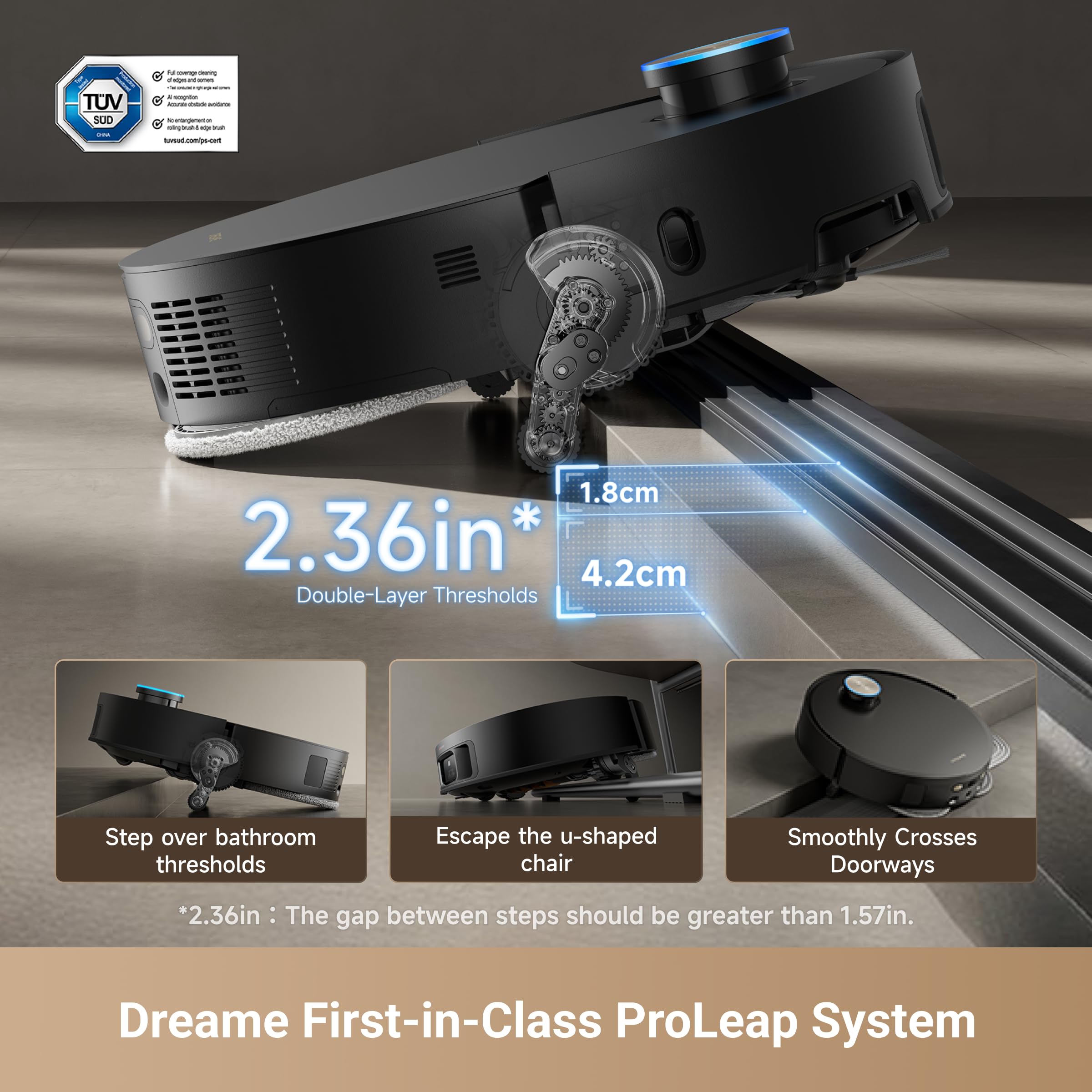
Figure 3.1: The DREAME X50 Ultra utilizing its ProLeap System to navigate over a double-layer threshold.
- VersaLift Navigation: The robot can lower its height to 3.5 inches to clean under low-clearance furniture, reaching dust and debris in hard-to-access areas.
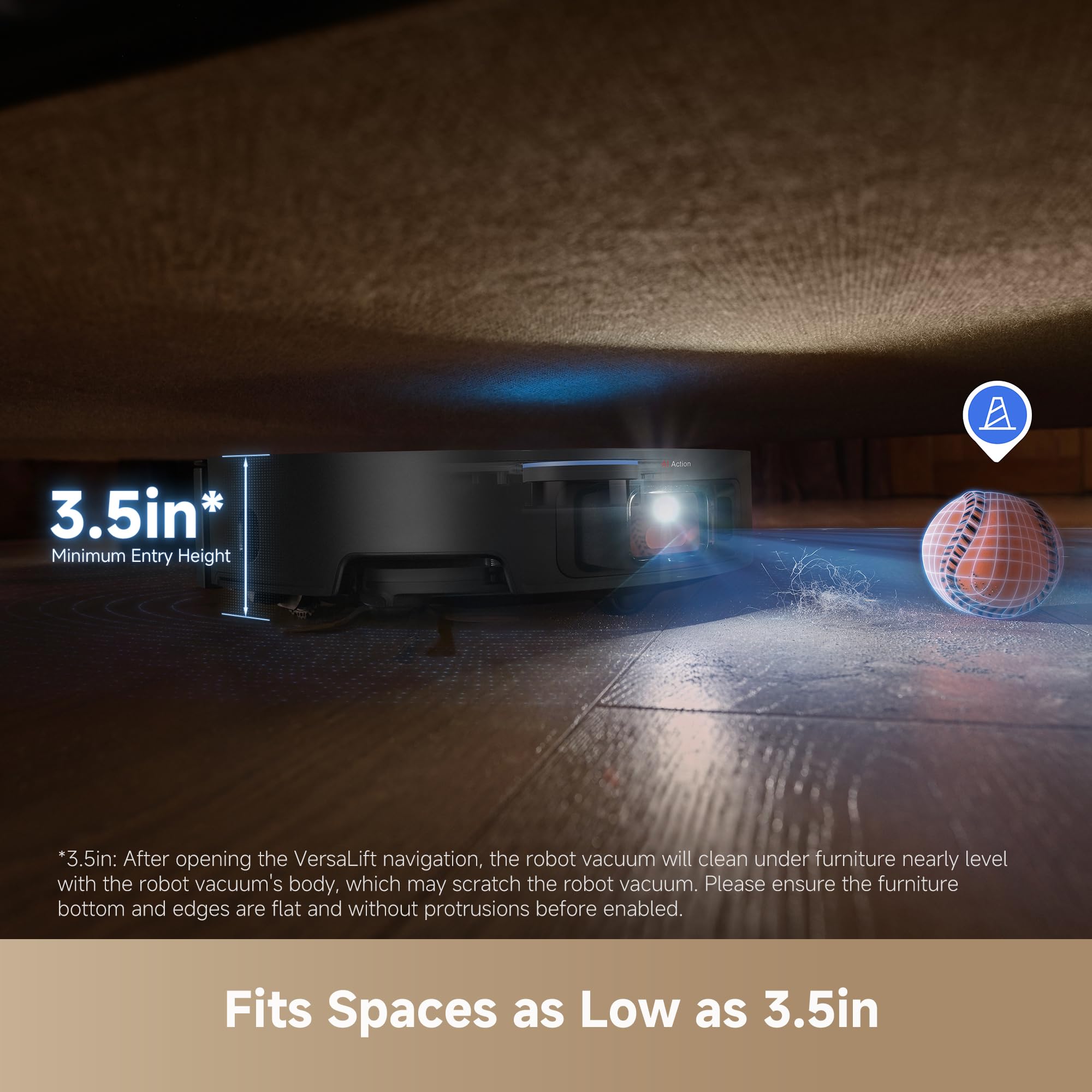
Figure 3.2: The DREAME X50 Ultra's VersaLift Navigation allows it to clean effectively under low furniture.
- Corner to Edge Deep Cleaning: The robot extends its side brush and mop pads to ensure comprehensive cleaning along walls and into corners, leaving less than 1mm along the edge.
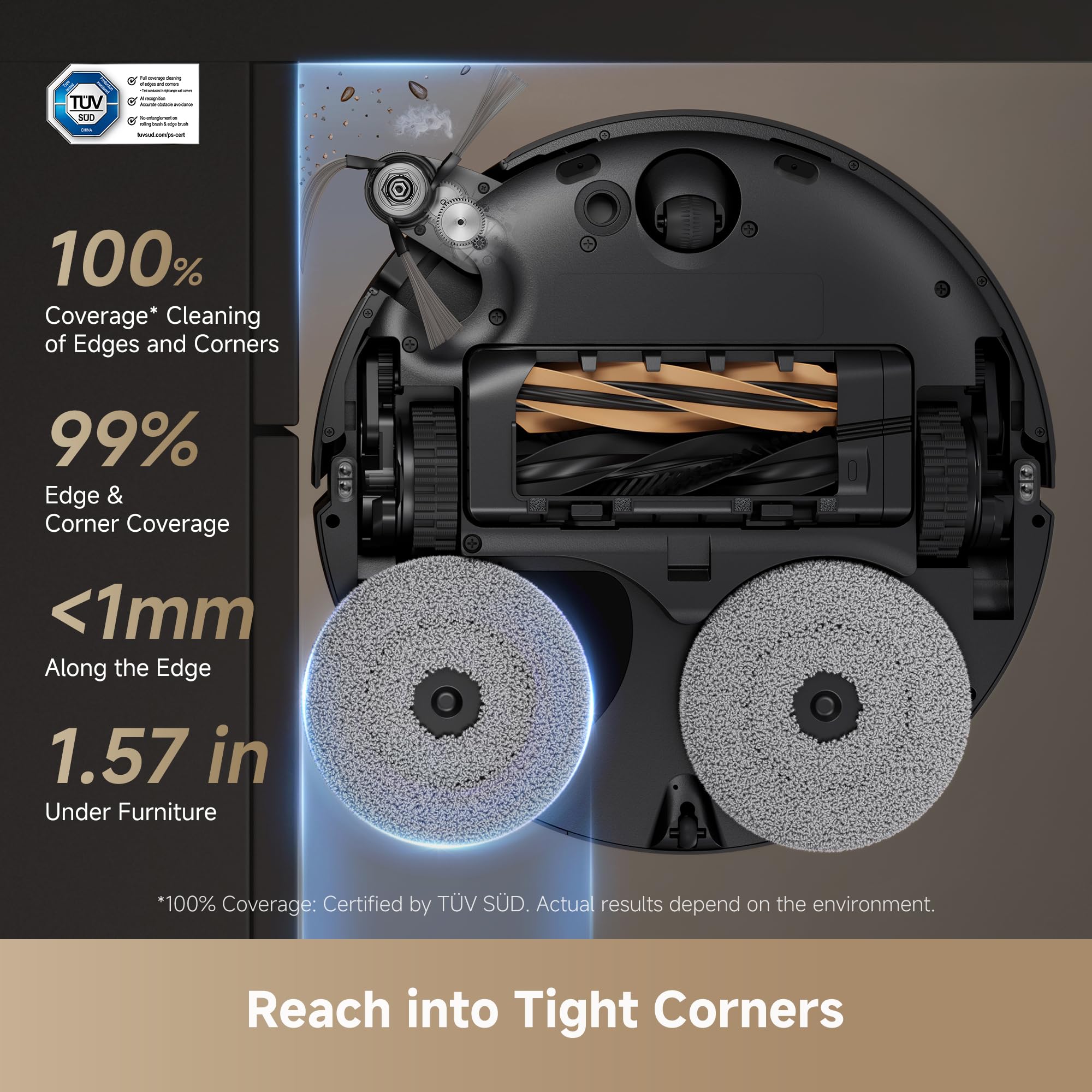
Figure 3.3: The DREAME X50 Ultra's design allows for 100% coverage of edges and corners.
- ხალიჩის მოვლა: The X50 Ultra offers five tailored modes for carpets, including automatic mop removal, carpet avoidance, and suction boost for deeper cleaning.
3.3 Using the DREAME Home App
The DREAME Home app provides full control over your robot vacuum. Features include:
- რუკის მართვა: Create, edit, and save multiple maps for different floors. Set no-go zones, no-mop zones, and virtual walls.
- მორგებული წმენდა: Select specific rooms or zones for cleaning, adjust suction power and water flow levels.
- განრიგი: Set up recurring cleaning schedules for convenience.
- რეალურ დროში მონიტორინგი: Track the robot's cleaning path and status in real-time.
- Firmware განახლებები: Receive over-the-air (OTA) updates to enhance performance and add new features.
Video 3.1: An instructional video demonstrating how to master your robotic vacuum cleaner using the DREAME app, covering various features and controls.
4. მოვლა
Regular maintenance ensures the longevity and optimal performance of your DREAME X50 Ultra.
4.1 Auto-Maintenance Features
The Intelligent PowerDock provides comprehensive auto-maintenance:
- Auto-Empty: The dust bag in the base station can hold up to 3.2L of debris, providing up to 100 days of hands-free dust disposal.
- ავტომატური საწმენდის რეცხვა: Mop pads are automatically washed with 176°F (80°C) hot water to remove tough stains and ensure hygiene.

Figure 4.1: The X50 Ultra's auto mop self-cleaning system uses hot water for effective stain removal.
- Auto Mop Drying: ობისა და სუნის თავიდან ასაცილებლად, ტილოს საფენებს ცხელი ჰაერით აშრობენ.
- Auto Water Tank Refilling: The robot's water tank is automatically refilled for continuous mopping.
- AceClean DryBoard System: An integrated washboard design simplifies cleaning and maintenance of the base station's mop washing area, ensuring less residue.

Figure 4.2: The AceClean DryBoard System ensures the mop washing area remains spotless.
4.2 Manual Cleaning and Component Care
- Detangling DuoBrush: The redesigned brush minimizes hair tangling. Periodically check and clean the main brush and side brush using the provided cleaning tool.
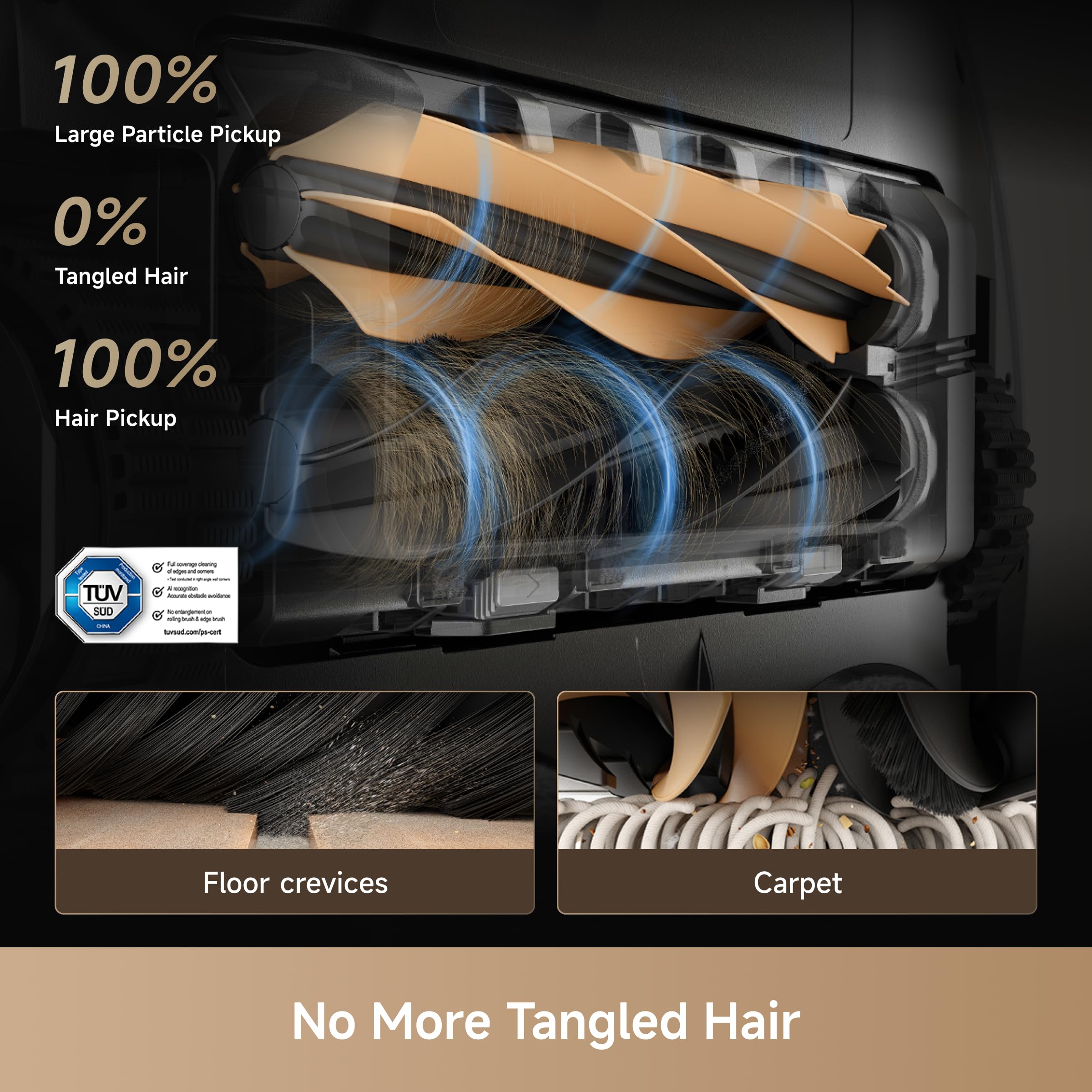
Figure 4.3: The DuoBrush system ensures 100% hair pickup with 0% tangles.
- მტვრის ჩანთის გამოცვლა: Replace the dust bag in the base station when indicated by the app or when full.
- წყლის ავზები: Regularly empty and rinse the dirty water tank. Refill the clean water tank with fresh water and cleaning solution as needed.
- საწმენდი ბალიშები: While the robot self-cleans, it's good practice to occasionally remove and hand-wash the mop pads for thorough cleaning.
- სენსორები: Wipe the robot's sensors (cliff sensors, wall sensors, etc.) with a soft, dry cloth to ensure accurate navigation.
5. Დიაგნოსტიკა
If you encounter any issues with your DREAME X50 Ultra, please refer to the following common troubleshooting steps:
- რობოტი არ იტენება: Ensure the base station is powered on and the robot is correctly docked. Clean the charging contacts on both the robot and the base station.
- რობოტის გაჭედვა: Clear obstacles from the cleaning path. Check if the robot is stuck on high thresholds (ensure ProLeap system is enabled if needed).
- ცუდი დასუფთავების ეფექტურობა: Check if the dust bag is full or if the main brush/side brush is tangled with hair. Clean or replace as necessary. Ensure water tanks are filled for mopping.
- აპებთან დაკავშირების პრობლემები: დარწმუნდით, რომ თქვენი Wi-Fi ქსელი სტაბილურია და რობოტი მოქმედების რადიუსშია. გადატვირთეთ რობოტი და თქვენი როუტერი. საჭიროების შემთხვევაში, ხელახლა დააწყვილეთ რობოტი აპლიკაციას.
- არაჩვეულებრივი ხმები: Check for foreign objects caught in the brushes or wheels. Ensure all components are properly installed.
For specific error codes or persistent issues, consult the DREAME Home app's help section or contact DREAME customer support.
6. სპეციფიკაციები
| ფუნქცია | სპეციფიკაცია |
|---|---|
| ბრენდი | ოცნება |
| მოდელის სახელი | X50 Ultra |
| საქონლის მოდელის ნომერი | RLX85CE |
| შეწოვის სიმძლავრე | Up to 20,000Pa Vormax Suction |
| ბატარეის ხანგრძლივობა | 180 წუთი |
| პროდუქტის ზომები | 17.2" სიგრძე x 17" სიგანე x 25.5" სიმაღლე |
| ნივთის წონა | 39.9 ფუნტი |
| კონტროლის მეთოდი | App, Remote, Voice (Amazon Echo, Siri, Google Home, Smartwatches) |
| ფილტრის ტიპი | ქსოვილი |
| დენის წყარო | კაბელიანი ელექტრო |
| ტtage | 110 ვოლტი |
| UPC | 810142560269 |
7. გარანტია და მხარდაჭერა
The DREAME X50 Ultra Robot Vacuum and Mop comes with a manufacturer's warranty. Please refer to the warranty card included in your product packaging for specific terms and conditions, including coverage period and limitations.
For technical support, troubleshooting assistance, or warranty claims, please contact DREAME customer service through the DREAME Home app or visit the official DREAME webსაიტი. მხარდაჭერის სამსახურთან დაკავშირებისას ხელთ გქონდეთ შესყიდვის ქვითარი და პროდუქტის სერიული ნომერი.
დაკავშირებული დოკუმენტები - X50 Ultra
 |
Dreame X50 სერიის რობოტი მტვერსასრუტისა და საწმენდის მომხმარებლის სახელმძღვანელო - ავტომატური დაცლა და თვითწმენდა Dreame X50 სერიის რობოტი მტვერსასრუტისა და საწმენდის მომხმარებლის სახელმძღვანელო. გაეცანით თქვენი ინტელექტუალური საწმენდი მოწყობილობის დაყენების, მუშაობის, მოვლა-პატრონობისა და პრობლემების მოგვარების ინსტრუქციებს ავტომატური დაცლისა და თვითწმენდის ფუნქციებით. |
 |
Dreame X50 სერიის რობოტი მტვერსასრუტი და საწმენდი ავტომატური დაცლის ფუნქციით და თვითწმენდის ფუნქციით. მომხმარებლის სახელმძღვანელო ეს მომხმარებლის სახელმძღვანელო შეიცავს Dreame X50 სერიის რობოტ მტვერსასრუტისა და საწმენდის ყოვლისმომცველ ინსტრუქციებს, რომლებიც აღჭურვილია ავტომატური დაცლისა და საწმენდის თვითწმენდის შესაძლებლობებით. შეიტყვეთ მეტი პროდუქტის შესახებ შემდეგ ბმულზე:view, safety information, usage restrictions, and maintenance for optimal performance of your Dreame X50 Ultra robot vacuum. |
 |
Dreame X50 Ultra რობოტი მტვერსასრუტისა და საწმენდის მომხმარებლის სახელმძღვანელო Comprehensive user manual for the Dreame X50 Ultra Robot Vacuum and Mop, covering safety information, product overview, and component details. Learn how to safely operate and maintain your Dreame robot vacuum. |
 |
Dreame X50 სერიის რობოტი მტვერსასრუტისა და საწმენდის მომხმარებლის სახელმძღვანელო User manual for the Dreame X50 Series Robot Vacuum and Mop, detailing features like auto-empty and mop self-cleaning. Includes setup, operation, maintenance, and troubleshooting guides. |
 |
Dreame X50 სერიის რობოტი მტვერსასრუტისა და საწმენდის მომხმარებლის სახელმძღვანელო Dreame X50 სერიის რობოტი მტვერსასრუტისა და საწმენდის ყოვლისმომცველი მომხმარებლის სახელმძღვანელო, რომელიც აღწერს მონტაჟს, მუშაობას, მოვლას და პრობლემების მოგვარებას ოპტიმალური მუშაობისთვის. აღჭურვილია ავტომატური დაცლისა და თვითწმენდის ფუნქციებით. |
 |
Dreame X50 სერიის რობოტი მტვერსასრუტისა და საწმენდის მომხმარებლის სახელმძღვანელო - ავტომატური დაცლა და თვითწმენდა Comprehensive user manual for the Dreame X50 Series Robot Vacuum and Mop. Learn about setup, features like auto-empty and self-cleaning mop, operation, maintenance, and troubleshooting for your smart home cleaning device. |
Ask a question about this manual
Ask about setup, troubleshooting, compatibility, parts, safety, or missing instructions. Manuals+ will review the question and use this page’s manual context to help answer it.