
1. შესავალი
Welcome to the user manual for your Emerson CKSS7071 Sunrise Smartset Alarm Clock Radio. This device is designed to enhance your daily routine with its unique features, including a sunrise simulation, soothing sound options, Bluetooth connectivity, and an 8-color dimmable LED display. Please read this manual thoroughly to understand the full functionality and ensure proper use and care of your new alarm clock radio.
ვიდეო 1: დასრულდაview of the Emerson CKSS7071 Sunrise Smartset Alarm Clock Radio. This video demonstrates the key features and design of the product.
2. მნიშვნელოვანი უსაფრთხოების ინფორმაცია
- წაიკითხეთ ყველა ინსტრუქცია მოწყობილობის მუშაობის დაწყებამდე.
- შეინახეთ ეს ინსტრუქციები მომავალი მითითებისთვის.
- არ გამოიყენოთ ეს მოწყობილობა წყალთან ახლოს.
- გაწმინდეთ მხოლოდ მშრალი ქსოვილით.
- არ დაბლოკოთ ვენტილაციის ღიობები. დაამონტაჟეთ მწარმოებლის ინსტრუქციის შესაბამისად.
- არ დააინსტალიროთ სითბოს წყაროსთან ახლოს, როგორიცაა რადიატორები, სითბოს რეგისტრები, ღუმელები ან სხვა მოწყობილობა (მათ შორის ampგამხსნელები), რომლებიც წარმოქმნიან სითბოს.
- დაიცავით დენის კაბელი სიარულისგან ან დაჭიმვისგან, განსაკუთრებით შტეფსელებთან, მოსახერხებელ კონტეინერებთან და იმ ადგილას, სადაც ისინი გამოდიან აპარატიდან.
- გამოიყენეთ მხოლოდ მწარმოებლის მიერ მითითებული დანართები/აქსესუარები.
- გამორთეთ ეს მოწყობილობა ელვისებური ქარიშხლის დროს ან დიდი ხნის განმავლობაში გამოუყენებლობისას.
- მიმართეთ ყველა მომსახურება კვალიფიციურ მომსახურე პერსონალს. სერვისი საჭიროა, როდესაც აპარატი რაიმე ფორმით დაზიანებულია, მაგალითად, დაზიანებულია კვების კაბელი ან შტეფსელი, დაიღვარა სითხე ან ჩავარდა მოწყობილობაში საგნები, აპარატი წვიმს ან ტენიანობას ექვემდებარება, ნორმალურად არ მუშაობს. , ან ჩამოაგდეს.
3. პაკეტის შიგთავსი
პაკეტის გახსნისას დარწმუნდით, რომ ყველა ნივთი ადგილზეა:
- Emerson CKSS7071 Sunrise Smartset Alarm Clock Radio
- AC დენის ადაპტერი
- მომხმარებლის სახელმძღვანელო
4. პროდუქტი დასრულდაview
4.1 ფრონტი View

სურათი 1: წინა view of the alarm clock, featuring the digital time display and the sunrise simulation light panel.
The front of the unit features the main 1.2-inch LED time display and the large circular light panel for sunrise simulation and ambient lighting. Indicators for AM/PM, Alarm 1/2, and Bluetooth status are also visible.
4.2 მხარე View (კონტროლი)
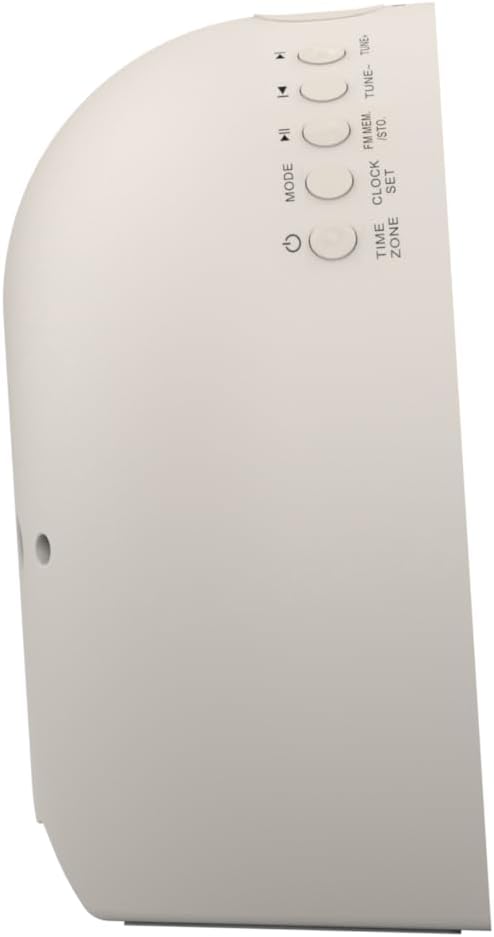
სურათი 2: მხარე view მაღვიძარას, სხვადასხვა ფუნქციების მართვის ღილაკების მონიშვნით.
The side panel houses the primary control buttons, including Power, Mode, Clock Set, Time Zone, Tune/Skip, and Volume controls. These buttons are used for setting time, alarms, and navigating audio functions.
4.3 უკანა View

სურათი 3: უკანა view of the alarm clock, showing the speaker grille and power connection port.
The rear of the unit features the main speaker grille and the power input port for connecting the AC adapter.
5. დაყენება
5.1 დენის კავშირი
- Plug the AC power adapter into the DC IN jack located on the back of the unit.
- Plug the other end of the adapter into a standard wall outlet (AC 100-240V, 50/60Hz).
- ერთეული ჩაირთვება ავტომატურად.
5.2 SmartSet Automatic Time Setting
The SmartSet system automatically sets the correct time and date as soon as you plug in the unit. It also maintains time and alarm settings during power disruptions or outages, provided the button cell battery is installed.
5.3 სარეზერვო აკუმულატორის მონტაჟი
A button cell battery (CR2032, included) is required for battery backup. This ensures that time and alarm settings are retained during a power outage.
- იპოვეთ ბატარეის განყოფილება მოწყობილობის ქვედა ნაწილში.
- გახსენით ბატარეის განყოფილების საფარი.
- Insert one CR2032 button cell battery, ensuring the correct polarity (+/-).
- უსაფრთხოდ დახურეთ ბატარეის განყოფილების საფარი.
6. საოპერაციო ინსტრუქციები
6.1 საათის ხელით დაყენება
- დააჭირეთ და გააჩერეთ საათის დაყენება ღილაკი. საათის ციფრები ციმციმდება.
- გამოიყენეთ TUNE -/+ ღილაკები საათის დასარეგულირებლად. დააჭირეთ საათის დაყენება დასადასტურებლად.
- წუთების ციფრები ციმციმებს. გამოიყენეთ TUNE -/+ ღილაკები წუთების დასარეგულირებლად. დააჭირეთ საათის დაყენება დასადასტურებლად.
- გააგრძელეთ ეს პროცესი წლის, თვის და დღის დასაყენებლად.
- დააჭირეთ საათის დაყენება კვლავ დროის დაყენების რეჟიმიდან გასასვლელად.
6.2 სიგნალიზაციის დაყენება (სიგნალიზაცია 1 და სიგნალიზაცია 2)
The unit features dual alarms. Follow these steps for each alarm:
- დააჭირეთ და გააჩერეთ სიგნალიზაცია 1 or სიგნალიზაცია 2 ღილაკი. მაღვიძარას საათის ციფრები აციმციმდება.
- გამოიყენეთ TUNE -/+ ღილაკებს მაღვიძარას საათის დასარეგულირებლად. დააჭირეთ შესაბამისს სიგნალიზაცია ღილაკი დასადასტურებლად.
- The alarm minute digits will flash. Use the TUNE -/+ buttons to adjust the alarm minutes. Press the respective სიგნალიზაცია ღილაკი დასადასტურებლად.
- Select the alarm source (Buzzer, FM Radio, or Soothing Sound). Press the respective სიგნალიზაცია ღილაკი დასადასტურებლად.
- მაღვიძარას ხმის სიმძლავრის რეგულირება ღილაკის გამოყენებით VOL -/+ buttons. Press the respective სიგნალიზაცია ღილაკი დასადასტურებლად.
- The alarm is now set. The alarm indicator (AL1 or AL2) will appear on the display.
6.3 მზის ამოსვლის სიმულაცია
The sunrise simulation feature gradually brightens the light panel before your set alarm time, mimicking a natural sunrise to gently wake you.
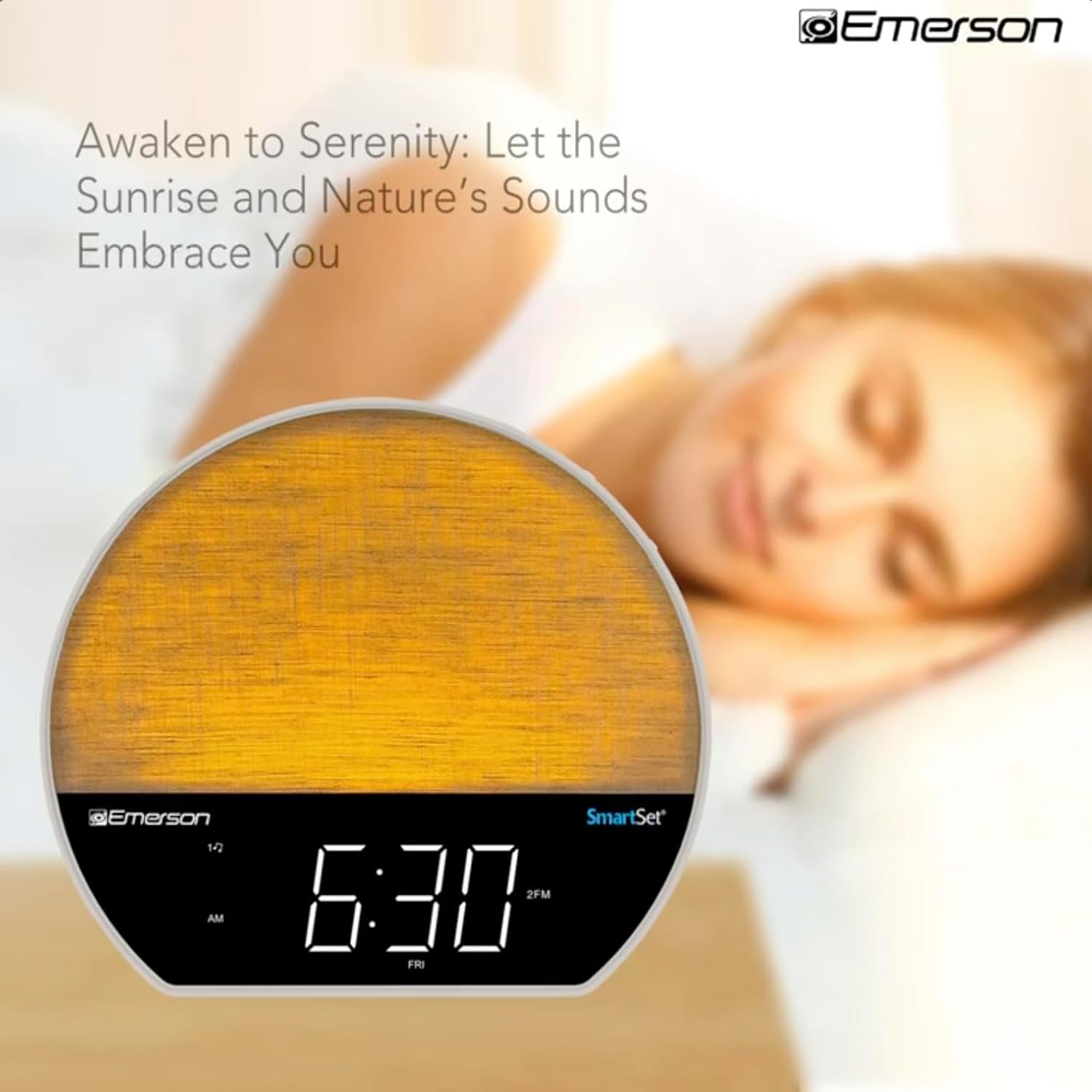
სურათი 4: The alarm clock simulating a sunrise with a warm, increasinგ სინათლის ინტენსივობა.
To activate, ensure the sunrise option is selected during alarm setup. The light will begin to brighten 30 minutes before the alarm sounds.
6.4 Soothing Sounds and White Noise
The unit includes 6 soothing sounds and white noise to help with relaxation or waking up.
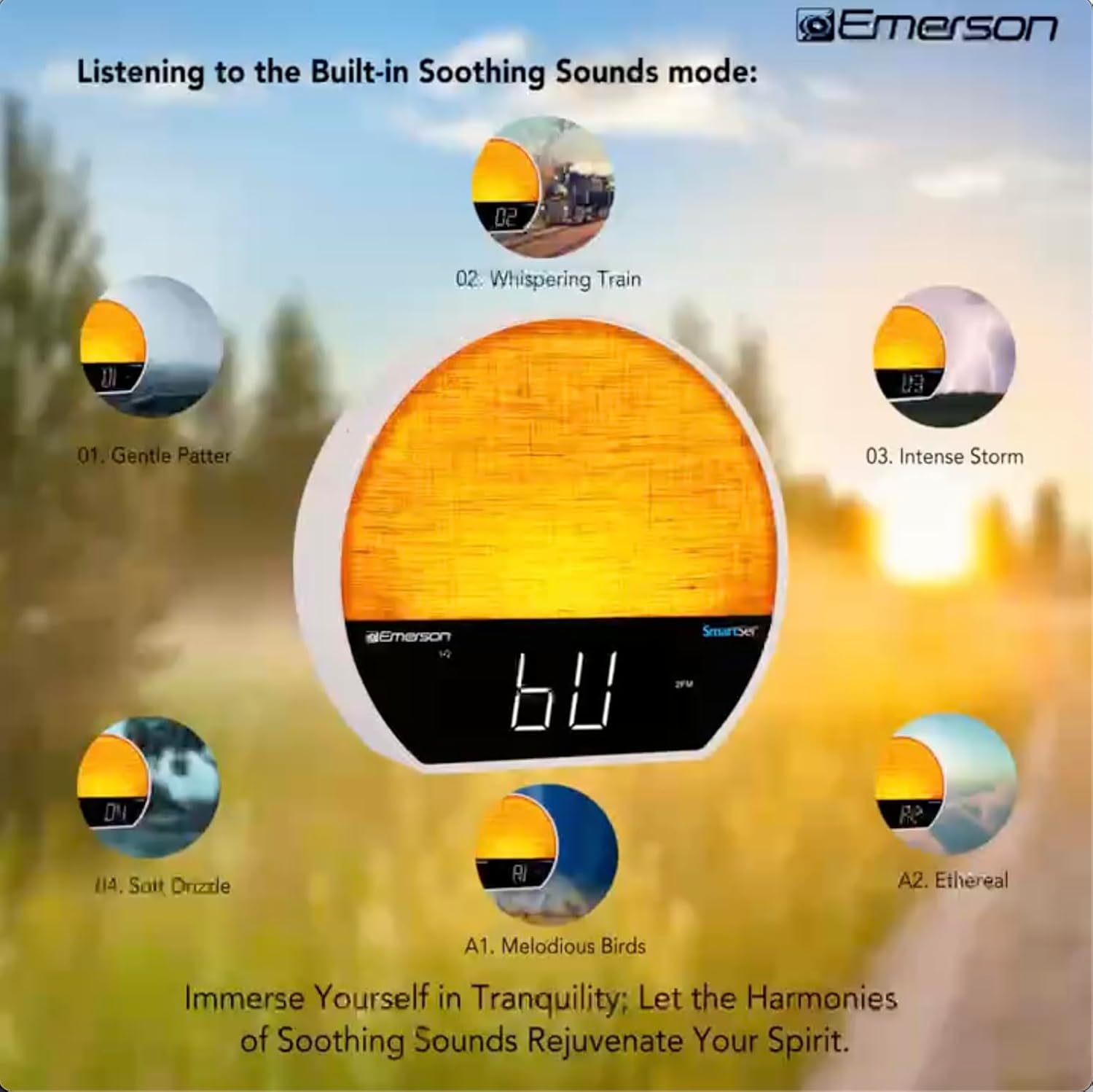
სურათი 5: Visual representation of the six soothing sound modes available on the alarm clock.
- დააჭირეთ MODE button repeatedly until the Soothing Sound mode is selected.
- გამოიყენეთ TUNE -/+ buttons to cycle through the available sounds (e.g., Gentle Patter, Whispering Train, Intense Storm, Soft Drizzle, Melodious Birds, Ethereal, White Noise).
- დაარეგულირეთ მოცულობა გამოყენებით VOL -/+ ღილაკები.
6.5 Bluetooth სპიკერის ფუნქცია
Connect your smartphone or other Bluetooth-enabled device to stream audio wirelessly.

სურათი 6: The alarm clock in Bluetooth mode, paired with a mobile device for audio streaming.
- დააჭირეთ MODE button until 'BT' appears on the display, indicating Bluetooth mode.
- On your device, enable Bluetooth and search for 'Emerson CKSS7071'.
- Select the device to pair. A confirmation tone will sound upon successful pairing.
- You can now play audio from your device through the alarm clock's speaker.
6.6 FM რადიოს მუშაობა
მოუსმინეთ თქვენს საყვარელ FM რადიოსადგურებს.
- დააჭირეთ MODE ღილაკს დააჭირეთ სანამ ეკრანზე „FM“ არ გამოჩნდება.
- დააჭირეთ TUNE -/+ buttons briefly to manually tune to a station.
- დააჭირეთ და გააჩერეთ TUNE -/+ ღილაკები შემდეგი ხელმისაწვდომი სადგურის ავტომატურად სკანირებისთვის.
- სადგურის შესანახად, დააჭირეთ და გააჩერეთ FM MEM ღილაკი, სანამ წინასწარ დაყენებული ნომერი არ აციმციმდება. გამოიყენეთ TUNE -/+ წინასწარ დაყენებული ნომრის ასარჩევად, შემდეგ დააჭირეთ FM MEM ისევ გადარჩენა.
6.7 LED Decor and Dimmer Control
Customize the ambient light with 8 different colors and adjust the brightness.

სურათი 7: The alarm clock demonstrating its 8-color dimmable LED decor options.
- დააჭირეთ სინათლე button to cycle through the 8 available colors or turn the light off.
- To adjust the brightness of the LED decor light, press and hold the სინათლე button. The brightness will cycle through 5 levels. Release the button at your desired brightness.
6.8 ეკრანის დიმერის კონტროლი
Adjust the brightness of the 1.2-inch LED time display.

სურათი 8: The alarm clock illustrating the five distinct levels of display luminescence.
დააჭირეთ მკრთალი button (often combined with another function, refer to button labels) to cycle through 4 levels of display brightness (Bright, Moderate, Dim, Faint).
6.9 ძილის ტაიმერი
Set a timer for the audio to automatically turn off after a specified duration.

სურათი 9: The alarm clock set for a sunset sleep timer, providing a harmonious end to the day.
- While audio is playing (FM or Soothing Sound), press the ძილი ღილაკი.
- განმეორებით დააჭირეთ ძილი button to cycle through available sleep timer durations (e.g., 15, 30, 60, 90 minutes, or OFF).
- The audio will automatically turn off after the selected time.
6.10 გადადების ფუნქცია
როდესაც სიგნალიზაცია გაისმის, დააჭირეთ ღილაკს გადადება button (usually a large button on top) to temporarily silence the alarm for a few minutes. The alarm will sound again after the snooze period.
7. მოვლა
7.1 დასუფთავება
- დასუფთავებამდე ყოველთვის გამორთეთ მოწყობილობა დენის განყოფილებიდან.
- გამოიყენეთ რბილი, მშრალი ქსოვილი გარე ზედაპირების გასაწმენდად.
- Do not use liquid cleaners, abrasive cleaners, or chemical sprays, as these may damage the finish.
7.2 ბატარეის გამოცვლა
If the time and alarm settings are not retained during a power outage, the button cell backup battery may need to be replaced. Follow the instructions in section 5.3 to replace the CR2032 battery.
8. Დიაგნოსტიკა
| პრობლემა | შესაძლო მიზეზი | გამოსავალი |
|---|---|---|
| ერთეული არ ჩართულია. | კვების ადაპტერი არ არის დაკავშირებული ან გაუმართავია. | დარწმუნდით, რომ ცვლადი დენის ადაპტერი საიმედოდ არის შეერთებული მოწყობილობაში და მოქმედ კედლის სოკეტშია. |
| დროის/მაღვიძარას პარამეტრები დაიკარგა დენის გათიშვის შემდეგtage. | სარეზერვო ბატარეა დაცლილია ან არ არის დამონტაჟებული. | Install or replace the CR2032 button cell battery (see section 5.3). |
| სიგნალიზაცია არ ჟღერს. | სიგნალიზაცია არ არის გააქტიურებული ან ხმა ძალიან დაბალია. | Ensure the alarm is set and activated (AL1/AL2 indicator on). Increase alarm volume. |
| Bluetooth მოწყობილობის დაწყვილება შეუძლებელია. | Unit not in Bluetooth mode or device too far. | Ensure the unit is in Bluetooth mode ('BT' displayed). Move your device closer to the unit. Try unpairing and re-pairing. |
| FM რადიოს ცუდი მიღება. | ანტენა არ არის გაშლილი ან არ ერევა. | Extend the FM wire antenna fully and reposition it for better reception. Avoid placing near other electronic devices. |
| ეკრანი ძალიან კაშკაშა/მკრთალია. | ეკრანის დაბინდვის პარამეტრი საჭიროებს კორექტირებას. | დააჭირეთ მკრთალი button to cycle through brightness levels (see section 6.8). |
9. სპეციფიკაციები
| ფუნქცია | დეტალი |
|---|---|
| მოდელის ნომერი | CKSS7071 |
| დენის წყარო | AC 100-240V, 50/60Hz (via AC adapter) |
| ბატარეის სარეზერვო საშუალება | 1 x CR2032 Button Cell Battery (included) |
| ჩვენების ტიპი | 1.2-inch LED Display |
| Bluetooth ვერსია | V5.4 |
| დამამშვიდებელი ხმები | 6 Nature Sounds + White Noise |
| LED Decor Colors | 8 Dimmable Colors |
| პროდუქტის ზომები (W x D x H) | 7.09" x 3.15" x 6.37" |
| წონა | არ არის მითითებული |
10. ინფორმაცია გარანტიის შესახებ
Emerson products are manufactured to the highest quality standards. This product is covered by a limited warranty against defects in materials and workmanship for a period of one (1) year from the original date of purchase. This warranty does not cover damage caused by misuse, accident, unauthorized modification, or normal wear and tear. Proof of purchase is required for all warranty claims. Please retain your receipt.
11. მომხმარებელთა მხარდაჭერა
If you have any questions, require assistance, or experience issues with your Emerson CKSS7071 Sunrise Smartset Alarm Clock Radio, please contact our customer support team.
- Webსაიტი: ეწვიეთ ოფიციალურ Emerson-ს webსაიტი ხშირად დასმული კითხვებისა და დამხმარე რესურსებისთვის.
- ელფოსტა: იხილეთ თქვენი პროდუქტის შეფუთვა ან ოფიციალური webსაიტი მომხმარებელთა მომსახურების ელექტრონული ფოსტის საკონტაქტოდ.
- ტელეფონი: იხილეთ თქვენი პროდუქტის შეფუთვა ან ოფიციალური webსაიტი მომხმარებელთა მომსახურების ტელეფონის ნომრებისთვის.
Please have your model number (CKSS7071) and proof of purchase ready when contacting support.