
1. შესავალი
This manual provides detailed instructions for the installation, operation, and maintenance of the ADVANTECH PCIE-1612C-AE 4-Port RS-232/422/485 PCIe Communication Card. This interface module is designed to expand your system's serial communication capabilities, offering robust and reliable data transfer for industrial and commercial applications. Please read this manual thoroughly before attempting to install or operate the device.
2. უსაფრთხოების ინფორმაცია
მოწყობილობის დაზიანების თავიდან ასაცილებლად და პირადი უსაფრთხოების უზრუნველსაყოფად, დაიცავით შემდეგი უსაფრთხოების ზომები:
- Always disconnect power from your computer system before installing or removing any internal components.
- Wear an anti-static wrist strap and work on an anti-static mat to prevent electrostatic discharge (ESD) damage to the card and other components.
- მგრძნობიარე კომპონენტებთან შეხების თავიდან ასაცილებლად, ბარათი კიდეებით დაიჭირეთ.
- გადახურების თავიდან ასაცილებლად, უზრუნველყავით კომპიუტერის კორპუსის სათანადო ვენტილაცია.
- არ დაუშვათ ბარათის ნესტი ან ექსტრემალური ტემპერატურა.
3. პაკეტის შიგთავსი
Verify that all items are present in the package. If any item is missing or damaged, contact your vendor immediately.
- 1 x ADVANTECH PCIE-1612C-AE 4-Port RS-232/422/485 PCIe Communication Card
- Documentation (e.g., Quick Start Guide, Driver CD/USB - may vary by package)
4. პროდუქტი დასრულდაview
The ADVANTECH PCIE-1612C-AE is a high-performance PCIe communication card designed for reliable serial data transmission. It features four independent serial ports, configurable for RS-232, RS-422, or RS-485 standards, making it versatile for various industrial and embedded applications.
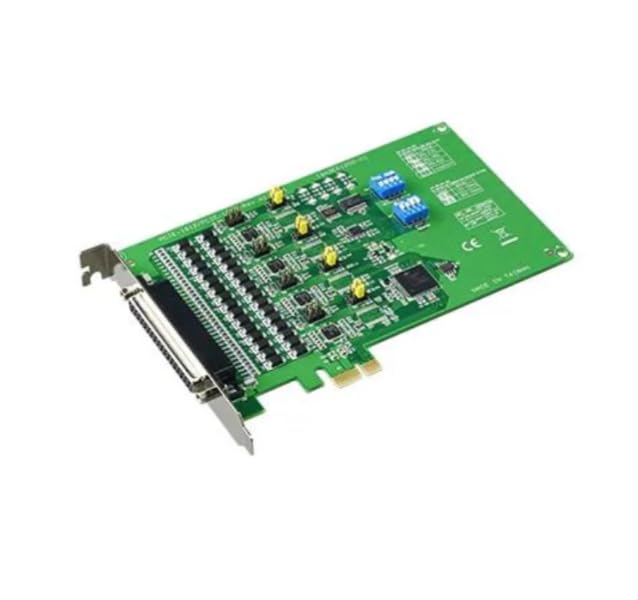
Figure 1: ADVANTECH PCIE-1612C-AE 4-Port RS-232/422/485 PCIe Communication Card. This image shows the physical card with its PCIe connector and four serial port connectors.
ძირითადი მახასიათებლები:
- Number of Channels / Ports: 4 პორტი
- მონაცემთა მაქსიმალური სიჩქარე: 921.6 კბ/წმ
- ინტერფეისის ტიპი: PCIe, RS-232/422/485
- ოპერაციული მიწოდება ტtage: 3.3 ვ
- ოპერაციული ტემპერატურის დიაპაზონი: -10°C-დან +60°C-მდე
5. დაყენება
Follow these steps to properly install the PCIE-1612C-AE card into your computer system:
- მოამზადეთ თქვენი სისტემა: Power off your computer and disconnect the power cord from the wall outlet. Disconnect all peripheral devices.
- გახსენით კომპიუტერის კორპუსი: დედაპლატსა და გაფართოების სლოტებზე წვდომისთვის მოხსენით კომპიუტერის კორპუსის გვერდითი პანელი.
- იპოვეთ ხელმისაწვდომი PCIe სლოტი: Identify an empty PCI Express (PCIe) slot on your motherboard. The PCIE-1612C-AE requires a standard PCIe slot.
- სლოტის საფარის მოხსნა: Remove the metal slot cover corresponding to the chosen PCIe slot from the back of your computer case.
- ბარათის დაყენება: Carefully align the PCIE-1612C-AE card with the PCIe slot. Apply even pressure to both ends of the card until it is firmly seated in the slot. Ensure the card's bracket is flush with the back of the computer case.
- დაიცავით ბარათი: Secure the card's bracket to the computer case using the screw or latch mechanism provided by your case.
- დახურეთ საქმე: Replace the computer's side panel and secure it.
- ხელახლა შეაერთეთ დენი: Reconnect the power cord and all peripheral devices. Power on your computer.
- დრაივერების დაყენება: Once the operating system boots, it may automatically detect the new hardware. Install the necessary drivers from the provided media or download them from the ADVANTECH webსაიტი. დრაივერის ინსტალაციისთვის მიჰყევით ეკრანზე მოცემულ ინსტრუქციებს.
6. მოქმედებს
After successful installation and driver setup, the PCIE-1612C-AE card's serial ports will be available in your operating system's Device Manager (Windows) or equivalent system information utility (Linux). Each port can be configured for its specific communication parameters (baud rate, data bits, parity, stop bits, flow control) through your operating system's settings or application software.
- დამაკავშირებელი მოწყობილობები: Connect your RS-232, RS-422, or RS-485 compatible devices to the corresponding ports on the PCIE-1612C-AE card using appropriate serial cables.
- პროგრამული უზრუნველყოფის კონფიგურაცია: Use your serial communication software or application to select the correct COM port number assigned to each physical port on the card and configure the communication parameters to match your connected device.
- RS-422/485 Mode: For RS-422/485 modes, ensure proper termination and biasing are applied if required by your network topology. Refer to your device's documentation for specific requirements.
7. მოვლა
The PCIE-1612C-AE card is designed for long-term reliability with minimal maintenance. However, adhering to general computer maintenance practices will help ensure optimal performance:
- მტვრის მოცილება: Periodically open your computer case (after disconnecting power) and use compressed air to gently remove dust buildup from the card and surrounding components. Dust can impede heat dissipation and lead to component failure.
- გარემოსდაცვითი კონტროლი: დარწმუნდით, რომ სამუშაო გარემო რჩება მითითებულ ტემპერატურისა და ტენიანობის დიაპაზონში.
- საკაბელო მენეჯმენტი: Keep internal cables tidy to maintain good airflow within the case.
8. Დიაგნოსტიკა
If you encounter issues with your PCIE-1612C-AE card, consider the following troubleshooting steps:
- ბარათი ვერ იქნა აღმოჩენილი:
- დარწმუნდით, რომ ბარათი სრულად არის ჩასმული PCIe სლოტში.
- Try installing the card in a different PCIe slot.
- Check your computer's BIOS/UEFI settings to ensure PCIe slots are enabled.
- Drivers Not Installing/Working:
- Verify you have downloaded the correct drivers for your operating system and card model from the ADVANTECH webსაიტი.
- Uninstall any previous serial port drivers before installing new ones.
- Check Device Manager for any error codes related to the serial ports.
- კომუნიკაციის შეცდომები:
- Confirm that the serial cable is correctly connected and not damaged.
- Verify that the communication parameters (baud rate, data bits, parity, stop bits, flow control) in your software match those of the connected device.
- For RS-485, check for proper wiring (A/B lines) and termination.
- Test with a known working serial device or loopback test if possible.
9. სპეციფიკაციები
| ფუნქცია | სპეციფიკაცია |
|---|---|
| მოდელის ნომერი | PCIE-1612C-AE |
| მწარმოებელი | ADVANTECH |
| პროდუქტის ტიპი | ინტერფეისის მოდულები |
| Number of Channels / Ports | 4 პორტი |
| ინტერფეისის ტიპი | PCIe, RS-232/422/485 |
| მონაცემთა მაქსიმალური სიჩქარე | 921.6 კბ/წმ |
| ოპერაციული მიწოდება ტtage | 3.3 ვ |
| მინიმალური სამუშაო ტემპერატურა | -10°C |
| მაქსიმალური სამუშაო ტემპერატურა | +60°C |
| ნივთის წონა | 7 ფუნტი |
10. გარანტია და მხარდაჭერა
For warranty information, please refer to the documentation included with your purchase or contact your reseller or ADVANTECH directly. Warranty terms and conditions may vary by region and purchase agreement.
For technical support, driver downloads, or further assistance, please visit the official ADVANTECH website or contact their customer support services. Provide your product model number (PCIE-1612C-AE) and any relevant system information when seeking support.